
A stylish and feature-rich Terminal User Interface for monitoring stock prices, news, and historical data.

Project description
stocksTUI
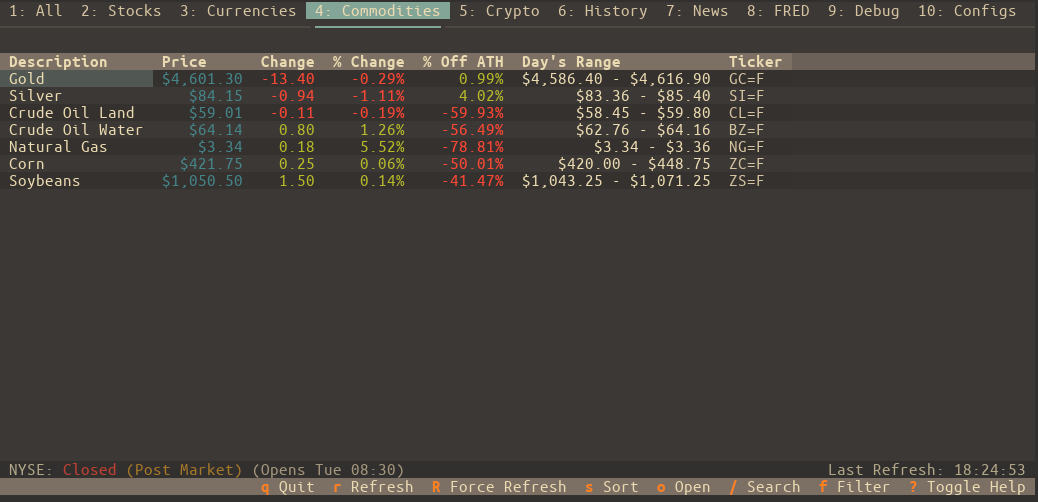
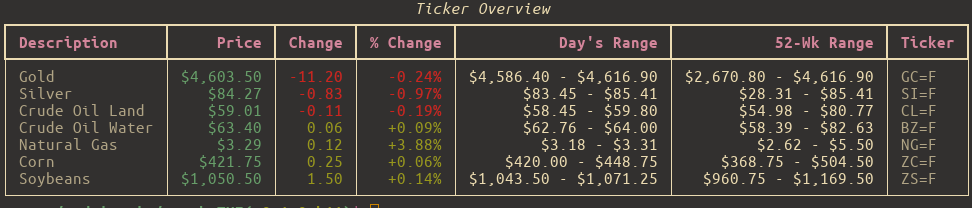
A fast, minimalist terminal app for checking stock prices, crypto, news, and historical charts — without leaving your shell. Built with Textual, powered by yfinance, and made for people who prefer the command line over CNBC.
✨ Features
-
Live-ish Price Data Watch your favorite tickers update in near real-time with configurable refresh intervals.
-
Watchlists That Make Sense Organize your assets into lists like "Tech", "Crypto", "Dividend Traps", or "Memes". Manage them entirely from the UI — no need to touch JSON unless you want to.
-
Tag-Based Filtering Assign tags (e.g.,
growth,ev,semiconductor) to your tickers and instantly filter any watchlist to see only what's relevant. -
Charts & Tables, Your Way View historical performance from
1DtoMax, from a table or a chart. -
Options Chain Support View detailed options chains with strike prices, bid/ask spreads, Greeks (Delta, Gamma, Theta, Vega), and open interest visualization. Track your positions with quantity and average cost.
-
News That Matters See the latest headlines per ticker or a combined feed — no ads, no autoplay videos, just info.
-
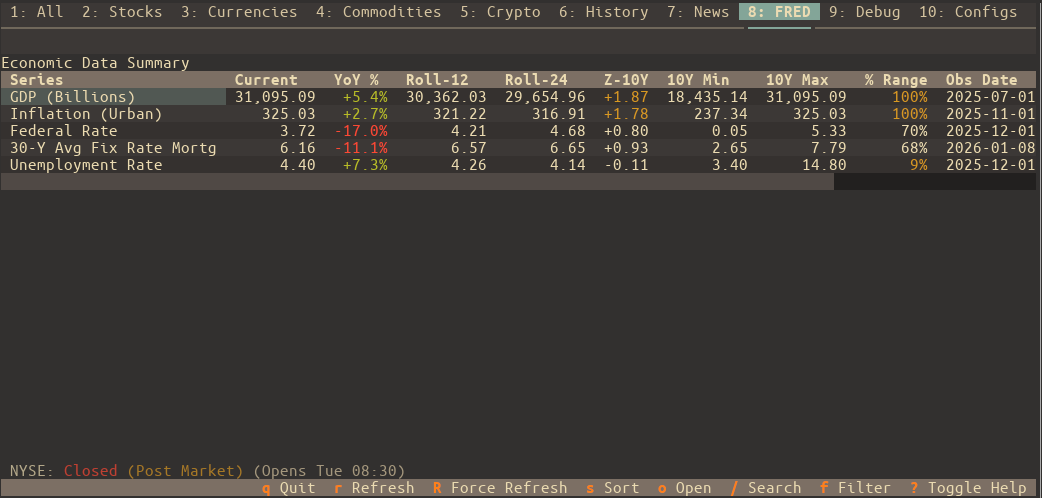
Economic Data (FRED) Monitor key economic indicators directly with integration for St. Louis Fed (FRED) data. Track GDP, Unemployment, CPI, and more with rolling averages and Z-score trend analysis.
-
Deep Market Context View comprehensive asset details including All Time High (ATH), % Off ATH, PE Ratio, Market Cap, and historical performance charts.
-
Quick Actions & Open Mode Instantly edit ticker aliases and notes with
e. Use "Open Mode" (o) to quickly jump to external resources or switch between news, history, and options. -
Keyboard-Friendly, Mouse-Optional Navigate everything with Vim-style keys or arrow keys. Bonus: lots of helpful keybindings, fully documented.
-
Custom Themes & Settings Tweak the look and feel with built-in themes or your own. Set your default tab, hide unused ones, and make it feel like your dashboard.
-
Smart Caching The app remembers what it can. Market-aware caching keeps startup fast and avoids pointless API calls on weekends or holidays.
⚠️ Note: All symbols follow Yahoo Finance format — e.g.,
AAPLfor Apple,^GSPCfor S&P 500, andBTC-USDfor Bitcoin.
🛠 Requirements
-
Python 3.10 or newer
-
OS Support:
- Linux / macOS — Fully supported
- Windows — Use Windows Terminal with WSL2. It won’t work in the old
cmd.exe.
🚀 Installation
The easiest way to install is with pipx:
1. Install pipx (if you don’t already have it):
# Debian/Ubuntu
sudo apt install pipx

# Arch Linux
sudo pacman -S python-pipx

# macOS
brew install pipx

# Or fallback to pip
python3 -m pip install --user pipx
python3 -m pipx ensurepath
2. Install stocksTUI:
pipx install stocksTUI
Done. You can now run stockstui from anywhere.
🧭 Usage
Run the app like so:
stockstui
Need help?
stockstui -h          # Short help
stockstui --man       # Full user manual
💡 Command-Line Examples
Open on Tesla's History tab.
stockstui --history TSLA
Get combined news for NVIDIA and AMD.
stockstui --news "NVDA,AMD"
Open on Apple's Options tab to view the options chain.
stockstui --options AAPL
Create a temporary watchlist for this session only.
stockstui --session-list "EV Stocks=TSLA,RIVN,LCID"
Launch a 5-day chart for Tesla.
stockstui --history TSLA --period 5d --chart
Open directly to a specific FRED economic series (e.g., Unemployment Rate).
stockstui --fred UNRATE
CLI mode: Output "stocks" list, filtered by the "tech" tag.
stockstui -o stocks --tags tech
🔑 FRED API Key
To use the Economic Data (FRED) features, you must provide a free API key from the Federal Reserve Bank of St. Louis.
- Create a free account and request an API key at fred.stlouisfed.org.
- Once you have your key, enter it in the app under Configs > FRED Settings.
- Click Save to enable FRED data fetching.
⌨️ Keybindings
- Press
?inside the app for a quick keybinding cheat sheet - Run
stockstui --manfor the full breakdown
🧑💻 For Developers: Install from Source
Want to try the bleeding-edge version or contribute?
git clone https://github.com/andriy-git/stocksTUI.git
cd stocksTUI
./install.sh
This sets up a virtual environment and a global stockstui command so you can test and develop from anywhere.
⚖️ License
Licensed under the GNU GPL v3.0.
See LICENSE for the legalese.
Release history Release notifications | RSS feed


Download files
Download the file for your platform. If you're not sure which to choose, learn more about installing packages.
Source Distribution
Built Distribution
Filter files by name, interpreter, ABI, and platform.
If you're not sure about the file name format, learn more about wheel file names.
Copy a direct link to the current filters
File details
Details for the file stockstui-0.1.0b13.tar.gz.
File metadata
- Download URL: stockstui-0.1.0b13.tar.gz
- Upload date:
- Size: 162.2 kB
- Tags: Source
- Uploaded using Trusted Publishing? No
- Uploaded via: twine/6.2.0 CPython/3.12.3
File hashes
| Algorithm | Hash digest | |
|---|---|---|
| SHA256 |
49d0186fd60a0d8deb2ac5ca3bd417b42bd01baef4f77b4f6a9e5ff9f27813f5
|
|
| MD5 |
c3f5a59ac4b29343d32b02c568943338
|
|
| BLAKE2b-256 |
14d88a105ef743d143f5e9abac578fbc143215353299f1734774bf35565040cf
|
File details
Details for the file stockstui-0.1.0b13-py3-none-any.whl.
File metadata
- Download URL: stockstui-0.1.0b13-py3-none-any.whl
- Upload date:
- Size: 132.7 kB
- Tags: Python 3
- Uploaded using Trusted Publishing? No
- Uploaded via: twine/6.2.0 CPython/3.12.3
File hashes
| Algorithm | Hash digest | |
|---|---|---|
| SHA256 |
5ee8652cc61d319f2cc46663eeead38ddb9036056c0d0c9dd8163b00ebf216f6
|
|
| MD5 |
f28b2ed3ea4fc8954e1d82e33adf44dd
|
|
| BLAKE2b-256 |
15c28112a43fdc5c653a8e55dc3c328769c43e125552e057284164456cfd1afb
|






