
A Python library for downloading stock market data of Dhaka Stock Exchange(DSE) and Chittagong Stock Exchange(CSE).
Verified details
These details have been verified by PyPIProject links
GitHub Statistics
Maintainers

Project description
Description
This is a Python library based on beautifulsoup4, pandas &
mplfinance.
You may use it to download price history and fundamental information of companies from
Dhaka Stock Exchange and Chittagong Stock Exchange, as well as DSE market
index data (DSEX, DSES, DS30, DGEN, CDSET).
This can assist you to create further analyses
based on fundamental, price history and index data.
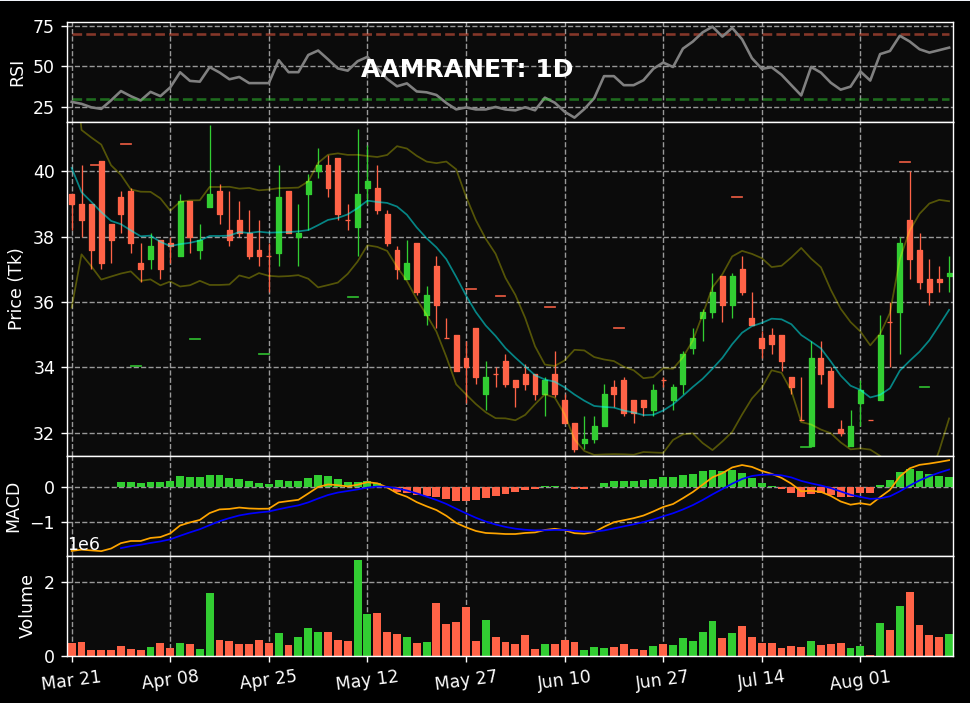
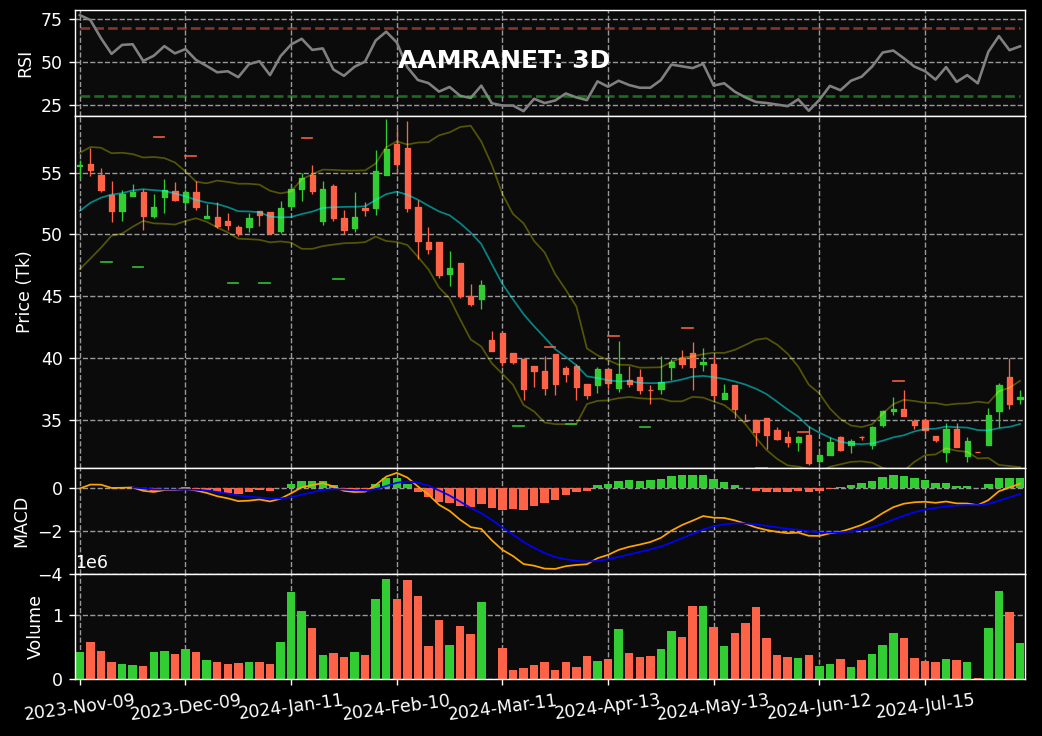
Also create Candlestick charts to analyse the price history of stocks using
this easy-to-use wrapper for mplfinance.
Installation
pip install stocksurferbd
Configuration (TLS / session / timeout)
All loaders (PriceData, FundamentalData, BlockTradeData) accept optional
arguments to control the underlying HTTP request:
from stocksurferbd import PriceData

# DSE's certificate chain is incomplete in some environments; disable TLS
# verification, reuse a session, or set a custom timeout if needed.
loader = PriceData(verify=False, session=None, timeout=60)
Defaults (verify=True, a fresh requests.Session, 30s timeout) preserve the
previous behaviour.
Usage
Downloading historical price data of a single stock-
from stocksurferbd import PriceData

loader = PriceData()

loader.save_history_data(symbol='ACI', file_name='ACI_history.xlsx', market='DSE')
The above code will create a file named- ACI_history.xlsx.
It'll contain historical price data for ACI Limited in Dhaka Stock Exchange (DSE).
There are 3 parameters for this method-
symbol: Provide stock symbol of the company as string.file_name: Provide the name of the history data file as string.market: Provide the market name as string from which you want to download the data. Probable values are'CSE'and'DSE'start_date/end_date(optional): Bound the date range. Accept adate/datetimeor any parseable string. Defaults arestart_date=None(source default — earliest available) andend_date=None(today). For DSE the range is sent to the day-end archive natively; for CSE it is applied client-side to the ~6-month graph window.
Getting price data as a pandas DataFrame (instead of a file)-
from stocksurferbd import PriceData

loader = PriceData()

# Historical OHLCV for one symbol (includes the open price, OPENP).
hist_df = loader.get_price_history_df('ACI', market='DSE',
                                      start_date='2026-01-01', end_date='2026-06-22')

# Snapshot of all listed symbols' latest prices.
current_df = loader.get_current_price_df(market='DSE')

# Day-end OHLCV for ALL instruments on a single day (includes OPENP).
day_end_df = loader.get_day_end_df(date='2026-06-22', market='DSE')
These mirror the DataFrame-returning methods on FundamentalData,
BlockTradeData and IndexData. save_history_data / save_current_data
are thin wrappers over them, so file output is unchanged.
Note: the DSE live current-price feed does not publish an open price, so
get_current_price_df(market='DSE')has noOPENPcolumn. For DSE open prices useget_price_history_df(one symbol, date range) orget_day_end_df(all symbols, one day) — both read the day-end archive, which includesOPENP. The CSE current feed does include anOPENcolumn.The day-end archive is only populated after the session closes, so
get_day_end_df(date=today)called mid-session (or on a non-trading day) returns an empty DataFrame. Useget_current_price_dffor live intraday prices.
Downloading current market price data of all listed companies in DSE/CSE-
from stocksurferbd import PriceData

loader = PriceData()

loader.save_current_data(file_name='current_data.xlsx', market='DSE')
The above code will create a file named- current_history.xlsx in the current folder.
It'll contain current price data for all symbols.
There are 2 parameters for this method-
file_name: Provide the name of the current price data file as string.market: Provide the market name as string from which you want to download the data. Probable values ar'CSE'and'DSE'
Downloading fundamental data for a list of companies available in DSE-
from stocksurferbd import FundamentalData
loader = FundamentalData()

loader.save_company_data('ACI', path='company_info')
The above code will create two files named ACI_company_data.xlsx &
ACI_financial_data.xlsx in the company_info folder relative to
current directory. The file named ACI_company_data.xlsx contains
the fundamental data of ACI Limited for the current year and
ACI_financial_data.xlsx contains year-wise fundamental data according to DSE website.
There are 2 parameters save_company_data() this method-
symbol: Provide stock symbol of the company as string.path: Provide the name of the directory as string to save the company data.
The ACI_company_data.xlsx file also includes company identity and disclosure
columns: company_name, website, address, financial_statement_link and
price_sensitive_info_link.
Downloading company news / disclosures (last 2 years) from DSE-
from stocksurferbd import FundamentalData
loader = FundamentalData()

loader.save_news_data('ACI', path='company_info', years=2)
The above code creates ACI_news_data.xlsx in the company_info folder with
columns symbol, date, title and news, sorted newest first.
DSE only. Company fundamentals and news are sourced from the DSE website; CSE is not supported for these.
Parameters of save_news_data()-
symbol: Provide stock symbol of the company as string.path: Provide the directory as string to save the news data.years: Rolling time window in years (default2). Passyears=Noneto download all available news.
Downloading block trade data from DSE-
from stocksurferbd import BlockTradeData
loader = BlockTradeData()

# Current day's block transactions for all listed symbols
loader.save_block_trade_data(file_name='block_trade_data.xlsx', market='DSE')

# Block-market related disclosures for one company over the last 2 years
loader.save_block_trade_news_data('ACI', path='company_info', years=2)
DSE does not publish a historical block-trade archive, so
save_block_trade_data() stores the current day's actual block transactions
(DATE, TRADING_CODE, MAX_PRICE, MIN_PRICE, TRADES, QUANTITY,
VALUE_MN) — run it daily to build history. save_block_trade_news_data()
provides a historical per-company proxy from block-market related news.
Both methods also have get_block_trades_df() and get_block_trade_news_df()
variants that return a pandas DataFrame instead of writing a file.
DSE only. Block trade data is available for DSE only (
market='DSE'); CSE is not supported.
Downloading market index data from DSE (DSEX, DSES, DS30, DGEN, CDSET)-
from stocksurferbd import IndexData
loader = IndexData()

# Rolling ~30 trading days of day-wise index values (DSEX, DSES, DS30, DGEN)
loader.save_index_history(file_name='index_data.xlsx', market='DSE')

# Full historical archive for any date range (data available from ~2010 onward)
loader.save_index_history(
    file_name='dsex_2020.xlsx', market='DSE',
    start_date='2020-01-01', end_date='2020-12-31',
)

# Daily history for CDSET (or DS30) by month-count — CDSET goes back to ~2016
loader.save_index_graph(index='CDSET', months=120, file_name='CDSET_history.xlsx', market='DSE')

# Live snapshot of all indices, including CDSET
loader.save_current_indices(file_name='current_indices.xlsx', market='DSE')

# Current-day per-minute ticks for a single index (incl. CDSET)
loader.save_intraday(index='CDSET', file_name='CDSET_intraday.xlsx', market='DSE')
These scrape the aggregate index values (not per-company share tables). DSE serves the indices in a few different ways, so there are dedicated methods:
| Method | Indices covered | Coverage |
|---|---|---|
save_index_history / get_index_history_df |
DSEX, DSES, DS30, DGEN |
rolling ~30 days by default; full archive (~2010+) when start_date/end_date are given |
save_index_graph / get_index_graph_df |
CDSET, DS30 |
daily close over the last months (CDSET back to ~2016) |
save_current_indices / get_current_indices_df |
DSEX, DSES, DS30, CDSET |
live snapshot |
save_intraday / get_intraday_df |
any one of the above (incl. CDSET) |
current day, ~1-min ticks |
start_date / end_date accept a date/datetime or any parseable string
(e.g. '2024-01-01'). Passing only one bounds that side; the other defaults to
~2010 (start) or today (end). For save_index_graph, months is a count
(e.g. 120 for ~10 years).
DSE only; index availability varies by launch date.
DGENis legacy (pre-2013, blank in recent rows);DSEX/DS30start Jan 2013 andDSESstarts Jan 2014 in the day-wise archive.CDSETis absent from that archive — usesave_index_graph(index='CDSET', ...)for its daily history. CSE indices are not supported.
Create Candlestick charts for analyzing price history-
from stocksurferbd import CandlestickPlot

cd_plot = CandlestickPlot(file_path='ACI_history.xlsx', symbol='ACI')
cd_plot.show_plot(
    data_n=120,
    resample=True,
    step='3D'
)
The above code will create a Candlestick plot like the ones provided by Stock broker trading panels.
There are 2 parameters __init__() method of CandlestickPlot class-
file_path: Provide the path of history file as string to generate plotsymbol: Provide stock symbol of the company as string.
There are also 3 parameters show_plot() method-
data_n: Provide an integer value. It sets the count of how many recent data points needs to be plotted.resample: Provide booleanTrueorFalse. SetTrueif you want to plot daily data aggregated by multiple days.step: Only Active whenresample=True. Valid values are in the form-'3D'and'7D'for 3 days plots and weekly plots respectively.
The following are some example images of Candlestick plots-
Output data schema
Each method writes an .xlsx file (and the get_*_df variants return the same
data as a pandas DataFrame). The columns of each output are listed below.
Price history — PriceData.save_history_data
| Market | Columns |
|---|---|
| DSE | DATE, TRADING_CODE, LTP, HIGH, LOW, OPENP, CLOSEP, YCP, TRADE, VALUE_MN, VOLUME |
| CSE | DATE, TRADING_CODE, LTP, OPENP, HIGH, LOW, CLOSEP, YCP, % CHANGE, TRADE, VALUE_MN, VOLUME |
Current prices — PriceData.save_current_data
| Market | Columns |
|---|---|
| DSE | DATE, TRADING_CODE, LTP, HIGH, LOW, CLOSEP, YCP, % CHANGE, TRADE, VALUE_MN, VOLUME |
| CSE | DATE, TRADING_CODE, LTP, OPEN, HIGH, LOW, YCP, TRADE, VALUE_MN, VOLUME |
Note: the price files are written with the DataFrame index, so they also contain a leading unnamed index column.
Company data — FundamentalData.save_company_data → <symbol>_company_data.xlsx
One row per company. Columns, grouped:
- Identity / links (new in 1.0.0):
company_name,website,address,financial_statement_link,price_sensitive_info_link - Basic:
symbol,auth_capital,trade_start,paid_up_capital,instrument_type,face_value,market_lot,ltp,last_agm_date,market_cap,outstanding_share,sector,listing_year,market_category - Dividend / reserves:
right_issue,year_end,reserve_w_oci,others_oci,cash_dividend_p,cash_dividend_year,stock_dividend_p,stock_dividend_year - Shareholding %:
sh_director,sh_govt,sh_inst,sh_foreign,sh_public - Interim EPS (
_q1,_q2,_hy,_q3,_9m,_yrsuffixes):eps_basic_*,eps_diluted_*,eps_cop_basic_*,eps_cop_diluted_*
The identity/links columns are appended at the end, so existing column positions are unchanged (backward compatible).
Financial data — FundamentalData.save_company_data → <symbol>_financial_data.xlsx
One row per financial year:
symbol, year, eps_original, eps_restated, eps_diluted,
eps_cop_original, eps_cop_restated, eps_cop_diluted, nav_original,
nav_restated, nav_diluted, pco, profit, tci, pe_original,
pe_restated, pe_diluted, pe_cop_original, pe_cop_restated,
pe_cop_diluted, dividend_p, dividend_yield_p
Company news — FundamentalData.save_news_data → <symbol>_news_data.xlsx (new in 1.0.0)
One row per news item, newest first:
symbol, date, title, news
Block trades (current day) — BlockTradeData.save_block_trade_data (new in 1.0.0)
One row per block transaction for the latest trading day:
DATE, TRADING_CODE, MAX_PRICE, MIN_PRICE, TRADES, QUANTITY, VALUE_MN
Market indices — IndexData
| Method | Columns |
|---|---|
save_index_history |
DATE, TOTAL_TRADE, TOTAL_VOLUME, VALUE_MN, MARKET_CAP_MN, DSEX, DSES, DS30, DGEN |
save_index_graph |
INDEX, DATE, POINTS |
save_current_indices |
INDEX, POINTS, CHANGE, PCT_CHANGE (one row per index; CHANGE/PCT_CHANGE are blank for CDSET) |
save_intraday |
INDEX, DATETIME, POINTS |
Block-trade news proxy — BlockTradeData.save_block_trade_news_data → <symbol>_block_trade_news.xlsx (new in 1.0.0)
Block-market related disclosures (a filtered view of the news feed):
symbol, date, title, news
If you want to contribute
Any contribution would be highly appreciated. Kindly go through the guidelines for contributing.
Project details
Verified details
These details have been verified by PyPIProject links
GitHub Statistics
Maintainers
Release history Release notifications | RSS feed


Download files
Download the file for your platform. If you're not sure which to choose, learn more about installing packages.
Source Distribution
Built Distribution
Filter files by name, interpreter, ABI, and platform.
If you're not sure about the file name format, learn more about wheel file names.
Copy a direct link to the current filters
File details
Details for the file stocksurferbd-1.2.0.tar.gz.
File metadata
- Download URL: stocksurferbd-1.2.0.tar.gz
- Upload date:
- Size: 26.1 kB
- Tags: Source
- Uploaded using Trusted Publishing? Yes
- Uploaded via: twine/6.1.0 CPython/3.13.12
File hashes
| Algorithm | Hash digest | |
|---|---|---|
| SHA256 |
8131c5d82fcf3e8f3bbbcf3b56e433a015edf5ae9f1fcb3c5bece1a21b6ae583
|
|
| MD5 |
7d84a4555675b0ff238cd8e21ad9cd33
|
|
| BLAKE2b-256 |
306db69510579734d36ae9ea978307dbdcf8d9908da74df4c9e6b86200b3f89f
|
Provenance
The following attestation bundles were made for stocksurferbd-1.2.0.tar.gz:
Publisher:
publish.yml on skfarhad/stocksurferbd
-
Statement:
-
Statement type:
https://in-toto.io/Statement/v1 -
Predicate type:
https://docs.pypi.org/attestations/publish/v1 -
Subject name:
stocksurferbd-1.2.0.tar.gz -
Subject digest:
8131c5d82fcf3e8f3bbbcf3b56e433a015edf5ae9f1fcb3c5bece1a21b6ae583 - Sigstore transparency entry: 1916181625
- Sigstore integration time:
-
Permalink:
skfarhad/stocksurferbd@62d9f104a0261787961287acc06f6b9f55950093 -
Branch / Tag:
refs/tags/v1.2.0 - Owner: https://github.com/skfarhad
-
Access:
public
-
Token Issuer:
https://token.actions.githubusercontent.com -
Runner Environment:
github-hosted -
Publication workflow:
publish.yml@62d9f104a0261787961287acc06f6b9f55950093 -
Trigger Event:
release
-
Statement type:
File details
Details for the file stocksurferbd-1.2.0-py3-none-any.whl.
File metadata
- Download URL: stocksurferbd-1.2.0-py3-none-any.whl
- Upload date:
- Size: 25.1 kB
- Tags: Python 3
- Uploaded using Trusted Publishing? Yes
- Uploaded via: twine/6.1.0 CPython/3.13.12
File hashes
| Algorithm | Hash digest | |
|---|---|---|
| SHA256 |
9ac30ca3cca355c832fc86b9a9e6060fd64d60d28caa6bf9e411d697233ff76a
|
|
| MD5 |
c2673b3bd2921ee87cd632ba5e69a5a5
|
|
| BLAKE2b-256 |
ded1f28bb64ddd039b0ff75c48319a91f8b2f50ad3cee1e2c7efa074d9651ca8
|
Provenance
The following attestation bundles were made for stocksurferbd-1.2.0-py3-none-any.whl:
Publisher:
publish.yml on skfarhad/stocksurferbd
-
Statement:
-
Statement type:
https://in-toto.io/Statement/v1 -
Predicate type:
https://docs.pypi.org/attestations/publish/v1 -
Subject name:
stocksurferbd-1.2.0-py3-none-any.whl -
Subject digest:
9ac30ca3cca355c832fc86b9a9e6060fd64d60d28caa6bf9e411d697233ff76a - Sigstore transparency entry: 1916181701
- Sigstore integration time:
-
Permalink:
skfarhad/stocksurferbd@62d9f104a0261787961287acc06f6b9f55950093 -
Branch / Tag:
refs/tags/v1.2.0 - Owner: https://github.com/skfarhad
-
Access:
public
-
Token Issuer:
https://token.actions.githubusercontent.com -
Runner Environment:
github-hosted -
Publication workflow:
publish.yml@62d9f104a0261787961287acc06f6b9f55950093 -
Trigger Event:
release
-
Statement type:






