
STPT MCP

An unofficial, standalone Model Context Protocol server for STPT public transport in Timișoara, Romania. It exposes live arrivals, date-aware schedule fallback, service alerts, vehicle positions, and an offline stop/route index to MCP clients over stdio or Streamable HTTP.
This project is not affiliated with, endorsed by, or operated by STPT or the Timișoara municipality. Upstream data is used with caching and conservative request limits. Do not use it for safety-critical decisions.
In action
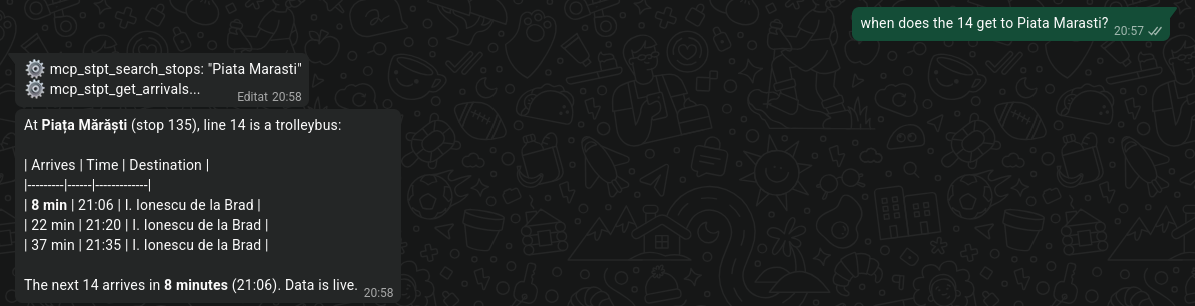
Ask in plain language. The assistant calls search_stops to resolve the stop,
then get_arrivals for the departures, and answers with the next bus. The same
tools work from any MCP client — Claude, Hermes, Cursor, or an agent of your
own.
Highlights
- Seven read-only MCP tools with typed output schemas.
- Live-first arrivals with date- and shape-aware schedule fallback, explicit provenance, and last-known-good stale data.
- Bounded TTL caches with single-flight refresh. Fifty concurrent calls to one stop produce one live upstream request, not fifty.
- Bounded upstream concurrency, timeouts, retries with jitter,
Retry-Aftersupport, and response-size limits. - Bundled GTFS-derived network snapshot, so stop/route discovery works offline.
- stdio and Streamable HTTP through the official MCP Python SDK.
- Secure HTTP defaults: loopback bind, DNS-rebinding protection, Host/Origin validation, body limits, bounded sessions/concurrency, optional bearer auth, and built-in OAuth 2.1 sign-in for hosted clients.
- Deterministic test suite with real MCP client tests for stdio and HTTP.
Requirements
- Python 3.11 or newer.
- uv for development (optional for end users).
- Network access to STPT endpoints for live data. Discovery tools work offline.
Install
From PyPI, with one command:
pip install stpt-mcp
stpt-mcp --version
Or run it without installing anything permanently, using uv:
uvx stpt-mcp --version
From a checkout:
uv sync --all-groups
uv run stpt-mcp --version
Or from a wheel/sdist:
python -m venv .venv
. .venv/bin/activate
pip install dist/stpt_mcp-0.3.6-py3-none-any.whl
stpt-mcp --version
stpt-mcp with no subcommand is equivalent to stpt-mcp serve and defaults to
stdio.
Quick start
stdio
uv run stpt-mcp serve --transport stdio
The simplest MCP client configuration lets uvx fetch the package from PyPI
on first use:
{
  "mcpServers": {
    "stpt": {
      "command": "uvx",
      "args": ["stpt-mcp", "serve", "--transport", "stdio"]
    }
  }
}
A minimal MCP client configuration using an installed console script:
{
  "mcpServers": {
    "stpt": {
      "command": "stpt-mcp",
      "args": ["serve", "--transport", "stdio"]
    }
  }
}
From a checkout without installing the script:
{
  "mcpServers": {
    "stpt": {
      "command": "uv",
      "args": [
        "run",
        "--directory",
        "/absolute/path/to/stpt-mcp",
        "stpt-mcp",
        "serve",
        "--transport",
        "stdio"
      ]
    }
  }
}
The server writes logs to stderr and never writes protocol data to stdout.
Streamable HTTP
uv run stpt-mcp serve --transport http
# endpoint: http://127.0.0.1:8000/mcp
# health:   http://127.0.0.1:8000/healthz
Generate a bearer token for any non-local deployment:
export STPT_MCP_AUTH_TOKEN="$(stpt-mcp token)"
stpt-mcp serve --transport http
Clients then send Authorization: Bearer <token>. /healthz stays
unauthenticated.
For hosted clients that support OAuth, set a public origin and a sign-in password instead of handing out a header token:
export STPT_MCP_PUBLIC_URL=https://mcp.example.com
export STPT_MCP_OAUTH_PASSWORD='replace-with-a-long-random-password'
stpt-mcp serve --transport http
Claude's custom connector can then use Sign in now with Register automatically. See OAuth sign-in for the reverse-proxy paths and connector steps.
Minimal client configuration:
{
  "mcpServers": {
    "stpt": {
      "url": "http://127.0.0.1:8000/mcp"
    }
  }
}
HTTP is bound to 127.0.0.1 by default. Binding elsewhere requires an explicit
STPT_MCP_ALLOWED_HOSTS allowlist. If you expose the server beyond localhost,
also set STPT_MCP_AUTH_TOKEN and terminate TLS at a reverse proxy. For a
complete public deployment, see Public HTTPS,
OAuth sign-in, Deployment, and
Security.
Tools
| Tool | Purpose |
|---|---|
search_stops |
Search stops by ID, name, or line (diacritic-insensitive). |
get_stop |
Stop coordinates, lines, directions, destinations, neighbors. |
list_routes |
Routes with mode, category, and colors. |
get_arrivals |
Live arrivals, with schedule fallback and line/limit filters. |
get_alerts |
Service alerts with active-period and stop/line filters. |
get_vehicles |
Vehicle positions with observation timestamps and staleness. |
get_service_status |
Readiness, version, feed metadata, cache statistics. |
Every result is a typed envelope. Data-source problems are returned as
status: "partial" or "error" with a structured error, not a traceback:
{
  "status": "partial",
  "error": {
    "code": "upstream_http_error",
    "message": "Live arrivals were unavailable; schedule data is being used.",
    "retryable": true,
    "upstream": "live arrivals"
  },
  "provenance": {
    "source": "schedule",
    "fetched_at": "2026-10-21T10:30:00Z",
    "observed_at": null,
    "is_stale": false,
    "data_age_seconds": 0.0,
    "fallback_reason": "live_unavailable",
    "warnings": ["Live arrivals were unavailable; trying the schedule."]
  },
  "stop_id": "59",
  "stop_name": "Piața Sfânta Maria",
  "line_filter": null,
  "lookahead_minutes": 180,
  "count": 9,
  "arrivals": []
}
arrivals is abbreviated above. Full schemas are generated from the Pydantic
models and exposed through MCP. See Tools for arguments,
semantics, error codes, and more examples.
Configuration
Configuration is read from environment variables; a few common values also have CLI flags. Defaults are safe for local use.
| Variable | Default | Purpose |
|---|---|---|
STPT_MCP_TRANSPORT |
stdio |
stdio or http. |
STPT_MCP_HOST |
127.0.0.1 |
HTTP bind address. |
STPT_MCP_PORT |
8000 |
HTTP port. |
STPT_MCP_PATH |
/mcp |
Streamable HTTP path. |
STPT_MCP_LOG_LEVEL |
INFO |
Python log level. |
STPT_MCP_AUTH_TOKEN |
unset | Optional static bearer token (16+ chars). |
STPT_MCP_ALLOWED_HOSTS |
loopback | Required for non-loopback binds. |
STPT_MCP_ALLOWED_ORIGINS |
loopback | Browser origins allowed by the SDK. |
STPT_MCP_MAX_REQUEST_BODY_SIZE |
1048576 |
HTTP request body limit in bytes. |
STPT_MCP_MAX_CONCURRENT_HTTP_REQUESTS |
100 |
HTTP concurrency cap. |
TTLs, stale windows, upstream timeouts, retry policy, and cache bounds are also configurable. See Configuration for the complete table.
How data selection works
- A fresh cached arrival snapshot for the stop is returned with no request.
- Otherwise live predictions are fetched. Non-empty live data wins.
- If live is empty or unavailable, the date-specific schedule is scraped.
- If the refresh fails, last-known-good data may be served inside the stale window.
- If no usable data remains, the tool returns a structured error.
provenance.source identifies live, schedule, or network data;
provenance.is_stale and data_age_seconds quantify freshness;
fallback_reason explains why live data was not used. Live arrivals expose no
upstream observation timestamp, so observed_at is the fetch time for live
arrivals and null for schedules.
Development
uv sync --all-groups
uv run ruff format --check .
uv run ruff check .
uv run mypy
uv run pytest
uv run pytest --cov --cov-report=term-missing
uv run bandit -c pyproject.toml -r src
uv run pip-audit
uv build
The default suite never contacts live STPT services. It uses deterministic
fixtures, injected clocks, httpx.MockTransport, and loopback fake upstreams.
An opt-in live smoke test is available:
STPT_MCP_RUN_NETWORK_TESTS=1 uv run pytest -m network
See Testing, Architecture, and Contributing.
Related projects
The same STPT data, exposed for different runtimes. If one of these fits your setup, the others probably do too.
| Project | Runtime | Use it for |
|---|---|---|
| STPT MCP (this repo) | Any MCP client | Talking to your transport data |
| STPT Transit | Home Assistant | Automations, sensors, and dashboards |
| Inky pHAT | Raspberry Pi | A glanceable e-ink departures display |
All three are unofficial and are not affiliated with STPT.
Limitations
- Upstream endpoints are unofficial public interfaces and may change without notice.
- Schedule scraping depends on current SMTT HTML structure.
- The bundled network snapshot is a point-in-time GTFS-derived artifact; its
feed version and service range are exposed by
get_service_status. - Each process has its own in-memory cache; multi-worker deployments do not share entries.
- OAuth is single-owner and keeps tokens in memory; a restart requires clients to sign in again. It is not a multi-user identity provider.
- Live arrivals do not carry an upstream observation timestamp.
Author
Created and maintained by Vlad Ohai (GitHub).
License and attribution
MIT licensed, © 2026 Vlad Ohai. STPT data remains the property of its respective owners. See LICENSE and NOTICE. OpenStreetMap-derived coordinates, if present, are © OpenStreetMap contributors under the ODbL.
1 maintainer

Metadata
1 maintainer
Release files for stpt-mcp 0.3.6
For a detailed explanation of source distributions (sdists) and built distributions (wheels), please see the package formats documentation.
Source distribution (sdist)
| File | Size | Uploaded | Provenance | |
|---|---|---|---|---|
| stpt_mcp-0.3.6.tar.gz | 283.0 kB | With provenance | Details |
Built distribution (wheel)
| File | Interpreter | ABI | Platform | Reset |
|---|---|---|---|---|
| stpt_mcp-0.3.6-py3-none-any.whl | Python 3 | none | any | Details |
Total release size: 385.5 kB
Release files / stpt_mcp-0.3.6.tar.gz
| Download URL | stpt_mcp-0.3.6.tar.gz |
|---|---|
| Size | 283.0 kB |
| Tags | Source |
|
SHA-256 checksum How to use checksums |
3aa7eb5db5ab7ec6acfbc6fd4c416c9f941ff706bb75a556e2a6ae11b4d9a9d6
|
|
BLAKE2b-256 checksum How to use checksums |
0b77a85cbb3b78915a5d62842772d516d3dbad6e46b75d527db9154e824766eb
|
| Upload date | |
|
Uploaded using Trusted Publishing? What is trusted publishing? |
Yes |
| Uploaded via |
twine/7.0.0 CPython/3.13.16
|
Provenance
Provenance describes where a file came from. On PyPI, provenance is shared via attestations, which provide a verifiable record of the build or publishing details. View details, limitations and caveats.


PyPI Publish Attestation
PyPI verified that this artifact, at this checksum, originated from the publisher listed below.
Signed by GitHub Actions, verified by PyPI on Oct 23, 2026.
Transparency logRelease files / stpt_mcp-0.3.6-py3-none-any.whl
| Download URL | stpt_mcp-0.3.6-py3-none-any.whl |
|---|---|
| Size | 102.5 kB |
| Tags | Python 3 |
|
SHA-256 checksum How to use checksums |
d5405e70e6fedc3a85186a14b0f8867d8451adc2ee00f9db6d97347863dcc2d9
|
|
BLAKE2b-256 checksum How to use checksums |
d0ac47c249352453a34f5437987e1ffbb0589d6833b4fd73ed1290b224bd98df
|
| Upload date | |
|
Uploaded using Trusted Publishing? What is trusted publishing? |
Yes |
| Uploaded via |
twine/7.0.0 CPython/3.13.16
|
Provenance
Provenance describes where a file came from. On PyPI, provenance is shared via attestations, which provide a verifiable record of the build or publishing details. View details, limitations and caveats.
PyPI Publish Attestation
PyPI verified that this artifact, at this checksum, originated from the publisher listed below.
Signed by GitHub Actions, verified by PyPI on Oct 23, 2026.
Transparency logSecurity for stpt-mcp 0.3.6
Provenance
Provenance describes where a file came from. On PyPI, provenance is shared via attestations, which provide a verifiable record of the build or publishing details. View details, limitations and caveats.
Full provenance
All 2 files in this release have been uploaded with provenance metadata.
Attestation for stpt_mcp-0.3.6.tar.gz
PyPI Publish Attestation
PyPI verified that this artifact, at this checksum, originated from the publisher listed below.
Signed by GitHub Actions, verified by PyPI on Oct 23, 2026.
Transparency logA note on package security
PyPI is a repository for distributing packages, not a service for auditing them. While third-party security researchers and our staff do their best to detect and remove malicious packages, PyPI cannot guarantee the quality, security or suitability of any given package.
To learn more about protecting yourself from malicious actors, visit our package security documentation.














