
Strategy Backtest
Strategy Backtest is a python program built with pandas that backtests various strategies
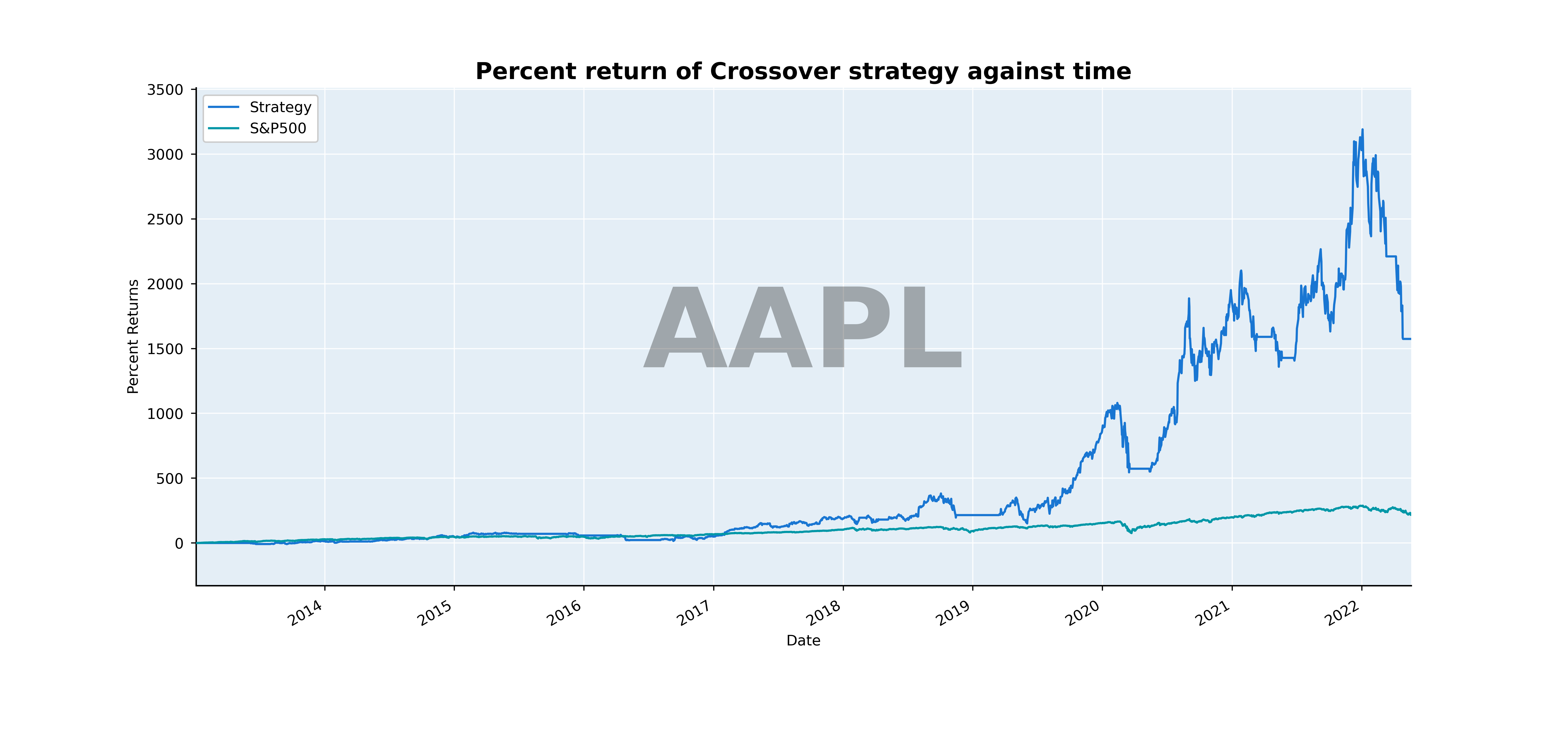
Example Plot:
Stats
                                                Stats
Ticker                                           AAPL
Start Time                        2013-01-02 00:00:00
End Time                          2022-05-20 00:00:00
Start Amount                                     5000
End Amount                                  83708.247
Average Hold Time                   156 days 13:30:00
Average Losses                              -7242.993
Average Profits                              12216.62
Biggest Loss                               -31825.015
Biggest Win                                 50857.595
Compound Annual Growth Rate (%)                36.766
Max Drawdown (%)                               -49.13
Average Drawdown (%)                          -11.827
Net Profit                                  78708.247
Profit Factor                                   2.811
Risk Reward                                     0.071
Sharpe Ratio                                    1.051
Volatility Annualized (% change)                0.454
Beta                                            0.209
Alpha                                          15.265
R-Squared                                       0.565
How it Works:
The strategy backtest framework works by pulling data from the yahoo finance api (unofficial) or allowing the user to supply their own data. The user can create their own strategy or use one of the provided ones. A strategy is created by making indicators that manipulate the data. For example there is a crossover strategy that compares a fast SMA (20 day) and a slow SMA (100 day).
The data is then entered into pandas DataFrames and then a strategy can be made with a manipulation of the DataFrame data. After the strategy is created it the strategy can be backtested on market stock data. It can also be plotted and the orders that the strategy makes, and the strategy metrics can also be displayed.
Dependencies:
pip install numpy
pip install pandas
pip install yfinance
pip install praw
pip install pytest
Installation:
pip install strat-backtest
From Source
Clone the github repo to the folder where the backtest is going to be run. Once all the dependencies are met the program can be implemented correctly. For a quicker installation download the backtest folder and then follow usage instructions3
Usage:
from strat_backtest.backtest import Backtest, download_data, load_data
from strat_backtest.backtest.custom_strats import MA_Cross_Strat, Ten_Percent_Strat
# Download data for tickers
# download_data('AAPL', 'MSFT', 'TSLA').AAPL.to_csv("./data/aapl.csv")

# Load data from a directory
data = load_data("./data")["aapl"].last("10Y")

# Initialize backtest and run strategy
backtest = Backtest(5000, "AAPL", MA_Cross_Strat, input_data=data, fast=20, lagging=100)
output = backtest.run()
Optimize Strategy
backtest = Backtest(5000, "AAPL", MA_Cross_Strat, input_data=data, fast=20, lagging=100)

optimal_nums, net_worth = backtest.optimize(
    init_state=[10, 60],
    fast=[36, 42, 2],
    lagging=[40, 210, 10],
    opt_type="grid_search",
    common_stock=True,
)

# Outputs the optimized numbers for the algorithm
print(optimal_nums, net_worth)
Plot Strategy against S&P500
# Plotting
backtest.strat.plot_data(
    ((output[["net_worth", "SP500"]].last("10Y").pct_change() + 1).cumprod() * 100)
    - 100,
    title="Percent return of Crossover strategy against time",
    ylabel="Percent Returns",
    color="LIGHT",
)
# Graph will be stored in ./Graphs
Access Metrics
# metrics for the backtest
backtest = Backtest(...)

# print output to stdout if output is marked True
stats = backtest.metrics(output=False)
Download Data
# Download data for tickers
# Comes as a dictionary of dataframes of OHLCV data
data = download_data('AAPL', 'MSFT', 'TSLA')

# Access data for individual ticker
aapl = data.AAPL

# For Example:
# data.MSFT
# data.TSLA

# Store data in a csv
aapl.to_csv("./data/aapl.csv")
Order History
# Orders

# Get orders (have to convert to dataframe for easy access)
orders = backtest.strat.orders
orders.to_df().to_csv("orders.csv")
Common Stocks via Reddit
INI setup if using ini for information
SAMPLE CONFIG INI
[REDDIT]
API_KEY = <api key (app id)>
SECRET = <secret>
USER_AGENT = <user agent>
Python setup
rc = common_stock.RedditConfig('APP_ID', 'SECRET', 'USER_AGENT')
Pytest
From root directory of project run
python -m pytest
Work in Progress
- Add more strategies
- Adapt code to work with options
Make script to analyze other sources of data to get better insight into which stocks to backtestAdd more stats- Add more items so framework is more robust
- Rewrite and improve documentation
- Maybe: Add algotrading bot to program
1 maintainer

Metadata
1 maintainer
Release files for strat-backtest 0.0.3
For a detailed explanation of source distributions (sdists) and built distributions (wheels), please see the package formats documentation.
Source distribution (sdist)
| File | Size | Uploaded | |
|---|---|---|---|
| strat-backtest-0.0.3.tar.gz | 1.7 MB | Details |
Built distribution (wheel)
| File | Interpreter | ABI | Platform | Reset |
|---|---|---|---|---|
| strat_backtest-0.0.3-py3-none-any.whl | Python 3 | none | any | Details |
Total release size: 3.3 MB
Release files / strat-backtest-0.0.3.tar.gz
| Download URL | strat-backtest-0.0.3.tar.gz |
|---|---|
| Size | 1.7 MB |
| Tags | Source |
|
SHA-256 checksum How to use checksums |
664feee6729cf961da386f244c4ab5f421f67561201e2b4f82306d0a199e12f3
|
|
BLAKE2b-256 checksum How to use checksums |
f668c6b58ce17a060f6356baf26841c37fffc6ae69bf9bb67705df6d5b7e0980
|
| Upload date | |
|
Uploaded using Trusted Publishing? What is trusted publishing? |
No |
| Uploaded via |
twine/4.0.1 CPython/3.10.4
|
Release files / strat_backtest-0.0.3-py3-none-any.whl
| Download URL | strat_backtest-0.0.3-py3-none-any.whl |
|---|---|
| Size | 1.7 MB |
| Tags | Python 3 |
|
SHA-256 checksum How to use checksums |
a29b5db2902024d088da5def82b5224f9d9ce5b7e990de9f6fb3768ef33a702e
|
|
BLAKE2b-256 checksum How to use checksums |
1ac3c5516df0b4960a66c7c966e798a29e0acc3e619c6aa740493e9492570bd9
|
| Upload date | |
|
Uploaded using Trusted Publishing? What is trusted publishing? |
No |
| Uploaded via |
twine/4.0.1 CPython/3.10.4
|














