
What is StrategyTester5?
Full documentation -> https://strategytester5.com
StrategyTester5 (ST5) is a Python framework for building, testing, and optimizing algorithmic trading strategies using the MetaTrader 5 platform.
It extends the native MetaTrader 5 Python API by adding high-performance backtesting, simulation, and data handling capabilities that are not available out of the box.

Why StrategyTester5?
The official MetaTrader5 Python API provides access to market data and trading operations — but it lacks a built-in way to efficiently backtest and simulate trading strategies.
StrategyTester5 fills this gap by providing backtesting and optimization capabilities.
!!! Note "Note"
Built for developers who want full control over their trading logic without leaving the MetaTrader 5 ecosystem.
How it Works
It simulates the MetaTrader5 API on the actual historical data from the MetaTrader5 terminal. See a quick start guide.
Installation
With pip (recommended)
This package is available at Python package index pypi.org.
pip install strategytester5
Or, you can install while checking for the updates.
pip install -U strategytester5
With git
Of course, you can pull strategytester5 directly from the GitHub repository.
Git clone:
git clone git@github.com:MegaJoctan/StrategyTester5.git strategytester5
Install the cloned repository as a package:
pip install -e strategytester5
Quick Start | Build & Test your First Trading Robot
All you need is to add three (3) Lines of code to your existing Python project.
01: Import the VirtualMetaTrader5 class
from strategytester5.MetaTrader5.api import VirtualMetaTrader5
02: Assign the parent (MetaTrader5) initialized instance to the VirtulMetaTrader5 object
if not mt5.initialize():
    raise RuntimeError(f"Failed to initialize mt5. Error = {mt5.last_error()}")

virtual_mt5 = VirtualMetaTrader5(parent_mt5=mt5)
Optional : Choosing the right MT5 instance
Since the VirtualMetaTrader5 object has similar methods and constants to MetaTrader5 API.
To keep all the code in a single file, introduce if statements to check for passed arguments from the script.
!!! Note "Rule of Thumb"
For instance, if a user has passed `--backtesting` when calling the main script the script should use a simulated MetaTrader5 rather than the actual one.

```python
script_argument = sys.argv[1:]
if "--backtesting" in script_argument:
    mt5 = VirtualMetaTrader5(parent_mt5=parent_mt5) # Assign parent MetaTrader5 to the virtual MetaTrader5 class object
else:
    mt5 = parent_mt5
```

> Always use the virtual MetaTrader5 object for backtesting and visualization purposes and stick to the original one for live trading. *That's all*
03: Backtesting your Python Trading Strategies
To Backtest your trading systems call the function run_backtesting.
if "--backtesting" in script_argument:

    stats = run_backtesting(
        main_function=main,
        tester_config=tester_config,
        virtual_mt5=mt5,
        logging_level=logging.DEBUG
    )

else:
    # run the script on the market (realtime)
    while True:
        main()
Tester Configurations
The so-called tester_config is supposed to be a dictionary with a set of key, and value pairs that resemble MetaTrader5's strategy tester section.
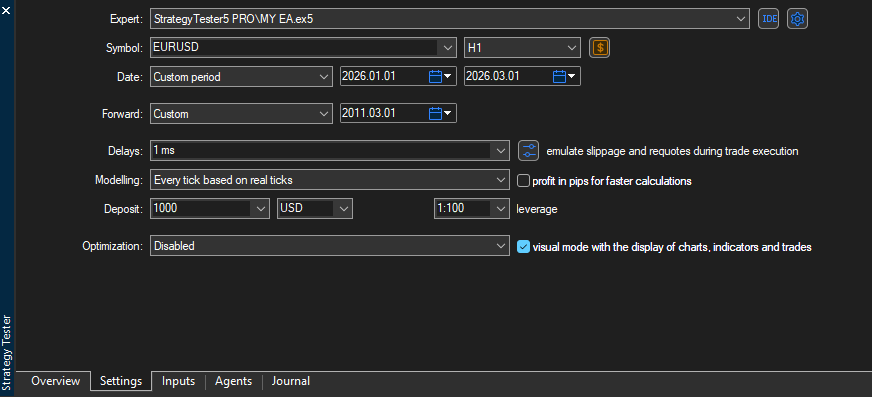
tester_config = {
        "bot_name": "RSI Strategy Bot",
        "symbols": ["EURUSD"],
        "timeframe": "H1",
        "start_date": "01.01.2026",
        "end_date": "01.06.2026",
        "modelling" : "open price only",
        "deposit": 1000,
        "leverage": "1:100"
}
!!! Note "Rule of Thumb"
Storing tester configuration in a JSON file is the best way forward. It helps adjust the values without changing the original code :)
Backtest your Python bots in MetaTrader5 👉 Learn How
1 maintainer

Metadata
1 maintainer
Release files for strategytester5 2.2.7
For a detailed explanation of source distributions (sdists) and built distributions (wheels), please see the package formats documentation.
Source distribution (sdist)
| File | Size | Uploaded | |
|---|---|---|---|
| strategytester5-2.2.7.tar.gz | 1.5 MB | Details |
Built distribution (wheel)
| File | Interpreter | ABI | Platform | Reset |
|---|---|---|---|---|
| strategytester5-2.2.7-py3-none-any.whl | Python 3 | none | any | Details |
Total release size: 2.9 MB
Release files / strategytester5-2.2.7.tar.gz
| Download URL | strategytester5-2.2.7.tar.gz |
|---|---|
| Size | 1.5 MB |
| Tags | Source |
|
SHA-256 checksum How to use checksums |
8946651c9b04c37ebaf259a879d7414c570795521280af3a5679a3a36b4c3725
|
|
BLAKE2b-256 checksum How to use checksums |
1dbfcd89709f18106777a3cc1fc8284b3c58a66dfa1c590834d4632b1321e631
|
| Upload date | |
|
Uploaded using Trusted Publishing? What is trusted publishing? |
Yes |
| Uploaded via |
twine/6.1.0 CPython/3.13.12
|
Provenance
Provenance describes where a file came from. On PyPI, provenance is shared via attestations, which provide a verifiable record of the build or publishing details. View details, limitations and caveats.


PyPI Publish Attestation
PyPI verified that this artifact, at this checksum, originated from the publisher listed below.
Signed by GitHub Actions, verified by PyPI on Jun 10, 2026.
Transparency logRelease files / strategytester5-2.2.7-py3-none-any.whl
| Download URL | strategytester5-2.2.7-py3-none-any.whl |
|---|---|
| Size | 1.5 MB |
| Tags | Python 3 |
|
SHA-256 checksum How to use checksums |
4d5829923bb8c6ab2ad7c37a6192dea71f7bcda248d62c019e5b29f02200bfc7
|
|
BLAKE2b-256 checksum How to use checksums |
9945b9224f46d9f0a7fd92da98187845f8baaee866d7a1ff2877e826b42aa9a0
|
| Upload date | |
|
Uploaded using Trusted Publishing? What is trusted publishing? |
Yes |
| Uploaded via |
twine/6.1.0 CPython/3.13.12
|
Provenance
Provenance describes where a file came from. On PyPI, provenance is shared via attestations, which provide a verifiable record of the build or publishing details. View details, limitations and caveats.
PyPI Publish Attestation
PyPI verified that this artifact, at this checksum, originated from the publisher listed below.
Signed by GitHub Actions, verified by PyPI on Jun 10, 2026.
Transparency log













