
Rule based tracker of gear and component wear primarily for Strava
Verified details
These details have been verified by PyPIProject links
GitHub Statistics
Maintainers

Project description
strava-gear
Rule based tracker of gear and component wear primarily for Strava



Simple, yet powerful, local and open-source gear tracker for Strava. Uses strava-offline to keep a local database of activities and then reads rules such as when a chain was replaced or that a certain hashtag means a different set of wheels was used, and computes the wear (distance ridden and time used) of all components.
Compared to Strava My Gear:
- unlimited number of components
- tracks wear of components swapped from one bike to another, or taken off temporarily
- hashtags for temporary component changes (race wheels, bikepacking bags, …)
- easy and reversible editing of maintenance history (it's just YAML, and you can put it under version control)
Planned, not yet implemented features:
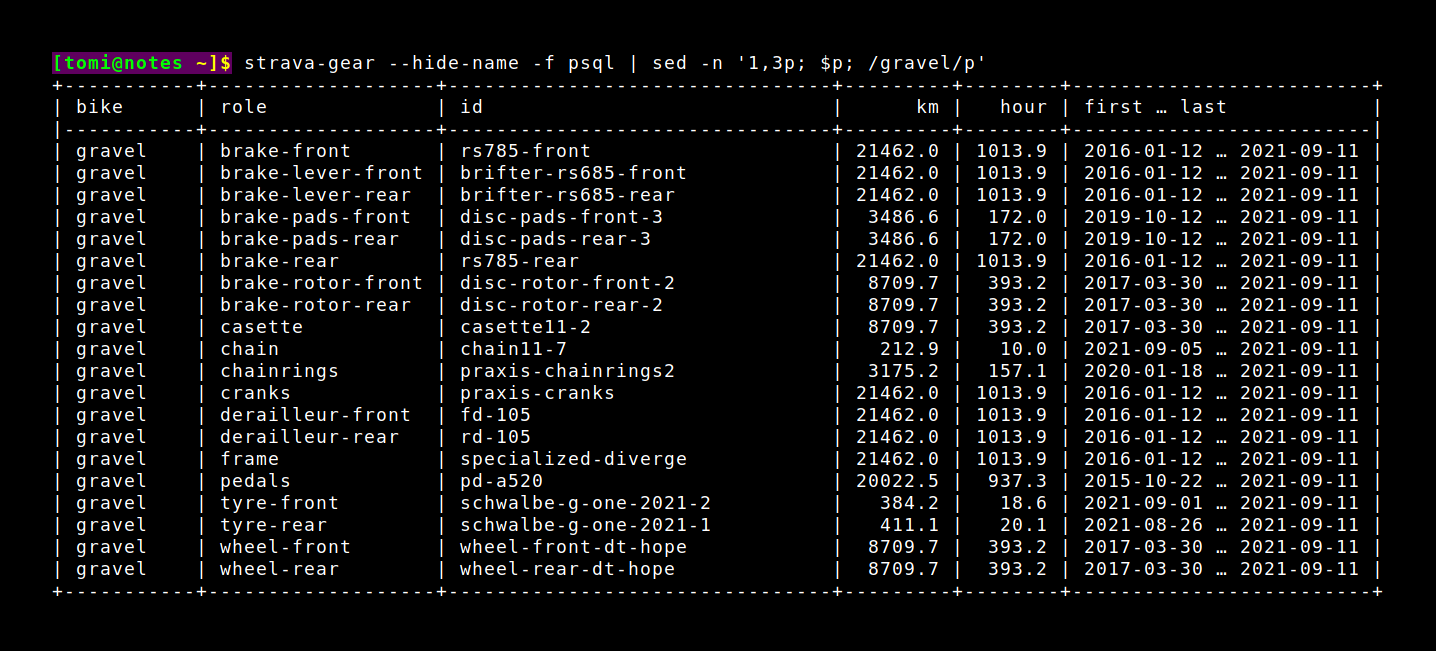
Installation
Using uv:
$ uv tool install "strava-gear[strava]"
Using pipx:
$ pipx ensurepath
$ pipx install "strava-gear[strava]"
From a git clone:
$ git clone https://github.com/liskin/strava-gear
$ uv tool install "./strava-gear[strava]"
If you've already installed strava-offline and use it separately, you can
omit the [strava] bit to avoid installing strava-offline twice.
Setup and usage
-
Run
strava-gear-sync(orstrava-offline sqliteif you chose to install strava-offline separately) to synchronize activities metadata to a local sqlite database. This takes a while: first time a couple dozen seconds, then it syncs incrementally which only takes a few seconds each time. Add-vto see progress.The first time you do this, it will open Strava in a browser and ask for permissions. Should you run into any trouble at this point, consult strava-offline readme or open an issue.
If you make changes to older activities (to assign a different bike to a ride, for example), you may need a
--fullre-sync rathen than the default incremental one. See the note about incremental synchronization for a detailed explanation. -
Create
~/.config/strava_gear/rules.yaml(the location will be different on Windows/MacOS, please consult--helpor just use--rulesexplicitly) and define components and rules. The complete format of therules.yamlfile is documented in Rules syntax, but a good start might be something like this:rules: - gravel: casette: grx-hg800 chain: grx-chain-1 - since: 2021-01-01 gravel: chain: grx-chain-2
This defines two rules:
-
The first one has no
since:, and defines the initial configuration: a bike named "gravel" in Strava starts with two components in two roles, respectively. The first component, "gravel-hg800", is assigned the "casette" role and "gravel-chain-1" is assigned to "chain". -
Then, on 2021-01-01, we replaced the chain. This is expressed as a rule with
since: 2021-01-01that assigns component "gravel-chain-2" to the "chain" role of our "gravel" bicycle.
-
-
Run
strava-gear:$ strava-gear bike role id name km hour first … last ------ ------- ----------- ----------- ------- ------ ----------------------- gravel casette grx-hg800 grx-hg800 19462.0 913.9 2016-01-12 … 2021-09-11 gravel chain grx-chain-2 grx-chain-2 2236.6 113.5 2021-01-18 … 2021-09-11As you see, strava-gear displays the components currently assigned to your gravel bike and their computed usage: distance, hours, first and last use.
You'll also notice that the component ids are shown twice. This is because if you declare your components explicitly, you can assign long names to them, such as "Shimano CN-HG701-11 with Quick-Link". This column can be hidden using the
--hide-namecommand-line option.If you want to see all components regardless of their current assignment, ordered by last usage, just ask for the
componentsreport:$ strava-gear --report=components id name km hour first … last ----------- ----------- ------- ------ ----------------------- grx-chain-1 grx-chain-1 17225.5 800.4 2016-01-12 … 2020-12-12 grx-hg800 grx-hg800 19462.0 913.9 2016-01-12 … 2021-09-11 grx-chain-2 grx-chain-2 2236.6 113.5 2021-01-18 … 2021-09-11There are more ways to customize the output (and input), use
--helpor see Command line options.
Rules syntax
The rules for strava-gear are by default loaded from
~/.config/strava_gear/rules.yaml (the location will be different on
Windows/MacOS, please consult --help or just use --rules explicitly).
Here's an informal description of what goes inside:
# The rules section is mandatory, and there must be at least one rule.
rules:

  # The general format of a rule is:
  - since: date  # ISO-8601 format, defaults to unix epoch if omitted
    # Bicycle id, name or alias (see further)
    bicycle:
      # Role can be anything like "chain", "rear-tyre", …
      role: component1_id
      role2: component2_id
      # …
    # Multiple bicycles and hashtags can be specified in one rule:
    bicycle2:
      role: component3_id
      # …
    "#hashtag1":
      role: component4_id
      # …
    # …

  # Typically, the first rule will specify initial component assigment,
  # for example:
  - gravel:
      frame: specialized-diverge-frame
      tyre-front: specialized-roubaix-pro-1
      tyre-rear: specialized-roubaix-pro-2
      chain: chain11-1
    road:
      frame: isaac-element-frame
      tyre-front: schwalbe-one-1
      tyre-rear: schwalbe-one-2
      chain: chain11-2
  # Note that this doesn't need to be at the top of the file. The rules are
  # sorted by their "since" fields anyway. It's totally okay to first specify
  # all rules for the gravel bike, then rules for the road bike, and so on.

  # Most rules will then specify a "since" field and some component changes:
  - since: 2020-02-01
    gravel:
      chain: chain11-3
  - since: 2020-08-01
    gravel:
      chain: chain11-4
    road:
      chain: chain11-5
  # and so on and so forth…

  # When null (a YAML keyword) is specified in place of a component,
  # it means the component was taken off the bike:
  - since: 2019-11-01
    road:
      mudguards: crud-roadracer-mk3  # mudguards for the winter
  - since: 2020-03-01
    road:
      mudguards: null                # but take them off as soon as possible!

  # Components can be moved from one bike to another without explicitly
  # unassigning them from the first bike:
  - since: 2021-01-01
    gravel:
      # These are automatically unassigned from road bike:
      tyre-front: schwalbe-one-1
      tyre-rear: schwalbe-one-2

  # For temporary component assignments, we can define hashtag rules:
  - "#cx-tyres":
      tyre-front: schwalbe-x-one-1
      tyre-rear: schwalbe-x-one-2
  - since: 2020-06-01
    "#cx-tyres":
      tyre-front: schwalbe-x-one-3
      tyre-rear: schwalbe-x-one-4

  # These temporarily change component assignments whenever the given hashtag
  # appears in the name (not description!) of an activity.
  #
  # Note that null component in a hashtag rule only means that the hashtag no
  # longer assigns that component, it doesn't result in temporary unassignment
  # whenever that hashtag is used in an activity name. If you need that, use a
  # dummy component id.

  # Special virtual hashtags `#column=value` are available for all columns in
  # the input database/csv. These can for example be used to define component
  # assignments for indoor trainer rides from Zwift, Rouvy, etc.:
  - "#type=VirtualRide":
      tyre-front: wahoo-kickr-climb
      tyre-rear: wahoo-kickr
  - "#commute=1":
      shoes: chrome-industries-kursk

  # Dates are interpreted as midnight in your current time zone.
  # Time can be specified too, if you swapped components in between rides in
  # one day:
  - since: 2020-05-01T14:00
  # If you travel between timezones and need strava-gear to give consistent
  # results, it's a good idea to specify the timezone as well:
  - since: 2020-05-01T14:00+02:00  # Central European Summer Time

# The components section is optional, but it's useful to declare component
# names or initial usage (second hand components, usage not tracked in Strava,
# etc.).
components:
  # The key is component id, the value is component name:
  chain11-1: "Shimano CN-HG701-11 (Quick-Link)"

  # To specify initial usage, the value must be an object instead:
  chain11-2:
    name: "Shimano CN-HG701-11 (connecting pin)"
    kms: 1000
    hours: 50

  # A component with same id and name can also be declared explicitly,
  # although it doesn't need to be.
  chain11-3:

# The aliases section can be omitted if you just want to use bike names as
# defined in Strava. If you, however, want to use shorter bike ids, or if
# you often rename your bikes in Strava and want to keep the names stable
# here, you can define aliases explicitly.
aliases:
  city: b123456    # To get these ids, visit https://www.strava.com/settings/gear
  gravel: b234567  # and prepend "b" to the number in the URL of the bike link.
  road: b345678    # Or just look into the strava-offline database. :-)
For a real life example, take a look at my own rules.yaml.
Command line options
$ strava-gear --help
Usage: strava-gear [OPTIONS]

Options:
  --rules FILENAME                Rules configuration (bikes, components, ...)  [default:
                                  /home/user/.config/strava_gear/rules.yaml]
  --csv FILENAME                  Load activities from CSV instead of the strava-offline database
                                  (columns: distance, gear_id, moving_time, name, start_date,
                                  total_elevation_gain)
  --strava-database PATH          Location of the strava-offline database  [default:
                                  /home/user/.local/share/strava_offline/strava.sqlite]
  -o, --output FILENAME           Output file  [default: -]
  -r, --report [components|bikes]
                                  Type of report  [default: bikes]
  -f, --tablefmt TEXT             Table format, see <https://github.com/astanin/python-
                                  tabulate#table-format>. Additionally, "csv" is supported for CSV
                                  output.  [default: simple]
  --show-name / --hide-name       Show long component names  [default: show-name]
  --show-first-last / --hide-first-last
                                  Show first/last usage of components  [default: show-first-last]
  --show-vert / --hide-vert       Show vertical (elevation gain)  [default: hide-vert]
  --show-retired / --hide-retired
                                  Show retired bikes (on Strava)  [default: hide-retired]
  --units [metric|imperial]       Show data in metric or imperial  [default: metric]
  --date-start ISO8601            Filter activities: start at or after the specified date(time)
  --date-end ISO8601              Filter activities: start before the specified date(time)
  --help                          Show this message and exit.
Contributing
Code
We welcome bug fixes, (reasonable) new features, documentation improvements, and more. Submit these as GitHub pull requests. Use GitHub issues to report bugs and discuss non-trivial code improvements; alternatively, get in touch via IRC/Fediverse/email.
See CONTRIBUTING.md for more details about the code base (including running tests locally).
Note that this project was born out of a desire to solve a problem I was facing. While I'm excited to share it with the world, keep in mind that I'll be prioritizing features and bug fixes that align with my personal use cases. There may be times when I'm busy with other commitments and replies to contributions might be delayed, or even occasionally missed. Progress may come in bursts. Adjust your expectations accordingly.
Donations (♥ = €)
If you like this tool and wish to support its development and maintenance, please consider a small donation or recurrent support through GitHub Sponsors.
By donating, you'll also support the development of my other projects. You might like these:
- strava-offline – Keep a local mirror of Strava activities for further analysis/processing
- strava-map-switcher – Map switcher for Strava website
Project details
Verified details
These details have been verified by PyPIProject links
GitHub Statistics
Maintainers
Release history Release notifications | RSS feed


Download files
Download the file for your platform. If you're not sure which to choose, learn more about installing packages.
Source Distribution
Built Distribution
Filter files by name, interpreter, ABI, and platform.
If you're not sure about the file name format, learn more about wheel file names.
Copy a direct link to the current filters
File details
Details for the file strava_gear-1.2.0.tar.gz.
File metadata
- Download URL: strava_gear-1.2.0.tar.gz
- Upload date:
- Size: 30.1 kB
- Tags: Source
- Uploaded using Trusted Publishing? Yes
- Uploaded via: twine/6.1.0 CPython/3.13.12
File hashes
| Algorithm | Hash digest | |
|---|---|---|
| SHA256 |
49e48673628af36e58dcbdf303fea1ddbbe93097a54cbcb447a5d5c838de9e13
|
|
| MD5 |
ffc802052d7b6aa8689d7e8327260140
|
|
| BLAKE2b-256 |
64b9e2a81b02f71562191087883d113a7e365827f8373a0418a8d22314faadb2
|
Provenance
The following attestation bundles were made for strava_gear-1.2.0.tar.gz:
Publisher:
pypi.yaml on liskin/strava-gear
-
Statement:
-
Statement type:
https://in-toto.io/Statement/v1 -
Predicate type:
https://docs.pypi.org/attestations/publish/v1 -
Subject name:
strava_gear-1.2.0.tar.gz -
Subject digest:
49e48673628af36e58dcbdf303fea1ddbbe93097a54cbcb447a5d5c838de9e13 - Sigstore transparency entry: 1789346096
- Sigstore integration time:
-
Permalink:
liskin/strava-gear@cff21d22108119c4b82c26cd8aac741ee7927beb -
Branch / Tag:
refs/tags/v1.2.0 - Owner: https://github.com/liskin
-
Access:
public
-
Token Issuer:
https://token.actions.githubusercontent.com -
Runner Environment:
github-hosted -
Publication workflow:
pypi.yaml@cff21d22108119c4b82c26cd8aac741ee7927beb -
Trigger Event:
release
-
Statement type:
File details
Details for the file strava_gear-1.2.0-py3-none-any.whl.
File metadata
- Download URL: strava_gear-1.2.0-py3-none-any.whl
- Upload date:
- Size: 18.3 kB
- Tags: Python 3
- Uploaded using Trusted Publishing? Yes
- Uploaded via: twine/6.1.0 CPython/3.13.12
File hashes
| Algorithm | Hash digest | |
|---|---|---|
| SHA256 |
8c48b78237ac00bf48ea0c8c8788fde05dd14b4a2963071abe6ddab6377cf054
|
|
| MD5 |
bd6fe49a6c062444b1764bd006f3595e
|
|
| BLAKE2b-256 |
e1830358cc084e881f6fc50127d26d1629be84cd7226b6b6db9c9a8b3b2ef2dc
|
Provenance
The following attestation bundles were made for strava_gear-1.2.0-py3-none-any.whl:
Publisher:
pypi.yaml on liskin/strava-gear
-
Statement:
-
Statement type:
https://in-toto.io/Statement/v1 -
Predicate type:
https://docs.pypi.org/attestations/publish/v1 -
Subject name:
strava_gear-1.2.0-py3-none-any.whl -
Subject digest:
8c48b78237ac00bf48ea0c8c8788fde05dd14b4a2963071abe6ddab6377cf054 - Sigstore transparency entry: 1789346117
- Sigstore integration time:
-
Permalink:
liskin/strava-gear@cff21d22108119c4b82c26cd8aac741ee7927beb -
Branch / Tag:
refs/tags/v1.2.0 - Owner: https://github.com/liskin
-
Access:
public
-
Token Issuer:
https://token.actions.githubusercontent.com -
Runner Environment:
github-hosted -
Publication workflow:
pypi.yaml@cff21d22108119c4b82c26cd8aac741ee7927beb -
Trigger Event:
release
-
Statement type:






