

Declarative SQL streaming pipelines for ClickHouse, with replay-aware builds and staged deployments.




StreamBuild lets data teams define continuously updating ClickHouse pipelines in typed SQL, inspect the affected graph before making changes, and rebuild it from retained streaming history when logic changes.
It brings dbt-style authoring and deployment workflows to streaming workloads:
- Declarative models compile into ClickHouse tables and materialized views.
- Replay-aware builds reconstruct affected models from retained stream history.
- Safe planning shows the graph and warehouse operations before execution.
- Staged deployments support review, audit, promotion, and graph-level rollback.
- Built-in observability covers sources, lag, lineage, runs, quality checks, and sensors.
StreamBuild currently targets ClickHouse and supports managed Kafka landing or adopted external stream tables.
Install
Requires Python 3.12 or newer.
pip install streambuild
stb --help
Quickstart
The included deterministic commerce demo runs locally with Redpanda and ClickHouse. It requires
Docker with Compose, Node.js 20.19 or newer, npm, and uv:
git clone https://github.com/chio-labs/streambuild.git
cd streambuild
make ui-install ui-build
uv tool install --editable .

cd examples/orders_demo
cp .env.example .env
make start
make dev
Open http://127.0.0.1:8000 to inspect three Kafka partitions, retained messages, replay-safe model
facts, tests, audits, and Kafka lag. See the commerce events demo
for its fixed event contract and controlled warning/recovery walkthrough.
How it works
Kafka or an adopted stream table
              |
              v
      retained landing data
              |
              v
 typed SQL models -> ClickHouse tables and materialized views
              |
              v
 plan -> build or stage -> audit -> promote
StreamBuild follows __source() and __ref() dependencies to compile the model graph. Live
materialized views keep it current; retained replay columns let a later build reconstruct the
affected scope after SQL changes.
Project
streambuild_project.toml
sources/
  orders.yml
macros/
  common.py
pipelines/
  pl__orders/
    pipeline.toml
    order_totals.sql
audits/
tests/
Minimal configuration:
name = "orders"
default_target = "dev"

[connection]
host = "localhost"
port = 8123
username = "default"
password = "${ENV:CLICKHOUSE_PASSWORD}"

[defaults]
pipeline_mode = "direct"

[defaults.sources.kafka.retention]
duration = "7d"
timestamp = "broker"
fallback = "landed"
cap_at = "landed"

[defaults.models.retention]
duration = "7d"
timestamp_column = "kafka_timestamp"
cap_at_column = "ingested_at"
when_missing = "error"

[ui]
timezone = "Europe/London"

[dependencies]
model_reference_scope = "pipeline"

[[dependencies.allowed_cross_pipeline_references]]
upstream_pipeline = "pl__shared_dimensions"
downstream_pipeline = "pl__orders"

[targets.dev]
database = "analytics"
Developer-specific target and connection overrides belong in the gitignored
streambuild_local.toml.
Sources
Managed Kafka source:
sources:
  - name: orders
    kind: kafka
    broker_list: kafka:9092
    topic: source.orders
    replay_boundary:
      mode: offsets
StreamBuild owns managed Kafka landing objects. It validates but never mutates adopted source tables. See the pipeline documentation for adopted stream-table configuration.
Typed retention defaults are checked against each compiled schema. A pipeline can override the
model default in pipeline.toml with [defaults.models.retention]; an individual table model can
override it with retention (...) or opt out with retention false. Specific models and sources
can continue to use free-form ttl expressions when adapter-specific behavior is required.
Pipelines
Each direct child of pipelines/ is a pipeline. Its directory name is its logical name:
pipelines/
  pl__orders/
    staging/
      orders_clean.sql
    order_totals.sql
Nested directories organize models but do not change pipeline identity. Pipeline, source, and model names share one namespace and must be unique.
Projects default to dependencies.model_reference_scope = "project", which permits model
references across pipeline directories for compatibility. Set the committed policy to "pipeline"
to keep model dependencies within their owning pipeline. Managed and adopted sources remain
shareable across pipelines under either policy.
Pipeline scope can grant narrow directional exceptions with
dependencies.allowed_cross_pipeline_references. Each entry permits models in
downstream_pipeline to reference models in upstream_pipeline; reverse access requires a
separate entry. Both pipelines must exist. These exceptions do not permit references between
direct and virtual pipelines.
Models
MODEL (
  engine "MergeTree()",
  order_by ["order_id", "_replay_partition", "_replay_offset"],
);

SELECT
  order_id::String AS order_id,
  _replay_partition::Int32 AS _replay_partition,
  _replay_offset::Int64 AS _replay_offset,
  _replay_timestamp::DateTime64(3) AS _replay_timestamp
FROM __source("orders")
Models must project explicit output types. Table models preserve replay lineage through normalized
_replay_* columns. Terminal query views use MODEL (kind view).
Python functions under macros/ are available in model, test, and audit SQL as @function_name().
Workflow
stb discover                 # inspect authored resources
stb compile                  # offline validation and artifacts
stb plan                     # read-only warehouse plan
stb build                    # confirm and execute
stb test
stb audit
stb dev                      # local UI at 127.0.0.1:8000
Select a model or pipeline with repeatable selectors:
stb plan --select pipeline:pl__orders
stb build --select order_totals --start-time 2026-08-01T00:00:00Z
stb compile is offline. stb plan reads warehouse state but cannot mutate it. stb build replans
immediately before execution so an approved command never relies on a stale plan.
Build modes
| Mode | Behavior | Best for |
|---|---|---|
| Direct | Rebuilds selected live relations immediately | Development and explicitly controlled live changes |
| Virtual | Builds deployment-specific relations before promotion | Review, validation, and production releases |
| Mixed | Stages virtual pipelines before applying direct pipelines | Projects containing both deployment strategies |
Deployments
Set pipeline_mode = "virtual" project-wide or mode = "virtual" in pipeline.toml.
stb build
stb deployment list
stb deployment show <deployment-id>
stb deployment diff <deployment-id>
stb deployment audit <deployment-id>
stb deployment promote <deployment-id>
stb deployment rollback --previous
Promotion and rollback switch stable views one relation at a time. Rollback restores a retained publication's bindings, not a historical data snapshot.
Destructive Operations
StreamBuild can destroy selected deployed pipelines while retaining their authored definitions,
managed sources, and replay data. A target reset additionally removes managed source and replay
relations, but preserves every _streambuild_* metadata table, account and authorization state,
Kafka offsets, and the reset's own run evidence.
stb destroy --target uat --select pipeline:pl__orders pipeline:pl__reporting
stb reset-target --target uat
Both commands require an interactive terminal. They print a frozen impact plan, require a separate review decision, and then prompt for exact pipeline-name challenges from that plan. There is no non-interactive approval option or administrator bypass. Execution locks the target, replans, and rejects manifest or warehouse drift before the first drop. Unselected downstream pipelines block a plan rather than being silently included. Standalone CLI execution also requires the local OS user to be an active built-in administrator in the StreamBuild control store.
UI plans and their review state are durable, actor-bound, and atomically single-use across server restarts and workers. Standalone CLI plans use the same durable control-store representation.
Classify production targets in committed project configuration so reset requires the additional
exact PRODUCTION challenge even when the target has a non-standard name:
[targets.live]
production = true

[targets.live.destruction]
max_table_size_to_drop = "100GiB"
max_table_size_to_drop is an optional committed, target-scoped ClickHouse safety ceiling for
each relation, not the aggregate plan size. It must be a finite positive byte-size string and cannot
be overridden from streambuild_local.toml. StreamBuild applies it only to that target's reviewed
destruction DROP statements, freezes the override and server default into each plan,
and still relies on ClickHouse to enforce the ceiling when every DROP executes. Other StreamBuild
queries continue to use the target connection and server defaults.
Ownership generations, external dependants in every ClickHouse database, and target/database drift are checked before execution. Historical deployment metadata alone never authorizes deletion of a live same-name relation. Target mutation locks remain fail-closed after a crashed owner; StreamBuild does not use an age-based automatic takeover that could overlap a long-running ClickHouse query.
The Pipelines UI exposes the same planner and executor through multi-selection and the dedicated
pipeline.destroy and target.reset permissions. Every generated statement, actor, challenge,
result, and observed remaining object after a partial failure is retained in Runs. A failed residual
catalog read is recorded as unavailable rather than as an empty target. Failed destructive Runs can
create a fresh recovery plan from their recorded root selection; old SQL and historical derived
closure are never replayed.
Development UI
stb dev serves a warehouse-backed interface for one resolved project and target. It provides:
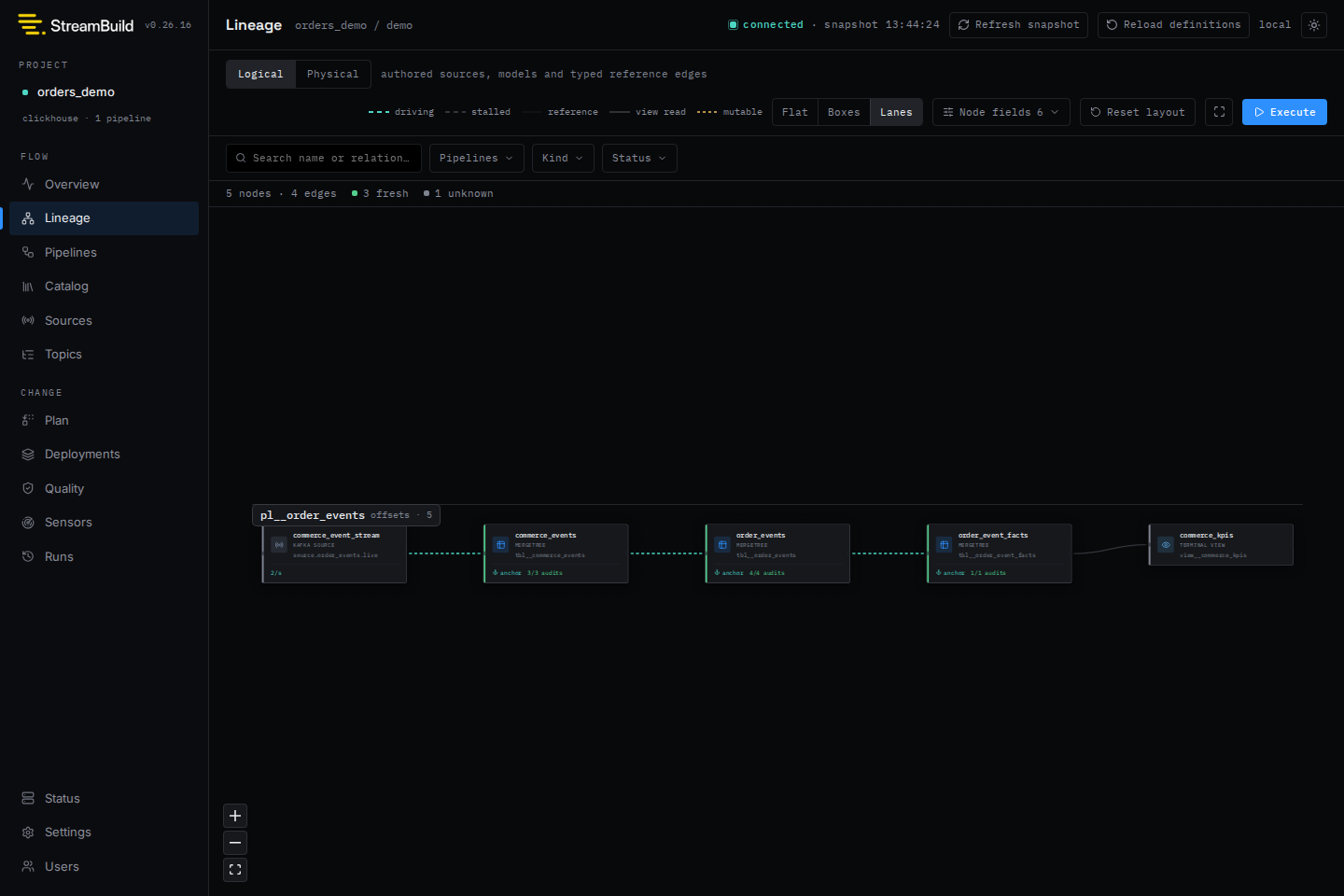
- overview, lineage, pipeline, catalog, source, topic, and message inspection
- connected plan previews and protected-pipeline confirmation
- direct, virtual, and mixed build execution
- deployment inventory, diff, promotion, and cleanup
- frozen bulk pipeline destruction and target reset plans with typed confirmation
- durable run timelines, statement progress, cancellation, and stale-run recovery guidance
- quality history, scheduler health, sensors, and dead-letter recovery
Run observability is warehouse-backed. A silent run becomes unresponsive after 45 seconds and
presumed_failed after [defaults].run_presumed_failed_after (default 10m). A new build is blocked
until that safety window expires to prevent overlapping warehouse writes.
Shared installations support trusted-proxy or password authentication with project-scoped roles. See the documentation for access control and operational configuration.
Guarantees
stb compileis connection-free and writes disposable artifacts undertarget/.stb planis read-only;stb buildalways replans against current warehouse state.- Lifecycle state is append-only metadata in the selected target database.
- Failed or cancelled builds are rerun, never resumed from copied SQL artifacts.
- Workflow statements execute serially to avoid unbounded ClickHouse memory pressure.
Documentation
Development
Install the locked Python and UI dependencies before running the verification lanes:
uv sync --locked --all-groups
make ui-install ui-build
make check-ci
make ui-verify
make test
Run every verification lane with:
make test-all
The integration and browser lanes provision real ClickHouse and Redpanda containers, so Docker must be running. Install Chromium and its system dependencies before the first browser run:
uv run playwright install --with-deps chromium
make ui-install ui-build
make test-browser
1 maintainer

Download files
Download the file for your platform. If you're not sure which to choose, learn more about installing packages.
Source Distribution
Built Distribution
Filter files by name, interpreter, ABI, and platform.
If you're not sure about the file name format, learn more about wheel file names.
Copy a direct link to the current filters
File details
Details for the file streambuild-0.38.2.tar.gz.
File metadata
- Download URL: streambuild-0.38.2.tar.gz
- Upload date:
- Size: 3.3 MB
- Tags: Source
- Uploaded using Trusted Publishing? Yes
- Uploaded via:
twine/7.0.0 CPython/3.13.14
File hashes
| Algorithm | Hash digest | |
|---|---|---|
| SHA256 |
d66460b5916ff139afab62ce9eb84dbdb9488fb3736cf66ceb8b3c9a360466db
|
|
| MD5 |
70ab6ed421eb583c252a12b9b87a7f9d
|
|
| BLAKE2b-256 |
ba667de8d2600d333fe704a00b3d7dfa37a73261eb4572efbb5dd8a1f1c5855e
|
Provenance
The following attestation bundles were made for streambuild-0.38.2.tar.gz:
Publisher:
publish.yml on chio-labs/streambuild
-
Statement:
-
Statement type:
https://in-toto.io/Statement/v1 -
Predicate type:
https://docs.pypi.org/attestations/publish/v1 -
Subject name:
streambuild-0.38.2.tar.gz -
Subject digest:
d66460b5916ff139afab62ce9eb84dbdb9488fb3736cf66ceb8b3c9a360466db - Sigstore transparency entry: 2624829813
- Sigstore integration time:
-
Permalink:
chio-labs/streambuild@11dc7f2299deffad9973f392634524f5d27c844f -
Branch / Tag:
refs/heads/main - Owner: https://github.com/chio-labs
-
Access:
public
-
Token Issuer:
https://token.actions.githubusercontent.com -
Runner Environment:
github-hosted -
Publication workflow:
publish.yml@11dc7f2299deffad9973f392634524f5d27c844f -
Trigger Event:
workflow_dispatch
-
Statement type:
File details
Details for the file streambuild-0.38.2-py3-none-any.whl.
File metadata
- Download URL: streambuild-0.38.2-py3-none-any.whl
- Upload date:
- Size: 2.0 MB
- Tags: Python 3
- Uploaded using Trusted Publishing? Yes
- Uploaded via:
twine/7.0.0 CPython/3.13.14
File hashes
| Algorithm | Hash digest | |
|---|---|---|
| SHA256 |
86d7fbb3cd76aa07ba3dcd5f74aa12158bcda554e30b755504eabdc329c498cc
|
|
| MD5 |
acd3097699ccc2a0e46be7be8707eec6
|
|
| BLAKE2b-256 |
95e9de9cd304fc1799573a7f4aef89b3b3484eecf0822dc132b70b99a259b9b6
|
Provenance
The following attestation bundles were made for streambuild-0.38.2-py3-none-any.whl:
Publisher:
publish.yml on chio-labs/streambuild
-
Statement:
-
Statement type:
https://in-toto.io/Statement/v1 -
Predicate type:
https://docs.pypi.org/attestations/publish/v1 -
Subject name:
streambuild-0.38.2-py3-none-any.whl -
Subject digest:
86d7fbb3cd76aa07ba3dcd5f74aa12158bcda554e30b755504eabdc329c498cc - Sigstore transparency entry: 2624829917
- Sigstore integration time:
-
Permalink:
chio-labs/streambuild@11dc7f2299deffad9973f392634524f5d27c844f -
Branch / Tag:
refs/heads/main - Owner: https://github.com/chio-labs
-
Access:
public
-
Token Issuer:
https://token.actions.githubusercontent.com -
Runner Environment:
github-hosted -
Publication workflow:
publish.yml@11dc7f2299deffad9973f392634524f5d27c844f -
Trigger Event:
workflow_dispatch
-
Statement type:














