
Context health monitoring for AI agents — detect poisoning, drift, loops

Project description
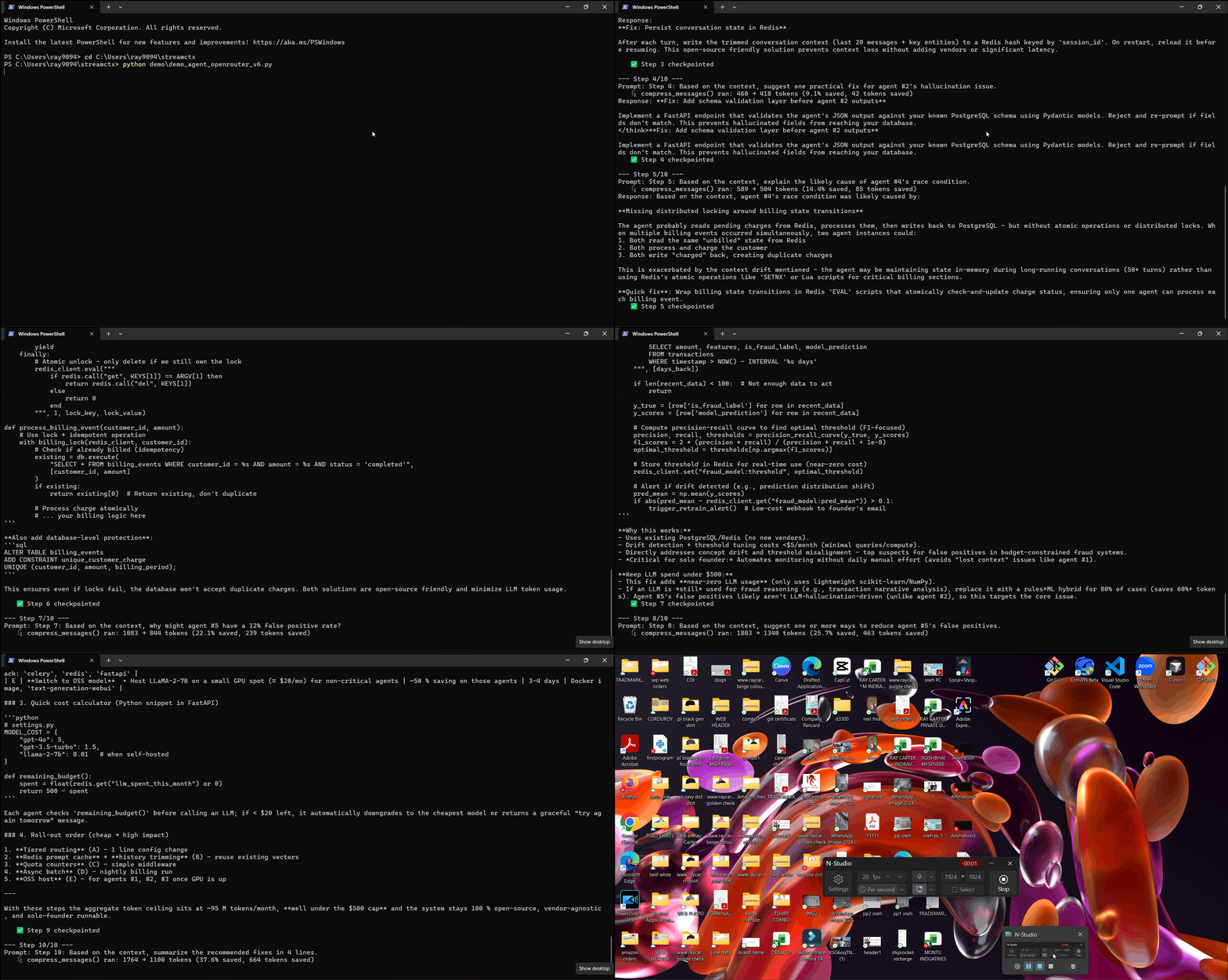
Your AI agent is silently corrupting its own context. StreamCtx detects it — and fixes it.




Every AI agent framework tells you how many tokens you used. None of them tell you why your agent is broken.
StreamCtx is a Context Nervous System for AI agents — a lightweight Python SDK that sits between your app and any LLM API, watching every message for signs of trouble: poisoned context, silent drift, runaway loops, and failures that trace back to something that happened 10 steps ago.
Install
pip install streamctx
2-Line Setup
import streamctx
streamctx.start()  # patches OpenAI + Anthropic automatically
The Problem Nobody Talks About
You ship an AI agent. It works perfectly in demos.
Then in production:
- Agent gets stuck repeating the same failed action 58 times
- Context from step 3 contradicts context from step 7
- Agent hallucinates a tool call, writes it to memory, references it forever
- Your $0.50 task costs $50 because nobody set a limit
- A call fails at step 12 — but the real cause was a bad compression at step 4, and you have no way to know that
Every LLM observability tool tracks tokens. Nobody tracks context health, and nobody tells you which earlier call actually caused a later failure.
Until now.
What StreamCtx Does
1. Context Poison Detection
result = streamctx.scan(messages)
print(result["health_score"])   # 25/100
print(result["warnings"])
#  ⚠️  Repeated errors: 'failed' 4x — agent stuck in loop
#  🔴  Context severely poisoned — resume from checkpoint
2. Context Diff — See Exactly What Changed
diff = streamctx.context_diff(step3_msgs, step7_msgs, step_a=3, step_b=7)
print(diff["summary"])
#  ⚠️  System prompt REMOVED — agent lost instructions
#  ⚠️  Contradiction: 'use gpt' added but 'use claude' removed
# Drift Score: 50/100
3. Auto-Checkpoint + Resume
session_id = streamctx.get_session_id()
messages = streamctx.resume(session_id)
# Pick up exactly where agent left off
4. 30–60% Token Compression
result = streamctx.compress(messages, max_tokens=2000)
# 140 tokens → 65-95 tokens depending on redundancy (30-60% reduction)
5. Self-Healing
stats = streamctx.healing_stats()
# failures: 3, recoveries: 3
6. Causal Failure Attribution — "Why Did This Actually Break?"
Most tools show you the call that failed. StreamCtx traces back through the session and tells you which earlier call actually caused it — even if that call succeeded at the time.
from streamctx.attribution import get_attribution_engine

engine = get_attribution_engine()
results = engine.attribute_session(session_id)
attribution = results[0]  # highest-confidence root cause

print(attribution.root_cause_call_id)   # call from earlier in the session
print(attribution.confidence)            # e.g. 0.82
print(attribution.reason)
# e.g. "Heavy compression + reused context degraded signal"
7. Counterfactual Replay — "What If This Call Had Been Different?"
Rewind to any checkpoint, change one message, and replay forward to see if the outcome changes — without touching your live session.
result = streamctx.replay(session_id, checkpoint_id, modified_message, dry_run=True)
print(result["diverges_at_step"])
print(result["new_outcome"])
8. Full Session Report
streamctx.report()
streamctx.stop()
Built to Be Trusted, Not Just Demoed
Most agent SDKs are tested against the happy path. StreamCtx is tested against production chaos:
- 67 automated tests, running on every push via GitHub Actions
- Chaos-tested: concurrent writes, malformed/adversarial payloads, rapid session cycling — 0 unhandled errors, DB integrity verified
- Soak-tested: 500+ continuous checkpoint cycles with stable memory (no leak) and flat/improving latency over time
- Adversarially fuzzed: the Poison Detector is fed corrupt JSON, null values, and prompt-injection-style payloads on purpose, so it never crashes on real-world garbage
- Benchmarked: Causal Failure Attribution verified against the Who&When dataset
- Concurrency-tested: 50 simultaneous workers hammering the SQLite backend (writes + Attribution/Replay reads) with zero errors, after fixing a WAL/connection-pooling + missing-index issue found by this exact testing
If it ships, it's because it survived being broken on purpose first.
Platform testing, honestly stated: day-to-day development happens on Windows. Every push is also verified on Linux and macOS via a GitHub Actions matrix (Ubuntu, macOS, Windows × Python 3.9–3.12, 12/12 combinations passing) — but that's CI coverage, not hands-on daily use on those platforms. If you hit something platform-specific we didn't catch, please open an issue.
Quick Start
import streamctx
from openai import OpenAI

streamctx.start()
client = OpenAI()

messages = [{"role": "user", "content": "Hello!"}]
response = client.chat.completions.create(
    model="gpt-4o-mini",
    messages=messages,
)

result = streamctx.scan(messages)
print(result["health_score"])
print(result["recommendation"])

streamctx.report()
streamctx.stop()
API Reference
streamctx.start()                                        # start tracking
streamctx.stop()                                          # stop tracking
streamctx.report()                                        # print full report
streamctx.wrap(client)                                    # patches client in-place; keep using the same 'client' object afterward

streamctx.scan(messages)                                  # context health score
streamctx.context_diff(a, b)                              # compare two steps

streamctx.checkpoint()                                    # save checkpoint
streamctx.resume(session_id)                              # resume from checkpoint
streamctx.get_session_id()                                # current session ID

streamctx.compress(messages)                               # 30-60% token compression
streamctx.healing_stats()                                  # self-healing stats

get_attribution_engine().attribute_session(session_id)           # trace root cause of a failure
streamctx.replay(session_id, checkpoint_id, msg)            # counterfactual replay
Storage Backends
StreamCtx works out of the box with zero config (SQLite, local file). For production, point it at Supabase for managed, multi-user persistence:
# .env
STREAMCTX_BACKEND=supabase
SUPABASE_URL=your-project-url
SUPABASE_KEY=your-api-key
No code changes needed — same API, different backend.
Feature Comparison
| Feature | StreamCtx | Langfuse | LangSmith | Helicone |
|---|---|---|---|---|
| Token tracking | YES | YES | YES | YES |
| Cost estimation | YES | YES | YES | YES |
| Context Poison Detection | YES | NO | NO | NO |
| Context Diff | YES | NO | NO | NO |
| Auto-checkpoint | YES | NO | NO | NO |
| 30-60% Compression | YES | NO | NO | NO |
| Self-healing | YES | NO | NO | NO |
| Causal Failure Attribution | YES | NO | NO | NO |
| Counterfactual Replay | YES | NO | NO | NO |
| Zero config | YES | NO | NO | NO |
| Open source | YES | YES | NO | YES |
| Core features free forever | YES | Partial | NO | Partial |
Why StreamCtx?
Most tools answer: "How many tokens did I use?"
StreamCtx answers: "Why is my agent broken, what caused it, and how do I fix it?"
Pricing
The core SDK — all 8 features above, plus the SQLite backend — is free forever, MIT-licensed, with no feature gates. No credit card, no signup, no locked features.
A managed offering (hosted Supabase backend + observability dashboard + team access) is planned for teams who want infrastructure handled for them. The features themselves will never move behind a paywall.
Roadmap
Done:
- Token tracking + cost estimation
- Context poison detection
- Context diff + drift scoring
- Auto-checkpoint + resume
- 30-60% token compression
- Self-healing engine
- Causal failure attribution
- Counterfactual replay engine
- Supabase storage backend
- Full CI/CD with 67 automated tests
- Chaos, soak, and adversarial testing
Actively building the next layer — details soon.
Reliability Testing
StreamCtx has been stress-tested beyond standard unit tests:
- Concurrency hardening: 50 concurrent workers, 0 errors, completed in under 5 seconds (verified on published PyPI v0.4.2)
- Adversarial testing: 18/18 tests passing for the Poison Detector, covering malformed input, non-string content, and prompt-injection-style payloads (uncovered and fixed a real crash bug in the process)
- Chaos engineering: Self-healing verified resilient under CPU saturation and simulated database lock/unavailability — WAL mode hardening confirmed to hold up under real failure conditions, not just happy-path tests
Full test suite: python -m pytest
License
MIT — Sneh R Joshi
Built by a solo founder who got tired of AI agents silently going insane.


Download files
Download the file for your platform. If you're not sure which to choose, learn more about installing packages.
Source Distribution
Built Distribution
Filter files by name, interpreter, ABI, and platform.
If you're not sure about the file name format, learn more about wheel file names.
Copy a direct link to the current filters
File details
Details for the file streamctx-0.4.3.tar.gz.
File metadata
- Download URL: streamctx-0.4.3.tar.gz
- Upload date:
- Size: 48.9 kB
- Tags: Source
- Uploaded using Trusted Publishing? No
- Uploaded via: twine/6.2.0 CPython/3.14.3
File hashes
| Algorithm | Hash digest | |
|---|---|---|
| SHA256 |
c44067b959e185f871acb1cc25d31cb06771906991b97237f8e7c25d0e884af3
|
|
| MD5 |
8a75ff0c946c28de94de82b770e40ab0
|
|
| BLAKE2b-256 |
0130c1f91ca83d7750b69eb9166146c099e0391c80370b3ea4751cba2adf31ff
|
File details
Details for the file streamctx-0.4.3-py3-none-any.whl.
File metadata
- Download URL: streamctx-0.4.3-py3-none-any.whl
- Upload date:
- Size: 33.3 kB
- Tags: Python 3
- Uploaded using Trusted Publishing? No
- Uploaded via: twine/6.2.0 CPython/3.14.3
File hashes
| Algorithm | Hash digest | |
|---|---|---|
| SHA256 |
0453d44e7c9773721e5d75789fa4ba489ab9b9b93ee142cdc41bf8e35453fc53
|
|
| MD5 |
9d670e709bcad01e92d9e1a43b2f94ac
|
|
| BLAKE2b-256 |
850df97d10ec2310184704edd0ed17a79cec4ab0fa5a18f9f454eeaa532d92eb
|






