

streaming-community
Fast, accurate streaming of training data from cloud storage
[Website] - [Quick Start] - [Docs]




About this fork
streaming-community is a community fork of MosaicML Streaming. The last upstream release, 0.13.0, was published on 2025-07-15 and no release has followed. That release pins transformers<5, so it cannot be installed together with transformers 5, and it pins numpy<2.2, so with numpy>=2.2 pip and uv silently fall back to 0.10.0, the last release without the numpy pin. This fork publishes the same library as streaming-community with current dependency bounds.
What stays the same:
- the import name,
import streaming - the MDS, JSON and XSV shard formats and
index.jsonversion 2 - the
state_dictkeys used for mid-epoch resumption - the environment variable names
Migrating from mosaicml-streaming:
-
Uninstall the upstream package first. Both distributions install into the
streaming/package directory, so they cannot be installed side by side.pip uninstall mosaicml-streaming pip install streaming-community
-
Projects that pin
mosaicml-streaming, such as composer<1.0and llm-foundry>=0.12.0,<0.13, would pull the upstream package back in. With uv, drop their requirement with an override inpyproject.toml:[tool.uv] override-dependencies = ["mosaicml-streaming ; sys_platform == 'never'"]
pip has no dependency override. Install such a project with
pip install --no-depsand add its other requirements yourself.
Upstream remains at https://github.com/mosaicml/streaming; see NOTICE for attribution.
👋 Welcome
MosaicML built StreamingDataset to make training on large datasets from cloud storage as fast, cheap, and scalable as possible.
It’s specially designed for multi-node, distributed training for large models—maximizing correctness guarantees, performance, and ease of use. Now, you can efficiently train anywhere, independent of your training data location. Just stream in the data you need, when you need it. To learn more about why MosaicML built StreamingDataset, read the announcement blog.
StreamingDataset is compatible with any data type, including images, text, video, and multimodal data.
With support for major cloud storage providers (AWS, OCI, GCS, Azure, Databricks, and any S3 compatible object store such as Cloudflare R2, Coreweave, Backblaze b2, etc. ) and designed as a drop-in replacement for your PyTorch IterableDataset class, StreamingDataset seamlessly integrates into your existing training workflows.
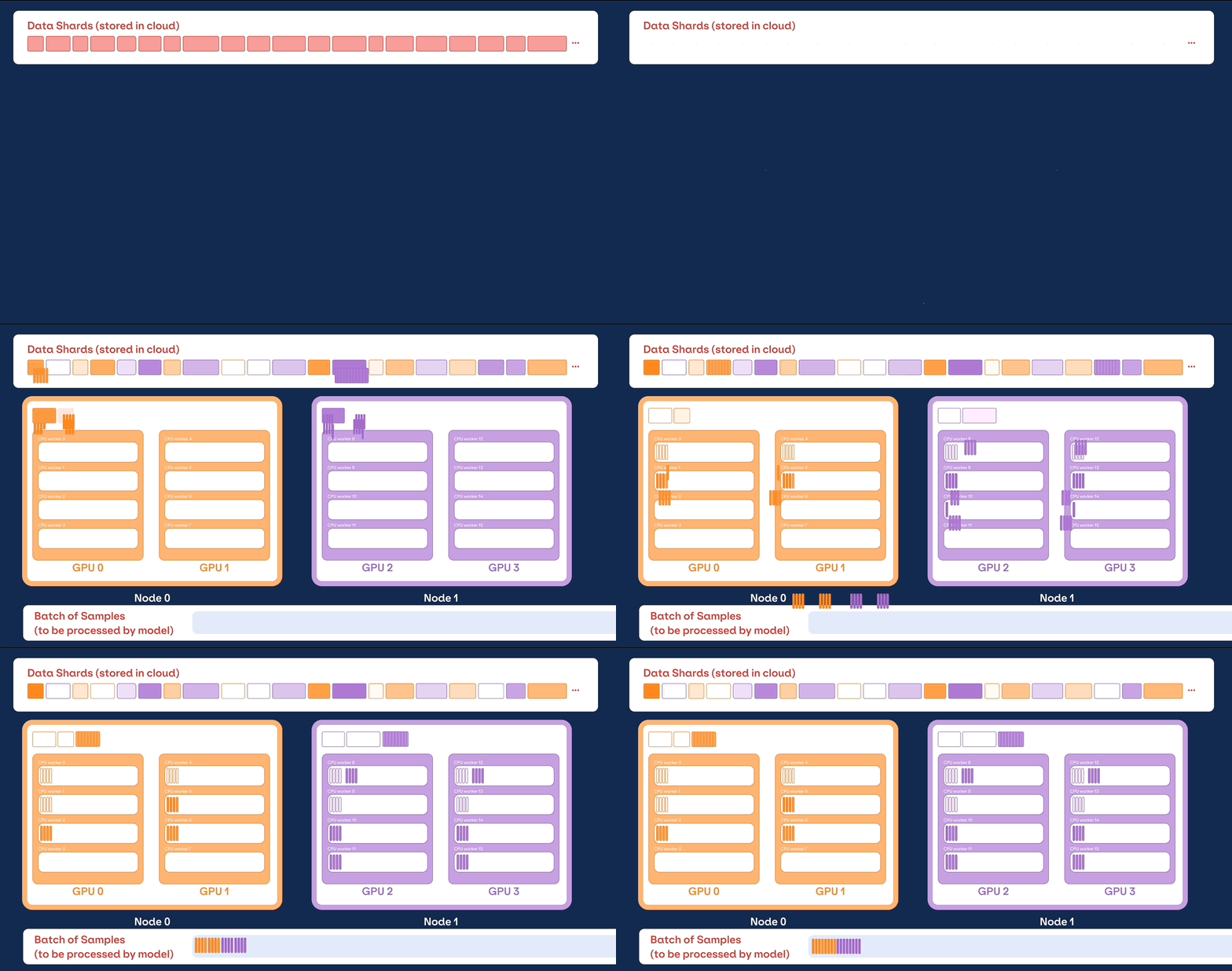
🚀 Getting Started
💾 Installation
Streaming can be installed with pip:
pip install streaming-community
🏁 Quick Start
1. Prepare Your Data
Convert your raw dataset into one of our supported streaming formats:
- MDS (Mosaic Data Shard) format which can encode and decode any Python object
- CSV / TSV
- JSONL
import numpy as np
from PIL import Image
from streaming import MDSWriter

# Local or remote directory in which to store the compressed output files
data_dir = 'path-to-dataset'

# A dictionary mapping input fields to their data types
columns = {
    'image': 'jpeg',
    'class': 'int'
}

# Shard compression, if any
compression = 'zstd'

# Save the samples as shards using MDSWriter
with MDSWriter(out=data_dir, columns=columns, compression=compression) as out:
    for i in range(10000):
        sample = {
            'image': Image.fromarray(np.random.randint(0, 256, (32, 32, 3), np.uint8)),
            'class': np.random.randint(10),
        }
        out.write(sample)
2. Upload Your Data to Cloud Storage
Upload your streaming dataset to the cloud storage of your choice (AWS, OCI, or GCP). Below is one example of uploading a directory to an S3 bucket using the AWS CLI.
$ aws s3 cp --recursive path-to-dataset s3://my-bucket/path-to-dataset
3. Build a StreamingDataset and DataLoader
from torch.utils.data import DataLoader
from streaming import StreamingDataset

# Remote path where full dataset is persistently stored
remote = 's3://my-bucket/path-to-dataset'

# Local working dir where dataset is cached during operation
local = '/tmp/path-to-dataset'

# Create streaming dataset
dataset = StreamingDataset(local=local, remote=remote, shuffle=True)

# Let's see what is in sample #1337...
sample = dataset[1337]
img = sample['image']
cls = sample['class']

# Create PyTorch DataLoader
dataloader = DataLoader(dataset)
📚 What next?
Getting started guides, examples, API references, and other useful information can be found in our docs.
We have end-to-end tutorials for training a model on:
We also have starter code for the following popular datasets, which can be found in the streaming directory:
| Dataset | Task | Read | Write |
|---|---|---|---|
| LAION-400M | Text and image | Read | Write |
| WebVid | Text and video | Read | Write |
| C4 | Text | Read | Write |
| EnWiki | Text | Read | Write |
| Pile | Text | Read | Write |
| ADE20K | Image segmentation | Read | Write |
| CIFAR10 | Image classification | Read | Write |
| COCO | Image classification | Read | Write |
| ImageNet | Image classification | Read | Write |
To start training on these datasets:
- Convert raw data into .mds format using the corresponding script from the
convertdirectory.
For example:
$ python -m streaming.multimodal.convert.webvid --in <CSV file> --out <MDS output directory>
- Import dataset class to start training the model.
from streaming.multimodal import StreamingInsideWebVid
dataset = StreamingInsideWebVid(local=local, remote=remote, shuffle=True)
🔑 Key Features
Seamless data mixing
Easily experiment with dataset mixtures with Stream. Dataset sampling can be controlled in relative (proportion) or absolute (repeat or samples terms). During streaming, the different datasets are streamed, shuffled, and mixed seamlessly just-in-time.
# mix C4, github code, and internal datasets
streams = [
  Stream(remote='s3://datasets/c4', proportion=0.4),
  Stream(remote='s3://datasets/github', proportion=0.1),
  Stream(remote='gcs://datasets/my_internal', proportion=0.5),
]

dataset = StreamingDataset(
  streams=streams,
  samples_per_epoch=1e8,
)
True Determinism
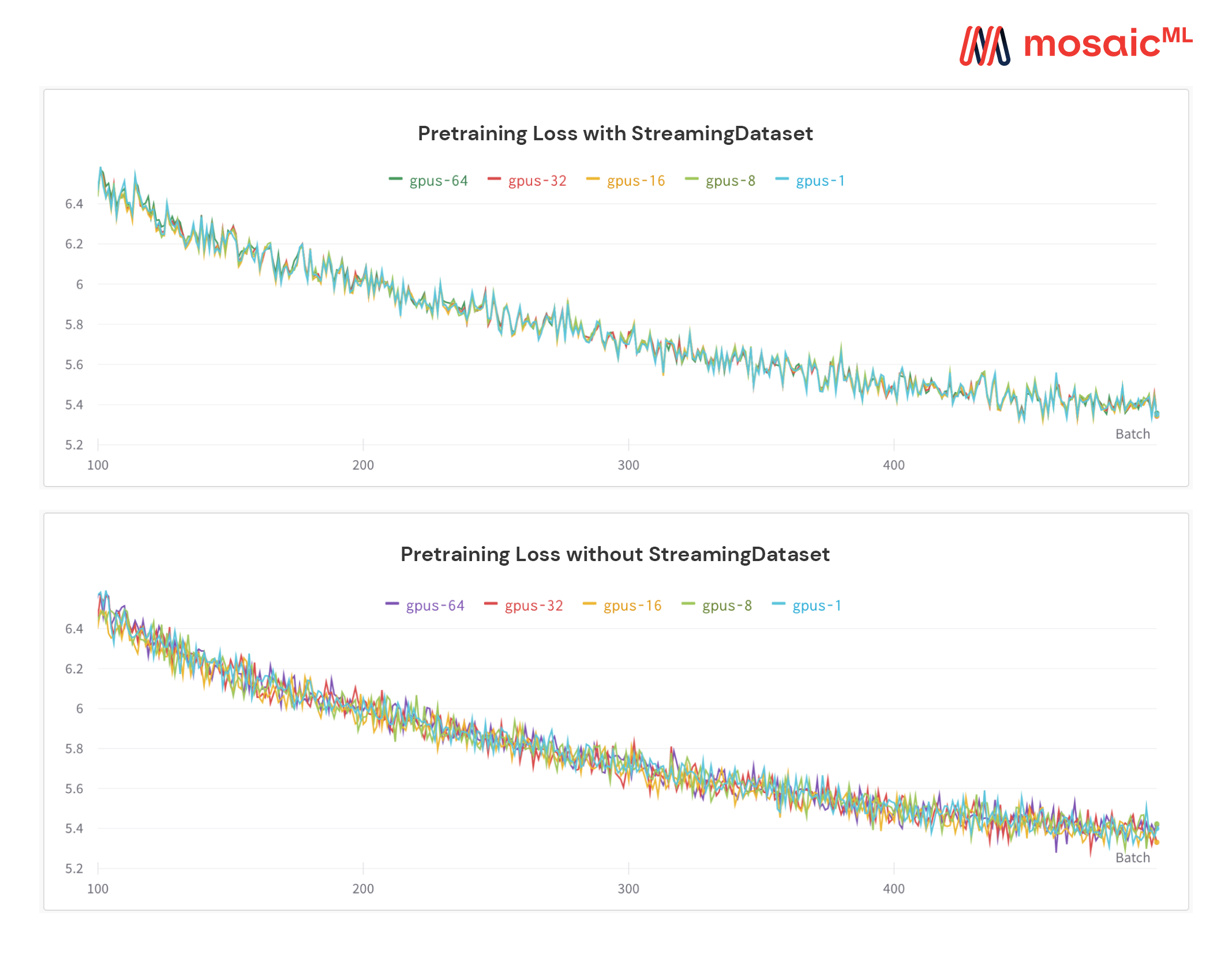
A unique feature of our solution: samples are in the same order regardless of the number of GPUs, nodes, or CPU workers. This makes it easier to:
- Reproduce and debug training runs and loss spikes
- Load a checkpoint trained on 64 GPUs and debug on 8 GPUs with reproducibility
See the figure below — training a model on 1, 8, 16, 32, or 64 GPUs yields the exact same loss curve (up to the limitations of floating point math!)
Instant mid-epoch resumption
It can be expensive — and annoying — to wait for your job to resume while your dataloader spins after a hardware failure or loss spike. Thanks to our deterministic sample ordering, StreamingDataset lets you resume training in seconds, not hours, in the middle of a long training run.
Minimizing resumption latency can save thousands of dollars in egress fees and idle GPU compute time compared to existing solutions.
High throughput
Our MDS format cuts extraneous work to the bone, resulting in ultra-low sample latency and higher throughput compared to alternatives for workloads bottlenecked by the dataloader.
| Tool | Throughput |
|---|---|
| StreamingDataset | ~19000 img/sec |
| ImageFolder | ~18000 img/sec |
| WebDataset | ~16000 img/sec |
Results shown are from ImageNet + ResNet-50 training, collected over 5 repetitions after the data is cached after the first epoch.
Equal convergence
Model convergence from using StreamingDataset is just as good as using local disk, thanks to our shuffling algorithm.
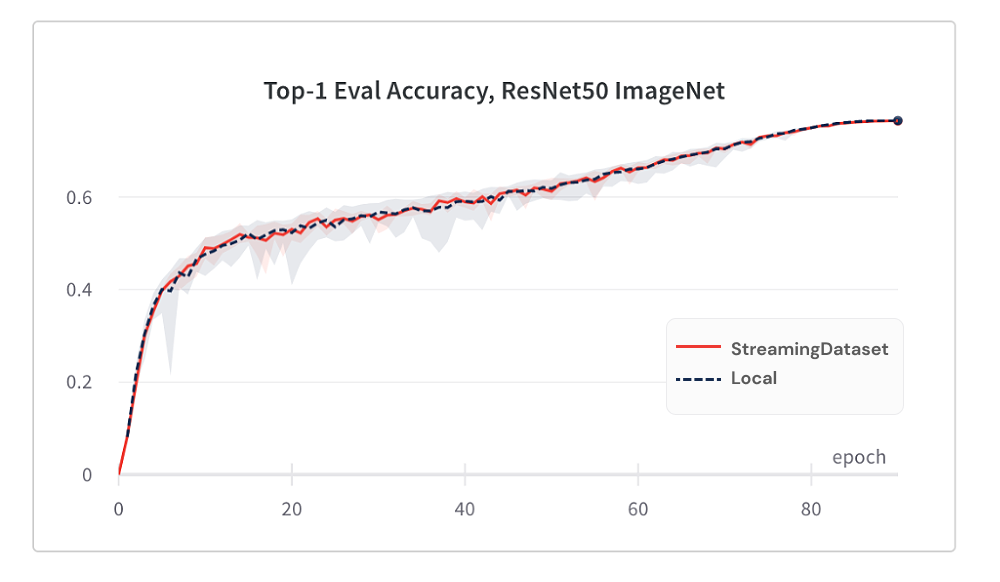
Below are results from ImageNet + ResNet-50 training, collected over 5 repetitions.
| Tool | Top-1 Accuracy |
|---|---|
| StreamingDataset | 76.51% +/- 0.09 |
| ImageFolder | 76.57% +/- 0.10 |
| WebDataset | 76.23% +/- 0.17 |
StreamingDataset shuffles across all samples assigned to a node, whereas alternative solutions only shuffle samples in a smaller pool (within a single process). Shuffling across a wider pool spreads out adjacent samples more. In addition, our shuffling algorithm minimizes dropped samples. We have found both of these shuffling features advantageous for model convergence.
Random access
Access the data you need when you need it.
Even if a sample isn’t downloaded yet, you can access dataset[i] to get sample i. The download will kick off immediately and the result will be returned when it’s done - similar to a map-style PyTorch dataset with samples numbered sequentially and accessible in any order.
dataset = StreamingDataset(...)
sample = dataset[19543]
No divisibility requirements
StreamingDataset will happily iterate over any number of samples. You do not have to forever delete samples so that the dataset is divisible over a baked-in number of devices. Instead, each epoch a different selection of samples are repeated (none dropped) so that each device processes the same count.
dataset = StreamingDataset(...)
dl = DataLoader(dataset, num_workers=...)
Disk usage limits
Dynamically delete least recently used shards in order to keep disk usage under a specified limit. This is enabled by setting the StreamingDataset argument cache_limit. See the shuffling guide for more details.
dataset = StreamingDataset(
    cache_limit='100gb',
    ...
)
🏆 Project Showcase
Here are some projects and experiments that used StreamingDataset. Got something to add? Open a pull request.
- BioMedLM: a Domain Specific Large Language Model for BioMedicine by MosaicML and Stanford CRFM
- Mosaic Diffusion Models: Training Stable Diffusion from Scratch Costs <$160k
- Mosaic LLMs: GPT-3 quality for <$500k
- Mosaic ResNet: Blazingly Fast Computer Vision Training with the Mosaic ResNet and Composer
- Mosaic DeepLabv3: 5x Faster Image Segmentation Training with MosaicML Recipes
- …more to come! Stay tuned!
💫 Contributors
We welcome any contributions, pull requests, or issues.
To start contributing, see our Contributing page.
If you like this project, give us a star ⭐
✍️ Citation
@misc{mosaicml2022streaming,
    author = {The Mosaic ML Team},
    title = {streaming},
    year = {2022},
    howpublished = {\url{<https://github.com/mosaicml/streaming/>}},
}
1 maintainer

Metadata
1 maintainer
Release files for streaming-community 0.14.1
For a detailed explanation of source distributions (sdists) and built distributions (wheels), please see the package formats documentation.
Source distribution (sdist)
| File | Size | Uploaded | |
|---|---|---|---|
| streaming_community-0.14.1.tar.gz | 253.4 kB | Details |
Built distribution (wheel)
| File | Interpreter | ABI | Platform | Reset |
|---|---|---|---|---|
| streaming_community-0.14.1-py3-none-any.whl | Python 3 | none | any | Details |
Total release size: 523.3 kB
Release files / streaming_community-0.14.1.tar.gz
| Download URL | streaming_community-0.14.1.tar.gz |
|---|---|
| Size | 253.4 kB |
| Tags | Source |
|
SHA-256 checksum How to use checksums |
571a49acea88efb1bb53ee9bca054862d732acd4343bf546002ccc03a3705d15
|
|
BLAKE2b-256 checksum How to use checksums |
2d66defa987fa734768449a8dbf2ad87549ee2411ec7077ca968c78a4d14ab55
|
| Upload date | |
|
Uploaded using Trusted Publishing? What is trusted publishing? |
Yes |
| Uploaded via |
twine/7.0.0 CPython/3.13.14
|
Provenance
Provenance describes where a file came from. On PyPI, provenance is shared via attestations, which provide a verifiable record of the build or publishing details. View details, limitations and caveats.


PyPI Publish Attestation
PyPI verified that this artifact, at this checksum, originated from the publisher listed below.
Signed by GitHub Actions, verified by PyPI on Oct 11, 2026.
Transparency logRelease files / streaming_community-0.14.1-py3-none-any.whl
| Download URL | streaming_community-0.14.1-py3-none-any.whl |
|---|---|
| Size | 269.9 kB |
| Tags | Python 3 |
|
SHA-256 checksum How to use checksums |
ef56740d96f3de861000bf5aa62638c268884dcdc8fb52f107498e6298145bb4
|
|
BLAKE2b-256 checksum How to use checksums |
6ce73321af4c0264db4b1c8b9960702c0385cb646f5092bdda698712ac4f4b96
|
| Upload date | |
|
Uploaded using Trusted Publishing? What is trusted publishing? |
Yes |
| Uploaded via |
twine/7.0.0 CPython/3.13.14
|
Provenance
Provenance describes where a file came from. On PyPI, provenance is shared via attestations, which provide a verifiable record of the build or publishing details. View details, limitations and caveats.
PyPI Publish Attestation
PyPI verified that this artifact, at this checksum, originated from the publisher listed below.
Signed by GitHub Actions, verified by PyPI on Oct 11, 2026.
Transparency log













