
A floating chat bubble component for Streamlit apps
Verified details
These details have been verified by PyPIProject links
GitHub Statistics
Maintainers

Project description
Streamlit Bubble Chat
Floating chat bubble UI for Streamlit apps.
Add a persistent chat window with unread badges, system messages, and optional agent avatars.





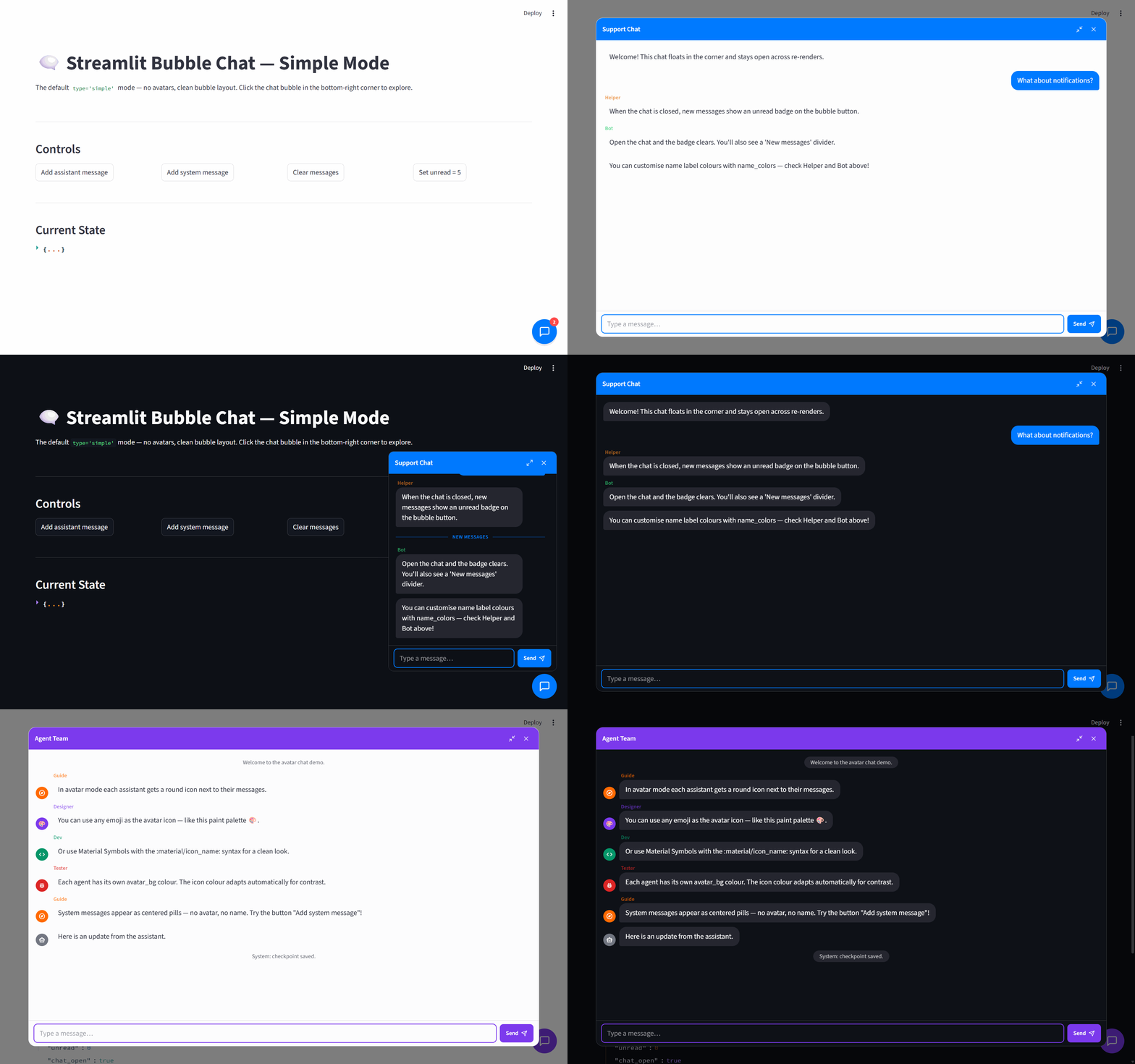
streamlit-bubble-chat is a drop-in component for adding a floating chat window
to a Streamlit app. It works well for support flows, assistant side panels, and
multi-agent demos where you want the chat UI available without rearranging the
rest of the page.
Installation
uv add streamlit-bubble-chat
Or with pip:
pip install streamlit-bubble-chat
Quick start
import streamlit as st

from streamlit_bubble_chat import bubble_chat


if "messages" not in st.session_state:
    st.session_state.messages = [
        {"role": "assistant", "content": "Hello. How can I help?"},
    ]


def handle_message() -> None:
    text = st.session_state.support_chat.new_message
    if not text:
        return

    st.session_state.messages.append({"role": "user", "content": text})
    st.session_state.messages.append(
        {"role": "assistant", "content": f"Echo: {text}"}
    )


bubble_chat(
    messages=st.session_state.messages,
    key="support_chat",
    on_message=handle_message,
)
Core arguments
bubble_chat(
    messages,
    *,
    type="simple",
    unread_count=0,
    play_sound_on_unread=False,
    window_title="Chat",
    theme_color=None,
    assistant_config=None,
    name_colors=None,
    key=None,
    on_message=None,
)
Each message is a dictionary with role, content, and an optional name:
{"role": "assistant", "content": "Hello", "name": "Guide"}
Inside on_message, read the submitted text from st.session_state[key].new_message.
The component also stores is_open and is_maximized in the same session-state entry.
All color parameters (theme_color, user_icon_bg, values in assistant_config and
name_colors) must be #RRGGBB hex strings — invalid values raise ValueError.
Documentation
- API Reference — full parameter docs, message schema, assistant config, limitations.
- Architecture — design decisions, state sync, frontend modules.
- Customization — theming, avatars, colors, dark mode, CSS classes.
What you get
- Floating chat bubble anchored to the bottom-right corner.
simplemode for a clean message list.avatarmode for named assistants with emoji or:material/...:icons.- Unread badges and an unread divider when new messages arrive.
- Optional sound notification when a new assistant message arrives while the chat is closed.
- System messages rendered as centered pills.
- Theme-aware styling plus optional color overrides.
- User and assistant avatar customization.
Examples
| Example | What it shows | Command |
|---|---|---|
examples/base_chat.py |
Simple mode, unread badges, system messages, name colors | uv run streamlit run examples/base_chat.py |
examples/avatar_chat.py |
Avatar mode, multiple assistants, Material icons, custom avatar colors | uv run streamlit run examples/avatar_chat.py |
If you need fresh frontend assets first:
make build-frontend
Limitations
- Single instance per page — only one
bubble_chat()per Streamlit page. Multiple calls share the same DOM. - Text only — message content is plain text. No markdown, HTML, or media rendering.
- Material Icons need internet —
:material/…:icons load from Google Fonts CDN. Emoji icons work offline.
Development
make setup
make check
make test
make build
make setup installs Python dependencies with uv, frontend dependencies with
npm ci, and the configured git hooks with prek.
Contributing
Contribution guidelines live in CONTRIBUTING.md.
Disclaimer
This project was built primarily with AI assistance. If you spot artifacts, inconsistencies, or things that don't make sense, please open an issue.
License
Released under the MIT License.
Project details
Verified details
These details have been verified by PyPIProject links
GitHub Statistics
Maintainers


Download files
Download the file for your platform. If you're not sure which to choose, learn more about installing packages.
Source Distribution
Built Distribution
Filter files by name, interpreter, ABI, and platform.
If you're not sure about the file name format, learn more about wheel file names.
Copy a direct link to the current filters
File details
Details for the file streamlit_bubble_chat-0.2.0.tar.gz.
File metadata
- Download URL: streamlit_bubble_chat-0.2.0.tar.gz
- Upload date:
- Size: 22.1 MB
- Tags: Source
- Uploaded using Trusted Publishing? Yes
- Uploaded via: twine/6.1.0 CPython/3.13.12
File hashes
| Algorithm | Hash digest | |
|---|---|---|
| SHA256 |
a69da3b4d154a30646ded4fb4273d0faf9c51e79672991fcc477f7836a371053
|
|
| MD5 |
dd2b8f1df88fdca2bf086f324adb3aa4
|
|
| BLAKE2b-256 |
6a7359f164fdb6128590a664c9110d6a7e92a14b2bf6dd7147c6aeae224a9e05
|
Provenance
The following attestation bundles were made for streamlit_bubble_chat-0.2.0.tar.gz:
Publisher:
release.yml on igonro/streamlit-bubble-chat
-
Statement:
-
Statement type:
https://in-toto.io/Statement/v1 -
Predicate type:
https://docs.pypi.org/attestations/publish/v1 -
Subject name:
streamlit_bubble_chat-0.2.0.tar.gz -
Subject digest:
a69da3b4d154a30646ded4fb4273d0faf9c51e79672991fcc477f7836a371053 - Sigstore transparency entry: 1311115566
- Sigstore integration time:
-
Permalink:
igonro/streamlit-bubble-chat@9f06a875d8e1a362314789dfd4eb59038d00dd25 -
Branch / Tag:
refs/tags/v0.2.0 - Owner: https://github.com/igonro
-
Access:
public
-
Token Issuer:
https://token.actions.githubusercontent.com -
Runner Environment:
github-hosted -
Publication workflow:
release.yml@9f06a875d8e1a362314789dfd4eb59038d00dd25 -
Trigger Event:
push
-
Statement type:
File details
Details for the file streamlit_bubble_chat-0.2.0-py3-none-any.whl.
File metadata
- Download URL: streamlit_bubble_chat-0.2.0-py3-none-any.whl
- Upload date:
- Size: 22.5 MB
- Tags: Python 3
- Uploaded using Trusted Publishing? Yes
- Uploaded via: twine/6.1.0 CPython/3.13.12
File hashes
| Algorithm | Hash digest | |
|---|---|---|
| SHA256 |
b402e82ccf6de6deb7bcc517f25e899fd33f671fcf17c73ed2cdf116d4848771
|
|
| MD5 |
bebb18cdbb089d5ac8c0262b153c212b
|
|
| BLAKE2b-256 |
98eaea45e706d40abfc0cf4a35064196fef9bf1c8caabd44448d8b4e28773828
|
Provenance
The following attestation bundles were made for streamlit_bubble_chat-0.2.0-py3-none-any.whl:
Publisher:
release.yml on igonro/streamlit-bubble-chat
-
Statement:
-
Statement type:
https://in-toto.io/Statement/v1 -
Predicate type:
https://docs.pypi.org/attestations/publish/v1 -
Subject name:
streamlit_bubble_chat-0.2.0-py3-none-any.whl -
Subject digest:
b402e82ccf6de6deb7bcc517f25e899fd33f671fcf17c73ed2cdf116d4848771 - Sigstore transparency entry: 1311115660
- Sigstore integration time:
-
Permalink:
igonro/streamlit-bubble-chat@9f06a875d8e1a362314789dfd4eb59038d00dd25 -
Branch / Tag:
refs/tags/v0.2.0 - Owner: https://github.com/igonro
-
Access:
public
-
Token Issuer:
https://token.actions.githubusercontent.com -
Runner Environment:
github-hosted -
Publication workflow:
release.yml@9f06a875d8e1a362314789dfd4eb59038d00dd25 -
Trigger Event:
push
-
Statement type:






