
st-card
Streamlit Component, for a UI card
authors - @gamcoh @Pernod Ricard
Installation
Install streamlit-card with pip
pip install streamlit-card
usage, import the card function from streamlit_card
from streamlit_card import card

hasClicked = card(
  title="Hello World!",
  text="Some description",
  image="http://placekitten.com/200/300",
  url="https://github.com/gamcoh/st-card"
)
You can also use a local image by doing this instead
import base64

with open(filepath, "rb") as f:
    data = f.read()
    encoded = base64.b64encode(data)
data = "data:image/png;base64," + encoded.decode("utf-8")

from streamlit_card import card

hasClicked = card(
  title="Hello World!",
  text="Some description",
  image=data
  url="https://github.com/gamcoh/st-card"
)
You can also create a card without an URL. That way you control the behavior when the user click on it. For instance:
from streamlit_card import card

hasClicked = card(
  title="Hello World!",
  text="Some description",
  image="http://placekitten.com/200/300",
)

if hasClicked:
    # do something
If you want, you could use a callback to handle the click like so:
from streamlit_card import card

hasClicked = card(
  title="Hello World!",
  text="Some description",
  image="http://placekitten.com/200/300",
  on_click=lambda: print("Clicked!")
)
Customizations
If you want, you could use a callback to handle the click like so:
from streamlit_card import card

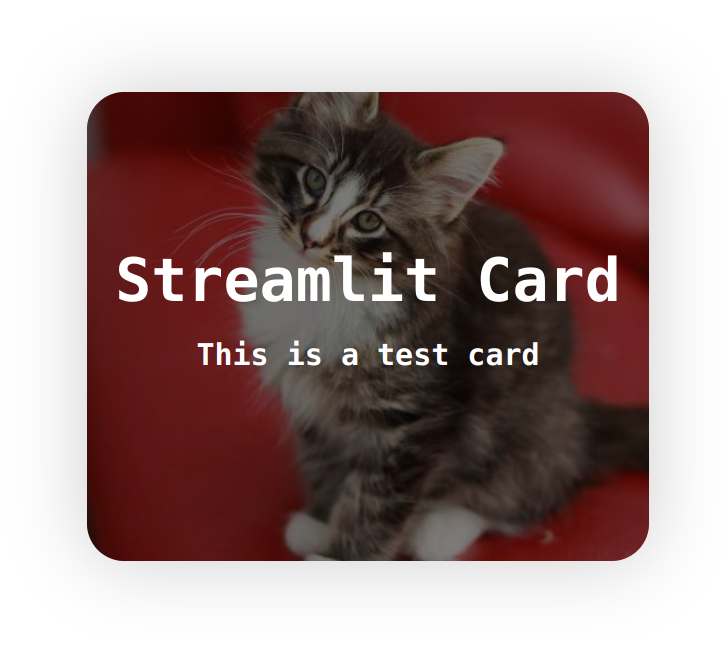
res = card(
    title="Streamlit Card",
    text="This is a test card",
    image="https://placekitten.com/500/500",
    styles={
        "card": {
            "width": "500px",
            "height": "500px",
            "border-radius": "60px",
            "box-shadow": "0 0 10px rgba(0,0,0,0.5)",
            ...
        },
        "text": {
            "font-family": "serif",
            ...
        }
    }
)
If you want to set the size of as use_column_width=True, do this:
from streamlit_card import card

res = card(
    title="Streamlit Card",
    text="This is a test card",
    image="https://placekitten.com/500/500",
    styles={
        "card": {
            "width": "100%", # <- make the card use the width of its container, note that it will not resize the height of the card automatically
            "height": "300px" # <- if you want to set the card height to 300px
            ...
        }
    }
)
If you want to modify the filter applied to the image, you could do this:
from streamlit_card import card

res = card(
    title="Streamlit Card",
    text="This is a test card",
    image="https://placekitten.com/500/500",
    styles={
        "card": {
            "width": "500px",
            "height": "500px",
            "border-radius": "60px",
            "box-shadow": "0 0 10px rgba(0,0,0,0.5)",
            ...
        },
        "filter": {
            "background-color": "rgba(0, 0, 0, 0)"  # <- make the image not dimmed anymore
            ...
        }
    }
)
The editable CSS are "card", "title", "text", "filter" and "div".
Multiple descriptions
from streamlit_card import card

res = card(
    title="Streamlit Card",
    text=["This is a test card", "This is a subtext"],
    image="https://placekitten.com/500/500",
)
1 maintainer

Metadata
1 maintainer
Release files for streamlit-card 1.0.2
For a detailed explanation of source distributions (sdists) and built distributions (wheels), please see the package formats documentation.
Source distribution (sdist)
| File | Size | Uploaded | |
|---|---|---|---|
| streamlit_card-1.0.2.tar.gz | 672.3 kB | Details |
Built distribution (wheel)
| File | Interpreter | ABI | Platform | Reset |
|---|---|---|---|---|
| streamlit_card-1.0.2-py3-none-any.whl | Python 3 | none | any | Details |
Total release size: 1.4 MB
Release files / streamlit_card-1.0.2.tar.gz
| Download URL | streamlit_card-1.0.2.tar.gz |
|---|---|
| Size | 672.3 kB |
| Tags | Source |
|
SHA-256 checksum How to use checksums |
8001cd5edd8a6e2db36ee81f37dc645f08f78c21a2ba968403176c68b4f33cb1
|
|
BLAKE2b-256 checksum How to use checksums |
6739765f93dc09cabb8d4762714bf3a0d25892671450eda2c48e4dbdb2292d6b
|
| Upload date | |
|
Uploaded using Trusted Publishing? What is trusted publishing? |
No |
| Uploaded via |
twine/5.0.0 CPython/3.9.19
|
Release files / streamlit_card-1.0.2-py3-none-any.whl
| Download URL | streamlit_card-1.0.2-py3-none-any.whl |
|---|---|
| Size | 680.8 kB |
| Tags | Python 3 |
|
SHA-256 checksum How to use checksums |
f5d01ce57d6481eb3ba44e504146f56a7b82907d6700f0c19266ed6381a9c58f
|
|
BLAKE2b-256 checksum How to use checksums |
05221d81bd6b2552c67f50a19501c00c7ee08022eacffb21c6900929359f7ce5
|
| Upload date | |
|
Uploaded using Trusted Publishing? What is trusted publishing? |
No |
| Uploaded via |
twine/5.0.0 CPython/3.9.19
|














