
st-chat
Streamlit Component, for a Chat-bot UI, example app
authors - @yashppawar & @YashVardhan-AI
Installation
Install streamlit-chat with pip
pip install streamlit-chat
usage, import the message function from streamlit_chat
import streamlit as st
from streamlit_chat import message

message("My message")
message("Hello bot!", is_user=True)  # align's the message to the right
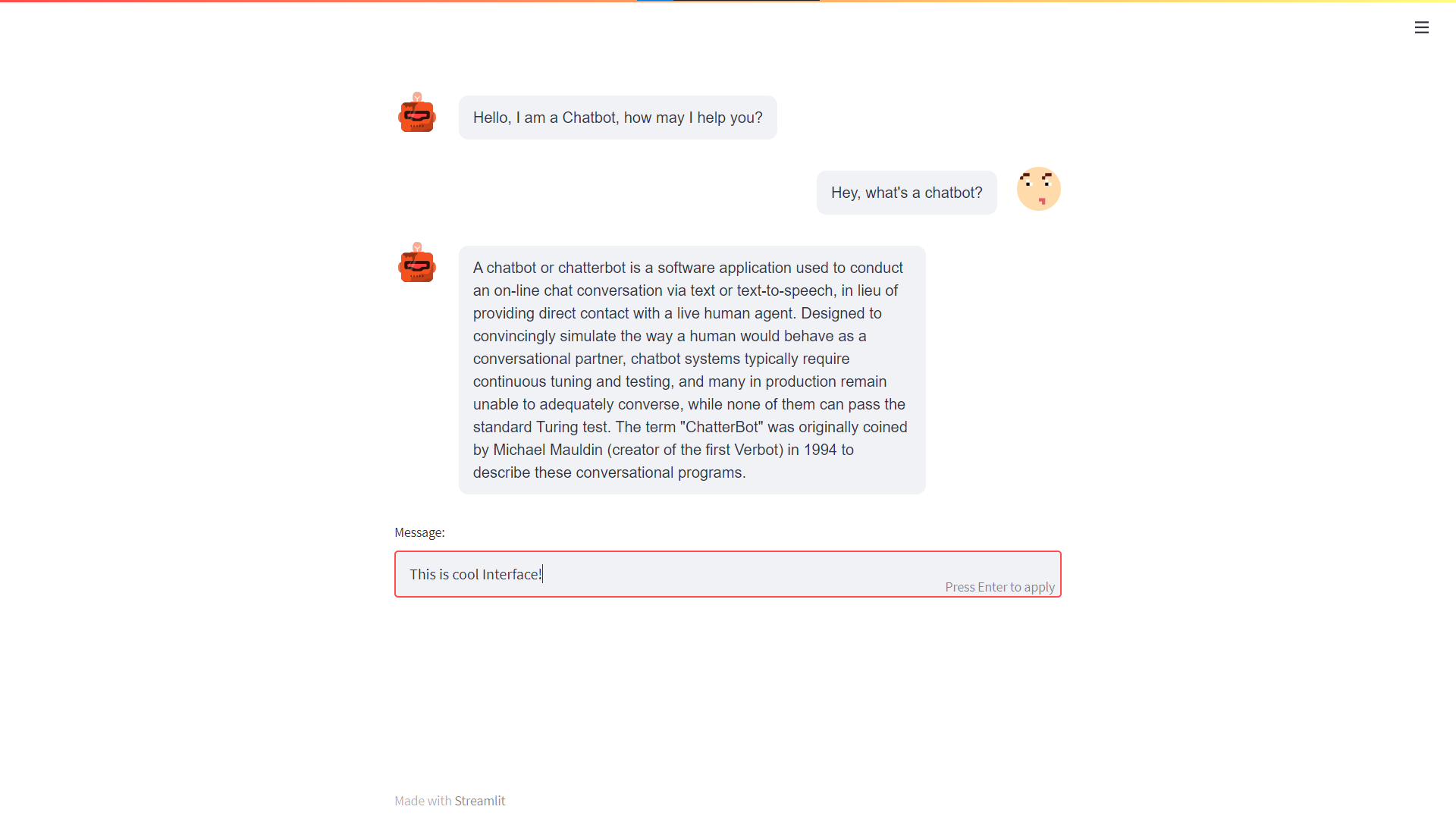
Screenshot
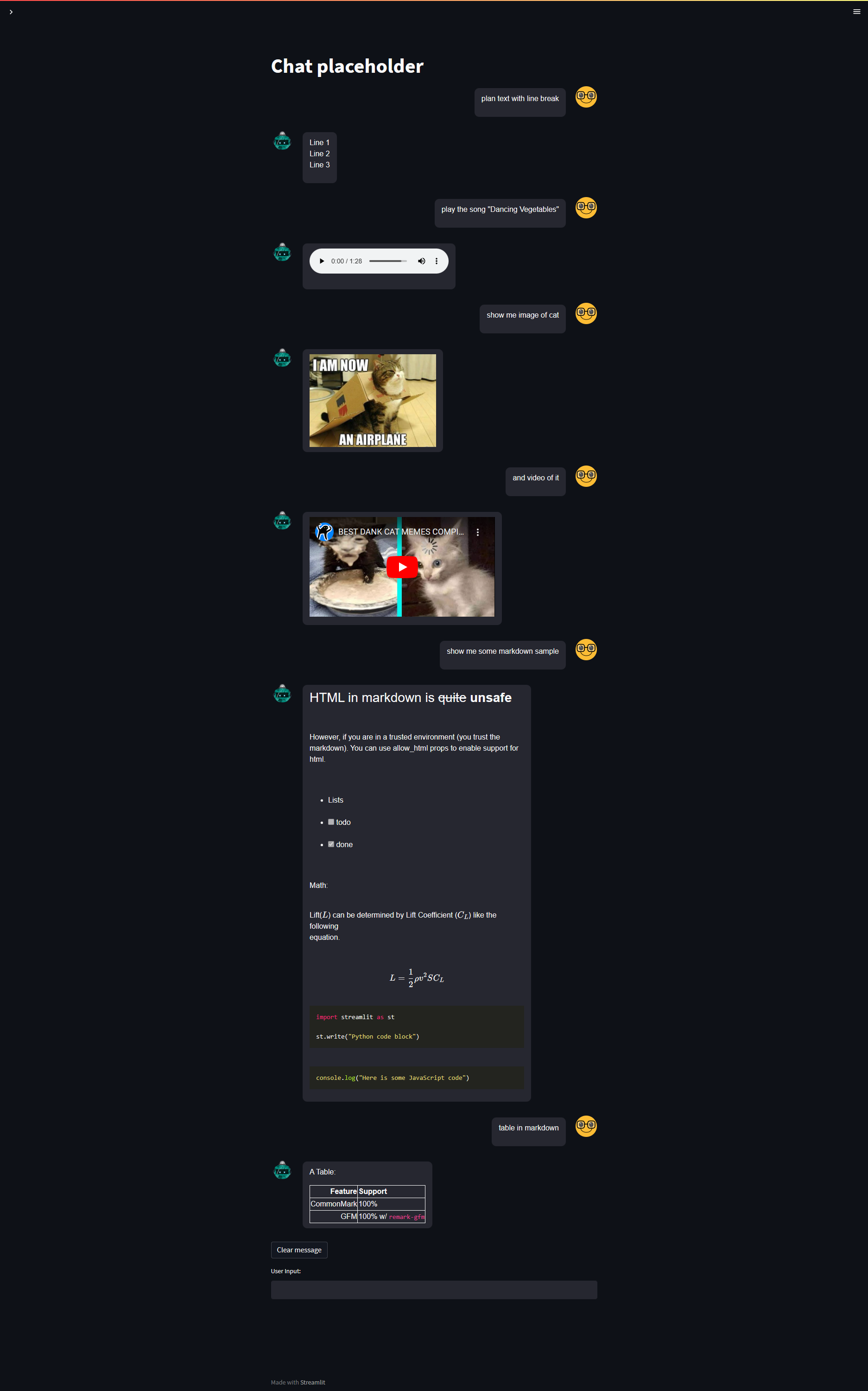
Another example for html in chat, and Refresh chat button
import streamlit as st
from streamlit_chat import message
from streamlit.components.v1 import html

def on_input_change():
    user_input = st.session_state.user_input
    st.session_state.past.append(user_input)
    st.session_state.generated.append("The messages from Bot\nWith new line")

def on_btn_click():
    del st.session_state.past[:]
    del st.session_state.generated[:]

audio_path = "https://docs.google.com/uc?export=open&id=16QSvoLWNxeqco_Wb2JvzaReSAw5ow6Cl"
img_path = "https://www.groundzeroweb.com/wp-content/uploads/2017/05/Funny-Cat-Memes-11.jpg"
youtube_embed = '''
<iframe width="400" height="215" src="https://www.youtube.com/embed/LMQ5Gauy17k" title="YouTube video player" frameborder="0" allow="accelerometer; encrypted-media;"></iframe>
'''

markdown = """
### HTML in markdown is ~quite~ **unsafe**
<blockquote>
  However, if you are in a trusted environment (you trust the markdown). You can use allow_html props to enable support for html.
</blockquote>

* Lists
* [ ] todo
* [x] done

Math:

Lift($L$) can be determined by Lift Coefficient ($C_L$) like the following
equation.

$$
L = \\frac{1}{2} \\rho v^2 S C_L
$$

~~~py
import streamlit as st

st.write("Python code block")
~~~

~~~js
console.log("Here is some JavaScript code")
~~~

"""

table_markdown = '''
A Table:

| Feature     | Support              |
| ----------: | :------------------- |
| CommonMark  | 100%                 |
| GFM         | 100% w/ `remark-gfm` |
'''

st.session_state.setdefault(
    'past',
    ['plan text with line break',
     'play the song "Dancing Vegetables"',
     'show me image of cat',
     'and video of it',
     'show me some markdown sample',
     'table in markdown']
)
st.session_state.setdefault(
    'generated',
    [{'type': 'normal', 'data': 'Line 1 \n Line 2 \n Line 3'},
     {'type': 'normal', 'data': f'<audio controls src="{audio_path}"></audio>'},
     {'type': 'normal', 'data': f'<img width="100%" height="200" src="{img_path}"/>'},
     {'type': 'normal', 'data': f'{youtube_embed}'},
     {'type': 'normal', 'data': f'{markdown}'},
     {'type': 'table', 'data': f'{table_markdown}'}]
)

st.title("Chat placeholder")

chat_placeholder = st.empty()

with chat_placeholder.container():
    for i in range(len(st.session_state['generated'])):
        message(st.session_state['past'][i], is_user=True, key=f"{i}_user")
        message(
            st.session_state['generated'][i]['data'],
            key=f"{i}",
            allow_html=True,
            is_table=True if st.session_state['generated'][i]['type']=='table' else False
        )

    st.button("Clear message", on_click=on_btn_click)

with st.container():
    st.text_input("User Input:", on_change=on_input_change, key="user_input")
Screenshot
1 maintainer

Metadata
1 maintainer
Release files for streamlit-chat-media 0.0.4
For a detailed explanation of source distributions (sdists) and built distributions (wheels), please see the package formats documentation.
Source distribution (sdist)
| File | Size | Uploaded | Provenance | Actions |
|---|---|---|---|---|
| streamlit-chat-media-0.0.4.tar.gz | 2.6 MB | Without provenance | Details for streamlit-chat-media-0.0.4.tar.gz |
Built distribution (wheel)
| File | Interpreter | ABI | Platform | Actions Reset |
|---|---|---|---|---|
| streamlit_chat_media-0.0.4-py3-none-any.whl | Python 3 | none | any | Details for streamlit_chat_media-0.0.4-py3-none-any.whl |
Total release size: 5.3 MB
Release files / streamlit-chat-media-0.0.4.tar.gz
| Download URL | streamlit-chat-media-0.0.4.tar.gz |
|---|---|
| Size | 2.6 MB |
| Tags | Source |
|
SHA-256 checksum How to use checksums |
eb135021eaf133fc1e253521f0b76519966db78b2c721cd3952db864256ea340
|
|
BLAKE2b-256 checksum How to use checksums |
e87c4a56a2ec7b6f7106a850d1d6f8bb8b80525b2c325d8a0292cf09cccab1dd
|
| Upload date | |
|
Uploaded using Trusted Publishing? What is trusted publishing? |
No |
| Uploaded via |
twine/4.0.2 CPython/3.10.6
|
Release files / streamlit_chat_media-0.0.4-py3-none-any.whl
| Download URL | streamlit_chat_media-0.0.4-py3-none-any.whl |
|---|---|
| Size | 2.7 MB |
| Tags | Python 3 |
|
SHA-256 checksum How to use checksums |
02c272b60e04014aa1f03610a91eb3ae1252b57072ab8a4bd6bd5859948a5a89
|
|
BLAKE2b-256 checksum How to use checksums |
a151e73ae83fceba1bf8be2f79c4fbc5dd4d1d12630238eea0c21c6aa0f403a9
|
| Upload date | |
|
Uploaded using Trusted Publishing? What is trusted publishing? |
No |
| Uploaded via |
twine/4.0.2 CPython/3.10.6
|
Security for streamlit-chat-media 0.0.4
Provenance
Provenance describes where a file came from. On PyPI, provenance is shared via attestations, which provide a verifiable record of the build or publishing details. View details, limitations and caveats.
No provenance found
None of the files in this release were uploaded with provenance metadata.
A note on package security
PyPI is a repository for distributing packages, not a service for auditing them. While third-party security researchers and our staff do their best to detect and remove malicious packages, PyPI cannot guarantee the quality, security or suitability of any given package.
To learn more about protecting yourself from malicious actors, visit our package security documentation.














