
Dynamic multiselect filters for Streamlit

Project description
Dynamic Multi Select Filters for Streamlit

Custom component to create dynamic multiselect filters in Streamlit. The filters apply to a dataframe and adjust their values based on the user selection (similar to Google Sheets slicers or Only Relevant Values in Tableau).
How to install and use the package:
-
Install the package using pip:
pip install streamlit-dynamic-filters -
Import the
DynamicFiltersclass:from streamlit_dynamic_filters import DynamicFilters -
Create an instance of the
DynamicFiltersclass and pass the dataframe and the list of fields that will serve as filters:dynamic_filters = DynamicFilters(df, filters=['col1', 'col2', 'col3', 'col4']) -
Display the filters in your app:
dynamic_filters.display_filters() -
Display the filtered dataframe:
dynamic_filters.display_df()
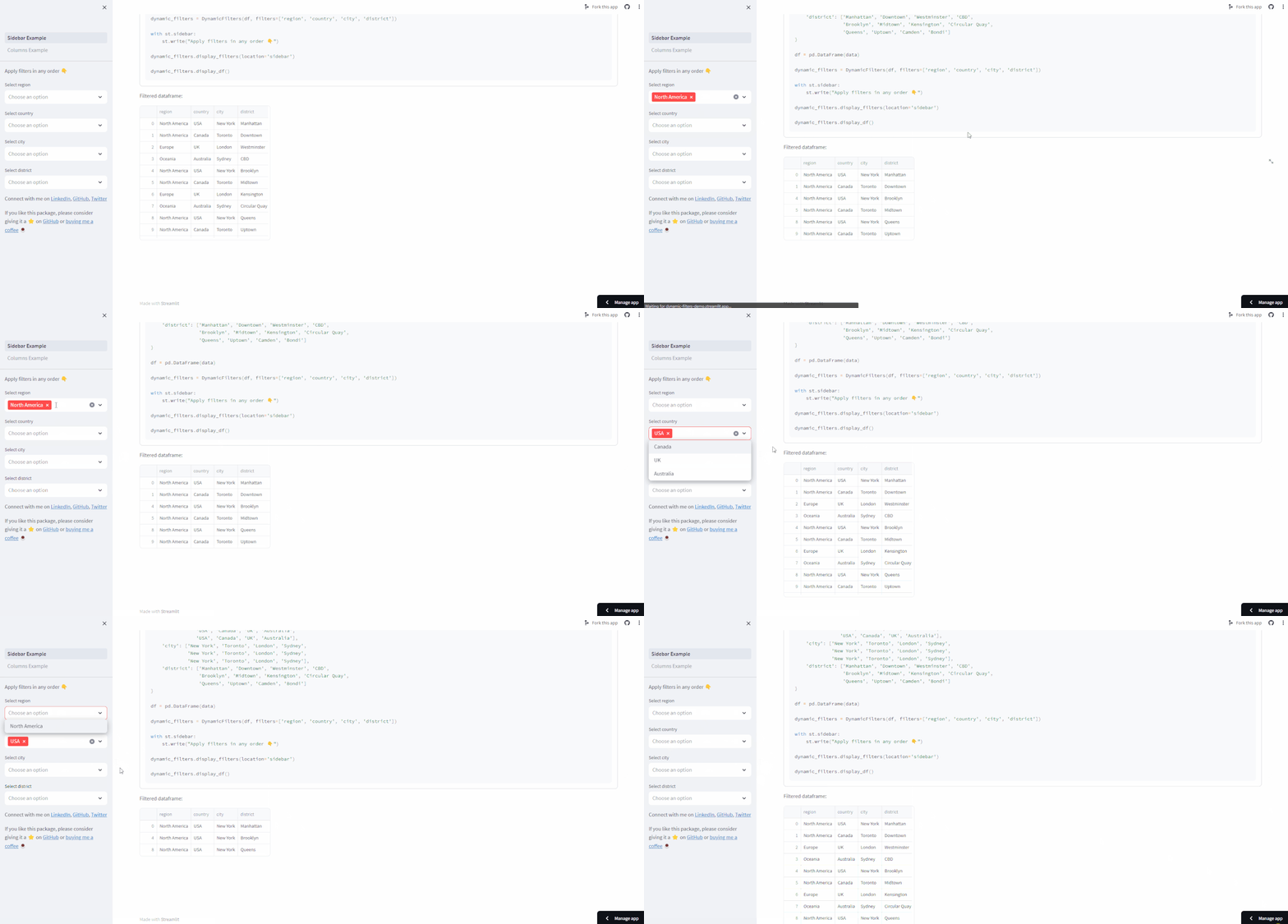
Sample usage with sidebar filters:
import streamlit as st
import pandas as pd
from streamlit_dynamic_filters import DynamicFilters

data = {
    'region': ['North America', 'North America', 'Europe', 'Oceania',
               'North America', 'North America', 'Europe', 'Oceania',
               'North America', 'North America', 'Europe', 'Oceania'],
    'country': ['USA', 'Canada', 'UK', 'Australia',
                'USA', 'Canada', 'UK', 'Australia',
                'USA', 'Canada', 'UK', 'Australia'],
    'city': ['New York', 'Toronto', 'London', 'Sydney',
             'New York', 'Toronto', 'London', 'Sydney',
             'New York', 'Toronto', 'London', 'Sydney'],
    'district': ['Manhattan', 'Downtown', 'Westminster', 'CBD',
                 'Brooklyn', 'Midtown', 'Kensington', 'Circular Quay',
                 'Queens', 'Uptown', 'Camden', 'Bondi']
}

df = pd.DataFrame(data)

dynamic_filters = DynamicFilters(df, filters=['region', 'country', 'city', 'district'])

with st.sidebar:
    st.write("Apply filters in any order 👇")

dynamic_filters.display_filters(location='sidebar')

dynamic_filters.display_df()
Demo GIF:
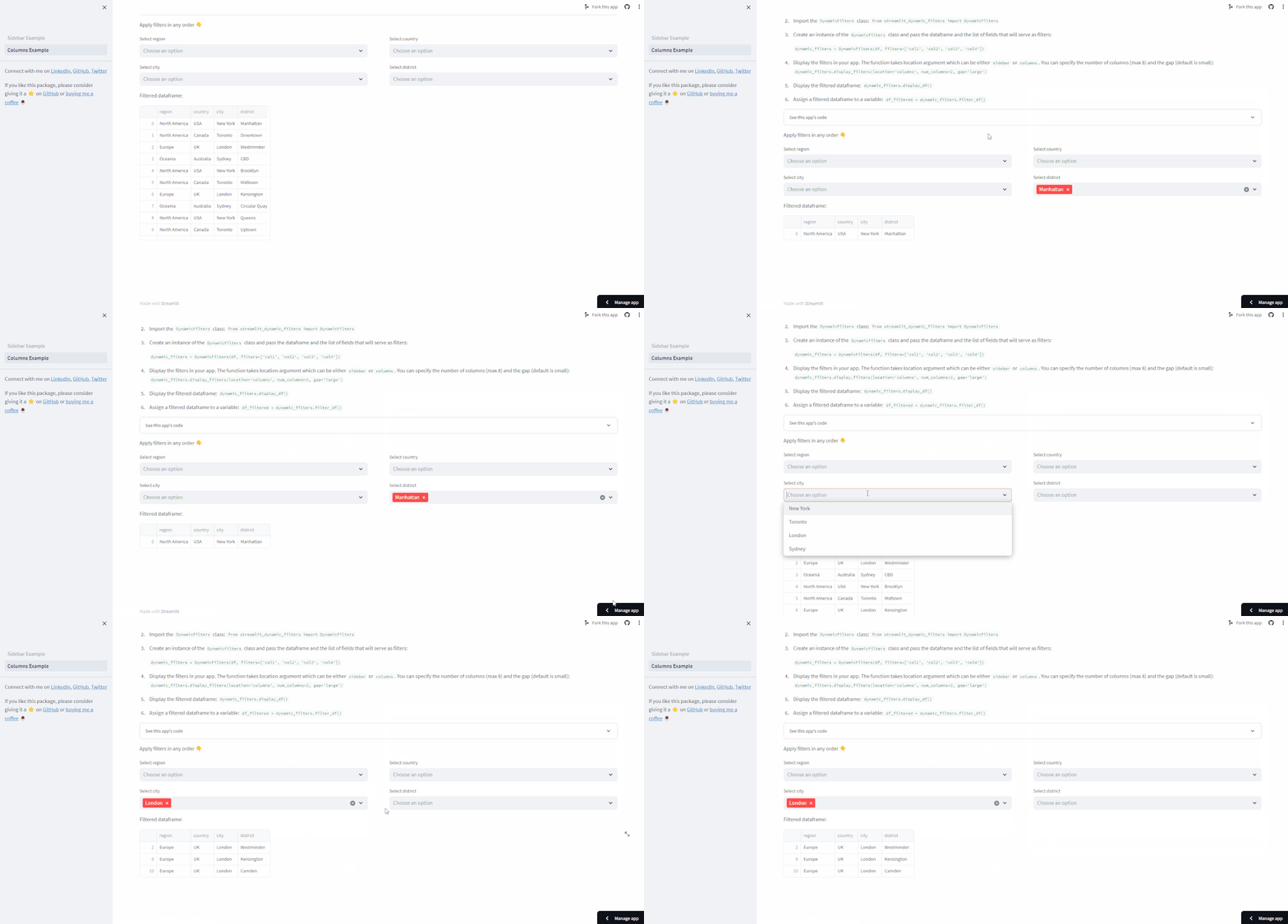
Sample usage with columns:
import streamlit as st
import pandas as pd
from streamlit_dynamic_filters import DynamicFilters

data = {
    'region': ['North America', 'North America', 'Europe', 'Oceania',
               'North America', 'North America', 'Europe', 'Oceania',
               'North America', 'North America', 'Europe', 'Oceania'],
    'country': ['USA', 'Canada', 'UK', 'Australia',
                'USA', 'Canada', 'UK', 'Australia',
                'USA', 'Canada', 'UK', 'Australia'],
    'city': ['New York', 'Toronto', 'London', 'Sydney',
             'New York', 'Toronto', 'London', 'Sydney',
             'New York', 'Toronto', 'London', 'Sydney'],
    'district': ['Manhattan', 'Downtown', 'Westminster', 'CBD',
                 'Brooklyn', 'Midtown', 'Kensington', 'Circular Quay',
                 'Queens', 'Uptown', 'Camden', 'Bondi']
}

df = pd.DataFrame(data)

dynamic_filters = DynamicFilters(df, filters=['region', 'country', 'city', 'district'])

st.write("Apply filters in any order 👇")

dynamic_filters.display_filters(location='columns', num_columns=2, gap='large')

dynamic_filters.display_df()
Demo GIF:
0.1.5 - 28th December 2023
Added by kzielins kzislinsk@gmail.com
- Hierarchical filter selectors
- Independent filters with diffrent sessions name
0.1.3 - 28th September
Added
- Ability to specify filter location in display_filters(). The filters can be either displayed in sidebar, main area or columns.
- Error handling of invalid arguments in display_filters().
Changed
- Renamed filter_except() to filter_df(). The function returns a filtered df.
Deprecated
Removed
Fixed
- The StreamlitApiException that occured when selected values did not exist in the dataset.
- Possibility to have more than one filter
Release history Release notifications | RSS feed


Download files
Download the file for your platform. If you're not sure which to choose, learn more about installing packages.
Source Distribution
Built Distribution
Filter files by name, interpreter, ABI, and platform.
If you're not sure about the file name format, learn more about wheel file names.
Copy a direct link to the current filters
File details
Details for the file streamlit_dynamic_filters-0.1.5.tar.gz.
File metadata
- Download URL: streamlit_dynamic_filters-0.1.5.tar.gz
- Upload date:
- Size: 6.3 kB
- Tags: Source
- Uploaded using Trusted Publishing? No
- Uploaded via: twine/4.0.2 CPython/3.10.6
File hashes
| Algorithm | Hash digest | |
|---|---|---|
| SHA256 |
27b00c88c4bcf06be4f249c2c2ae425fd6eb17d07e3c96881d6c94be10e43e5e
|
|
| MD5 |
19a8dbe1c9237ee578db728410a82e61
|
|
| BLAKE2b-256 |
a2fc6adf6c7e02a9a139590b58e111823ae3740deb9db35e17436bb9cb45f846
|
File details
Details for the file streamlit_dynamic_filters-0.1.5-py3-none-any.whl.
File metadata
- Download URL: streamlit_dynamic_filters-0.1.5-py3-none-any.whl
- Upload date:
- Size: 5.6 kB
- Tags: Python 3
- Uploaded using Trusted Publishing? No
- Uploaded via: twine/4.0.2 CPython/3.10.6
File hashes
| Algorithm | Hash digest | |
|---|---|---|
| SHA256 |
ca4bbef1fb22811478abf50f23f81e6ce555fb36dd30ce868f73a05ee0d528e5
|
|
| MD5 |
bbb11784ffe08dbbe38383764d06e436
|
|
| BLAKE2b-256 |
02864b49b85e16c088915a7c175685c39b33183f564597c6ac36490bbc790ac1
|






