
streamlit-firebase-auth
Overview
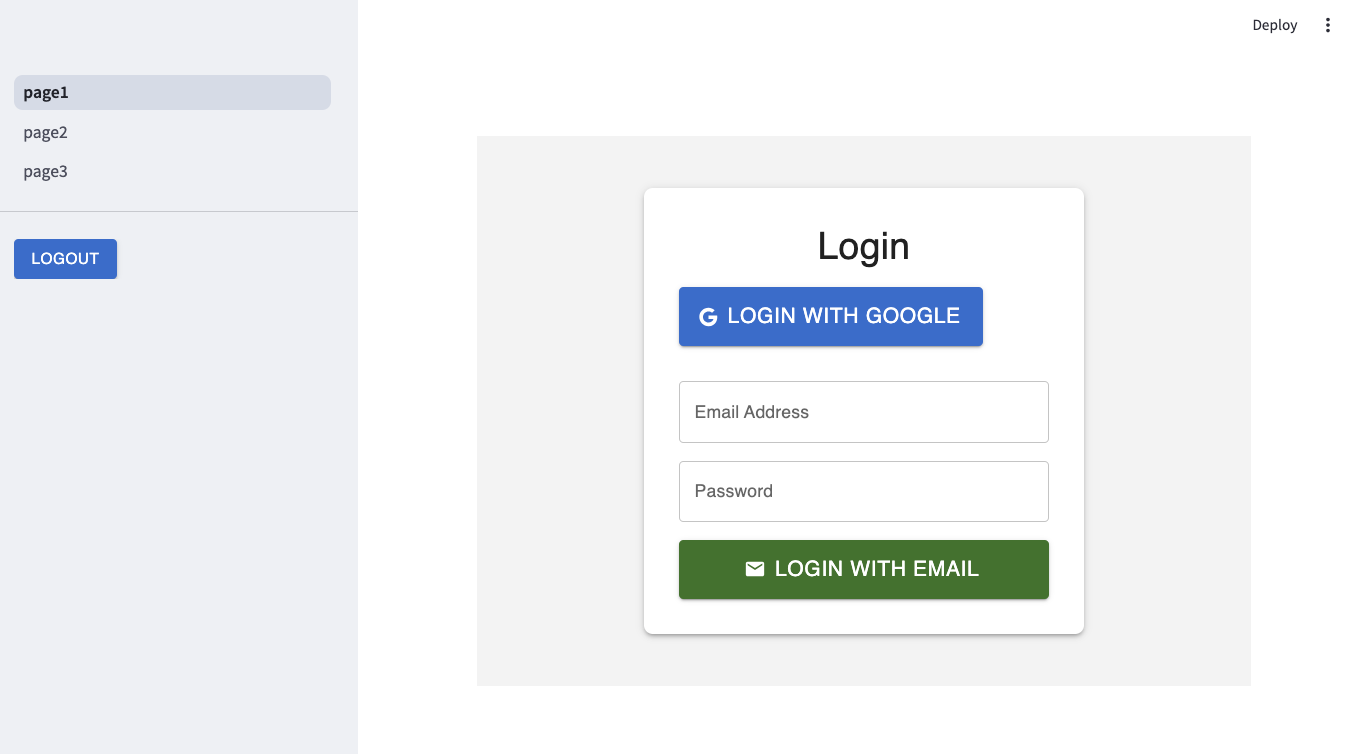
streamlit-firebase-auth is a lightweight Streamlit component library that simplifies integrating Firebase Authentication into your apps. It provides built-in widgets for login and logout functionalities as well as session management utilities, enabling you to quickly add secure, Firebase-powered user authentication to your Streamlit projects.
Install
pip install streamlit-firebase-auth
Quick Use
from streamlit_firebase_auth import FirebaseAuth

auth = FirebaseAuth(
        {
            "apiKey": "YOUR_API_KEY",
            "authDomain": "YOUR_AUTH_DOMAIN",
            "projectId": "YOUR_PROJECT_ID",
            "storageBucket": "YOUR_STORAGE_BUCKET",
            "messagingSenderId": "YOUR_MESSAGING_SENDER_ID",
            "appId": "YOUR_APP_ID",
        })

login_user = auth.check_session()

if login_user:
    auth.logout_form()
else:
    suth.login_form()
API Reference
auth.login_form()
Description:
Displays a login form to the user and returns the result of the login attempt.
Return (dict):
success(bool): True if login was successful; otherwise, False.message(str, optional): An error message if the login failed.
auth.logout_form()
Description:
Displays a logout interface and performs logout operations (like clearing the session).
Return (dict):
success(bool): True if logout was successful; otherwise, False.message(str, optional): An error message if the logout failed.
auth.check_session()
Description:
Checks the current session to determine if the user is authenticated.
Return (dict):
A dictionary containing the user information provided by Firebase upon successful login.
auth.signup(email: str, password: str)
Description: Signs up a new user using Firebase Admin. This function creates a new user account and returns the result of the signup.
Return (dict):
success(bool): True if the signup was successful; otherwise, False.message(str, optional): An error message if the signup failed.
auth.send_password_reset_email(email: str)
Description: Sends a password reset email to the specified email address. This function handles the email sending process and returns the result.
Return (dict):
success(bool): True if the email was sent successfully; otherwise, False.message(str, optional): An error message if sending the email failed.
Detailed Usage
Please refer to the example for detailed usage.
Run :
streamlit run example/app.py
Image
1 maintainer

Metadata
1 maintainer
Release files for streamlit-firebase-auth 1.1.6
For a detailed explanation of source distributions (sdists) and built distributions (wheels), please see the package formats documentation.
Source distribution (sdist)
| File | Size | Uploaded | |
|---|---|---|---|
| streamlit_firebase_auth-1.1.6.tar.gz | 1.4 MB | Details |
Built distribution (wheel)
| File | Interpreter | ABI | Platform | Reset |
|---|---|---|---|---|
| streamlit_firebase_auth-1.1.6-py3-none-any.whl | Python 3 | none | any | Details |
Total release size: 2.7 MB
Release files / streamlit_firebase_auth-1.1.6.tar.gz
| Download URL | streamlit_firebase_auth-1.1.6.tar.gz |
|---|---|
| Size | 1.4 MB |
| Tags | Source |
|
SHA-256 checksum How to use checksums |
aaf1f9155d9f45808ac5a82275f1067386a5f631c75092033a55163830f65d44
|
|
BLAKE2b-256 checksum How to use checksums |
0c2204f7af08c7e35d0d7ca44b381388d75044a9377e35fa4f3833e3ed8c3876
|
| Upload date | |
|
Uploaded using Trusted Publishing? What is trusted publishing? |
No |
| Uploaded via |
twine/6.1.0 CPython/3.12.0
|
Release files / streamlit_firebase_auth-1.1.6-py3-none-any.whl
| Download URL | streamlit_firebase_auth-1.1.6-py3-none-any.whl |
|---|---|
| Size | 1.4 MB |
| Tags | Python 3 |
|
SHA-256 checksum How to use checksums |
ff14e3ad27d05c0ea7ee9e93bc67ade1c77089d561ab18f30aed4f6bf9f34e7b
|
|
BLAKE2b-256 checksum How to use checksums |
d2463ffbc671e4e25837c57c6658a053e67368fbd30fe63fbeeff3602c9fd542
|
| Upload date | |
|
Uploaded using Trusted Publishing? What is trusted publishing? |
No |
| Uploaded via |
twine/6.1.0 CPython/3.12.0
|














