
streamlit-gantt
An interactive Gantt chart component for Streamlit



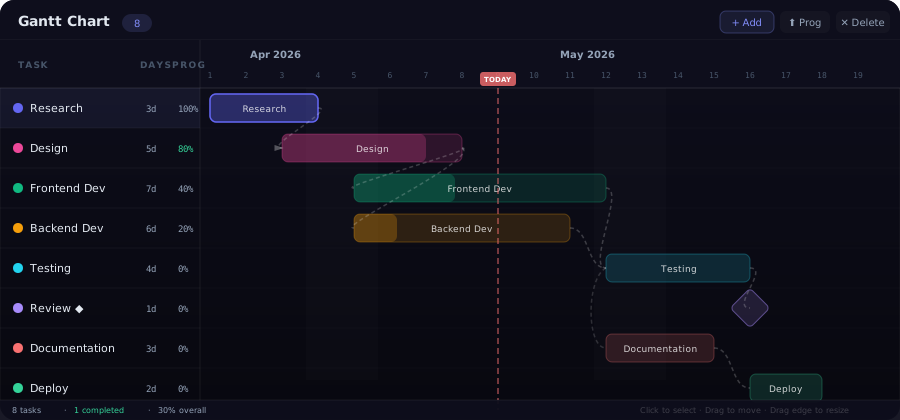
streamlit-gantt is a fully interactive Gantt chart that runs inside any Streamlit application. It supports drag-to-move, drag-to-resize, task dependencies with curved arrows, milestone markers, progress tracking, and a dark-themed UI — all rendered client-side with zero extra dependencies.
Features
Task Management
- Add tasks — click the + Add button in the toolbar to create a new task; it's automatically placed after the last existing task
- Delete tasks — select a task and click ✕ Delete (with a confirmation prompt to prevent accidents)
- Edit in place — task names, durations, and progress percentages are all reflected in the sidebar and on the bar itself
- Progress tracking — each task has a 0–100% progress value; increment it with the ⬆ Prog (+10%) button or set it programmatically
- Auto-coloring — tasks are assigned colors from an 8-color palette that rotates automatically: indigo, pink, emerald, amber, cyan, violet, red, and mint
Timeline Visualization
- Day-level grid — each column represents one day; column widths are 36 px for comfortable reading
- Month labels — displayed above the day numbers so you always know the calendar context
- Weekend highlighting — Saturday and Sunday columns are subtly tinted so weekends stand out
- Today line — a dashed red vertical line marks the current day for at-a-glance status
- Auto-range — the timeline automatically extends to accommodate all tasks plus a 5-day buffer
Dependencies
- Curved dashed arrows — dependency lines are drawn as smooth cubic Bézier curves with a dashed stroke
- Any-to-any wiring — every task's
depsarray can reference any other task ID - Auto-cleanup — when a task is deleted, all references to it are removed from other tasks'
depsarrays - Visual flow — arrows originate from the right edge of the predecessor and terminate at the left edge of the successor
Milestones
- Diamond markers — any task with
"milestone": truerenders as a rotated-45° diamond instead of a bar - Same interactions — milestones can be selected, moved, and connected with dependencies just like regular tasks
- Duration independent — milestones typically have a duration of 1 day but the diamond renders at a fixed size
Drag Interactions
- Drag to move — grab any task bar and drag it horizontally; the task snaps to the nearest day boundary on release
- Drag to resize — grab the right edge handle of a task bar to change its duration (minimum 1 day)
- Click to select — click a task bar or its row in the sidebar to select it; click again to deselect
- Deferred sync — Streamlit is only notified on
mouseup, preventing unnecessary re-renders during drags
Layout
┌──────────────────────────────────────────────────────┐
│  Toolbar  [ Gantt Chart  (8) ]   [+Add] [⬆Prog] [✕] │
├─────────────┬────────────────────────────────────────┤
│  TASK  D  % │  Apr 2026               May 2026      │
│─────────────│  1  2  3  4  5  6  7  8  9 10 11 ...  │
│ ● Research  │  ████████████                          │
│ ● Design    │        ██████████████████              │
│ ● Frontend  │              ████████████████████████  │
│ ● Backend   │              ██████████████████████    │
│ ● Testing   │                          ████████████  │
│ ◆ Review    │                                ◆       │
│ ● Docs      │                          ████████████  │
│ ● Deploy    │                                ████████│
├─────────────┴────────────────────────────────────────┤
│  8 tasks · 1 completed · 30% overall                 │
└──────────────────────────────────────────────────────┘
- Sticky task list — the left panel (200 px) stays fixed while the timeline scrolls horizontally
- Sticky date header — month labels and day numbers stay fixed during vertical scrolling
- Status bar — shows total tasks, completed count, and overall progress percentage
Installation
pip install streamlit-gantt
Quick Start
import streamlit as st
from streamlit_gantt import st_gantt

st.set_page_config(layout="wide")
st.title("📊 Project Timeline")

result = st_gantt(key="gantt")

if result:
    tasks = result.get("tasks", [])
    completed = sum(1 for t in tasks if t.get("progress", 0) >= 100)
    st.write(f"{completed} / {len(tasks)} tasks completed")
API Reference
st_gantt
st_gantt(
    tasks: list[dict] | None = None,
    height: int = 500,
    key: str | None = None,
) -> dict | None
Parameters
| Parameter | Type | Default | Description |
|---|---|---|---|
tasks |
list[dict] or None |
None |
Initial task data. When None, the chart starts with a set of demo tasks. Pass an empty list [] for a blank chart. |
height |
int |
500 |
Height of the Gantt component in pixels. |
key |
str or None |
None |
An optional key that uniquely identifies this component. Required when placing multiple Gantt charts on one page. |
Return Value
Returns a dict (or None before first interaction) with the following structure:
{
    "tasks": [
        {
            "id": 1,
            "name": "Research",
            "start": 0,           # start day offset from the base date
            "duration": 3,        # duration in days
            "progress": 100,      # 0–100 percent
            "color": "#6366f1",   # hex color from the palette
            "deps": [],           # list of dependency task IDs
            "milestone": False    # True for diamond milestones
        },
        {
            "id": 2,
            "name": "Design",
            "start": 2,
            "duration": 5,
            "progress": 80,
            "color": "#ec4899",
            "deps": [1],          # depends on task 1
            "milestone": False
        }
    ]
}
Task Data Structure
| Field | Type | Description |
|---|---|---|
id |
int |
Unique task identifier (auto-incremented) |
name |
str |
Task name displayed in the sidebar and on the bar |
start |
int |
Start day as an offset from the chart's base date (April 1, 2026 by default) |
duration |
int |
Duration in days (minimum 1) |
progress |
int |
Completion percentage, 0–100 |
color |
str |
Hex color string; auto-assigned from the 8-color palette if not provided |
deps |
list[int] |
List of task IDs that this task depends on. Dependency arrows are drawn from each predecessor to this task. |
milestone |
bool |
When true, the task renders as a diamond marker instead of a bar. Default false. |
Color Palette
Tasks are auto-assigned these colors in order:
| Index | Color | Name |
|---|---|---|
| 0 | #6366f1 |
Indigo |
| 1 | #ec4899 |
Pink |
| 2 | #10b981 |
Emerald |
| 3 | #f59e0b |
Amber |
| 4 | #22d3ee |
Cyan |
| 5 | #a78bfa |
Violet |
| 6 | #f87171 |
Red |
| 7 | #34d399 |
Mint |
Usage Examples
Custom Project Plan
import streamlit as st
from streamlit_gantt import st_gantt

tasks = [
    {"id": 1, "name": "Requirements",   "start": 0, "duration": 3, "progress": 100, "color": "#6366f1", "deps": []},
    {"id": 2, "name": "UI Design",      "start": 3, "duration": 5, "progress": 60,  "color": "#ec4899", "deps": [1]},
    {"id": 3, "name": "Backend API",    "start": 3, "duration": 7, "progress": 40,  "color": "#10b981", "deps": [1]},
    {"id": 4, "name": "Frontend Build", "start": 8, "duration": 6, "progress": 0,   "color": "#f59e0b", "deps": [2]},
    {"id": 5, "name": "Integration",    "start": 10,"duration": 4, "progress": 0,   "color": "#22d3ee", "deps": [3, 4]},
    {"id": 6, "name": "QA Testing",     "start": 14,"duration": 3, "progress": 0,   "color": "#a78bfa", "deps": [5]},
    {"id": 7, "name": "Launch 🚀",      "start": 17,"duration": 1, "progress": 0,   "color": "#f87171", "deps": [6], "milestone": True},
]

result = st_gantt(tasks=tasks, height=500, key="project")
Reading Task Updates
result = st_gantt(key="gantt")

if result and result.get("tasks"):
    tasks = result["tasks"]

    # Progress summary
    total = len(tasks)
    done = sum(1 for t in tasks if t.get("progress", 0) >= 100)
    avg_progress = sum(t.get("progress", 0) for t in tasks) / total if total else 0

    col1, col2, col3 = st.columns(3)
    col1.metric("Total Tasks", total)
    col2.metric("Completed", done)
    col3.metric("Avg Progress", f"{avg_progress:.0f}%")

    # Detailed table
    st.dataframe([
        {
            "Task": t["name"],
            "Start Day": t["start"],
            "Duration": f"{t['duration']}d",
            "Progress": f"{t['progress']}%",
            "Dependencies": ", ".join(str(d) for d in t.get("deps", [])) or "—",
            "Milestone": "◆" if t.get("milestone") else "",
        }
        for t in tasks
    ])
Empty Chart for User Input
# Pass an empty list to start with a blank chart
result = st_gantt(tasks=[], height=400, key="blank")

if result:
    st.json(result)  # show raw data as user adds tasks
Architecture
The component is built with React 18 communicating with Streamlit via the bidirectional component API (streamlit-component-lib).
┌──────────────────────────────────────────────┐
│  Python (Streamlit)                          │
│  st_gantt(tasks, height, key)                │
│       ↓ args         ↑ componentValue        │
├──────────────────────────────────────────────┤
│  React Frontend (iframe)                     │
│  ┌────────────────────────────────────────┐  │
│  │ Toolbar (Add / Progress / Delete)      │  │
│  ├──────────┬─────────────────────────────┤  │
│  │ Task     │ Date header (sticky)        │  │
│  │ List     ├─────────────────────────────┤  │
│  │ (sticky) │ Grid + bars + arrows        │  │
│  │          │ (drag-move, drag-resize)    │  │
│  ├──────────┴─────────────────────────────┤  │
│  │ Status Bar                             │  │
│  └────────────────────────────────────────┘  │
└──────────────────────────────────────────────┘
- Grid rendering — computed from
totalDays(max task end + 5-day buffer); each column is 36 px wide - SVG dependency arrows — drawn as
<path>elements with cubic Bézier curves and dashed strokes - Snapping — all drag operations snap to the nearest day boundary
- Deferred sync —
Streamlit.setComponentValue()is called only onmouseup, not during drags, to prevent re-render storms - State — React
useStatewith controlled task array; selection, drag offsets, and resize handles are local state
Interactions Summary
| Action | Behavior |
|---|---|
| Click task bar | Select / deselect the task |
| Click task row (sidebar) | Select / deselect the task |
| Drag task bar | Move horizontally (snaps to day) |
| Drag right edge | Resize duration (min 1 day) |
| + Add button | Append new task after last |
| ⬆ Prog button | Increase selected task's progress by 10% |
| ✕ Delete button | Remove selected task (with confirmation) |
Browser Compatibility
| Browser | Status |
|---|---|
| Chrome / Edge 90+ | ✅ Full support |
| Firefox 90+ | ✅ Full support |
| Safari 15+ | ✅ Full support |
| Mobile browsers | ⚠️ Usable but optimized for desktop |
Requirements
- Python 3.8+
- Streamlit ≥ 1.28.0
License
MIT — see LICENSE for details.
Links
1 maintainer

Metadata
1 maintainer
Release files for streamlit-gantt 0.1.1
For a detailed explanation of source distributions (sdists) and built distributions (wheels), please see the package formats documentation.
Source distribution (sdist)
| File | Size | Uploaded | |
|---|---|---|---|
| streamlit_gantt-0.1.1.tar.gz | 412.5 kB | Details |
Built distribution (wheel)
| File | Interpreter | ABI | Platform | Reset |
|---|---|---|---|---|
| streamlit_gantt-0.1.1-py3-none-any.whl | Python 3 | none | any | Details |
Total release size: 823.4 kB
Release files / streamlit_gantt-0.1.1.tar.gz
| Download URL | streamlit_gantt-0.1.1.tar.gz |
|---|---|
| Size | 412.5 kB |
| Tags | Source |
|
SHA-256 checksum How to use checksums |
425df15bfb04606e5ef73d1c732cdac6cac21b098cb88e0631e7ab8782906437
|
|
BLAKE2b-256 checksum How to use checksums |
3fb0b0fe75bbecc569a4942759d64b25bf10f62a19e4ef959dd3dde0f3d78ddc
|
| Upload date | |
|
Uploaded using Trusted Publishing? What is trusted publishing? |
No |
| Uploaded via |
twine/6.2.0 CPython/3.11.9
|
Release files / streamlit_gantt-0.1.1-py3-none-any.whl
| Download URL | streamlit_gantt-0.1.1-py3-none-any.whl |
|---|---|
| Size | 410.9 kB |
| Tags | Python 3 |
|
SHA-256 checksum How to use checksums |
743d71a3732569c6d703d13f546e8f8e79265159a626e9591a2480fdde5d77cf
|
|
BLAKE2b-256 checksum How to use checksums |
f8ec0bd7e652e3ea83f00f1c0e9665b67b4d5f4b3c0fffba91e4a918943ca94f
|
| Upload date | |
|
Uploaded using Trusted Publishing? What is trusted publishing? |
No |
| Uploaded via |
twine/6.2.0 CPython/3.11.9
|














