
A drag-and-drop Kanban board component for Streamlit

Project description
streamlit-kanban
A drag-and-drop Kanban board component for Streamlit



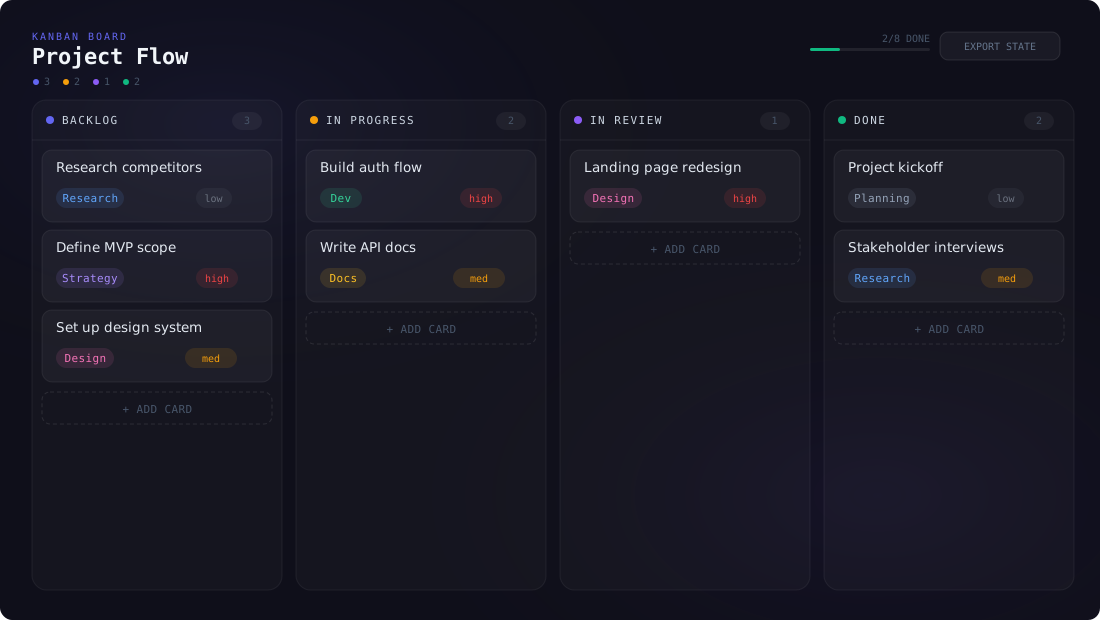
streamlit-kanban is a fully interactive Kanban board that runs inside any Streamlit application. Move cards between columns with native HTML5 drag-and-drop, edit cards inline, track progress with color-coded tags and priorities, and get the complete board state back as structured JSON — all with zero runtime dependencies beyond Streamlit.
Features
Drag-and-Drop
- Native HTML5 drag-and-drop — grab any card and drop it into a different column; no external DnD library required
- Reorder within columns — drag cards up or down to change their position within the same column
- Visual drop targets — columns highlight when a card is being dragged over them
Card Management
- Add cards — click the + button on any column header to create a new card
- Edit inline — click any card to open an edit overlay where you can change the title, tag, and priority
- Delete cards — remove cards from the edit dialog
- Color-coded tags — tags like "Dev", "Design", "Bug", "Docs" are automatically colored with distinct hues
- Priority badges —
high(red),medium(amber), andlow(cyan) badges are displayed on each card
Board Features
- Progress bar — a global progress bar in the header shows how many cards are in the "Done" column vs. total
- Column accents — each column has a configurable hex color shown as a dot next to the title
- Card count badges — each column header displays the number of cards it contains
- Full state round-trip — every interaction (drag, add, edit, delete) sends the full updated board state back to Python
Dark Theme
- Consistent dark UI with glass-morphism card styles
- Subtle borders, rounded corners, and hover effects
- Designed to match Streamlit's dark mode
Installation
pip install streamlit-kanban
Quick Start
import streamlit as st
from streamlit_kanban import st_kanban

columns = [
    {
        "id": "todo",
        "title": "To Do",
        "color": "#6366f1",
        "cards": [
            {"id": "c1", "title": "Write tests",    "tag": "Dev",    "priority": "high"},
            {"id": "c2", "title": "Update docs",    "tag": "Docs",   "priority": "low"},
        ],
    },
    {
        "id": "in-progress",
        "title": "In Progress",
        "color": "#f59e0b",
        "cards": [
            {"id": "c3", "title": "Build auth flow", "tag": "Dev", "priority": "high"},
        ],
    },
    {
        "id": "done",
        "title": "Done",
        "color": "#10b981",
        "cards": [],
    },
]

st.title("My Project Board")

if "board" not in st.session_state:
    st.session_state.board = columns

result = st_kanban(st.session_state.board, key="kanban")

if result:
    st.session_state.board = result
API Reference
st_kanban
st_kanban(
    columns: list[dict],
    key: str | None = None,
) -> list[dict] | None
Parameters
| Parameter | Type | Default | Description |
|---|---|---|---|
columns |
list[dict] |
required | Column definitions with cards. See data structures below. |
key |
str or None |
None |
An optional key that uniquely identifies this component. Required when placing multiple boards on one page. |
Return Value
Returns the updated list[dict] of columns after any user interaction (drag, add, edit, delete), or None on first render before any interaction.
The returned structure is identical to the input columns format, making it easy to persist state with st.session_state.
Data Structures
Column
{
    "id":    str,          # unique identifier (e.g. "todo", "in-progress")
    "title": str,          # display name shown in the column header
    "color": str,          # hex accent color for the column dot (e.g. "#6366f1")
    "cards": list[dict]    # list of card objects in this column
}
Card
{
    "id":       str,   # unique card identifier
    "title":    str,   # card text / description
    "tag":      str,   # category label (e.g. "Dev", "Design", "Bug", "Docs")
    "priority": str    # "high" | "medium" | "low"
}
| Field | Type | Description |
|---|---|---|
id |
str |
Unique card identifier. Must be unique across all columns. |
title |
str |
The card's display text. |
tag |
str |
A category label. Automatically receives a distinct color badge. |
priority |
str |
One of "high", "medium", or "low". Rendered as a colored badge: red, amber, or cyan. |
Usage Examples
Persisting Board State
import streamlit as st
from streamlit_kanban import st_kanban

# Initialize board in session state
if "board" not in st.session_state:
    st.session_state.board = [
        {"id": "backlog",     "title": "Backlog",     "color": "#94a3b8", "cards": []},
        {"id": "todo",        "title": "To Do",       "color": "#6366f1", "cards": []},
        {"id": "in-progress", "title": "In Progress", "color": "#f59e0b", "cards": []},
        {"id": "review",      "title": "Review",      "color": "#a78bfa", "cards": []},
        {"id": "done",        "title": "Done",        "color": "#10b981", "cards": []},
    ]

result = st_kanban(st.session_state.board, key="board")
if result:
    st.session_state.board = result
Reading Board Metrics
result = st_kanban(columns, key="kanban")

if result:
    total_cards = sum(len(col["cards"]) for col in result)
    done_cards = sum(
        len(col["cards"]) for col in result if col["id"] == "done"
    )
    st.metric("Progress", f"{done_cards}/{total_cards}")

    # List all high-priority cards
    urgent = [
        card["title"]
        for col in result
        for card in col["cards"]
        if card.get("priority") == "high"
    ]
    if urgent:
        st.warning(f"🔴 {len(urgent)} high-priority items: {', '.join(urgent)}")
Exporting as JSON
import json

result = st_kanban(columns, key="kanban")

if result:
    st.download_button(
        "📥 Export Board",
        json.dumps(result, indent=2),
        "board.json",
        "application/json",
    )
Architecture
The component is built with React 18 communicating with Streamlit via the bidirectional component API (streamlit-component-lib).
┌─────────────────────────────────────────────────┐
│  Python (Streamlit)                             │
│  st_kanban(columns, key)                        │
│       ↓ args              ↑ componentValue      │
├─────────────────────────────────────────────────┤
│  React Frontend (iframe)                        │
│  ┌───────────────────────────────────────────┐  │
│  │ Header: title + progress bar              │  │
│  ├──────┬──────┬──────┬──────┬───────────────┤  │
│  │ Col  │ Col  │ Col  │ Col  │ ...           │  │
│  │      │      │      │      │               │  │
│  │ Card │ Card │ Card │      │               │  │
│  │ Card │ Card │      │      │               │  │
│  │ Card │      │      │      │               │  │
│  │  +   │  +   │  +   │  +   │               │  │
│  └──────┴──────┴──────┴──────┴───────────────┘  │
└─────────────────────────────────────────────────┘
- Drag engine — native HTML5
dragstart/dragover/dropevents; no external library - State sync — every card move, add, or edit immediately calls
Streamlit.setComponentValue()with the full board - Edit overlay — a modal dialog for editing card title, tag, and priority fields
Browser Compatibility
| Browser | Status |
|---|---|
| Chrome / Edge 90+ | ✅ Full support |
| Firefox 90+ | ✅ Full support |
| Safari 15+ | ✅ Full support |
| Mobile browsers | ⚠️ Touch drag-and-drop may vary |
Requirements
- Python 3.8+
- Streamlit ≥ 1.28.0
License
MIT — see LICENSE for details.
Links


Download files
Download the file for your platform. If you're not sure which to choose, learn more about installing packages.
Source Distribution
Built Distribution
Filter files by name, interpreter, ABI, and platform.
If you're not sure about the file name format, learn more about wheel file names.
Copy a direct link to the current filters
File details
Details for the file streamlit_kanban-0.3.1.tar.gz.
File metadata
- Download URL: streamlit_kanban-0.3.1.tar.gz
- Upload date:
- Size: 413.2 kB
- Tags: Source
- Uploaded using Trusted Publishing? No
- Uploaded via: twine/6.2.0 CPython/3.11.9
File hashes
| Algorithm | Hash digest | |
|---|---|---|
| SHA256 |
370891f990a5544fd73b3ca9a1b47e70d5475194470f18f5e68599e9501a6124
|
|
| MD5 |
6698870bbd6b7db56cc67e82eee7d4bb
|
|
| BLAKE2b-256 |
b67fb25b66cc8ce01f63afdba4bdc683b5e4c3a2c1172f6b1f3732354b85b90d
|
File details
Details for the file streamlit_kanban-0.3.1-py3-none-any.whl.
File metadata
- Download URL: streamlit_kanban-0.3.1-py3-none-any.whl
- Upload date:
- Size: 413.2 kB
- Tags: Python 3
- Uploaded using Trusted Publishing? No
- Uploaded via: twine/6.2.0 CPython/3.11.9
File hashes
| Algorithm | Hash digest | |
|---|---|---|
| SHA256 |
0c800f51646fc39605cc2adc065106822b64bfe086f3f9236cc157bc53e2f4ca
|
|
| MD5 |
6a884957aa216922783952acb560aa4a
|
|
| BLAKE2b-256 |
f39f3f595c98a0aee4e670f4f93424694b8f50ae653e26ff58550c84da2cfd25
|






