
Keycloak authentication for Streamlit (forked for keycloak-js v26.0.1)

Project description
Streamlit Keycloak
Keycloak user authentication and single sign-on inside your Streamlit app
Installation
pip install streamlit-keycloak
Usage
Provide the URL to your Keycloak server, the realm and client and the component will perform the authentication when the app is rendered. First it will attempt to silently authenticate using single sign-on. If this fails, a dialog will appear from which you can open a popup to the Keycloak login page.
When authentication is successful, the component returns a dataclass containing the authentication state, an access token, which can be used to access other restricted resources, a refresh token and a user info object, containing e.g. the username and group memberships. If your configuration provides refresh tokens, the access token can be automatically refreshed when it expires.
So far the component has not been tested in a wide variety of environments. So if you’re also using Keycloak and would benefit from less logging in and easy access to tokens, give this a go and share your experience. Feedback is always welcome.
Frontend authentication like this can only be done with clients that have their access type set to ‘public’ as their is no way to securely provide the client secret from the browser.
Examples
from dataclasses import asdict
from streamlit_keycloak import login
import streamlit as st


def main():
    st.subheader(f"Welcome {keycloak.user_info['preferred_username']}!")
    st.write(f"Here is your user information:")
    st.write(asdict(keycloak))


st.title("Streamlit Keycloak example")
keycloak = login(
    url="http://localhost:8080",
    realm="myrealm",
    client_id="myclient",
)

if keycloak.authenticated:
    main()
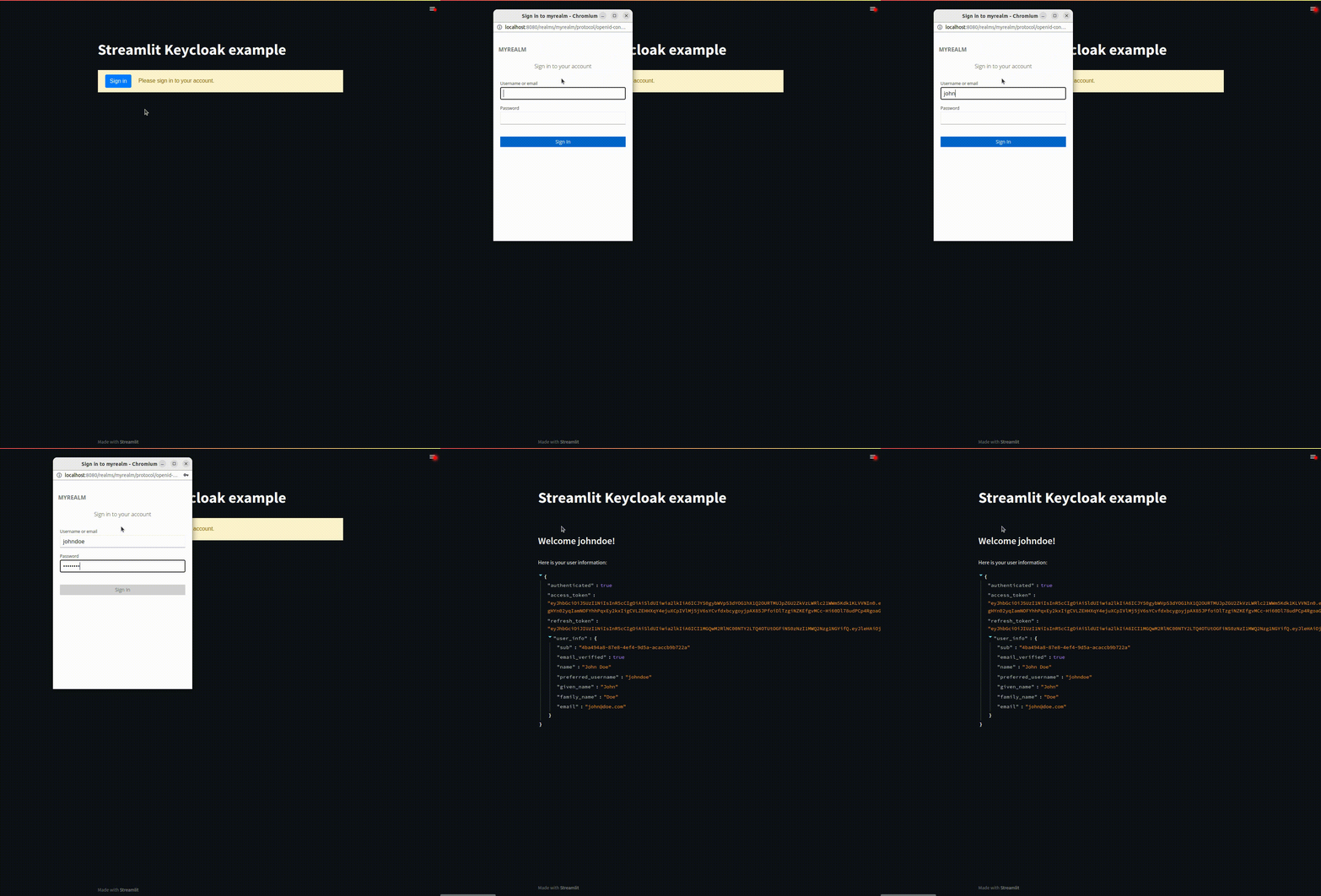
By default your access tokens will be refreshed when they expire. Refreshing the tokens will cause your app to be rerendered. If this is not desired, this behaviour can be disabled using the auto_refresh parameter.
keycloak = login(
    url="http://localhost:8080",
    realm="myrealm",
    client_id="myclient",
    auto_refresh=False
)
Depending on your Keycloak configuration, you might want to specify additional parameters to the Keycloak. These can be provided using the init_options parameter and will be passed to the init function in the frontend. See the keycloak-js documentation for details.
keycloak = login(
    url="http://localhost:8080",
    realm="myrealm",
    client_id="myclient",
    init_options={
        "checkLoginIframe": False
    }
)
All text in the login dialog can be customized using the custom_labels parameter, by providing a dictionary with specific keys set.
keycloak = login(
    url="http://localhost:8080",
    realm="myrealm",
    client_id="myclient",
    custom_labels={
        "labelButton": "Sign in",
        "labelLogin": "Please sign in to your account.",
        "errorNoPopup": "Unable to open the authentication popup. Allow popups and refresh the page to proceed.",
        "errorPopupClosed": "Authentication popup was closed manually.",
        "errorFatal": "Unable to connect to Keycloak using the current configuration."
    }
)
Getting started with Keycloak
Setting up your own Keycloak instance can be tricky. This guide should get you started.
TLDR
- Create your Keycloak instance
- Create a realm
- Create a client
- Keep client authentication disabled
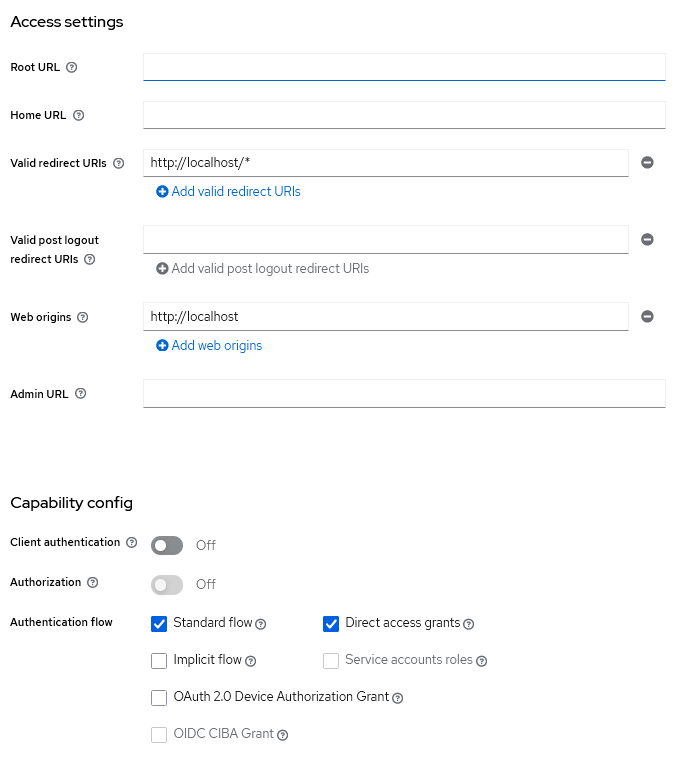
- Set a valid redirect uri, e.g. https://hostname:port/*
- Set valid web origins, e.g. https://hostname
- Create a user
- Set a password for it
A minimum configuration should look something like this:
Credits
Many thanks to the authors of the streamlit-auth0 and auth0-spa-js packages for inspiring a large part of the approach.
And thanks to 93degree for the Svelte component template, which is awesome.
Release history Release notifications | RSS feed


Download files
Download the file for your platform. If you're not sure which to choose, learn more about installing packages.
Source Distribution
Built Distribution
Filter files by name, interpreter, ABI, and platform.
If you're not sure about the file name format, learn more about wheel file names.
Copy a direct link to the current filters
File details
Details for the file streamlit_keycloak_fork-1.1.3.tar.gz.
File metadata
- Download URL: streamlit_keycloak_fork-1.1.3.tar.gz
- Upload date:
- Size: 437.5 kB
- Tags: Source
- Uploaded using Trusted Publishing? No
- Uploaded via: twine/5.1.1 CPython/3.12.0
File hashes
| Algorithm | Hash digest | |
|---|---|---|
| SHA256 |
afab9079bf74ed13fa754520c0038350ceedb05402d0b0fab9649c129b8e9438
|
|
| MD5 |
c5e4a4be8e7b020311df90a3245a7f3c
|
|
| BLAKE2b-256 |
b0a9f6212adbc480e148f6afeac7007ca689957d01114904fcfbe921ea33c985
|
File details
Details for the file streamlit_keycloak_fork-1.1.3-py3-none-any.whl.
File metadata
- Download URL: streamlit_keycloak_fork-1.1.3-py3-none-any.whl
- Upload date:
- Size: 445.0 kB
- Tags: Python 3
- Uploaded using Trusted Publishing? No
- Uploaded via: twine/5.1.1 CPython/3.12.0
File hashes
| Algorithm | Hash digest | |
|---|---|---|
| SHA256 |
76e8f460ab1061f4adb9029194ee49793169ac2bccb8c7337f53b0ff197c41c9
|
|
| MD5 |
b572ed0abc0c9d831e32328259e45cd7
|
|
| BLAKE2b-256 |
761a4e66a0a5066f9556fec9a00537a58a8ed745dd621fa2c3d6eb7ff89ad417
|






