
Streamlit module which provides implementation of various Material UI components

Project description
Welcome to Streamlit MUI

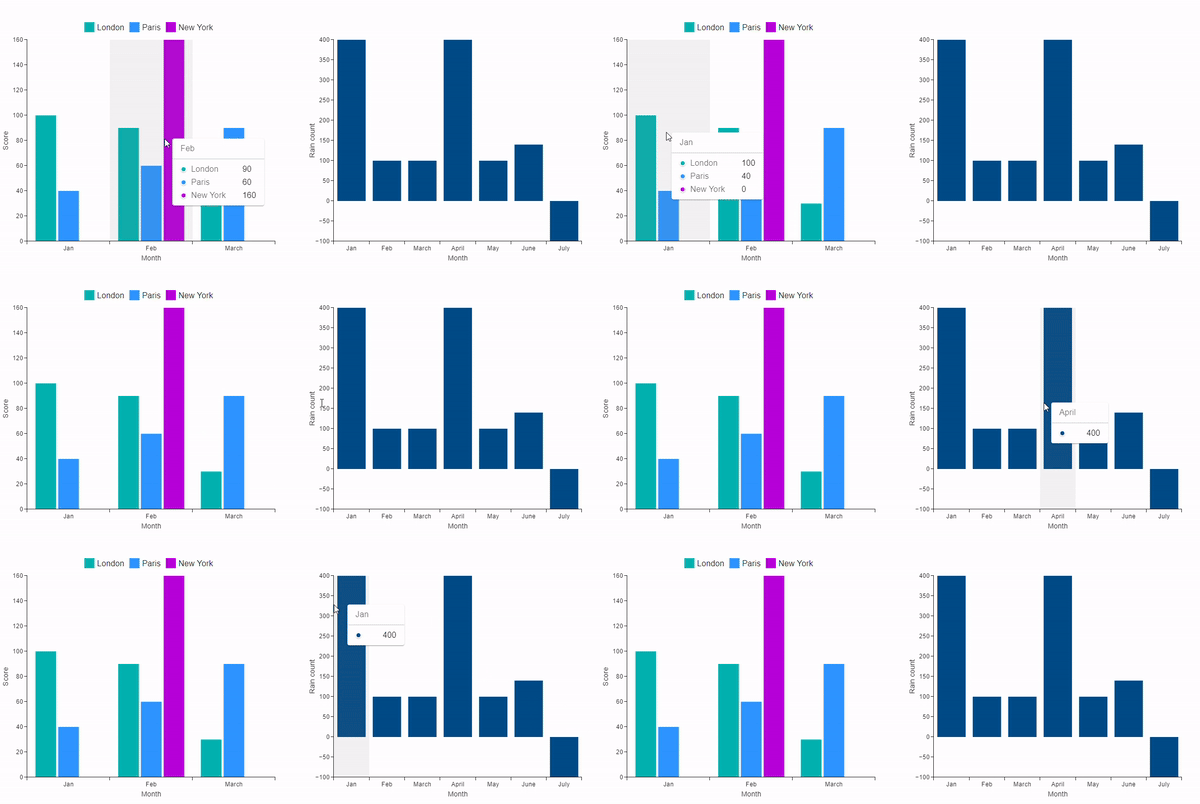
This Python library provides a flexible way to integrate Material UI components in your streamlit application. As of now this includes single bar and grouped bar charts. In near future a lot of MUI components will be provided by this library.
Installation
Open a terminal and run
$ pip install streamlit_mui
$ streamlit_mui_hello
Usage
Creating a Single Series Bar Chart
To create a bar chart, use the DefaultBarChartConfig class to define the chart's configuration, then pass it to the bar_chart function to render the chart.
from streamlit_mui import bar_chart, DefaultBarChartConfig, BarData

default_bar_chart_config = DefaultBarChartConfig(data=[
    BarData("Jan", 400),
    BarData("Feb", 100),
    BarData("March", 100),
    BarData("April", 400),
    BarData("May", 100),
    BarData("June", 140),
    BarData("July", -100),
    BarData("August", 100),
    BarData("September", 100),
    BarData("October", 100),
    BarData("November", 80),
    BarData("December", 100),
],
    bar_color='#004b85',
    x_axis_label="Month", y_axis_label="Rain count")

bar_chart(key="bar_chart_unique_key", config=default_bar_chart_config)
Usage
Creating a Grouped Series Bar Chart
For a grouped bar chart, use the GroupBarChartConfig class. Define the data for each group using GroupSeriesData and GroupBarData.
from streamlit_mui import bar_chart, GroupBarChartConfig, GroupBarData, GroupSeriesData

group_bar_chart_config = GroupBarChartConfig(
    x_axis_label="Month",
    y_axis_label="Score",
    data=[
        GroupSeriesData("Jan", data=[
            GroupBarData("London", 100),
            GroupBarData("Paris", 40)
        ]),
        GroupSeriesData("Feb", data=[
            GroupBarData("London", 90),
            GroupBarData("Paris", 60),
            GroupBarData("New York", 160)
        ]),
        GroupSeriesData("March", data=[
            GroupBarData("London", 30),
            GroupBarData("Paris", 90)
        ])
    ],
    series=["London", "Paris", "New York"])

bar_chart(key="bar_chart_unique_key", config=group_bar_chart_config)
Author
- Dilip Thakkar [dilip.thakkar.eng@gmail.com]
- LinkedIn [https://www.linkedin.com/in/dilip-thakkar-465898194/]
Release history Release notifications | RSS feed


Download files
Download the file for your platform. If you're not sure which to choose, learn more about installing packages.
Source Distribution
Built Distribution
Filter files by name, interpreter, ABI, and platform.
If you're not sure about the file name format, learn more about wheel file names.
Copy a direct link to the current filters
File details
Details for the file streamlit_mui-1.0.2.tar.gz.
File metadata
- Download URL: streamlit_mui-1.0.2.tar.gz
- Upload date:
- Size: 827.6 kB
- Tags: Source
- Uploaded using Trusted Publishing? No
- Uploaded via: twine/5.1.1 CPython/3.11.3
File hashes
| Algorithm | Hash digest | |
|---|---|---|
| SHA256 |
50e3fdbc58b93f731c52bb99887eb3d82621d7c3b9ae32413fff838aa3f187a1
|
|
| MD5 |
0fca817c0843297939ab5fce64c5ade5
|
|
| BLAKE2b-256 |
2464229eebabeecbb8018b1bf158ed35cd2d6321b7d37ccb36106a8f8f0b71e7
|
File details
Details for the file streamlit_mui-1.0.2-py3-none-any.whl.
File metadata
- Download URL: streamlit_mui-1.0.2-py3-none-any.whl
- Upload date:
- Size: 834.8 kB
- Tags: Python 3
- Uploaded using Trusted Publishing? No
- Uploaded via: twine/5.1.1 CPython/3.11.3
File hashes
| Algorithm | Hash digest | |
|---|---|---|
| SHA256 |
7e9f3949e370d941035dc09ea0b82fe1eb54cb29dab06a0f550b722826c22f79
|
|
| MD5 |
80f23ee76476539f4414bea4fda5a5f6
|
|
| BLAKE2b-256 |
1318ca77143115feae8431a01316d92a70997c10977e8dc32eb76aeccd1c299f
|






