





streamlit-pdf-viewer
Streamlit component that allows the visualisation and enrichment of PDF documents. You can see an application in action here.
Features
- Show PDF files in a Streamlit application with a simple command
- Based on the pdf.js library
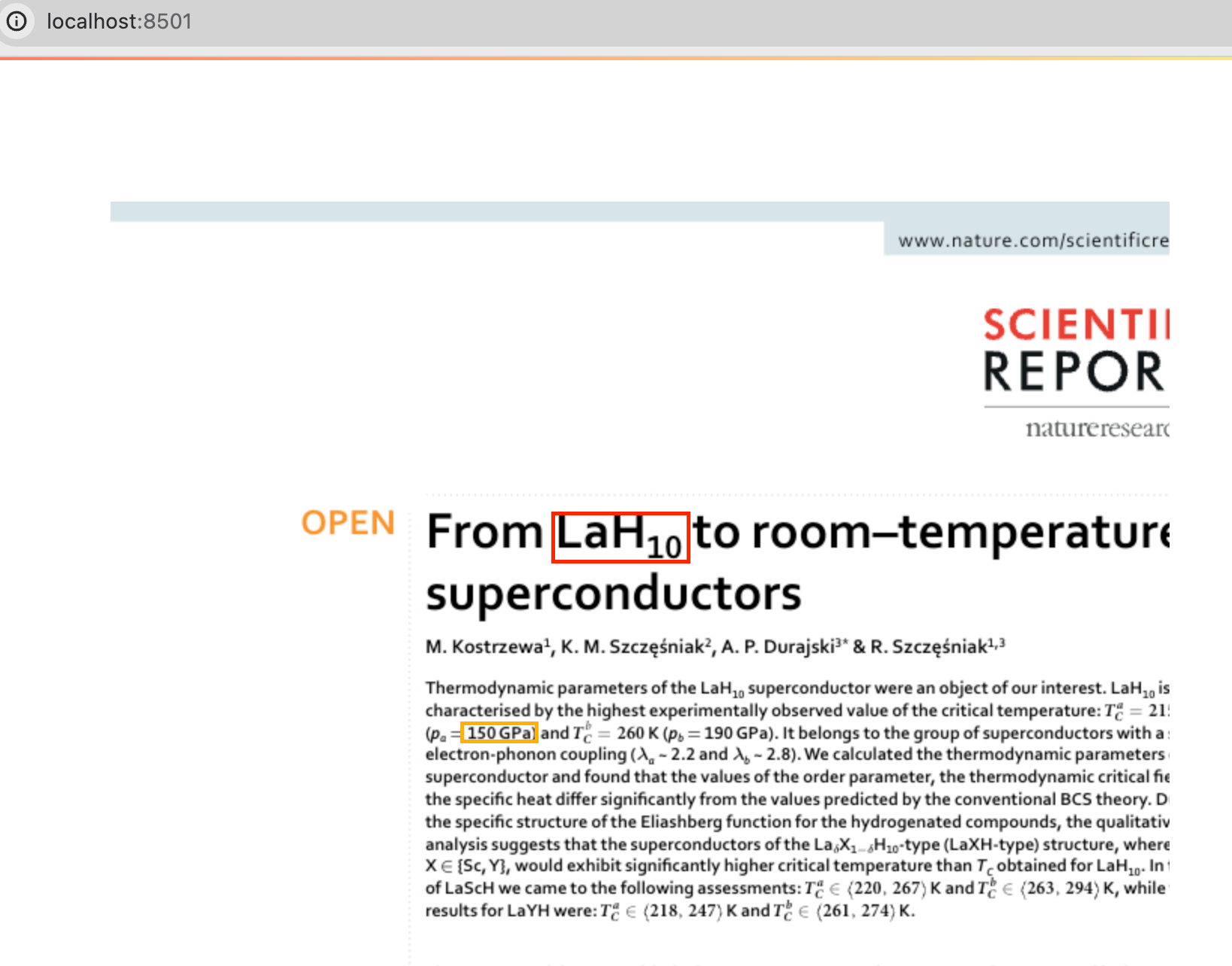
- Visualize annotations on top of the PDF documents
- Render text on top of the PDF document, allowing copy-paste
- Allow rendering specific pages of the PDF document
- Scroll to a specific page
- Scroll to a specific annotation
- Allow custom callbacks when an annotation is clicked
- Interactive zoom controls with multiple zoom options
- Configurable alignment of the PDF viewer within its container
- Optional horizontal separators between PDF pages
- Version 0.0.x provides an additional "legacy" viewer using the native pdf.js browser's, with limitations including no annotations, no scrolling - this is removed from version 0.1.x.
Limitations
- Tested and developed to support Firefox and Chrome.
- The legacy visualization works only on Firefox and does not support annotations
- This is a side project, so all troubleshooting may take time
- The component is still in development, so expect some bugs and limitations
- The streamlit reload at each action may render slowly for complex PDF documents
Caveats
Here are some caveats to be aware of:
- It is mandatory to specify a
widthto show PDF document on tabs and expanders, otherwise, the viewer will not be displayed on tabs not immediately visible. - From version 0.0.16, the behavior for managing width and height has changed:
- If only the height is specified, the PDF document will be shown in proportion with the with proportional based on the PDF dimensions.
- The possibility to show a large view of half the PDF is not available anymore (let's face it, it was not very useful).
- If you need to use all the available space and limit the height, you can encapsulate the
pdf_viewer()into ast.component(width:...)setting the width.
- The
legacyrendering has been removed from version 0.1.x+
Streamlit compatibility
Streamlit 1.41–1.58 have a regression in custom-component iframe handling that resets the
page scroll position after an st.dialog is closed — see issue
#107 for details and the bisect
data. This was fixed upstream in Streamlit 1.59.0.
Recommended: use Streamlit ≥ 1.59.0 (verified against the full test suite). Streamlit ≤ 1.40.2
also works. Avoid the 1.41–1.58 range; a runtime UserWarning is emitted at import time when an
affected version is detected.
Getting started
pip install streamlit-pdf-viewer
In your streamlit application, you can use it as:
import streamlit as st
from streamlit_pdf_viewer import pdf_viewer

pdf_viewer("str, path or bytes")
You can also customize the viewer with additional options:
import streamlit as st
from streamlit_pdf_viewer import pdf_viewer

# Display PDF with custom zoom, alignment, and separators
pdf_viewer(
    "path/to/your/document.pdf",
    width=700,
    height=1000,
    zoom_level=1.2,                    # 120% zoom
    viewer_align="center",             # Center alignment
    show_page_separator=True           # Show separators between pages
)
Params
In the following table the list of parameters that can be provided to the pdf_viewer function:
| name | description |
|---|---|
| input | The source of the PDF file. Accepts a file path or binary data. |
| width | Width of the PDF viewer in pixels. It defaults to 700 pixels. It supports both integer (pixel, e.g. 700) and string (percentages, e.g. 90% will make the pdf render to 90% of the container/window/screen width. If the pdf width is larger than the screen width, it will horizontally scroll). |
| height | Height of the PDF viewer in pixels. If not provided, the viewer shows the whole content. |
| annotations | A list of annotations to be overlaid on the PDF. Format is described here. |
| pages_vertical_spacing | The vertical space (in pixels) between each page of the PDF. Defaults to 2 pixels. |
| annotation_outline_size | Size of the outline around each annotation in pixels. Defaults to 1 pixel. |
| pages_to_render | Filter the rendering to a specific set of pages. By default, all pages are rendered. |
| render_text | Enable a layer of text on top of the PDF document. The text may be selected and copied. NOTE to avoid breaking existing deployments, we made this optional at first, also considering that having many annotations might interfere with the copy-paste. |
| zoom_level | The zoom level of the PDF viewer. Can be a float (0.1-10.0), "auto" for fit-to-width, "auto-height" for fit-to-height, or None (defaults to auto-fit to width). When zoom controls are enabled, users can interactively adjust the zoom level. |
| viewer_align | The alignment of the PDF viewer within its container. Can be "center" (default), "left", or "right". |
| show_page_separator | Whether to show a horizontal separator line between PDF pages. Defaults to True. |
| scroll_to_page | Scroll to a specific page when the component is rendered. The parameter is an integer, which represent the positional value of the page. E.g. 1, will be the first page. Default is None. Require ints and ignores the parameters below zero. |
| scroll_to_annotation | Scroll to a specific annotation when the component is rendered. The parameter is a 1-based positional integer referring to the annotation's order in the annotations list, independent of any id field set on the annotation. E.g. 1 scrolls to the first annotation. Default is None (don't scroll). Requires an int; values below 1 are silently coerced to None. Mutually exclusive with scroll_to_page. Raises an exception if used with scroll_to_page. |
| scroll_behavior | The scrolling behavior when navigating to a page or annotation. Can be "smooth" (animated scroll) or "instant" (immediate jump). Defaults to "smooth". |
| on_annotation_click | Callback function that is called when an annotation is clicked. The function receives the annotation as a parameter. |
Annotation format
The annotation format has been derived from the Grobid's coordinate formats, which are described as a list of "bounding boxes".
The annotations are expressed as a dictionary of six elements; the page, x and y indicate the top left point.
The color can be expressed following the HTML CSS convention.
The border style also follow the HTML conventions limited to these values: solid, dashed, dotted, double, groove, ridge, inset, outset.
Any other value will result in the default value: solid.
Annotation unique identifiers are expressed by the id field, if id is not specified, an identifier will be generated during rendering.
Furthermore, the HTML identifier will be generated as #annotation-{annotation.id}.
Here is an example:
[
  {
    "page": 1,
    "x": 220,
    "y": 155,
    "height": 22,
    "width": 65,
    "color": "red",
    "border": "solid"
  },
[...]
The example shown in our screenshot can be found here.
Custom callback for clicking on annotations
from streamlit_pdf_viewer import pdf_viewer

annotations = [
    {
        "page": 1,
        "x": 220,
        "y": 155,
        "height": 22,
        "width": 65,
        "color": "red"
    },
    {
        "page": 1,
        "x": 220,
        "y": 155,
        "height": 22,
        "width": 65,
        "color": "red",
        "border": "dotted"
    }
]


def my_custom_annotation_handler(annotation):
    print(f"Annotation {annotation} clicked.")


pdf_viewer(
    "path/to/pdf",
    on_annotation_click=my_custom_annotation_handler,
    annotations=annotations
)
Developers notes
Environment
- Python >= 3.8
- Node.js >= 16
- Streamlit >= 1.28.2
Configure environment for development
First, make sure that _RELEASE = False in streamlit_pdf_viewer/__init__.py. To run the component in development mode,
use the following commands:
streamlit run streamlit_pdf_viewer/__init__.py

cd frontend
npm run serve
These commands will start the Streamlit application and serve the Node.js component. Please make sure you're in the correct directory before running these commands.
Integrate into a streamlit application
-
Build the frontend part:
cd frontend
export NODE_OPTIONS=--openssl-legacy-provider
npm run build
-
Make sure that _RELEASE = True in
streamlit_pdf_viewer/__init__.py. -
move to the streamlit_application and run
pip install -e {path of component}
Release
bump-my-version bump patch | minor | major
git push
git push --tags
Acknowledgement
The project was initiated by Luca Foppiano at the National Institute for Materials Science (NIMS) in Japan. Currently, the development is possible thanks to ScienciLAB.
Main contacts: Luca Foppiano and Tomoya Mato.
1 maintainer

Metadata
1 maintainer
Release files for streamlit-pdf-viewer 0.0.30
For a detailed explanation of source distributions (sdists) and built distributions (wheels), please see the package formats documentation.
Source distribution (sdist)
| File | Size | Uploaded | |
|---|---|---|---|
| streamlit_pdf_viewer-0.0.30.tar.gz | 2.2 MB | Details |
Built distribution (wheel)
| File | Interpreter | ABI | Platform | Reset |
|---|---|---|---|---|
| streamlit_pdf_viewer-0.0.30-py3-none-any.whl | Python 3 | none | any | Details |
Total release size: 4.4 MB
Release files / streamlit_pdf_viewer-0.0.30.tar.gz
| Download URL | streamlit_pdf_viewer-0.0.30.tar.gz |
|---|---|
| Size | 2.2 MB |
| Tags | Source |
|
SHA-256 checksum How to use checksums |
316ac73e123652e1afc8ae4a7fa78a9f08c7999cc9c46cb1e3890b34305f770e
|
|
BLAKE2b-256 checksum How to use checksums |
0cd5651308e5a8403ec40cfb818f462d86618443f8b9bb1d8872085637f2517d
|
| Upload date | |
|
Uploaded using Trusted Publishing? What is trusted publishing? |
No |
| Uploaded via |
twine/6.2.0 CPython/3.12.3
|
Release files / streamlit_pdf_viewer-0.0.30-py3-none-any.whl
| Download URL | streamlit_pdf_viewer-0.0.30-py3-none-any.whl |
|---|---|
| Size | 2.2 MB |
| Tags | Python 3 |
|
SHA-256 checksum How to use checksums |
6cd8ae37627d881c8ad4930ff720d1569f026eed45462ee5329272dedb497679
|
|
BLAKE2b-256 checksum How to use checksums |
a495bd99dea7b49e4df054592d5f488b4d85decf841c4300f9d697c3409ae654
|
| Upload date | |
|
Uploaded using Trusted Publishing? What is trusted publishing? |
No |
| Uploaded via |
twine/6.2.0 CPython/3.12.3
|














