
Streamlit Pydantic
Auto-generate Streamlit UI elements from Pydantic models.




Getting Started • Documentation • Support • Report a Bug • Contribution • Changelog
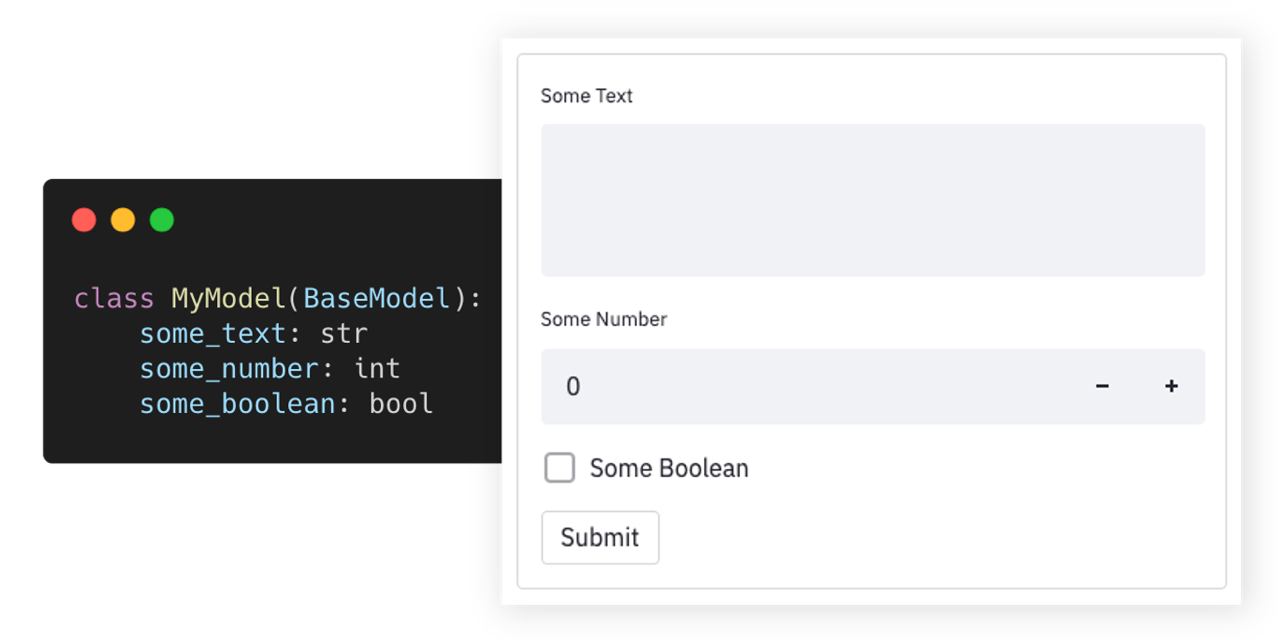
Streamlit-pydantic makes it easy to auto-generate UI elements from Pydantic models or dataclasses. Just define your data model and turn it into a full-fledged UI form. It supports data validation, nested models, and field limitations. Streamlit-pydantic can be easily integrated into any Streamlit app.
Beta Version: Only suggested for experimental usage.
Try out and explore various examples in our playground here.
Highlights
- 🪄 Auto-generated UI elements from Pydantic models & Dataclasses.
- 📇 Out-of-the-box data validation.
- 📑 Supports nested Pydantic models.
- 📏 Supports field limits and customizations.
- 🎈 Easy to integrate into any Streamlit app.
Getting Started
Installation
Requirements: Python 3.6+.
pip install streamlit-pydantic
Usage
-
Create a script (
my_script.py) with a Pydantic model and render it viapydantic_form:import streamlit as st from pydantic import BaseModel import streamlit_pydantic as sp class ExampleModel(BaseModel): some_text: str some_number: int some_boolean: bool data = sp.pydantic_form(key="my_form", model=ExampleModel) if data: st.json(data.json())
-
Run the streamlit server on the python script:
streamlit run my_script.py -
You can find additional examples in the examples section below.
Examples
👉 Try out and explore these examples in our playground here
The following collection of examples demonstrate how Streamlit Pydantic can be applied in more advanced scenarios. You can find additional - even more advanced - examples in the examples folder or in the playground.
Simple Form
import streamlit as st
from pydantic import BaseModel
import streamlit_pydantic as sp

class ExampleModel(BaseModel):
    some_text: str
    some_number: int
    some_boolean: bool

data = sp.pydantic_form(key="my_form", model=ExampleModel)
if data:
    st.json(data.json())
Date Validation
import streamlit as st
from pydantic import BaseModel, Field, HttpUrl
from pydantic.color import Color

import streamlit_pydantic as sp


class ExampleModel(BaseModel):
    url: HttpUrl
    color: Color
    email: str = Field(..., max_length=100, regex=r"^\S+@\S+$")


data = sp.pydantic_form(key="my_form", model=ExampleModel)
if data:
    st.json(data.json())
Dataclasses Support
import dataclasses
import json

import streamlit as st
from pydantic.json import pydantic_encoder

import streamlit_pydantic as sp


@dataclasses.dataclass
class ExampleModel:
    some_number: int
    some_boolean: bool
    some_text: str = "default input"


data = sp.pydantic_form(key="my_form", model=ExampleModel)
if data:
    st.json(json.dumps(data, default=pydantic_encoder))
Complex Nested Model
from enum import Enum
from typing import Set

import streamlit as st
from pydantic import BaseModel, Field, ValidationError, parse_obj_as

import streamlit_pydantic as sp


class OtherData(BaseModel):
    text: str
    integer: int


class SelectionValue(str, Enum):
    FOO = "foo"
    BAR = "bar"


class ExampleModel(BaseModel):
    long_text: str = Field(..., description="Unlimited text property")
    integer_in_range: int = Field(
        20,
        ge=10,
        lt=30,
        multiple_of=2,
        description="Number property with a limited range.",
    )
    single_selection: SelectionValue = Field(
        ..., description="Only select a single item from a set."
    )
    multi_selection: Set[SelectionValue] = Field(
        ..., description="Allows multiple items from a set."
    )
    single_object: OtherData = Field(
        ...,
        description="Another object embedded into this model.",
    )


data = sp.pydantic_form(key="my_form", model=ExampleModel)
if data:
    st.json(data.json())
Render Input
from pydantic import BaseModel

import streamlit_pydantic as sp


class ExampleModel(BaseModel):
    some_text: str
    some_number: int = 10  # Optional
    some_boolean: bool = True  # Option


input_data = sp.pydantic_input("model_input", ExampleModel, use_sidebar=True)
Render Output
import datetime

from pydantic import BaseModel, Field

import streamlit_pydantic as sp


class ExampleModel(BaseModel):
    text: str = Field(..., description="A text property")
    integer: int = Field(..., description="An integer property.")
    date: datetime.date = Field(..., description="A date.")


instance = ExampleModel(text="Some text", integer=40, date=datetime.date.today())
sp.pydantic_output(instance)
Custom Form
import streamlit as st
from pydantic import BaseModel

import streamlit_pydantic as sp


class ExampleModel(BaseModel):
    some_text: str
    some_number: int = 10
    some_boolean: bool = True


with st.form(key="pydantic_form"):
    sp.pydantic_input(key="my_input_model", model=ExampleModel)
    submit_button = st.form_submit_button(label="Submit")
Support & Feedback
| Type | Channel |
|---|---|
| 🚨 Bug Reports |  |
| 🎁 Feature Requests |  |
| 👩💻 Usage Questions |  |
| 📢 Announcements | |
Documentation
The API documentation can be found here. To generate UI elements, you can use the high-level pydantic_form method. Or the more flexible lower-level pydantic_input and pydantic_output methods. See the examples section on how to use those methods.
Contribution
- Pull requests are encouraged and always welcome. Read our contribution guidelines and check out help-wanted issues.
- Submit Github issues for any feature request and enhancement, bugs, or documentation problems.
- By participating in this project, you agree to abide by its Code of Conduct.
- The development section below contains information on how to build and test the project after you have implemented some changes.
Development
To build the project and run the style/linter checks, execute:
make install
make check
Run make help to see additional commands for development.
Licensed MIT. Created and maintained with ❤️ by developers from Berlin.
1 maintainer

Metadata
1 maintainer
Release files for streamlit-pydantic 0.6.0
For a detailed explanation of source distributions (sdists) and built distributions (wheels), please see the package formats documentation.
Source distribution (sdist)
| File | Size | Uploaded | Provenance | Actions |
|---|---|---|---|---|
| streamlit-pydantic-0.6.0.tar.gz | 22.2 kB | Without provenance | Details for streamlit-pydantic-0.6.0.tar.gz |
Built distribution (wheel)
| File | Interpreter | ABI | Platform | Actions Reset |
|---|---|---|---|---|
| streamlit_pydantic-0.6.0-py3-none-any.whl | Python 3 | none | any | Details for streamlit_pydantic-0.6.0-py3-none-any.whl |
Total release size: 40.4 kB
Release files / streamlit-pydantic-0.6.0.tar.gz
| Download URL | streamlit-pydantic-0.6.0.tar.gz |
|---|---|
| Size | 22.2 kB |
| Tags | Source |
|
SHA-256 checksum How to use checksums |
3bc5d51af085eb6791b360f569f1a541681ddcc51579b09a1e2ab54639b39d49
|
|
BLAKE2b-256 checksum How to use checksums |
8ada918863014e53f862a0158f97eca03d8107cd2de45d5e92ecc2b3a85d4f5d
|
| Upload date | |
|
Uploaded using Trusted Publishing? What is trusted publishing? |
No |
| Uploaded via |
twine/4.0.2 CPython/3.10.9
|
Release files / streamlit_pydantic-0.6.0-py3-none-any.whl
| Download URL | streamlit_pydantic-0.6.0-py3-none-any.whl |
|---|---|
| Size | 18.1 kB |
| Tags | Python 3 |
|
SHA-256 checksum How to use checksums |
7a69ec6519f5de1b21bd9737891c61d8fea33d7727824ab19c4c65d49f136304
|
|
BLAKE2b-256 checksum How to use checksums |
bc534bf8c20ebfd5fc60040d7d09777a983b54156af65978617edf56531abb6e
|
| Upload date | |
|
Uploaded using Trusted Publishing? What is trusted publishing? |
No |
| Uploaded via |
twine/4.0.2 CPython/3.10.9
|
Security for streamlit-pydantic 0.6.0
Provenance
Provenance describes where a file came from. On PyPI, provenance is shared via attestations, which provide a verifiable record of the build or publishing details. View details, limitations and caveats.
No provenance found
None of the files in this release were uploaded with provenance metadata.
A note on package security
PyPI is a repository for distributing packages, not a service for auditing them. While third-party security researchers and our staff do their best to detect and remove malicious packages, PyPI cannot guarantee the quality, security or suitability of any given package.
To learn more about protecting yourself from malicious actors, visit our package security documentation.














