
streamlit-stepper
A multi-step wizard component for Streamlit



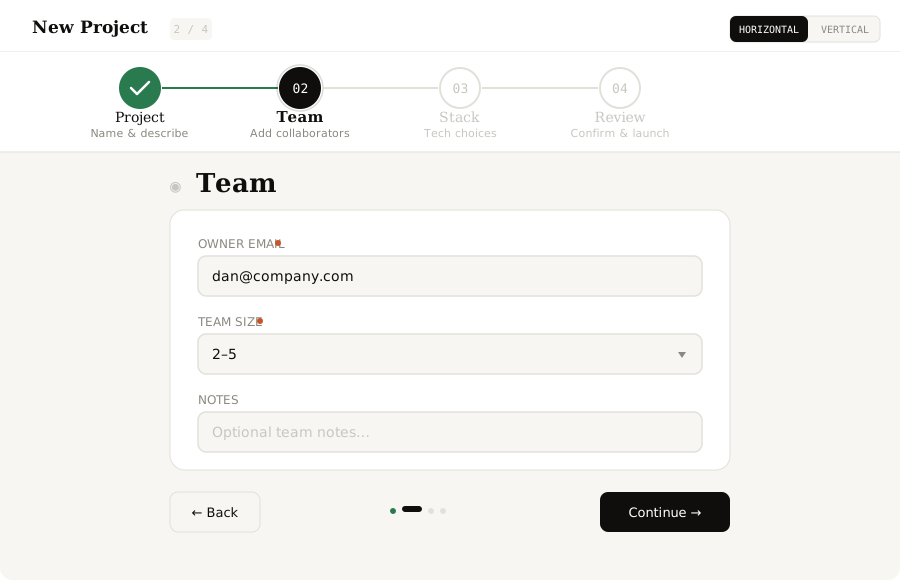
streamlit-stepper is a fully interactive multi-step wizard that runs inside any Streamlit application. Define steps with typed fields, get built-in validation, animated progress connectors, an auto-generated review step, and the final collected values back in Python — all with zero runtime dependencies beyond Streamlit.
Features
Step Navigation
- Horizontal orientation — tabs displayed across the top with animated fill connectors between steps
- Vertical orientation — sidebar-style step list; switchable at runtime via the
orientationparameter - Click-to-jump — click any previously completed step to jump back and edit
- Dot-strip navigation — a dot indicator at the bottom of each step shows overall progress
Form Fields
- Text inputs — single-line text fields with optional placeholder hints
- Textarea — multi-line text areas for longer content
- Select dropdowns — pick from a list of predefined options
- Required validation — blocks the Next button and shows inline error hints when required fields are empty
Review & Completion
- Auto-generated review step — any step with
"fields": []automatically renders a summary of all prior entries - Completion screen — displayed when the user clicks the final submit button
- Structured return value — all collected field values are returned to Python as a flat dictionary
Visual Design
- Animated connectors — fill lines between step indicators animate as the user progresses
- Step icons — each step displays a configurable icon character (e.g. "◈", "①", "→")
- Subtitles — secondary descriptive text below each step label
- Dark theme — consistent dark UI designed to match Streamlit's dark mode
Installation
pip install streamlit-stepper
Quick Start
import streamlit as st
from streamlit_stepper import st_stepper

steps = [
    {
        "label": "Project",
        "subtitle": "Name & describe",
        "icon": "◈",
        "fields": [
            {
                "key": "name",
                "label": "Project name",
                "type": "text",
                "placeholder": "e.g. Apollo Dashboard",
                "required": True,
            },
            {
                "key": "type",
                "label": "Project type",
                "type": "select",
                "options": ["Web App", "Data Pipeline", "ML Model", "API Service"],
                "required": True,
            },
        ],
    },
    {
        "label": "Team",
        "subtitle": "Add collaborators",
        "icon": "◉",
        "fields": [
            {
                "key": "owner",
                "label": "Owner email",
                "type": "text",
                "placeholder": "you@company.com",
                "required": True,
            },
            {
                "key": "size",
                "label": "Team size",
                "type": "select",
                "options": ["Solo", "2–5", "6–15", "15+"],
                "required": True,
            },
        ],
    },
    {
        "label": "Review",
        "subtitle": "Confirm & launch",
        "icon": "◆",
        "fields": [],
    },
]

result = st_stepper(steps, orientation="horizontal", key="wizard")

if result and result["completed"]:
    st.balloons()
    st.success(f"Created project: {result['values']['name']}")
    st.json(result["values"])
API Reference
st_stepper
st_stepper(
    steps: list[dict],
    orientation: str = "horizontal",
    key: str | None = None,
) -> dict | None
Parameters
| Parameter | Type | Default | Description |
|---|---|---|---|
steps |
list[dict] |
required | Step definitions. See step schema below. |
orientation |
str |
"horizontal" |
Layout of the step indicator. "horizontal" (tabs across top) or "vertical" (sidebar list). |
key |
str or None |
None |
An optional key that uniquely identifies this component. Required when placing multiple steppers on one page. |
Return Value
Returns a dict after each step interaction, or None before any interaction.
{
    "step":      int,    # index of the last completed step (0-based)
    "values":    dict,   # {field_key: entered_value} for all fields across all steps
    "completed": bool,   # True when the user clicks the final submit button
}
Data Structures
Step
{
    "label":    str,          # short name displayed in the step indicator (e.g. "Project")
    "subtitle": str,          # secondary text below the label
    "icon":     str,          # decorative character (e.g. "◈", "①", "→")
    "fields":   list[dict],   # field definitions for this step (empty = review step)
}
A step with "fields": [] automatically renders as a review summary of all prior steps.
Field
{
    "key":         str,          # returned as a key in result["values"]
    "label":       str,          # field display label
    "type":        str,          # "text" | "textarea" | "select"
    "placeholder": str,          # optional hint text (for text/textarea)
    "required":    bool,         # if True, blocks Next when empty
    "options":     list[str],    # required when type == "select"
}
| Field | Type | Description |
|---|---|---|
key |
str |
Unique field key. Appears in result["values"]. |
label |
str |
Display label shown above the input. |
type |
str |
One of "text", "textarea", or "select". |
placeholder |
str |
Hint text for text/textarea fields. Optional. |
required |
bool |
When True, the Next button is disabled until the field has a value. Inline error hints are shown. |
options |
list[str] |
List of choices. Required when type == "select". |
Usage Examples
Vertical Orientation
result = st_stepper(steps, orientation="vertical", key="wizard")
Multi-step Onboarding Form
import streamlit as st
from streamlit_stepper import st_stepper

steps = [
    {
        "label": "Account",
        "subtitle": "Basic info",
        "icon": "①",
        "fields": [
            {"key": "email", "label": "Email", "type": "text",
             "placeholder": "you@example.com", "required": True},
            {"key": "name",  "label": "Full name", "type": "text",
             "required": True},
        ],
    },
    {
        "label": "Preferences",
        "subtitle": "Customize",
        "icon": "②",
        "fields": [
            {"key": "role", "label": "Role", "type": "select",
             "options": ["Developer", "Designer", "PM", "Other"], "required": True},
            {"key": "bio", "label": "Short bio", "type": "textarea",
             "placeholder": "Tell us about yourself…"},
        ],
    },
    {
        "label": "Confirm",
        "subtitle": "Review & submit",
        "icon": "✓",
        "fields": [],
    },
]

result = st_stepper(steps, key="onboarding")

if result and result["completed"]:
    st.success(f"Welcome, {result['values']['name']}!")
    st.json(result["values"])
Collecting Values on Each Step
result = st_stepper(steps, key="wizard")

if result:
    st.write(f"Currently on step {result['step'] + 1} of {len(steps)}")
    st.write("Values collected so far:", result["values"])

    if result["completed"]:
        # Process final submission
        save_to_database(result["values"])
        st.success("Saved!")
Architecture
The component is built with React 18 communicating with Streamlit via the bidirectional component API (streamlit-component-lib).
┌──────────────────────────────────────────────────────┐
│  Python (Streamlit)                                  │
│  st_stepper(steps, orientation, key)                 │
│       ↓ args                ↑ componentValue         │
├──────────────────────────────────────────────────────┤
│  React Frontend (iframe)                             │
│  ┌────────────────────────────────────────────────┐  │
│  │  Step Indicator (horizontal or vertical)       │  │
│  │  [◈ Project]──────[◉ Team]──────[◆ Review]    │  │
│  │   ✓ done     ════  active  ────  upcoming     │  │
│  ├────────────────────────────────────────────────┤  │
│  │  Step Content                                  │  │
│  │  ┌────────────────────────────────────┐        │  │
│  │  │  Field: Project name   [________] │        │  │
│  │  │  Field: Project type   [▼ select] │        │  │
│  │  └────────────────────────────────────┘        │  │
│  ├────────────────────────────────────────────────┤  │
│  │  Navigation: [Back]  ● ● ○  [Next]            │  │
│  └────────────────────────────────────────────────┘  │
└──────────────────────────────────────────────────────┘
- Step indicator — renders horizontal tabs or a vertical sidebar with animated fill connectors
- Validation engine — checks required fields before allowing navigation to the next step
- Review renderer — automatically summarizes all prior field values when a step has empty
fields - State sync — every navigation action calls
Streamlit.setComponentValue()with the current step index and all collected values
Browser Compatibility
| Browser | Status |
|---|---|
| Chrome / Edge 90+ | ✅ Full support |
| Firefox 90+ | ✅ Full support |
| Safari 15+ | ✅ Full support |
| Mobile browsers | ✅ Responsive layout |
Requirements
- Python 3.8+
- Streamlit ≥ 1.28.0
License
MIT — see LICENSE for details.
Links
1 maintainer

Metadata
1 maintainer
Release files for streamlit-stepper 0.3.2
For a detailed explanation of source distributions (sdists) and built distributions (wheels), please see the package formats documentation.
Source distribution (sdist)
| File | Size | Uploaded | |
|---|---|---|---|
| streamlit_stepper-0.3.2.tar.gz | 415.3 kB | Details |
Built distribution (wheel)
| File | Interpreter | ABI | Platform | Reset |
|---|---|---|---|---|
| streamlit_stepper-0.3.2-py3-none-any.whl | Python 3 | none | any | Details |
Total release size: 830.6 kB
Release files / streamlit_stepper-0.3.2.tar.gz
| Download URL | streamlit_stepper-0.3.2.tar.gz |
|---|---|
| Size | 415.3 kB |
| Tags | Source |
|
SHA-256 checksum How to use checksums |
13df5a1e785fabdbbacc6330799da5b91a1a9231d29bad794b5d313e11c973ae
|
|
BLAKE2b-256 checksum How to use checksums |
a1a5fdf9f2969e004e1697c4f7c31a4758854c1422258454d50a50696858a513
|
| Upload date | |
|
Uploaded using Trusted Publishing? What is trusted publishing? |
No |
| Uploaded via |
twine/6.2.0 CPython/3.11.9
|
Release files / streamlit_stepper-0.3.2-py3-none-any.whl
| Download URL | streamlit_stepper-0.3.2-py3-none-any.whl |
|---|---|
| Size | 415.3 kB |
| Tags | Python 3 |
|
SHA-256 checksum How to use checksums |
bc038400446d52c69c6d5efe8f7473252cbd2625d07cb0a4877b59d002683749
|
|
BLAKE2b-256 checksum How to use checksums |
104bcc3eb4c6ae98ce1937606c60fca1db4dcee71e49a6b8a437174bfe108ed2
|
| Upload date | |
|
Uploaded using Trusted Publishing? What is trusted publishing? |
No |
| Uploaded via |
twine/6.2.0 CPython/3.11.9
|














