
streamlit-table-filter
A table-based alternative to Streamlit's multiselect widget.
I like building dashboards in Streamlit, but I've never been a big fan of using dropdowns as filters, especially when there are a lot of options to go through.
With streamlit-table-filter, you can see your options in a table, select or deselect them with checkboxes, and display extra information alongside each option (e.g. the number of orders per country or plays per artist).
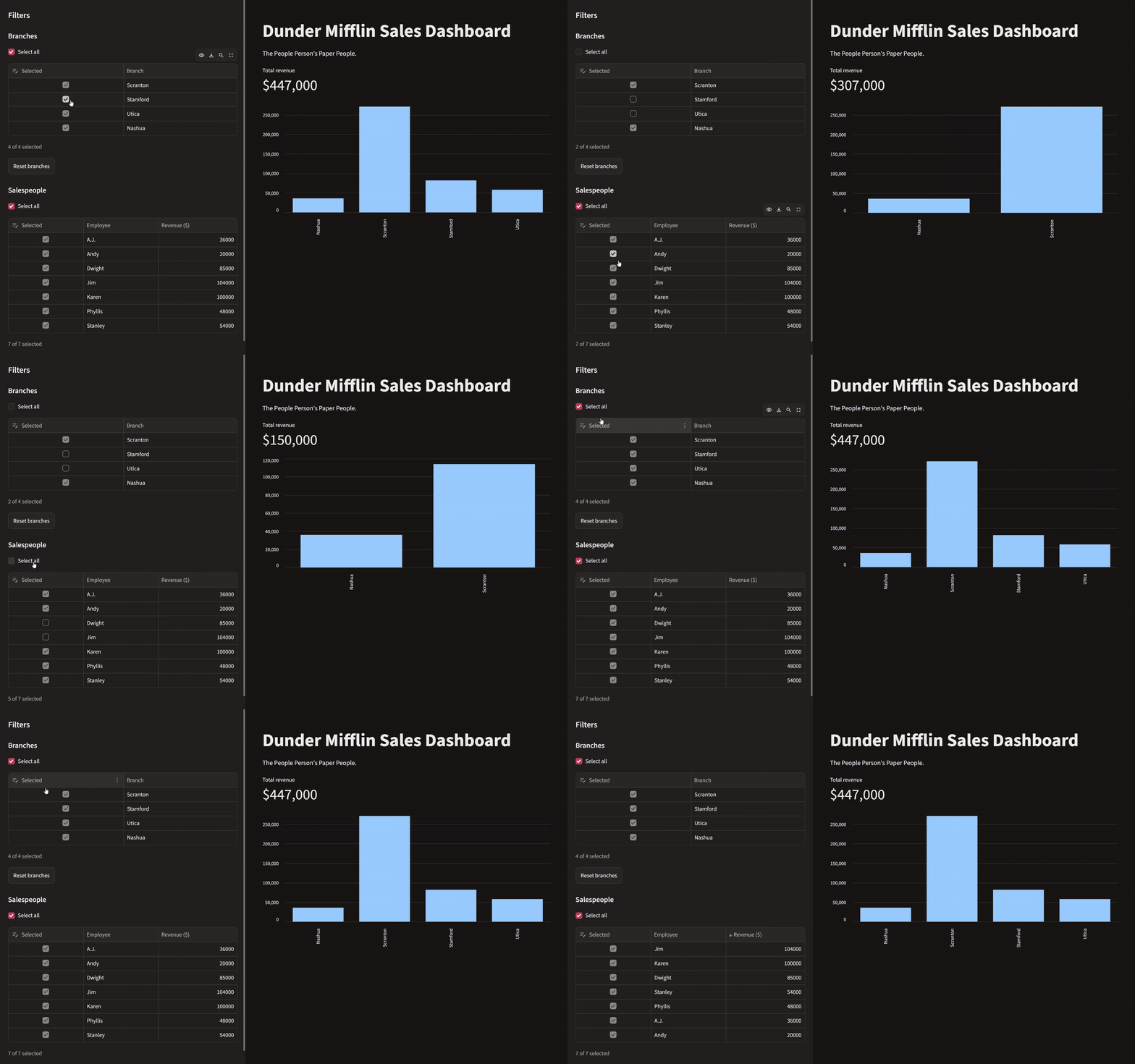
Installation
pip install streamlit-table-filter
Getting started
import streamlit as st
from streamlit_table_filter import table_filter

countries = table_filter(
    ["Germany", "France", "Portugal", "Spain"],
    key="countries",
    label="Country",
)

st.write(countries)
That's it. You get back a list of the selected values, which you can use to filter your data just as you would with st.multiselect.
All options are selected by default. You can select or deselect all of them at once, and your selections are kept across reruns.
Using a DataFrame
Sometimes it's useful to give users a bit more context before they select an option. For example, when filtering by music genre, you might want to show how many times each genre was played.
import pandas as pd
from streamlit_table_filter import table_filter

genres = pd.DataFrame({
    "genre": ["Rock", "Jazz", "Soul"],
    "plays": [120, 85, 42],
})

selected_genres = table_filter(
    genres,
    key="genres",
    id_column="genre",
    column_config={"genre": "Genre", "plays": "Plays"},
)
The filter displays both columns but only returns the values from id_column. You can also use a separate ID column and hide it with display_columns.
Polars DataFrames work the same way. To install Polars with the package, run pip install "streamlit-table-filter[polars]".
Using it in a dashboard
Put the filter in the sidebar and use its output to filter your data:
import pandas as pd
import streamlit as st
from streamlit_table_filter import table_filter

sales = pd.DataFrame({
    "country": ["Germany", "France", "Portugal", "Spain"],
    "revenue": [1200, 850, 620, 940],
})

with st.sidebar:
    countries = table_filter(
        sales["country"].unique().tolist(),
        key="countries",
        label="Country",
    )

filtered_sales = sales[sales["country"].isin(countries)]

st.metric("Total revenue", f"€{filtered_sales['revenue'].sum():,.0f}")
st.dataframe(filtered_sales)
You can use as many filters as you need. Just give each one a different key.
Customization
Most of the time, you'll only need options and key. Here are the other options available:
| Parameter | What it does |
|---|---|
options |
A list of unique, non-null, hashable values, a pandas DataFrame or a Polars DataFrame. |
key |
A unique name for the filter (required). |
label |
The column heading when passing a list. |
id_column |
The column to return values from (required for DataFrames). IDs must be unique, non-null and hashable. |
display_columns |
Choose which DataFrame columns to show and in which order. Defaults to all columns. |
initial_selection |
Values selected on first render or reset. Defaults to all options. Pass [] to start with none. |
column_config |
Rename or format columns using Streamlit's column configuration. |
selection_label |
Heading of the checkbox column. Defaults to "Selected". |
width, height |
Table dimensions in pixels. Defaults to Streamlit's sizing behavior. |
If you change the available options, the filter keeps the existing selections that are still available and selects any newly available options. It returns the selected values in the order you supplied them. If nothing is selected, it returns [].
Resetting a filter
If your dashboard has a reset button, you can restore a filter's initial selection using reset_table_filter:
from streamlit_table_filter import reset_table_filter

st.button("Reset countries", on_click=reset_table_filter, args=("countries",))
Use this with the filter's key. The reset takes effect the next time the filter is rendered.
Try it out
The repository includes a small interactive dashboard in examples/demo.py. From the repository directory, run:
pip install .
streamlit run examples/demo.py
Requires Python 3.10+ and Streamlit 1.40+.
License
1 maintainer

Metadata
1 maintainer
Release files for streamlit-table-filter 0.1.0
For a detailed explanation of source distributions (sdists) and built distributions (wheels), please see the package formats documentation.
Source distribution (sdist)
| File | Size | Uploaded | Provenance | Actions |
|---|---|---|---|---|
| streamlit_table_filter-0.1.0.tar.gz | 1.4 MB | With provenance | Details for streamlit_table_filter-0.1.0.tar.gz |
Built distribution (wheel)
| File | Interpreter | ABI | Platform | Actions Reset |
|---|---|---|---|---|
| streamlit_table_filter-0.1.0-py3-none-any.whl | Python 3 | none | any | Details for streamlit_table_filter-0.1.0-py3-none-any.whl |
Total release size: 1.4 MB
Release files / streamlit_table_filter-0.1.0.tar.gz
| Download URL | streamlit_table_filter-0.1.0.tar.gz |
|---|---|
| Size | 1.4 MB |
| Tags | Source |
|
SHA-256 checksum How to use checksums |
aa50223819904af61f651e19f9dabb236f0ffe7297c3580f984a713848c845d0
|
|
BLAKE2b-256 checksum How to use checksums |
71baa3ec27d176fd2be3a558a4cd529d082927fcb62da8e0b8e8530743b1bef8
|
| Upload date | |
|
Uploaded using Trusted Publishing? What is trusted publishing? |
Yes |
| Uploaded via |
twine/7.0.0 CPython/3.13.16
|
Provenance
Provenance describes where a file came from. On PyPI, provenance is shared via attestations, which provide a verifiable record of the build or publishing details. View details, limitations and caveats.


PyPI Publish Attestation
PyPI verified that this artifact, at this checksum, originated from the publisher listed below.
Signed by GitHub Actions, verified by PyPI on Nov 26, 2026.
Transparency logRelease files / streamlit_table_filter-0.1.0-py3-none-any.whl
| Download URL | streamlit_table_filter-0.1.0-py3-none-any.whl |
|---|---|
| Size | 6.5 kB |
| Tags | Python 3 |
|
SHA-256 checksum How to use checksums |
2d5835c5e68653cb086131b1b21ea696d5d12cd7a6dc817307aa8d8d2f2530cd
|
|
BLAKE2b-256 checksum How to use checksums |
2a1d46222c7cecb32ac4a4c8347ec01e94c20c8a0a061e7dd2c5785959ed6197
|
| Upload date | |
|
Uploaded using Trusted Publishing? What is trusted publishing? |
Yes |
| Uploaded via |
twine/7.0.0 CPython/3.13.16
|
Provenance
Provenance describes where a file came from. On PyPI, provenance is shared via attestations, which provide a verifiable record of the build or publishing details. View details, limitations and caveats.
PyPI Publish Attestation
PyPI verified that this artifact, at this checksum, originated from the publisher listed below.
Signed by GitHub Actions, verified by PyPI on Nov 26, 2026.
Transparency logSecurity for streamlit-table-filter 0.1.0
Provenance
Provenance describes where a file came from. On PyPI, provenance is shared via attestations, which provide a verifiable record of the build or publishing details. View details, limitations and caveats.
Full provenance
Both files in this release have been uploaded with provenance metadata.
Attestation for streamlit_table_filter-0.1.0.tar.gz
PyPI Publish Attestation
PyPI verified that this artifact, at this checksum, originated from the publisher listed below.
Signed by GitHub Actions, verified by PyPI on Nov 26, 2026.
Transparency logA note on package security
PyPI is a repository for distributing packages, not a service for auditing them. While third-party security researchers and our staff do their best to detect and remove malicious packages, PyPI cannot guarantee the quality, security or suitability of any given package.
To learn more about protecting yourself from malicious actors, visit our package security documentation.













