
STREONOR MCP
Set up your STREONOR stream controller from Claude or Codex. Build scenes, assign shortcuts, and choose icons by describing what you want.
“Make a Work scene with buttons for email, calendar, and GitHub. Copy the volume knob from Daily.”
Get started · Devices · Examples · Changelog
An independent community project. Unaffiliated with STREONOR.
Get started
-
Install the STREONOR app on Windows, connect your STREONOR device, and install uv.
-
Run the command for your client.
Codex
codex mcp add streonor -- uvx --python 3.12 streonor-mcp==0.8.4
Claude Code
claude mcp add --transport stdio --scope user streonor -- uvx --python 3.12 streonor-mcp==0.8.4
-
Restart your client and ask: “Use STREONOR MCP to list my scenes.”
The commands install from PyPI without Git.
Claude Desktop and other clients · macOS and Linux exported profiles
What you can do
- Build or edit a scene. Fill a page with app launchers, shortcuts, knobs, or multi-step Action Flows. The MCP previews changes and keeps backups.
- Give each state its own icon. Use an installed icon or supply your own, including separate images for a Hotkey Switch.
- Keep the Windows app open. Try experimental live icon editing in the original S6 Mini scene or import a full layout as a scene copy. Other edits to the original scene use an app restart. Live editing setup.
Devices
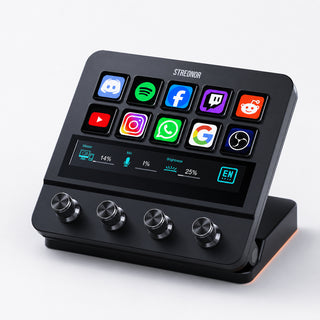
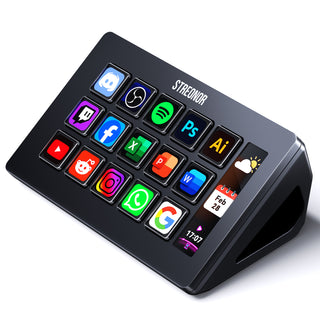
The S6 Mini is verified on Windows. Have a different model? Try the setup above and start by listing your scenes. Share your model and results to help us document device support.
| Product photo | Model | MCP support |
|---|---|---|
 |
S6 Mini | Supported and tested on Windows |
 |
S10 Pro | Contribute today |
 |
S15 Standard | Contribute today |
 |
S32 Max | Contribute today |
Product photos are served by the STREONOR storefront.
Available actions
The MCP creates actions from your installed Toolbox. Ask it to list the actions available on your computer. Some actions need extra plugin settings or connections. Configure Create Folder in the STREONOR app.
See the action types found on one installation
| Plugin | Action types |
|---|---|
| Brightness | Brightness, devsleep |
| Browser | Back, Collect, Forward, Refresh |
| Calendario | Calendario |
| close | Close |
| ETS2 Hotkey | Boosting Speed, Cruise Control, Double Flashing Light, Downshift, Flashing Headlights, Handbrake, Headlight, High Beam, Horns, Ignition/Shutdown, Left Turn Signal, Reduce Speed, Right Turn Signal, Upshift, Windshield Wiper |
| Go back | Go back |
| Hotkey | Hotkey |
| HotkeySwitch | HotkeySwitch |
| K1ProLEDLight | LED-, LED+, LEDMODECHANGE, LEDSPEED-, LEDSPEED+, WinqMac |
| KnobOperatingGroup | KnobOperatingGroup |
| Mouse event | Mouse event |
| Multi Action | Delay, Multi Action, Multi Action ActionTrigger, Multi Action ActionWheel, Multi Action LunBo, Multi Action Toggle |
| Multimedia | Multimedia, SystemVolume |
| musicalrhythm | 图谱1, 图谱2, 图谱3, 图谱4, 图谱5 |
| Network | UDP |
| OBS Studio | Audio Mixer, Record, Scene, Screenshot, Source Visibility, Stream, Studio Mode, Transition, Virtual camera, 绿幕背景图 DN, 绿幕背景图 UP |
| OBS Tool | Browser Source, CPU Usage, Dropped Frames, Filter Switch, Image Settings, Input Monitor Settings, Input Mute Toggle, Input Volume, Input Volume Control, Input Volume Settings, Instant Replay, Next Scene, Previous Scene, Remote Recording Start/Stop/Pause, Remote Streaming Start/Stop, Scene Switcher, Set Profile, Set Scene Collection, Set Transition, Source Animation, Source Visibility, Studio Mode Toggle, Video Playback, Virtual Camera |
| Open | Open, OpenApps |
| Pages | change page, Go to page, Next page, Page Indicator, Previous page |
| Password | Password |
| Quick Control | Calculator, Control panel, Display desktop, Emoticons, Home page, Increase the volume, Lower the volume, Mail, Microphone, Music, Mute, Notification, Search bar, Sleep, Speech recognition, Switch screen, Task Manager |
| Scene Shift | Scene Shift |
| Soundboard | Play Audio, Stop Audio |
| Super Hotkeys | Super Hotkeys |
| Text | Text |
| Time Options | Countdown, Timer, World Time |
| Touchbar | Decrease screen brightness, Desktop Saver, Dictation, Dispatch Center, DND Mode, Fast Forward, Fast Rewind, Focus On Search, Increase screen brightness, Input Method, Launchpad, Mute, Next Track, Notification Center, Play/Pause, Previous Track, Screen brightness, Screen Lock, Screenshot, Show Desktop, Siri, Sleep, Volume, Volume down, Volume up |
| Useful notes | Record to-do, Remember things |
| Visual Studio Code | Change Language, Create Terminal, Execute Command, Execute Terminal Command, Insert Snippet, Open Folder |
| vMix | Shortcut |
| Weather query | Weather query |
| Website | Website |
| YouTube | Chat Message, Viewers |
Learn more
Example workflows · Tool reference · Capability coverage · Contribute
License
The original Streonor MCP code and documentation are available under the MIT License. STREONOR’s name identifies compatible products. The vendor software, trademarks, and linked material belong to their respective owners and are outside the scope of this license.
1 maintainer

Metadata
1 maintainer
Release files for streonor-mcp 0.8.4
For a detailed explanation of source distributions (sdists) and built distributions (wheels), please see the package formats documentation.
Source distribution (sdist)
| File | Size | Uploaded | Provenance | Actions |
|---|---|---|---|---|
| streonor_mcp-0.8.4.tar.gz | 91.5 kB | With provenance | Details for streonor_mcp-0.8.4.tar.gz |
Built distribution (wheel)
| File | Interpreter | ABI | Platform | Actions Reset |
|---|---|---|---|---|
| streonor_mcp-0.8.4-py3-none-any.whl | Python 3 | none | any | Details for streonor_mcp-0.8.4-py3-none-any.whl |
Total release size: 141.9 kB
Release files / streonor_mcp-0.8.4.tar.gz
| Download URL | streonor_mcp-0.8.4.tar.gz |
|---|---|
| Size | 91.5 kB |
| Tags | Source |
|
SHA-256 checksum How to use checksums |
8271cd46dabf1d435f780f93a189ba6263cb25f00c214c930bdf81b278ed91ce
|
|
BLAKE2b-256 checksum How to use checksums |
88b4379e034a318752bc8890bd5f07cd37bb34fb6b4aef49eb41bdf88e6d7b57
|
| Upload date | |
|
Uploaded using Trusted Publishing? What is trusted publishing? |
Yes |
| Uploaded via |
twine/6.1.0 CPython/3.13.7
|
Provenance
Provenance describes where a file came from. On PyPI, provenance is shared via attestations, which provide a verifiable record of the build or publishing details. View details, limitations and caveats.


PyPI Publish Attestation
PyPI verified that this artifact, at this checksum, originated from the publisher listed below.
Signed by GitHub Actions, verified by PyPI on Nov 21, 2026.
Transparency logRelease files / streonor_mcp-0.8.4-py3-none-any.whl
| Download URL | streonor_mcp-0.8.4-py3-none-any.whl |
|---|---|
| Size | 50.4 kB |
| Tags | Python 3 |
|
SHA-256 checksum How to use checksums |
25c5397dbfce671bfb068e125572f0e66690995eaaeae0cc67d8e792af2e0821
|
|
BLAKE2b-256 checksum How to use checksums |
fab5aee0cfef457199fe57a6b923c68ffe3b82000a74bf5443aa82e878b62efe
|
| Upload date | |
|
Uploaded using Trusted Publishing? What is trusted publishing? |
Yes |
| Uploaded via |
twine/6.1.0 CPython/3.13.7
|
Provenance
Provenance describes where a file came from. On PyPI, provenance is shared via attestations, which provide a verifiable record of the build or publishing details. View details, limitations and caveats.
PyPI Publish Attestation
PyPI verified that this artifact, at this checksum, originated from the publisher listed below.
Signed by GitHub Actions, verified by PyPI on Nov 21, 2026.
Transparency logSecurity for streonor-mcp 0.8.4
Provenance
Provenance describes where a file came from. On PyPI, provenance is shared via attestations, which provide a verifiable record of the build or publishing details. View details, limitations and caveats.
Full provenance
Both files in this release have been uploaded with provenance metadata.
Attestation for streonor_mcp-0.8.4.tar.gz
PyPI Publish Attestation
PyPI verified that this artifact, at this checksum, originated from the publisher listed below.
Signed by GitHub Actions, verified by PyPI on Nov 21, 2026.
Transparency logA note on package security
PyPI is a repository for distributing packages, not a service for auditing them. While third-party security researchers and our staff do their best to detect and remove malicious packages, PyPI cannot guarantee the quality, security or suitability of any given package.
To learn more about protecting yourself from malicious actors, visit our package security documentation.














