
stresstify is a Python package designed for retrieving system information and performing stress tests on CPU, RAM, and disk. It provides detailed CPU information, including name, core count, frequency, and usage, as well as memory and disk usage statistics. The package includes stress tests such as CPU-intensive calculations across multiple cores, continuous RAM allocation until failure, and disk write speed measurement. The author is not responsible for any hardware damage caused by excessive load.

Project description
Stresstify
Stresstify is a Python module created specifically for stress testing of CPU, RAM, and disk. It also provides tools to monitor the state of these components.
The module includes the main StressTest class with several methods, as well as additional standalone functions.
The command to install the module is pip install stresstify
RAM Test
The ram_test() method performs a simple stress test on the system's RAM by loading files of approximately 8 MB into memory. When using debug=True, it records the elapsed time and memory usage percentage for each iteration. The size parameter defines how many MB will be added per iteration, with a default value of 8.
import stresstify
root = stresstify.StressTest(debug=True)
result = root.ram_test()
print(result)
Output:
{'elapsed_time': 32, 'ram_used': {0.03: '59.80%', 0.05: '60.00%', 0.07: '60.10%', 0.09: '60.30%', 0.10: '100%'}}
Memory Test
The memory_test() method checks the disk write and read speeds by creating a temporary 1 GB binary file, which is immediately deleted. With debug=True, it displays the average write speed and average write time; with debug=False, it outputs only the values from the last iteration. Below are the key values in the dictionary and their meanings:
average_write_time: Average time taken to write the data in seconds.average_read_speed: Average read speed in MB/s.read_average_time: Average time taken to read the data in seconds.
import stresstify
root = stresstify.StressTest(debug=True)
result = root.memory_test()
print(result)
Output:
{'average_speed': 1189.33, 'average_time': 0.86}
CPU Test
The cpu_test() function creates a high CPU load by multiplying large matrices on each other. By default, the parameter size=11585, which is equal to about 1 gb of data for multiplications, also by default iterations=11, which means that the processor will perform 10 such tasks, which will be divided to all processor cores automatically. When you output the result of the function, you will see a dictionary with the contents:
average_cpu_load: Average CPU load.average_cpu_freq: Average CPU frequency.cpu_load_dict: A dictionary with the key "start" representing the initial CPU load, followed by the load for each iteration.cpu_freq_dict: A dictionary with the key "start" representing the initial CPU frequency, followed by the frequency for each iteration.time_dict: The elapsed time for each iteration. (Note: The time values might not strictly increase, as different cores may complete tasks at varying speeds.) Parameters:size: Data capacity (default is 1 GB).iterations: Number of iterations for the load (distributed to all processor cores).debug: Default is False, but when set to True, provides additional information during function execution.visualize: Default is False. If set to True, it displays plots (works withdebug=True).x_label: Optional parameter to add text to the x-axis of the plot.y_label: Optional parameter to add text to the y-axis of the plot.title: Optional parameter to add a title to the chart.plot_type: Ifplot_type="window", it will open a window with the chart. Ifplot_type="console", it will display the chart in the console.
import stresstify
if __name__ == '__main__':
    root = stresstify.StressTest(debug=True)
    result = root.cpu_test()
    print(result)
Output:
{'average_cpu_load': 23.37, 'average_cpu_freq': 2409.09, 'average_time': 25.74, 'cpu_load_dict': {'start': 3.1, 1: 23.8, 2: 23.3, 3: 34.6, 4: 33.1, 5: 22.4, 6: 22.5, 7: 27.8, 8: 21.9, 9: 22.2, 10: 22.4}, 'cpu_freq_dict': {'start': 2500.0, 1: 2500.0, 2: 2500.0, 3: 2500.0, 4: 2500.0, 5: 2500.0, 6: 1500.0, 7: 2500.0, 8: 2500.0, 9: 2500.0, 10: 2500.0}, 'time_dict': {1: 25.84, 2: 25.91, 3: 25.44, 4: 25.41, 5: 26.0, 6: 25.82, 7: 25.43, 8: 25.95, 9: 25.88, 10: 25.69}}
CPU Info
The standalone function cpu_info() provides detailed information about the processor:
cpu_name: The name of the processor.physical_cores: Number of physical cores.logical_cores: Number of logical cores.max_frequency: Maximum CPU frequency.min_frequency: Minimum CPU frequency.current_frequency: Current CPU frequency.cpu_percent: A list showing the load percentage for each core.
import stresstify
root = stresstify.cpu_info()
print(root)
Output:
{'cpu_name': '12th Gen Intel(R) Core(TM) i5-12450H', 'physical_cores': 8, 'logical_cores': 12, 'max_frequency': 2500.0, 'min_frequency': 0.0, 'current_frequency': 1500.0, 'cpu_percent': [9.1, 47.8, 22.2, 13.8, 23.8, 13.6, 25.4, 13.6, 15.2, 15.6, 16.7, 16.4]}
RAM Info
The memory_info() function retrieves details about the system's RAM:
Total_GB: Total RAM in gigabytes.Used_GB: Amount of RAM currently used (in gigabytes).Free_GB: Amount of free RAM (in gigabytes).Percent: Percentage of RAM utilization.
import stresstify
root = stresstify.memory_info()
print(root)
Output:
{'Total_GB': 15.710990905761719, 'Used_GB': 10.429752349853516, 'Free_GB': 5.280986785888672, 'Percent': 66.4}
Disk Info
The disk_info() function displays information about each disk partition. For each partition, it provides:
mountpoint: The path where the partition is mounted (e.g., "C:", "/mnt/data").total_size_GB: Total size of the partition in gigabytes.used_size_GB: Used space on the partition in gigabytes.free_size_GB: Free space on the partition in gigabytes.usage_percent: Percentage of the partition's used space.
import stresstify
root = stresstify.disk_info()
print(root)
Output:
{'C:\\': {'mountpoint': 'C:\\', 'total_size_GB': 181.64, 'used_size_GB': 157.15, 'free_size_GB': 24.49, 'usage_percent': 86.5}, 'D:\\': {'mountpoint': 'D:\\', 'total_size_GB': 214.45, 'used_size_GB': 168.92, 'free_size_GB': 45.53, 'usage_percent': 78.8}, 'E:\\': {'mountpoint': 'E:\\', 'total_size_GB': 80.0, 'used_size_GB': 16.71, 'free_size_GB': 63.29, 'usage_percent': 20.9}}
Plot
The plot() method is used for quickly creating plots that can be displayed in the console or opened in a separate window. The method supports a couple of parameters:
x: This parameter accepts ONLY a list with float elements inside. It is used for the x-coordinate values.
y: This parameter accepts ONLY a list with float elements inside. It is used for the y-coordinate values.
x_label: Label for the x-axis.
y_label: Label for the y-axis.
title: Title label.
type: This parameter accepts console and window. When set to console, the program will display the plot in the console, and when set to window, it will open a window with the plot.
import stresstify
if __name__ == '__main__':
    root = stresstify.StressTest(debug=True)
    result = root.cpu_test(iterations=8)
    x = list(result['time_dict'].keys())
    y = list(result['cpu_load_dict'].values())[1:]
    stresstify.plot(x, y, x_label='Time', y_label='CPU %', title='CPU Test', type='window') # or type='console'
Output:
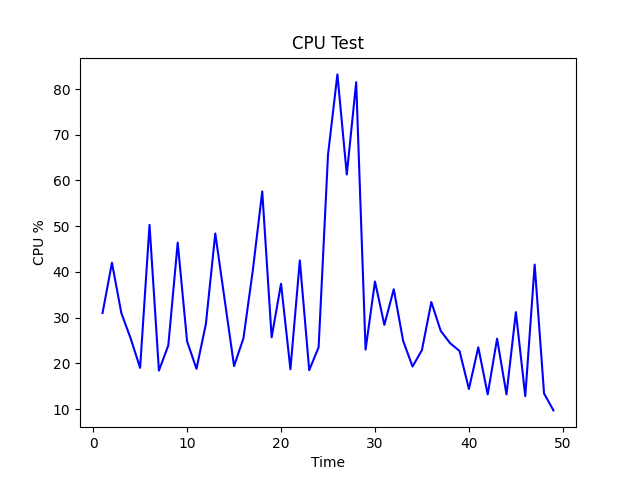
                                      CPU Test
    ┌──────────────────────────────────────────────────────────────────────────┐
38.5┤        *                                                                 │
    │       **                                                                 │
    │       **                                                                 │
34.9┤      *  *                                                                │
    │      *  *                                                                │
    │     *    *                                                               │
31.3┤     *    *                                                               │
    │    *      *                                                              │
27.6┤    *      *                                                              │
    │   *        *                                                             │
    │   *        *                                                             │
24.0┤  *          *                                                            │
    │  *          *                                                            │
    │ *            *                                                           │
20.4┤ *            *                                                           │
    │*              *                                                          │
    │*              *        *                                        *        │
16.8┤                ******** **************************************** ********│
    └┬─────────────────┬──────────────────┬─────────────────┬─────────────────┬┘
    1.0               3.2                5.5               7.8             10.0
CPU %                                   Time
Project Source Code


Download files
Download the file for your platform. If you're not sure which to choose, learn more about installing packages.
Source Distribution
Built Distribution
Filter files by name, interpreter, ABI, and platform.
If you're not sure about the file name format, learn more about wheel file names.
Copy a direct link to the current filters
File details
Details for the file stresstify-0.1.1.tar.gz.
File metadata
- Download URL: stresstify-0.1.1.tar.gz
- Upload date:
- Size: 7.3 kB
- Tags: Source
- Uploaded using Trusted Publishing? No
- Uploaded via: twine/6.1.0 CPython/3.12.0
File hashes
| Algorithm | Hash digest | |
|---|---|---|
| SHA256 |
d55f0a6da55b03c1d69933d727ce516d22c761edebab671a56db547adc1cc7a9
|
|
| MD5 |
78a93efe9619e7331d7519b90e56188c
|
|
| BLAKE2b-256 |
4c103463c31a7a624453043c93f8b2120b6f689d43eff7dc8b39af1290508c71
|
File details
Details for the file stresstify-0.1.1-py3-none-any.whl.
File metadata
- Download URL: stresstify-0.1.1-py3-none-any.whl
- Upload date:
- Size: 8.0 kB
- Tags: Python 3
- Uploaded using Trusted Publishing? No
- Uploaded via: twine/6.1.0 CPython/3.12.0
File hashes
| Algorithm | Hash digest | |
|---|---|---|
| SHA256 |
2b43a9548e63d2b0c035b240294bdcd5c063302acb7da833b0e6e5917f4dc597
|
|
| MD5 |
3266f2a6e74e7456481003a5510af069
|
|
| BLAKE2b-256 |
b09f457f5307edfca5496248808f78629b526a36a39f87f3f05aa71801428c72
|






