
strgen
Overview
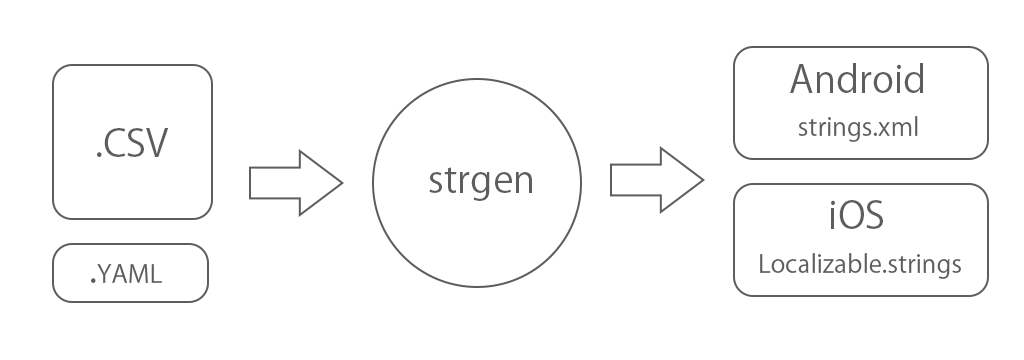
The strgen can create iOS / Android strings file from CSV file.
Install
https://pypi.org/project/strgen/
The strgen can install using pip.
$ pip install strgen
Usage
1. Prepare input files
Prepare input files.
CSV file
The source file of multi language strings.
YAML file
The config file.
2. Run strgen
$ strgen --config strgen.yml
Run with argument of YAML file path.
If not specified, strgen.yml in the current directory will be used.
The following files will be generated under the build folder.
- build/
- apple/
- LocalizableStrings.swift
- lproj/
- en.lproj/Localizable.strings
- ja-JP.lproj/Localizable.strings
- ...
- google/
- values-en/strings.xml
- values-ja-JP/strings.xml
- ...
- apple/
in apple folder(for iOS/macOS), LocalizableStrings.swift that enumerated the key names is also generated.
import Foundation

class LocalizableStrings {

    enum Key: String {
        case yes
        case no
        case cancel
        case next
        case close
        case escape_test
        case parameter_google
        case parameter_apple
    }

}
Sample
There are sample that you can easily try.
- Install
strgen$ pip install strgen
- Clone project.
$ git clone https://github.com/daisuke-t-jp/strgen
- Change the current directory to
strgen/sample. - Run
$ strgen --config strgen.yml
- Check
buildfolder.
Input file format
CSV format
| id | en | ja-JP | zh-Hans | zh-Hant | ... |
|---|---|---|---|---|---|
| hello_world | Hello world | こんにちは世界 | 你好,世界 | 你好,世界 | ... |
| yes | Yes | はい | 是 | 是 | ... |
| no | No | いいえ | 没有 | 沒有 | ... |
| cancel | Cancel | キャンセル | 取消 | 取消 | ... |
| next | Next | キャンセル | 下一个 | 下一個 | ... |
| close | Next | キャンセル | 下一个 | 下一個 | ... |
| escape_test | escape <'""&?@> test | ||||
| parameter_google | Parameter %1$s, %2$s. | ||||
| parameter_apple | Parameter %1$@, %2$@. |
Header
Start the header line with id.
Next, add the language (language and country code).
Body
The id string will be the key to reference on iOS / Android.
Enter the localized string for each language.
You can leave the localized string blank.
In that case, no localized strings are generated for that language.
YAML format
strgen.yml
general:
  input_file_path: ./source.csv
  output_path: ./
google:
  enabled: true
  strings_file_name: strings.xml
apple:
  enabled: true
  strings_file_name: Localizable.strings
  swift_file_name: LocalizableStrings.swift
  swift_class_name: LocalizableStrings
general
input_file_path (Required)
Input CSV file path.
output_path (Optional)
Output path.
The default directory will be the same as the YAML file.
google
enabled (Optional)
Enabled flag for generate output files.
Default is true.
strings_file_name (Optional)
Generated strings file's name.
Default is strings.xml.
apple
enabled (Optional)
Enabled flag for generate output files.
Default is true.
strings_file_name (Optional)
Generated strings file's name.
Default is Localizable.strings.
swift_file_name (Optional)
Generated swift file's name.
Default is LocalizableStrings.swift.
swift_class_name (Optional)
Generated swift class name.
Default is LocalizableStrings.
1 maintainer

Metadata
1 maintainer
Release files for strgen 1.3.1
For a detailed explanation of source distributions (sdists) and built distributions (wheels), please see the package formats documentation.
Source distribution (sdist)
| File | Size | Uploaded | Provenance | Actions |
|---|---|---|---|---|
| strgen-1.3.1.tar.gz | 8.5 kB | Without provenance | Details for strgen-1.3.1.tar.gz |
Release files / strgen-1.3.1.tar.gz
| Download URL | strgen-1.3.1.tar.gz |
|---|---|
| Size | 8.5 kB |
| Tags | Source |
|
SHA-256 checksum How to use checksums |
8bf37579de27bb0a019fa77836e2660ebf354bd628e2bc76149305c2f6339573
|
|
BLAKE2b-256 checksum How to use checksums |
d54e9e1a3f46d91610097be91b577277897421015c2e2d2b275b4bc027a488a1
|
| Upload date | |
|
Uploaded using Trusted Publishing? What is trusted publishing? |
No |
| Uploaded via |
twine/3.2.0 pkginfo/1.6.1 requests/2.25.0 setuptools/49.2.1 requests-toolbelt/0.9.1 tqdm/4.54.1 CPython/3.8.6
|
Security for strgen 1.3.1
Provenance
Provenance describes where a file came from. On PyPI, provenance is shared via attestations, which provide a verifiable record of the build or publishing details. View details, limitations and caveats.
No provenance found
None of the files in this release were uploaded with provenance metadata.
A note on package security
PyPI is a repository for distributing packages, not a service for auditing them. While third-party security researchers and our staff do their best to detect and remove malicious packages, PyPI cannot guarantee the quality, security or suitability of any given package.
To learn more about protecting yourself from malicious actors, visit our package security documentation.














