
stripboard
Design stripboard (protoboard / veroboard) circuit layouts in Python, and render them to a PDF you can solder from — plus a silkscreen label, laser g-code, an SVG, a 3D-printable label, and a 3D-printable carrier.
Stripboard is prototyping board with parallel copper strips running across one face. You place components on the grid, cut the strips where two nets must not share one, and add jumper wires where a net has to cross between strips. Doing that on paper is tedious and easy to get wrong. This library lets you write it down instead:
from stripboard import project

def draw(sb):
    sb.text(1, 'A', 'BLINKER')
    u1 = sb.dip(6, 'F', 3, 4, '555', pins=['GND', 'TRIG', 'OUT', 'RESET',
                                           'CTRL', 'THRESH', 'DISCH', 'VCC'])
    r1 = sb.resist(13, 'F', '10K', l=3)
    led = sb.led(16, 'N')

    sb.net('VCC', u1.pin('VCC'), u1.pin('RESET'), r1.pin(1), color='r')
    sb.net('GND', u1.pin('GND'), u1.pin('CTRL'), led.pin('K'), color='k')
    sb.autoroute()

project(draw, name='blinker', width=18, height='T')
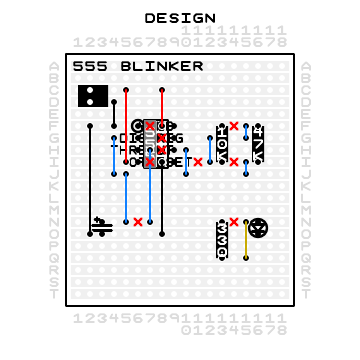
You declare what is electrically true and autoroute() works out the copper — which
strips carry which net, where the jumpers go, and which tracks to cut. Or route it
yourself with jumper() / link() / cut() / trace() and keep full control. Both
workflows are
in examples/.
No runtime dependencies. Pure standard library, including the PDF writer and the autorouter.
Install
pip install stripboard
Requires Python 3.12 or newer.
Getting started
stripboard new my-board     # scaffold my_board.py in the current directory
python my_board.py          # -> my_board.pdf
Edit draw(sb), re-run, look at the PDF. When the layout is right, flip
designing = False to get the build sheet.
Output
project() decides what to emit from its keyword arguments:
| Argument | Produces | What it's for |
|---|---|---|
| (always) | <name>.pdf |
The board. designing=True gives a one-page DESIGN preview; designing=False gives the FRONT / BACK / DESIGN build sheet. |
label=True |
<name>-label.pdf |
Black-and-white silkscreen, for toner transfer or a laser. |
gcode=True |
<name>.nc |
GRBL laser g-code that etches that silkscreen onto the board top. |
scad=True |
<name>.scad |
An OpenSCAD label for a two-colour 3D print: a plate the size of the board with the silkscreen inlaid flush into its top face, and the lead holes drilled through both. One body per filament. Generating it needs nothing installed. |
carrier=True |
<name>.stl |
A 3D-printable carrier that the finished board slots into. Needs OpenSCAD. |
The three views on the build sheet are the three ways you actually look at the board: FRONT as you place components, BACK mirrored as you cut tracks and solder, and DESIGN with each net flood-filled in colour so you can check connectivity by eye.
Coordinates
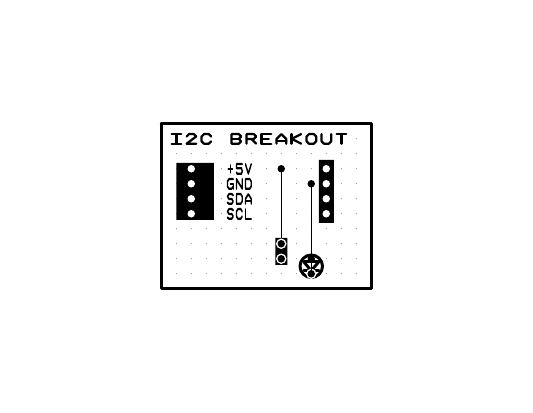
A 1-based integer grid. Columns are numbers running along x; rows are letters
('A' = 1 … 'Z' = 26) or plain ints, running along y. Copper strips run
horizontally, so two pins on the same row are already connected — that is the whole
trick of the format, and most of the design work is deciding where to break it.
Board sizes take either spelling: width=18, height='T' is the same as
width=18, height=20.
Routing
Every part builder returns a handle whose .pin(name) gives a netlist reference:
u1 = sb.dip(6, 'F', 3, 4, '555', pins=['GND', 'TRIG', ...])
sb.net('GND', u1.pin('GND'), c1.pin(2), color='k')   # a whole net at once
sb.connect(u1.pin('OUT'), r3.pin(1))                 # or one edge at a time
result = sb.autoroute(seed=0)
autoroute() returns the solver's result — status, cost, per-net status, validation — and
draws the jumpers and cuts it chose. Pass locked=False to a part builder to let the
solver place that part too, and it will be drawn wherever it lands.
To place a crossing yourself and have the solver route around it, use link(x, y1, y2)
rather than jumper(): its two ends are pins and its span is a keep-out, so hand-placed
and autorouted copper can share a board.
The solver lives in stripboard.router and is usable on its own; see
docs/router-spec.md.
Development
git clone https://github.com/Stocko-2073/stripboard-py
cd stripboard-py
pip install -e ".[dev]"

pytest                  # fast suite
pytest -m ''            # everything, including the solver tests
ruff check src tests
mypy
Licence
MIT. See LICENSE.
1 maintainer

Metadata
1 maintainer
Release files for stripboard 0.4.0
For a detailed explanation of source distributions (sdists) and built distributions (wheels), please see the package formats documentation.
Source distribution (sdist)
| File | Size | Uploaded | |
|---|---|---|---|
| stripboard-0.4.0.tar.gz | 188.3 kB | Details |
Built distribution (wheel)
| File | Interpreter | ABI | Platform | Reset |
|---|---|---|---|---|
| stripboard-0.4.0-py3-none-any.whl | Python 3 | none | any | Details |
Total release size: 296.9 kB
Release files / stripboard-0.4.0.tar.gz
| Download URL | stripboard-0.4.0.tar.gz |
|---|---|
| Size | 188.3 kB |
| Tags | Source |
|
SHA-256 checksum How to use checksums |
918e0d366b7a5f3959c48b0eb3c848268e43607293dfdf13fd3577201db123db
|
|
BLAKE2b-256 checksum How to use checksums |
9cd0f825031c3ada16778a10039286dbe8704e521201d926ac8818aef05528a9
|
| Upload date | |
|
Uploaded using Trusted Publishing? What is trusted publishing? |
Yes |
| Uploaded via |
twine/7.0.0 CPython/3.13.14
|
Provenance
Provenance describes where a file came from. On PyPI, provenance is shared via attestations, which provide a verifiable record of the build or publishing details. View details, limitations and caveats.


PyPI Publish Attestation
PyPI verified that this artifact, at this checksum, originated from the publisher listed below.
Signed by GitHub Actions, verified by PyPI on Sep 8, 2026.
Transparency logRelease files / stripboard-0.4.0-py3-none-any.whl
| Download URL | stripboard-0.4.0-py3-none-any.whl |
|---|---|
| Size | 108.5 kB |
| Tags | Python 3 |
|
SHA-256 checksum How to use checksums |
e9149d0accab998b3fef00480ef1cf7e17e4c6d86c24d00df3a9f10746259ec0
|
|
BLAKE2b-256 checksum How to use checksums |
a7744b76319b6463eb8449da1122ccc0359ba89296fddbf4b416d5ed597ff4ac
|
| Upload date | |
|
Uploaded using Trusted Publishing? What is trusted publishing? |
Yes |
| Uploaded via |
twine/7.0.0 CPython/3.13.14
|
Provenance
Provenance describes where a file came from. On PyPI, provenance is shared via attestations, which provide a verifiable record of the build or publishing details. View details, limitations and caveats.
PyPI Publish Attestation
PyPI verified that this artifact, at this checksum, originated from the publisher listed below.
Signed by GitHub Actions, verified by PyPI on Sep 8, 2026.
Transparency log













