
Python interface to TRIPACK and STRIPACK fortran code for triangulation/interpolation in Cartesian coordinates and on a sphere


Project description
Stripy



A Python interface to TRIPACK and STRIPACK Fortran code for (constrained) triangulation in Cartesian coordinates and on a sphere. Stripy is an object-oriented package and includes routines from SRFPACK and SSRFPACK for interpolation (nearest neighbor, linear and hermite cubic) and to evaluate derivatives (Renka 1996a,b and 1997a,b).
stripy is bundled with litho1pt0 which is a python interface to the crust 1.0 dataset and the lithospheric part of the litho 1.0 dataset (Laske et al, 2013 and Pasyanos et al, 2014) which both requires and demonstrates the triangulation / searching and interpolation on the sphere that is provided by stripy.
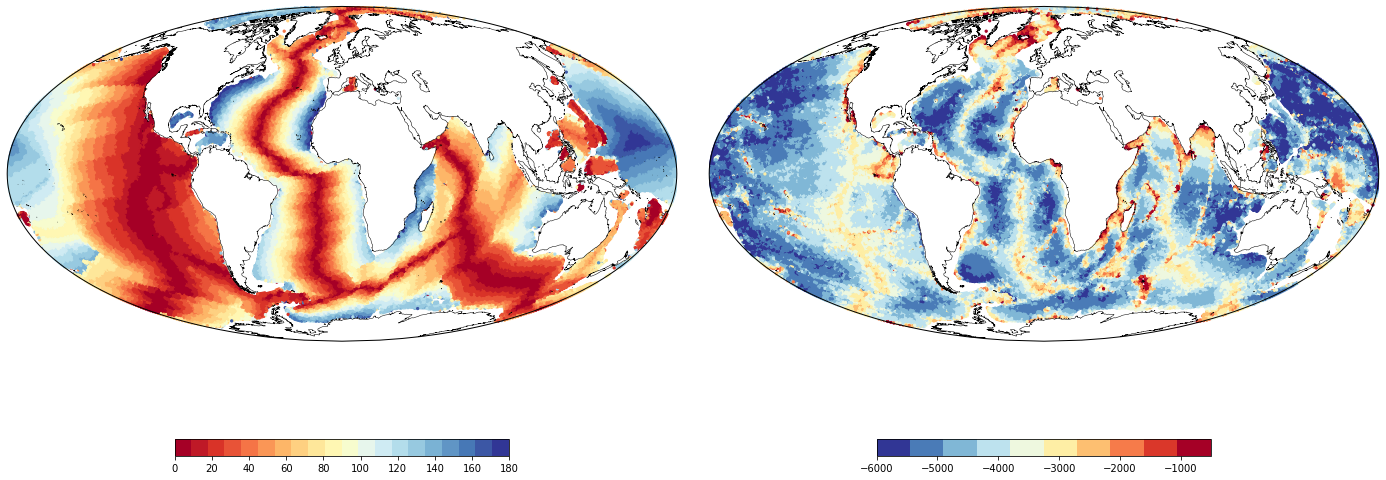
Sample images created with stripy illustrating the meshing capability: ocean age data can be triangulated on the sphere with no need for points on land. Once stripy ingests your data points, you can sample another dataset to your grid (bathymetry on the right), smooth, find the derivatives of your data, or interpolate to another set of points.
Binder
Launch the demonstration

(This is the development branch)
Citation

Moresi, L. and Mather, B.R., (2019). Stripy: A Python module for (constrained) triangulation in Cartesian coordinates and on a sphere.. Journal of Open Source Software, 4(38), 1410, https://doi.org/10.21105/joss.01410
Navigation / Notebooks
There are two matching sets of stripy notebooks - one set for Cartesian Triangulations and one for Spherical Triangulations. For most geographical applications, the spherical triangulations are the natural choice as they expect longitude and latitude coordinates (admittedly in radians).
Note: the Cartesian and Spherical notebooks can be obtained / installed from stripy itself as follows:
python -c 'import stripy; stripy.documentation.install_documentation(path="Notebooks")'
Cartesian
- Ex1-Cartesian-Triangulations.ipynb
- Ex2-CartesianGrids.ipynb
- Ex3-Interpolation.ipynb
- Ex4-Gradients.ipynb
- Ex5-Smoothing.ipynb
- Ex6-Scattered-Data.ipynb
- Ex7-Refinement-of-Triangulations.ipynb
- Ex8-Spline-Tension.ipynb
- Ex9-Voronoi-Diagram.ipynb
Spherical
- Ex1-Spherical-Triangulations.ipynb
- Ex2-SphericalGrids.ipynb
- Ex3-Interpolation.ipynb
- Ex4-Gradients.ipynb
- Ex5-Smoothing.ipynb
- Ex6-Scattered-Data.ipynb
- Ex7-Refinement-of-Triangulations.ipynb
- Ex8-Spline-Tension.ipynb
- Ex9-Voronoi-Diagram.ipynb
Examples
Note, these examples are the notebooks from litho1pt0 which are installed from the
package itself:
python -c 'import litho1pt0; litho1pt0.documentation.install_documentation(path="Notebooks")'
The first three notebooks are an introduction to litho1pt0 that does not explicitly mention stripy but
the next two worked examples show how to search, interpolate and plot with the help of stripy routines.
- Ex1-Litho1Layers.ipynb
- Ex2-Litho1Properties.ipynb
- Ex3-CrustalRegionalisation.ipynb
- WorkEx1-CratonAverageProperties.ipynb
- WorkEx2-OceanDepthAge.ipynb
Installation
Dependencies
You will need Python 2.7 or 3.5+. Also, the following packages are required:
Recommended Packages for running the notebooks:
Installing using pip
You can install stripy using the
pip package manager with either version of Python:
python2 -m pip install stripy
python3 -m pip install stripy
All the dependencies will be automatically installed by pip, except for gfortran
(or any Fortran compiler). It must be installed in your system before installing
stripy with pip.
If you change the Fortran compiler, you may have to add the
flags config_fc --fcompiler=<compiler name> when setup.py is run
(see docs for numpy.distutils).
Installing using Docker
A more straightforward installation which does not depend on specific compilers relies on the docker virtualisation system.
To install the docker image and test it is working:
   docker pull underworldcode/stripy:latest
   docker run --rm underworldcode/stripy:latest help
To install the helper scripts for bash:
   docker run --rm underworldcode/stripy:latest bash_utils > bash_utils.sh
   source bash_utils.sh
( you may find it helpful to move/rename this file and source it from your bash profile at login time )
The bash_utils.sh script installs the following functions which are available through the bash command line:
  stripy-docker-help
  stripy-docker-sh
  stripy-docker-nb
  stripy-docker-browse
  stripy-docker-serve
  stripy-docker-terminal
For more information on these functions, run
  source bash_utils.sh
  stripy-docker-help
To use the docker version as you would, say, using ipython to type on the command line:
   source bash_utils.sh  # (only needs to be done once)
   stripy-docker-terminal
   ls
   ipython
To use the docker version to run a script
   source bash_utils.sh  # (only needs to be done once)
   stripy-docker-sh my_python_script.py
To build the dockerfile locally, we provide a script. First ensure you have checked out the source code from github and then run the script in the Docker directory. If you modify the dockerfile and want to push the image to make it publicly available, it will need to be retagged to upload somewhere other than the underworldcode repository.
git checkout https://github.com/underworldcode/stripy.git
cd stripy
source Docker/build-dockerfile.sh
Usage
Two classes are included as part of the Stripy package:
sTriangulation(Spherical coordinates)Triangulation(Cartesian coordinates)
These classes share similar methods and can be easily interchanged. In addition, there are many helper functions provided for building meshes.
A series of tests are located in the tests subdirectory.
In order to perform these tests clone the repository and run pytest:
git checkout https://github.com/underworldcode/stripy.git
cd stripy
pytest -v
API Documentation
The API for all functions and classes in stripy can be accessed from https://underworldcode.github.io/stripy/.
References
-
Laske, G., G. Masters, and Z. Ma (2013), Update on CRUST1. 0—A 1-degree global model of Earth's crust, Geophys Research Abstracts, 15, EGU2013–2658.
-
Pasyanos, M. E., T. G. Masters, G. Laske, and Z. Ma (2014), LITHO1.0: An updated crust and lithospheric model of the Earth, Journal of Geophysical Research-Solid Earth, 119(3), 2153–2173, doi:10.1002/2013JB010626.
-
R. J. Renka, "ALGORITHM 751: TRIPACK: A Constrained Two- Dimensional Delaunay Triangulation Package" ACM Trans. Math. Software, Vol. 22, No. 1, 1996, pp. 1-8.
-
R. J. Renka, "ALGORITHM 752: SRFPACK: Software for Scattered Data Fitting with a Constrained Surface under Tension", ACM Trans. Math. Software, Vol. 22, No. 1, 1996, pp. 9-17.
-
R. J. Renka, "ALGORITHM 772: STRIPACK: Delaunay Triangulation and Voronoi Diagram on the Surface of a Sphere" ACM Trans. Math. Software, Vol. 23, No. 3, 1997, pp. 416-434.
-
R. J. Renka, "ALGORITHM 773: SSRFPACK: Interpolation of Scattered Data on the Surface of a Sphere with a Surface under Tension", ACM Trans. Math. Software, Vol. 23, No. 3, 1997, pp. 437-439.
Release history Release notifications | RSS feed


Download files
Download the file for your platform. If you're not sure which to choose, learn more about installing packages.
Source Distributions
Built Distributions
Filter files by name, interpreter, ABI, and platform.
If you're not sure about the file name format, learn more about wheel file names.
Copy a direct link to the current filters
File details
Details for the file stripy-2.0.3-cp38-cp38-macosx_10_14_x86_64.whl.
File metadata
- Download URL: stripy-2.0.3-cp38-cp38-macosx_10_14_x86_64.whl
- Upload date:
- Size: 14.6 MB
- Tags: CPython 3.8, macOS 10.14+ x86-64
- Uploaded using Trusted Publishing? No
- Uploaded via: twine/3.2.0 pkginfo/1.6.1 requests/2.24.0 setuptools/49.2.1 requests-toolbelt/0.9.1 tqdm/4.51.0 CPython/3.8.6
File hashes
| Algorithm | Hash digest | |
|---|---|---|
| SHA256 |
51e5149eb24e0ff5bb63dabeb60e921046312870588ca4afe00f57aa98a908d2
|
|
| MD5 |
f2daadde208ecb1b0525b725976f83e8
|
|
| BLAKE2b-256 |
7aa173e29fd49bf40e6207d46088647ab9e4faf792943dbf447de1c99a19c43c
|
File details
Details for the file stripy-2.0.3-cp37-cp37m-macosx_10_14_x86_64.whl.
File metadata
- Download URL: stripy-2.0.3-cp37-cp37m-macosx_10_14_x86_64.whl
- Upload date:
- Size: 14.6 MB
- Tags: CPython 3.7m, macOS 10.14+ x86-64
- Uploaded using Trusted Publishing? No
- Uploaded via: twine/3.2.0 pkginfo/1.6.1 requests/2.24.0 setuptools/47.1.0 requests-toolbelt/0.9.1 tqdm/4.51.0 CPython/3.7.9
File hashes
| Algorithm | Hash digest | |
|---|---|---|
| SHA256 |
464a2515c642a317fb7bb7e6a98cf4edfe04c0764ca8d38a3b607b086aedfc9d
|
|
| MD5 |
0ddb534c2904ba3c99274b743dffc43d
|
|
| BLAKE2b-256 |
059c62051f3bc9b452499092d469b3d142d86d4d3c65fd8c66aa7f04c8d93ed9
|
File details
Details for the file stripy-2.0.3-cp27-cp27m-macosx_10_14_x86_64.whl.
File metadata
- Download URL: stripy-2.0.3-cp27-cp27m-macosx_10_14_x86_64.whl
- Upload date:
- Size: 14.5 MB
- Tags: CPython 2.7m, macOS 10.14+ x86-64
- Uploaded using Trusted Publishing? No
- Uploaded via: twine/1.15.0 pkginfo/1.6.1 requests/2.24.0 setuptools/41.2.0 requests-toolbelt/0.9.1 tqdm/4.51.0 CPython/2.7.18
File hashes
| Algorithm | Hash digest | |
|---|---|---|
| SHA256 |
b17bd3fb8cead9624cbc731a5f71118931319b07edcd69b6ee421b0f74f76b0d
|
|
| MD5 |
9cf80c8ee12cae942a6f22ff769634ff
|
|
| BLAKE2b-256 |
e113d5a98c444e4ae46ea498d0c90706ca10f375b1a56af5a5869b997ef819c3
|






