
structura-render
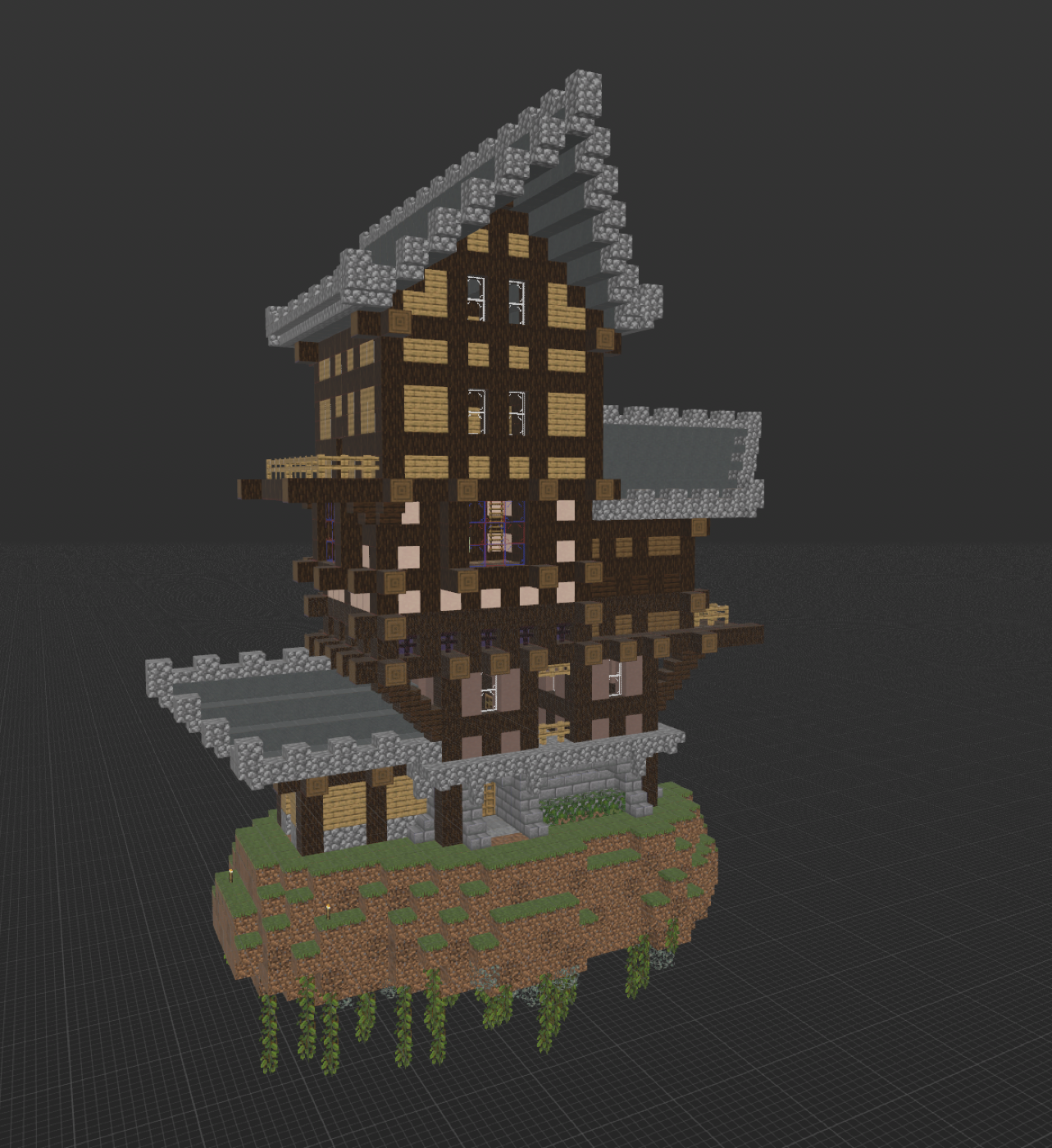
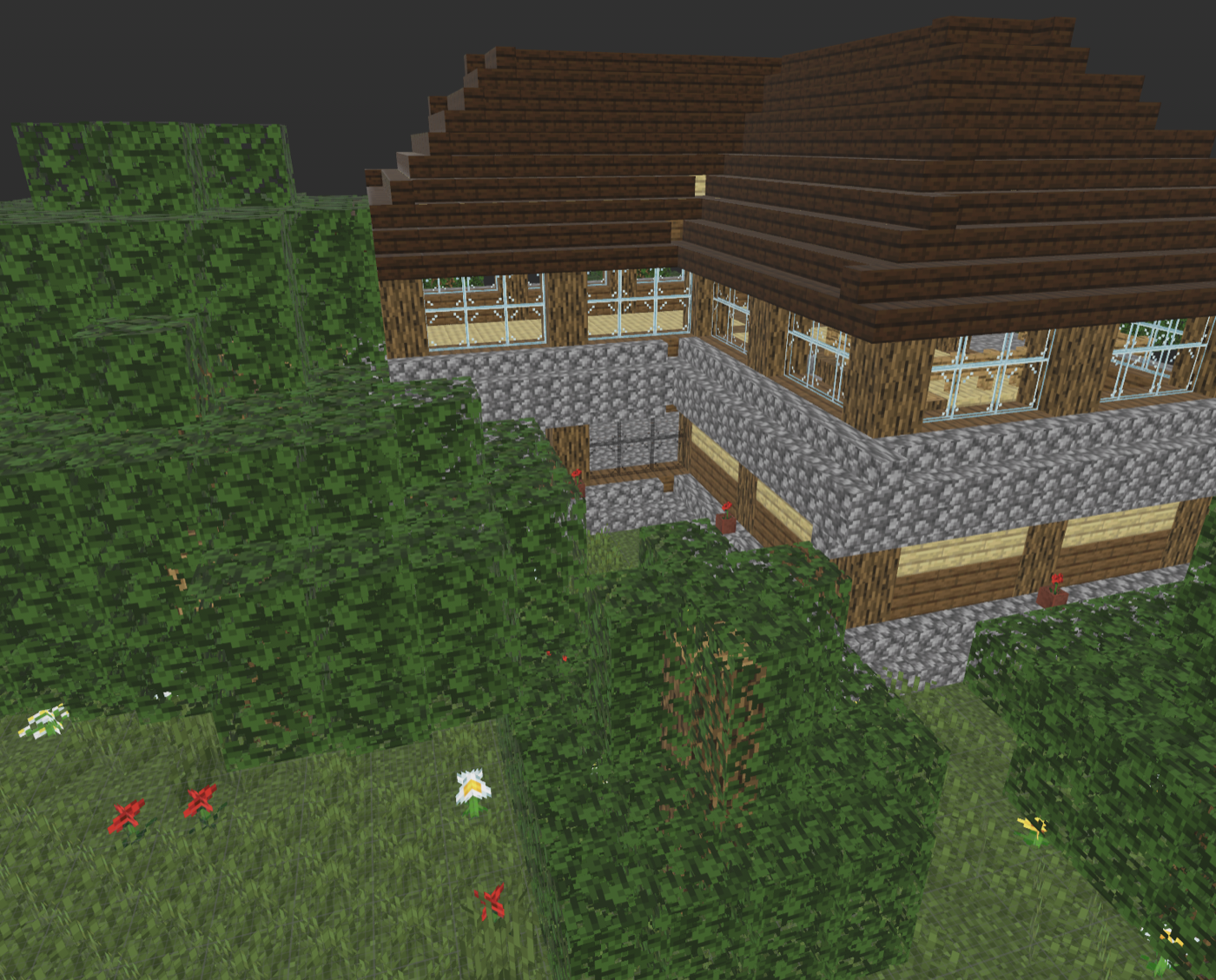
Minecraft structures, rendered like Minecraft.
Turn a Java Edition Structure NBT, Litematic or Sponge schematic into a PNG or a portable 3D model.
structura-render reads the blockstates, models and textures from your own
Minecraft client, so stairs stay stairs, doors keep their state, glass keeps
its alpha and every export agrees with the preview.
Quick start
Install only the output you need:
pip install "structura-render[hero,usdz]"
Render a showcase image and export the same geometry:
structura-render png house.litematic house.png --transparent --orthographic
structura-render usdz house.litematic house.usdz
For Minecraft 1.21.1, the standard launcher installation is detected
automatically on macOS, Linux and Windows. To use another client or resource
pack, point the renderer at its .jar or extracted assets/minecraft folder:
export STRUCTURA_MINECRAFT_ASSETS="$HOME/.minecraft/versions/1.21.1/1.21.1.jar"
The jar is extracted once into the user cache. Mojang assets are never bundled, copied into the package or redistributed.
Outputs
| Result | Install | Command |
|---|---|---|
| Six-view technical PNG | base package | structura-render-projections in.nbt out.png |
| Perspective / orthographic PNG | [hero] |
structura-render-hero in.nbt out.png |
| USDZ / Apple Quick Look | [usdz] |
structura-export-usdz in.nbt out.usdz |
| GLB or glTF | [gltf] |
structura-export-gltf in.nbt out.glb |
| Wavefront OBJ | [obj] |
structura-export-obj in.nbt out.obj |
| Binary STL | [stl] |
structura-export-stl in.nbt out.stl |
Extras can be combined:
pip install "structura-render[hero,usdz,gltf,obj,stl]"
Every command accepts .nbt, .litematic and Sponge v2/v3 .schem natively.
Legacy .schematic input is available through the legacy extra:
pip install "structura-render[hero,legacy]"
structura-render-hero castle.schematic castle.png
Preview conversion preserves the selection's bounds, authored air, block
materials, connections and all entities. It does not apply datapack placement
cleanup. Litematic v5–v7 supports multiple disjoint regions, signed sizes and
entity positions without requiring the legacy extra. Use --region Main
to render one named region. Overlaps require an explicit region choice.
Other Amulet input formats are not verified by the conversion tests.
Texture-backed exporters fail clearly when client assets are unavailable,
instead of silently producing a misleading result. For diagnostics only, the
3D exporters can retain the old coloured-cube fallback with
--allow-flat-fallback. Hero renders expose the same choice as --no-textures.
The commands support --help without optional backends or Minecraft assets.
PNG and USDZ do not require trimesh. OBJ, STL, glTF/GLB and USDZ do not install
or import PyVista/VTK; only the [hero] extra needs a plotting backend.
If an application previously installed [usdz] and also rendered PNGs, it
should now request [hero,usdz] explicitly.
The unified command and python -m structura_render accept projections,
png, glb, gltf, obj, stl and usdz. Existing commands remain supported:
python -m structura_render glb house.litematic house.glb
structura-render projections house.litematic views.png --views top north
uvx --from 'structura-render[gltf]' structura-render glb house.litematic house.glb
Python images
from structura_core import load_structure
from structura_render import render_hero, render_projection, render_projections

structure = load_structure("house.litematic", region="Main")
image = render_projection(structure, view="top", scale=8, transparent=True)
image.save("top.png")
render_projections(structure, "views.png", views=("top", "north"))
render_hero(structure, "house.png", transparent=True, orthographic=True)
All three return a Pillow image. The sheet and hero functions optionally write
an output atomically; the existing destination survives an encoding failure.
Projection images need neither Minecraft textures nor a graphics backend.
They show the nearest non-air block cell rather than textured model geometry.
An explicit structure_void is invisible. Plain projections allocate memory
according to image area, without constructing a dense 3D volume.
Default guards are 16,000,000 output pixels (max_pixels / --max-pixels),
16,000,000 cells in a 3D bounding box (max_voxels / --max-voxels) and
2,000,000 decoded Litematic/Sponge cells (--max-blocks). Larger trusted inputs can
raise these limits; choosing --region avoids allocating the empty space
between distant regions. These guards are not a bound on total process memory.
Diagnostic overlays
Pass ready boolean masks in the structure's local X/Y/Z coordinates:
from structura_render import ProjectionOverlays, render_projections

overlays = ProjectionOverlays(envelope=envelope_mask, cavern_aura=cavern_mask,
                              aura=aura_mask, ground_y=12)
render_projections(structure, "diagnostic.png", overlays=overlays)
render_projection accepts the same option, including transparent output.
Cavern aura is translucent blue, aura is cyan, and envelope is purple with a
solid contour. Side views show ground_y as a dashed line (two cells on, two
off). Masks must match the structure size and have boolean dtype; inputs are
not modified. Computing envelope/aura belongs to the caller's geometry layer.
All fields are optional; ordinary projections retain their previous appearance.
structura-render projections house.schem views.png --ground-y 12
structura-render projections house.schem views.png --overlays masks.npz
The optional NPZ contains only envelope, aura, and/or cavern_aura arrays;
write it with numpy.savez_compressed. Object arrays are rejected and archive
sizes are checked against --max-blocks before loading.
Independent resources
from structura_render import AssetContext, TextureBank, render_hero

resources = AssetContext("/path/to/assets/minecraft")
bank = TextureBank(resources)
render_hero(structure, "house.png", texture_bank=bank)
A context owns JSON, texture, entity, item and font caches. Geometry builders
activate the bank's context internally; nested calls and independent renders
in different threads keep their resources separate. Importing runtime modules
does not discover or extract assets. TextureBank() still works and resolves
the environment at construction, so existing calls remain valid.
Reuse a bank/context for a series of renders. If its files change, call
resources.clear() before the next render; existing banks are refreshed too.
Use a new context for another root. Low-level helpers can run inside
with resources.activate():. This scope is local to the current execution
context, not a process-wide switch. Client jars are extracted to a temporary
directory and published only when complete. Resource-pack layering and full
modded client rendering are outside this API's current contract.
Texture resolution and atlas limits
Atlases retain original texture pixels and rectangular crops; HD textures are
no longer reduced to 16×16. Edge padding protects UV boundaries. Tall static
textures remain intact; animated block/item textures use the first frame
specified by .png.mcmeta, including explicit frame dimensions.
The default atlas side limit is 2048 pixels. If images cannot fit, export fails
before allocating an oversized atlas or replacing the existing output. Set
max_atlas_size on hero/geometry APIs or --max-atlas-size 4096 in the CLI for
a larger pack. There is no silent downsampling. Texture decoding additionally
rejects images above 16,000,000 pixels. These limits do not bound all process
memory; multi-page atlases remain a separate extension.
Shared geometry
geometry.TexturedMesh contains NumPy points, quads, UV coordinates, per-face
alpha modes and an RGBA atlas. mesh.build_textured_geometry produces these
buffers once; file exporters consume them directly. TexturedMesh.to_pyvista
adapts them for image rendering. The existing build_textured_meshes function
retains its PyVista return values for callers using that interface.
Format-specific materials and file writing stay in their exporters. There is no second scene graph, editing model, interactive viewer or plugin framework. New image and file formats can reuse the same geometry without importing a graphics engine.
Moving exports
GLB and USDZ are single-file exports. For .gltf or .obj, keep the model
together with its generated resources when moving or sharing it:
- glTF uses a
<filename>.assets/directory; - OBJ uses an adjacent
.mtlfile and a<filename>.assets/directory; - resource filenames are derived from their contents, so exporting another model into the same directory does not overwrite the first model's assets.
The main glTF/OBJ file is published after its resources are written. Old resources are retained when a model is replaced, since another exported model may still reference them. Paths inside the export use relative, ASCII-safe resource names, including when the model's filename contains spaces or Unicode.
What makes the output faithful
- Client-driven models. Blockstate variants, multipart conditions, parent models, element rotations, UV rotation and UV locking come from the game.
- One geometry pipeline. PNG, USDZ, glTF, OBJ and STL share the same mesh builder, so format-specific implementations do not drift apart.
- State-aware special blocks. Chests, signs, banners, beds, heads, shulker boxes, bells, decorated pots, fluids and portals use compact textured models.
- Structure entities. Paintings, populated item frames, armor stands, dropped items and the vanilla entity catalog through 26.2 remain visible.
- Correct transparency. Per-pixel alpha is preserved for glass, foliage, bars, panes, water and other cutout or translucent surfaces. glTF and USDZ group geometry into opaque, cutout and blended materials. glTF explicitly requests nearest texture filtering; OBJ includes a grayscale opacity map.
- No stale cube list. Occlusion data is derived from client model geometry.
The generic resolver follows the client data rather than a short table of guessed blocks. New JSON-modelled blocks therefore work without adding another hardcoded shape to the renderer.
Choosing Minecraft assets
STRUCTURA_MINECRAFT_ASSETS accepts either:
- a Minecraft client
.jar; - an extracted
assets/minecraftdirectory.
When the variable is unset, the renderer first looks for assets/minecraft in
the working tree and then for a launcher-installed 1.21.1 client. Cached jar
content is keyed by the jar path, size and modification time, so different
versions do not collide.
Minecraft 1.13 and newer use the supported asset layout. The renderer is verified end to end with 1.21.1 and 26.2. This repository's own datapack targets Java 1.21.1, so use that client when exact project parity matters.
Honest limits
Entity rendering is static. The renderer does not evaluate animation, AI, item predicates, enchantment glint, armor trims or arbitrary display transforms. Entity previews preserve identity and silhouette; they are not a replacement for Minecraft's animated renderer. Block geometry still follows the client model pipeline described above.
The base install contains structura-core, NumPy and Pillow. PyVista, OpenUSD
and trimesh are installed only by the output extras that need them.
STL contains geometry only. Its exporter welds vertices and removes duplicate triangles; an isolated solid cube produces a closed, outward-facing surface. Plants, intersecting shapes and open planes may still require repair or thickening before 3D printing. STL does not retain textures or transparency.
For implementation coverage and explicit dynamic-render limitations, see
docs/block-render-audit-26.2.md.
1 maintainer

Download files
Download the file for your platform. If you're not sure which to choose, learn more about installing packages.
Source Distribution
Built Distribution
Filter files by name, interpreter, ABI, and platform.
If you're not sure about the file name format, learn more about wheel file names.
Copy a direct link to the current filters
File details
Details for the file structura_render-0.5.1.tar.gz.
File metadata
- Download URL: structura_render-0.5.1.tar.gz
- Upload date:
- Size: 229.6 kB
- Tags: Source
- Uploaded using Trusted Publishing? Yes
- Uploaded via:
twine/7.0.0 CPython/3.13.14
File hashes
| Algorithm | Hash digest | |
|---|---|---|
| SHA256 |
a0979c4afffd5fb24522caaf0bac6febeb3bd14c6941c5b73827a0a163516225
|
|
| MD5 |
798ac6ab53730b729300b83dbe1b6b2d
|
|
| BLAKE2b-256 |
db662ec1b40b1ee23798759d02448dd4bf6bf8fe7d0e1dfceb6c302737cfdc46
|
Provenance
The following attestation bundles were made for structura_render-0.5.1.tar.gz:
Publisher:
publish.yml on kirimba1024/structura-render
-
Statement:
-
Statement type:
https://in-toto.io/Statement/v1 -
Predicate type:
https://docs.pypi.org/attestations/publish/v1 -
Subject name:
structura_render-0.5.1.tar.gz -
Subject digest:
a0979c4afffd5fb24522caaf0bac6febeb3bd14c6941c5b73827a0a163516225 - Sigstore transparency entry: 2750312460
- Sigstore integration time:
-
Permalink:
kirimba1024/structura-render@98f01fde7d310e115a99b65dc6d1795d4473175e -
Branch / Tag:
refs/tags/v0.5.1 - Owner: https://github.com/kirimba1024
-
Access:
public
-
Token Issuer:
https://token.actions.githubusercontent.com -
Runner Environment:
github-hosted -
Publication workflow:
publish.yml@98f01fde7d310e115a99b65dc6d1795d4473175e -
Trigger Event:
release
-
Statement type:
File details
Details for the file structura_render-0.5.1-py3-none-any.whl.
File metadata
- Download URL: structura_render-0.5.1-py3-none-any.whl
- Upload date:
- Size: 216.7 kB
- Tags: Python 3
- Uploaded using Trusted Publishing? Yes
- Uploaded via:
twine/7.0.0 CPython/3.13.14
File hashes
| Algorithm | Hash digest | |
|---|---|---|
| SHA256 |
86b4ee3e863c19df8e9679cce00e73e9163d0904df957d31b16e2e5f12cbea2a
|
|
| MD5 |
254e4b286b4a07a050496d696aef85e1
|
|
| BLAKE2b-256 |
14818961eded25db91fadfadbb46b3043b76587ca7edd07debde6b6bdb4d46e0
|
Provenance
The following attestation bundles were made for structura_render-0.5.1-py3-none-any.whl:
Publisher:
publish.yml on kirimba1024/structura-render
-
Statement:
-
Statement type:
https://in-toto.io/Statement/v1 -
Predicate type:
https://docs.pypi.org/attestations/publish/v1 -
Subject name:
structura_render-0.5.1-py3-none-any.whl -
Subject digest:
86b4ee3e863c19df8e9679cce00e73e9163d0904df957d31b16e2e5f12cbea2a - Sigstore transparency entry: 2750312968
- Sigstore integration time:
-
Permalink:
kirimba1024/structura-render@98f01fde7d310e115a99b65dc6d1795d4473175e -
Branch / Tag:
refs/tags/v0.5.1 - Owner: https://github.com/kirimba1024
-
Access:
public
-
Token Issuer:
https://token.actions.githubusercontent.com -
Runner Environment:
github-hosted -
Publication workflow:
publish.yml@98f01fde7d310e115a99b65dc6d1795d4473175e -
Trigger Event:
release
-
Statement type:














