
Python package to cluster molecular structures into groups of similar ones.
Verified details
These details have been verified by PyPIProject links
GitHub Statistics
Maintainers

Project description
structure_clustering
structure_clustering is a Python package to cluster molecular structures into groups of similar ones. It provides a command-line interface to perform clustering of a multi-xyz file, or you can use it within your Python code.
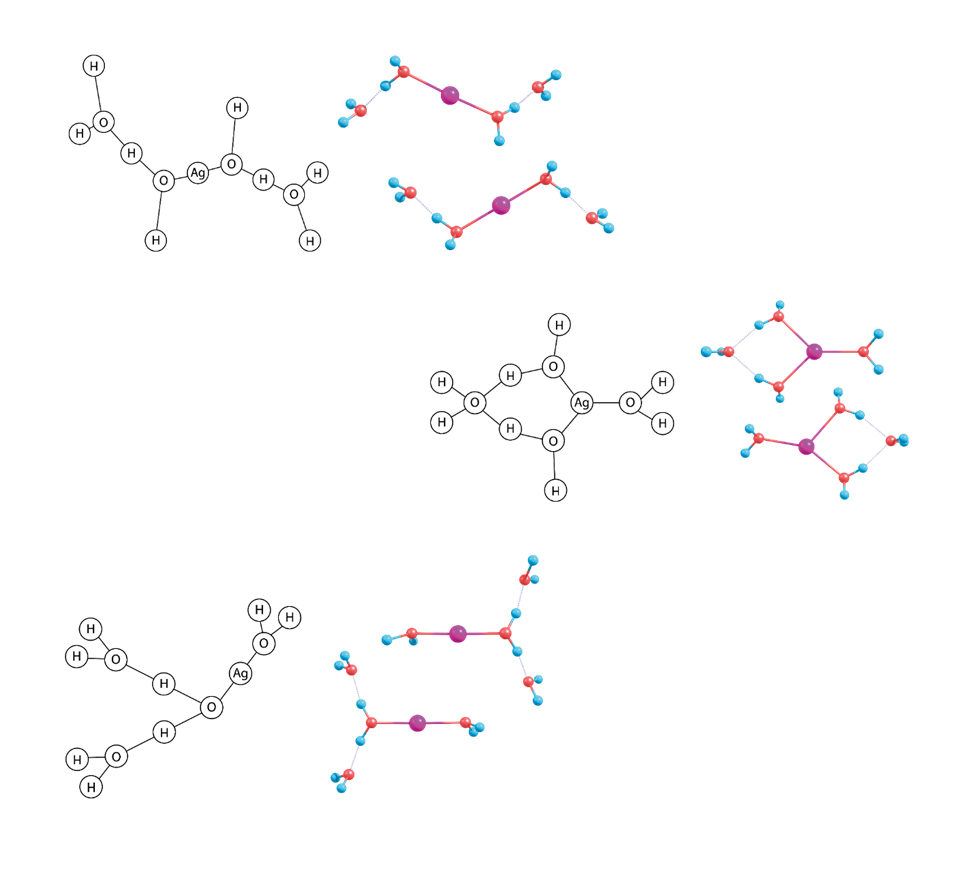
[^1]: The figure shows exemplary clusters from Ag⁺(H₂O)₄ structures.
Installation
You can install structure_clustering via pip:
pip install structure_clustering
For most platforms, prebuilt wheels are available. If you need (or prefer) to compile and build the wheel yourself, ensure that the Boost Graph Library is available system-wide.
Using the Command-Line interface
You can invoke the structure_clustering script using the structure_clustering command.
usage: structure_clustering <xyz_file> [--config CONFIG] [--output OUTPUT] [--disconnected]

Cluster molecular structures into groups.

positional arguments:
  xyz_file         path of the multi-xyz-file containing the structures

options:
  --config CONFIG  path of the config TOML file
  --output OUTPUT  path of the resulting output file, defaults to <xyz_file>.sc.dat
  --disconnected   if you want to include disconnected graphs
  -h, --help       show this help message and exit
For example, to cluster your xyz file:
structure_clustering my_structures.xyz
To specify a "special" distance for recognising O-H connectivity (see the next section), use:
structure_clustering my_structures.xyz --config sc_config.toml
In both cases, a file named my_structures.xyz.sc.dat will be created, which you can import at 
The terminal output will look like this:
Loading configuration from demo_config.toml
Using covalent radius of 1.59 for Ag
Using pair distance of 2.3 for O-H
Clustering does not include disconnected graphs

Using 437 structures from structures.xyz
Clustering finished <structure_clustering._core.Result object at 0x7f7c949c37b0>
  14 clusters (total 318 structures)
  13 unique single structures
  132 (30.21%) structures sorted out (305 remaining)
  cluster size: Avg=22.7 Med=4.5 Q1=2.2 Q3=23.5
  connections/structure: Avg=12.2 Med=12.0 Q1=12.0 Q3=12.0 (all 437)
  connections/structure: Avg=12.4 Med=12.0 Q1=12.0 Q3=12.0 (remaining 305)
Writing output file to structures.xyz.sc.dat ...

🚀 Open https://photophys.github.io/cluster-vis/ to visualize your results
Config File
You can use a TOML file to configure the behaviour of the command-line interface.
[covalent]
He = 0.9
Ag = 1.59

[pair]
O-H = 2.3

[options]
only_connected_graphs = true
All settings are optional. Distances are given in Angstrom. Elements are case-sensitive. If you specify only_connected_graphs in the config file, this will overwrite your setting from the command-line switch.
Demo Code
import structure_clustering
from structure_clustering import Structure, Atom

sc_machine = structure_clustering.Machine()

sc_machine.setCovalentRadius(1, 0.42)  # change hydrogen covalent radius to 0.42
sc_machine.addPairDistance(8, 1, 2.3)  # extend max distance for O-H pairs to 2.3 Ang

sc_machine.setOnlyConnectedGraphs(True)  # only include fully connected graphs (default)

# you will need some structures
population = structure_clustering.import_multi_xyz("structs.xyz")

# you can also create your structures programmatically
structure = Structure()
structure.addAtom(Atom(8, -1.674872668, 0.0, -0.984966492))
structure.addAtom(Atom(1, -1.674872668, 0.759337, -0.388923492))
structure.addAtom(Atom(1, -1.674872668, -0.759337, -0.388923492))
population += [structure]  # add this structure to our population

sc_result = sc_machine.cluster(population)

print("clusters", sc_result.clusters)
print("singles", sc_result.singles)

# Output (indices from the original structure list):
# clusters [[0, 11], [1, 2, 4, 6, 12, 13, 14, 15, 19], [3, 17, 18, 23]]
# singles [9, 16, 22]
License
structure_clustering is licensed under the MIT License. See the LICENSE file for more details.
Project details
Verified details
These details have been verified by PyPIProject links
GitHub Statistics
Maintainers


Download files
Download the file for your platform. If you're not sure which to choose, learn more about installing packages.
Source Distribution
Built Distributions
Filter files by name, interpreter, ABI, and platform.
If you're not sure about the file name format, learn more about wheel file names.
Copy a direct link to the current filters
File details
Details for the file structure_clustering-1.1.0.tar.gz.
File metadata
- Download URL: structure_clustering-1.1.0.tar.gz
- Upload date:
- Size: 15.1 kB
- Tags: Source
- Uploaded using Trusted Publishing? Yes
- Uploaded via: twine/5.1.1 CPython/3.12.6
File hashes
| Algorithm | Hash digest | |
|---|---|---|
| SHA256 |
a56b4b19c7f927242ac5c014bc539b246977aa5838023386556bc4bf83b8861a
|
|
| MD5 |
dabab1a775f39e9e04d21b514a5e6037
|
|
| BLAKE2b-256 |
5e69bf4dca4e49e94d914ec4a839eab2826f7840ae29a35bd2e3cb0e7ba1db51
|
File details
Details for the file structure_clustering-1.1.0-cp312-cp312-manylinux_2_17_x86_64.manylinux2014_x86_64.whl.
File metadata
- Download URL: structure_clustering-1.1.0-cp312-cp312-manylinux_2_17_x86_64.manylinux2014_x86_64.whl
- Upload date:
- Size: 142.7 kB
- Tags: CPython 3.12, manylinux: glibc 2.17+ x86-64
- Uploaded using Trusted Publishing? Yes
- Uploaded via: twine/5.1.1 CPython/3.12.6
File hashes
| Algorithm | Hash digest | |
|---|---|---|
| SHA256 |
878135bda65930b206cbf42bfcfbf0eaa3f845f23ca30fa27e76fcbcc5c3e1ff
|
|
| MD5 |
8a1c6a1eaa542f4b6ed4e7e797b5ff19
|
|
| BLAKE2b-256 |
faf248454a7859b61342c0aa9e818e5cb9f3eee57f6f5fe1e6fe9a5819207f30
|
File details
Details for the file structure_clustering-1.1.0-cp311-cp311-manylinux_2_17_x86_64.manylinux2014_x86_64.whl.
File metadata
- Download URL: structure_clustering-1.1.0-cp311-cp311-manylinux_2_17_x86_64.manylinux2014_x86_64.whl
- Upload date:
- Size: 143.1 kB
- Tags: CPython 3.11, manylinux: glibc 2.17+ x86-64
- Uploaded using Trusted Publishing? Yes
- Uploaded via: twine/5.1.1 CPython/3.12.6
File hashes
| Algorithm | Hash digest | |
|---|---|---|
| SHA256 |
ca2b7770d8134a4a94a1a0f1baffb7562b27faf499899e038874bcfda95183dc
|
|
| MD5 |
c631439f2be52804dcab52ff470dced3
|
|
| BLAKE2b-256 |
4bc8cac2c1f21ece44701c7f03be46bf826c03d40fc7d5a7f5d0c8bf63c1bc5c
|
File details
Details for the file structure_clustering-1.1.0-cp310-cp310-manylinux_2_17_x86_64.manylinux2014_x86_64.whl.
File metadata
- Download URL: structure_clustering-1.1.0-cp310-cp310-manylinux_2_17_x86_64.manylinux2014_x86_64.whl
- Upload date:
- Size: 141.6 kB
- Tags: CPython 3.10, manylinux: glibc 2.17+ x86-64
- Uploaded using Trusted Publishing? Yes
- Uploaded via: twine/5.1.1 CPython/3.12.6
File hashes
| Algorithm | Hash digest | |
|---|---|---|
| SHA256 |
90d7d15d5a8474a2031ed7df4414cca2d319b6771e35d5bb3df425a2ac9ab0c9
|
|
| MD5 |
1c216d99962399569fc0417b2a4dd512
|
|
| BLAKE2b-256 |
e3bfc35942cec15ef05375cd51d67b9c097722d9ae742e824eeaac71de24e461
|
File details
Details for the file structure_clustering-1.1.0-cp39-cp39-manylinux_2_17_x86_64.manylinux2014_x86_64.whl.
File metadata
- Download URL: structure_clustering-1.1.0-cp39-cp39-manylinux_2_17_x86_64.manylinux2014_x86_64.whl
- Upload date:
- Size: 141.9 kB
- Tags: CPython 3.9, manylinux: glibc 2.17+ x86-64
- Uploaded using Trusted Publishing? Yes
- Uploaded via: twine/5.1.1 CPython/3.12.6
File hashes
| Algorithm | Hash digest | |
|---|---|---|
| SHA256 |
6d60274341d15b236dade18c46b21095c6aa4165741e7b80e3da172f8f15c5c2
|
|
| MD5 |
9702ed1df3c4b0b51f0b00b9d6050666
|
|
| BLAKE2b-256 |
874083ebce825ac5ff3dbe7d60ab1af6d784f0910231a5426dde9c714bc8a06c
|
File details
Details for the file structure_clustering-1.1.0-cp38-cp38-manylinux_2_17_x86_64.manylinux2014_x86_64.whl.
File metadata
- Download URL: structure_clustering-1.1.0-cp38-cp38-manylinux_2_17_x86_64.manylinux2014_x86_64.whl
- Upload date:
- Size: 141.5 kB
- Tags: CPython 3.8, manylinux: glibc 2.17+ x86-64
- Uploaded using Trusted Publishing? Yes
- Uploaded via: twine/5.1.1 CPython/3.12.6
File hashes
| Algorithm | Hash digest | |
|---|---|---|
| SHA256 |
55f35744c5a09940b47326aa264342f936e671a0512299b1808ea26621a0c6aa
|
|
| MD5 |
27b964544d156d1d1d384aced4b22585
|
|
| BLAKE2b-256 |
cee448188a47fd3ad3fda173cfde9c17216d398eff6cc2aacce5e8408401050e
|
File details
Details for the file structure_clustering-1.1.0-cp37-cp37m-manylinux_2_17_x86_64.manylinux2014_x86_64.whl.
File metadata
- Download URL: structure_clustering-1.1.0-cp37-cp37m-manylinux_2_17_x86_64.manylinux2014_x86_64.whl
- Upload date:
- Size: 143.1 kB
- Tags: CPython 3.7m, manylinux: glibc 2.17+ x86-64
- Uploaded using Trusted Publishing? Yes
- Uploaded via: twine/5.1.1 CPython/3.12.6
File hashes
| Algorithm | Hash digest | |
|---|---|---|
| SHA256 |
210302237547478c1eca014fff5abc19f44d81bf2610e123c829f124af548c2a
|
|
| MD5 |
90dcf969588fded3d1ed3f79221c3500
|
|
| BLAKE2b-256 |
b6b9ef43d43dd7e83226fc6593c1a55a2c6e91aec2622b07eb280aaeba43cec3
|






