
sts-suite





Terminal debugger for Feetech STS3215 smart serial bus servos.
Requirements
- Python 3.10 or newer
- A USB-to-TTL adapter wired to the servo bus
Install
With uv:
uv tool install sts-suite
Or with pip:
pip install sts-suite
Run
sts
Pick a serial port and baud rate. The debugger opens. The last choice is saved to ~/.cache/sts-suite/last.json.
If no motors respond, hit Baud sweep in the port picker and it will try every preset and pick the one with the most motors.
Main screen
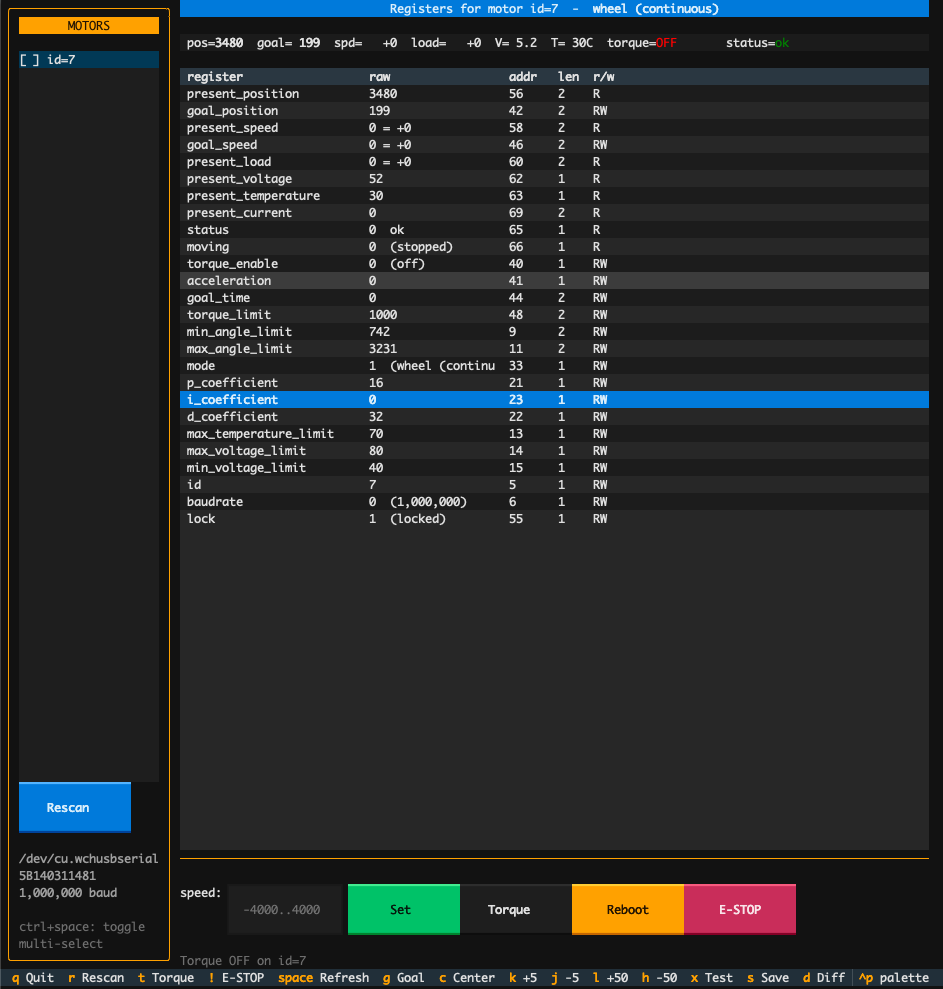
Left sidebar: motors on the bus. Toggle multi-select with ctrl+space; goal and nudge then drive the whole selection via sync_write in one packet.
Right side: a watch strip with the always-visible vitals, then the full register table. Enter on any RW row pops an edit modal with a description, range, units, and a dropdown for enum registers.
Screens
| Key | Screen |
|---|---|
? |
Help overlay |
o |
Oscilloscope: live plot of position / speed / load / current |
w |
Waveform generator: sine, square, triangle, step |
v |
Grid view: every motor on one screen |
d |
Diff against a saved state snapshot |
Ctrl+L |
Preset loader: apply a JSON of register values |
Keybindings
| Key | Action |
|---|---|
q |
Quit |
r |
Rescan bus |
t |
Toggle torque on selected (or all selected) |
! |
E-STOP: broadcast torque off to every motor |
space |
Full refresh |
Ctrl+Space |
Toggle multi-select on highlighted motor |
g |
Focus goal / speed input |
k / j |
Nudge +5 / -5 (auto-scales per mode) |
l / h |
Nudge +50 / -50 |
c |
Center: goal to 2048 or speed to 0 |
Enter |
Edit selected register (RW only) |
x |
Movement test on selected motor |
s |
Save JSON snapshot of every motor |
Ctrl+R |
Reboot selected motor |
Modes
The control bar adapts to the selected motor's mode register.
| Mode | Name | Target | Range | Nudge scale |
|---|---|---|---|---|
| 0 | position (servo) | goal_position | 0 to 4095 | 1 |
| 1 | wheel (continuous) | goal_speed | -4000 to 4000 | 10 |
| 2 | PWM (open-loop) | goal_speed | -1000 to 1000 | 5 |
| 3 | step | goal_position | -32768 to 32767 | 20 |
Status register
Bit flags decoded in the register table and watch strip.
| Tag | Meaning |
|---|---|
VOLT |
voltage out of range |
ANGLE |
angle limit exceeded |
HOT |
overheat |
CURR |
overcurrent |
OVLD |
overload |
Snapshot file
s writes sts-state-YYYYMMDD-HHMMSS.json in the current directory with every register value for every motor on the bus. Load one with d to diff against the current live readings.
Preset file
Presets live in any JSON file with a top-level registers map:
{
  "registers": {
    "p_coefficient": 32,
    "i_coefficient": 0,
    "d_coefficient": 0,
    "torque_limit": 800,
    "acceleration": 30,
    "max_temperature_limit": 70
  }
}
Ctrl+L applies every RW field to the selected motor; EEPROM fields are unlocked and re-locked automatically.
Performance
- Live tick reads SRAM 40-70 in one
read_raw_datacall (single round trip per refresh). - Full refresh reads EEPROM 0-39 plus SRAM 40-70 as two bulk reads instead of 26.
- Serial I/O runs in a worker thread; a stuck motor can't freeze the UI.
- Multi-motor writes use
sync_write_raw_dataso N motors update in one packet.
Stack
- Textual and textual-plotext for the UI
- rustypot for the Feetech protocol over serial
License
Apache License 2.0. See LICENSE.
1 maintainer

Metadata
1 maintainer
Release files for sts-suite 0.1.2
For a detailed explanation of source distributions (sdists) and built distributions (wheels), please see the package formats documentation.
Source distribution (sdist)
| File | Size | Uploaded | |
|---|---|---|---|
| sts_suite-0.1.2.tar.gz | 137.0 kB | Details |
Built distribution (wheel)
| File | Interpreter | ABI | Platform | Reset |
|---|---|---|---|---|
| sts_suite-0.1.2-py3-none-any.whl | Python 3 | none | any | Details |
Total release size: 170.9 kB
Release files / sts_suite-0.1.2.tar.gz
| Download URL | sts_suite-0.1.2.tar.gz |
|---|---|
| Size | 137.0 kB |
| Tags | Source |
|
SHA-256 checksum How to use checksums |
21b0b3e3268d756982c8abcac86a305f5bfa563abcccdc0b84dd92f3e11e898e
|
|
BLAKE2b-256 checksum How to use checksums |
c90e185345e25497bb19f66918389e217c1d18ae063d9ed5c9dd54bd783d97a5
|
| Upload date | |
|
Uploaded using Trusted Publishing? What is trusted publishing? |
Yes |
| Uploaded via |
twine/6.1.0 CPython/3.13.12
|
Provenance
Provenance describes where a file came from. On PyPI, provenance is shared via attestations, which provide a verifiable record of the build or publishing details. View details, limitations and caveats.


PyPI Publish Attestation
PyPI verified that this artifact, at this checksum, originated from the publisher listed below.
Signed by GitHub Actions, verified by PyPI on Jun 29, 2026.
Transparency logRelease files / sts_suite-0.1.2-py3-none-any.whl
| Download URL | sts_suite-0.1.2-py3-none-any.whl |
|---|---|
| Size | 33.8 kB |
| Tags | Python 3 |
|
SHA-256 checksum How to use checksums |
5c19f7508e46a3ee3cdfcc7a8bcd58f93e5402d2f6064136c3e3019828e6c03b
|
|
BLAKE2b-256 checksum How to use checksums |
d75b0a4629a42a80c9e8967d5d30d691535b1c5858f00269954cc4555e7f48d3
|
| Upload date | |
|
Uploaded using Trusted Publishing? What is trusted publishing? |
Yes |
| Uploaded via |
twine/6.1.0 CPython/3.13.12
|
Provenance
Provenance describes where a file came from. On PyPI, provenance is shared via attestations, which provide a verifiable record of the build or publishing details. View details, limitations and caveats.
PyPI Publish Attestation
PyPI verified that this artifact, at this checksum, originated from the publisher listed below.
Signed by GitHub Actions, verified by PyPI on Jun 29, 2026.
Transparency log













