
stucktrace
See where students get stuck, not just whether they passed.
stucktrace is a zero-dependency Python library for Jupyter/JupyterHub that records how a student works through programming tasks (runs, errors, edits, pauses, visualizer use, explicit "I'm lost" markers), compresses that raw trajectory into a small structured context, and turns it into two reports:
- Student Self-Reflection Report: where you got stuck, which error patterns you repeated, what worked, what to try next. It never gives away the solution.
- Instructor Diagnostic Report: a per-task difficulty table, timestamped panic/stuck points, error clusters, error→fix transitions and suggested interventions.
It plugs into the Moodle + OPT_Mentor + Hermes stack: Moodle attempt metadata in and CSV/JSON out, OPT_Mentor trace import, and Hermes LLM reports. A built-in offline report engine takes over whenever Hermes is unreachable.
%load_ext stucktrace            # every cell run is now recorded
%stucktrace task sum_evens
# ... student works, fails, retries ...
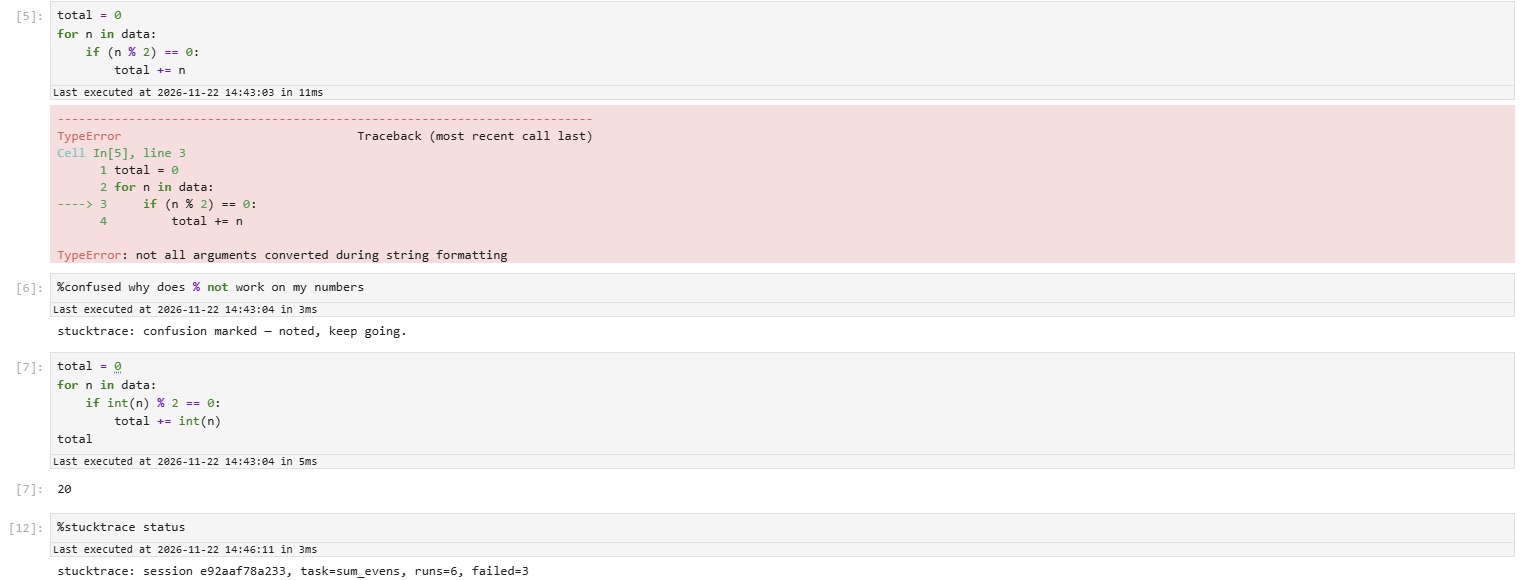
%confused why does % not work on my numbers
%stucktrace report student
Motivation
A Moodle grade tells you the outcome of an attempt. Two students with the same 7/10 can have very different sessions:
- one solved everything steadily and lost points on an edge case;
- the other spent 6 minutes firing the same
TypeErrorat the interpreter, went silent, rewrote the whole cell and got lucky.
Instructors can't watch 200 notebooks during a lab, and students rarely remember how they got stuck, only that they did. The process data already exists inside the kernel (every run, every traceback) but nobody keeps it. When someone does keep it, it's a raw log that is too long for a person to read and too noisy to send to an LLM.
stucktrace keeps the process data, compresses it, and explains it back to both sides:
| Who | Question | What stucktrace gives |
|---|---|---|
| Student | "Why did that take me so long?" | A no-spoiler reflection report: stuck points, repeated patterns, habits to change |
| Instructor | "Which task and which concept broke the class?" | Ranked hotspots, error clusters, panic timestamps, interventions, Moodle CSV |
| LLM (Hermes) | "What happened in this session?" | ~1–6 KB structured context instead of hundreds of raw events |
Innovation
1. Trajectory Compressor (compressor.py). This is the core of the package, not just a logger:
- Error-signature clustering. Messages are normalized (identifiers, numbers, addresses stripped), so
name 'x' is not definedandname 'total' is not definedcount as one recurring misconception. - Six stuck/panic signals per task:
Signal Default rule rapid_fail_burst≥3 failed runs, each ≤25 s after the previous one (trial-and-error mode) repeated_errorsame error signature ≥3 times in a row long_pause≥120 s of silence right after a failure rewrite≥40 % of the code changed right after a failure (thrashing) identical_rerunexactly the same code re-run right after a failure ("maybe it works this time") confusionexplicit mark_confusion("I don't get the loop")/%confused - Panic score in [0, 1]: a weighted combination of the signals (
1 - exp(-Σw/2)) mapped to low / medium / high. - Key transitions. Every failure→success step: which error was fixed, after how many failed attempts, how big the fixing edit was, and whether a visualizer step came first. This measures whether visualization actually helped.
- Run-length digest. The whole task in one line:
F:NameError | F:TypeError x3 | P:149s | ?"why does % not work" | V | S - Measured compression. On a simulated 210-run lab session, 95 KB of raw events become a 6 KB context (15.6× smaller). The demo session (14 events) compresses about 1.6×; the gain grows with session length.
2. Fail-safe by design. Every telemetry entry point swallows its own errors. Student exceptions are recorded and re-raised untouched. No network call can block or crash a notebook, and Hermes failures fall back to the offline engine with a visible warning.
3. Spoiler guard. LLMs like to "just show the fix", so multi-line code blocks are removed from student-facing reports automatically. The Hermes prompt also forbids solutions.
4. Privacy knobs. store_code=False keeps only hashes and lengths, never code. Raw OPT_Mentor traces are summarized into one event instead of being stored step by step.
Architecture
            Jupyter cell hooks / @track / with track()      mark_confusion · log_viz
                               │                                     │
                               ▼                                     ▼
 ┌──────────────────────────────────────────────────────────────────────────┐
 │ tracker.py   Session: append-only Event log (run/confusion/viz/task)     │
 │              edit_ratio via difflib · autosave JSONL · ring buffer       │
 └───────────────────────────────┬──────────────────────────────────────────┘
                                 ▼
 ┌──────────────────────────────────────────────────────────────────────────┐
 │ compressor.py  error signatures → clusters → stuck signals → panic score │
 │                transitions · viz effect · run-length digest              │
 │                → CompressedTrajectory (.to_json / .to_markdown / .to_prompt)
 └───────────────┬───────────────────────────────┬──────────────────────────┘
                 ▼                               ▼
 ┌───────────────────────────────┐   ┌──────────────────────────────────────┐
 │ adapters.py                   │   │ reporter.py                          │
 │  MoodleAdapter  (in: attempt  │   │  generate_report(mode, backend, lang)│
 │    meta, out: CSV / JSON)     │──▶│   Hermes ──fail──▶ LocalReportGenerator
 │  OPTMentorAdapter (trace in)  │   │   spoiler_guard (student mode)       │
 │  HermesClient (LLM)           │   │   Report → Jupyter Markdown / .md    │
 │  LocalReportGenerator (EN/RU) │   └──────────────────────────────────────┘
 └───────────────────────────────┘
| Module | Responsibility |
|---|---|
events.py |
Event dataclass, the raw record format (JSONL-serializable) |
tracker.py |
Session, global API, IPython hooks and magics, track decorator/context manager |
compressor.py |
Trajectory Compressor (the innovation) |
adapters.py |
Moodle / OPT_Mentor / Hermes integrations and the offline report engine |
reporter.py |
Orchestration, fallback, spoiler guard, Report rendering |
cli.py, demo.py |
stucktrace demo / report / compress / moodle |
More detail: docs/architecture.md.
Installation & Setup
pip install stucktrace                 # zero dependencies
pip install "stucktrace[jupyter]"      # + IPython (already present on any JupyterHub)
pip install "stucktrace[dev]"          # + pytest, build, twine
Requires Python ≥ 3.8 and uses only the standard library, so it can't conflict with what's already on a JupyterHub image.
Hermes (optional). Set environment variables, or pass a HermesClient(...):
export HERMES_API_URL="https://<hermes-host>/v1/chat/completions"   # OpenAI-compatible endpoint
export HERMES_API_KEY="..."
export HERMES_MODEL="hermes"            # optional
export HERMES_TIMEOUT="12"              # optional, seconds per request
Network errors and 5xx answers are retried once; 4xx answers (e.g. a wrong key) fall back to the offline engine immediately.
If HERMES_API_URL is not set, reports are generated offline with no warning. If it is set but unreachable, you still get an offline report, marked with a warning.
Quickstart
JupyterHub
import stucktrace as st
%load_ext stucktrace                  # or: st.start_session(student_id="s123", course="CS1302")
%stucktrace task loops                # name the current task
Then just work. Every cell run is recorded with its result, error type, duration and edit size. Cells that only drive stucktrace (magics, st.* calls) are ignored.
%confused I don't understand why the loop stops early     # (avoid a trailing "?": IPython reads it as help)
st.log_viz(step=4, line=7, note="i == len(xs)")          # manual visualization step
%stucktrace status
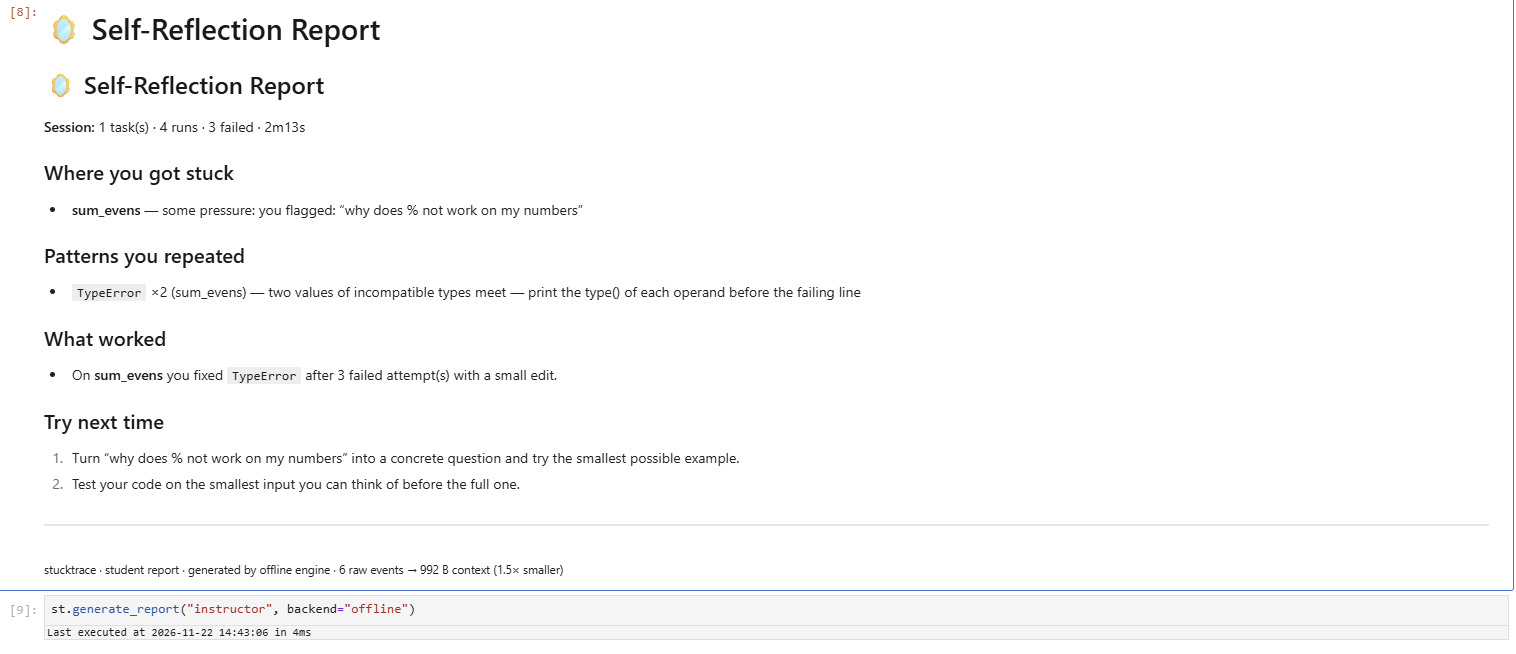
%stucktrace report student            # renders Markdown in the notebook
%stucktrace report instructor --lang ru
%stucktrace save my_session.jsonl
%stucktrace reset                     # start a fresh session (save first!)
Plain Python scripts
import stucktrace as st
st.start_session(student_id="s42", jupyter=False)

@st.track("average")                 # each call = one attempt
def average(xs):
    return sum(xs) / len(xs)

try:
    with st.track("parse", code="int('4.5')"):   # context-manager form
        int("4.5")
except ValueError:
    st.mark_confusion("why can't int() read 4.5")

print(st.generate_report("instructor"))
st.get_session().save("session.jsonl")
CLI
stucktrace demo                       # 45-second end-to-end demo (add --lang ru, --pause 2)
stucktrace report session.jsonl --mode instructor -o report.md
stucktrace compress session.jsonl --format prompt
stucktrace moodle session.jsonl --format csv
Example Use Cases
- Lab session triage. The TA collects
session.jsonlfiles at the end of a lab and runsstucktrace moodleon each. Sorting bypanic_scoreshows which students need a follow-up and which task broke the class. - Exam post-mortem. The instructor report marks persistent clusters (e.g.
TypeErroronstr % intin 40 % of sessions), which points to a misconception to re-teach, not just a hard question. - Student self-study. A student ends a practice notebook with
%stucktrace report studentand gets habits to change ("change one thing at a time") without being given the answer. - Does the visualizer help?
viz_helpedandviz_beforeon transitions show whether OPT_Mentor tracing actually shortens time-to-fix. - Moodle integration.
MoodleAdapter.from_attempt(lti_params)tags the session with the course/quiz/user IDs, andexport_attempt_json/export_csvproduce per-question rows to import.
from stucktrace import MoodleAdapter, OPTMentorAdapter
MoodleAdapter.from_attempt({"courseid": 1302, "quizid": 7, "userid": "s1024", "attempt": 1},
                           question_map={"sum_evens": 1, "fizzbuzz": 2}).apply_to(st.get_session())
OPTMentorAdapter().import_trace(trace_json, task="sum_evens")   # Python-Tutor-style trace
Example reports
Output of stucktrace demo (offline engine). Full EN/RU versions and the exact LLM context are in docs/report_examples.md.
Student Self-Reflection Report
## 🪞 Self-Reflection Report
**Session:** 3 task(s) · 9 runs · 6 failed · 5m30s

### Where you got stuck
- **sum_evens** — high pressure: 4 failed runs in 16s; same TypeError 3× in a row;
  149s of silence after TypeError; you flagged: "why does % not work on my numbers?"
- **count_vowels** — low pressure: 44% of the code rewritten after IndexError

### Patterns you repeated
- `TypeError` ×3 (sum_evens) — two values of incompatible types meet — print the type()
  of each operand before the failing line

### What worked
- On **sum_evens** you fixed `TypeError` after 4 failed attempt(s) with a small edit.
- On **sum_evens** the visualizer helped: success came within a few runs after tracing.
- **fizzbuzz** worked on the first try.

### Try next time
1. When a run fails, stop for 30 seconds and read the *whole* traceback before re-running.
2. If the same error comes back, write down (or say out loud) what you *expect* that line to do.
3. Change one thing at a time — big rewrites after an error hide what actually fixed it.
Instructor Diagnostic Report
## 🧭 Instructor Diagnostic Report
**Student:** s1024 · **Course:** CS1302 Intro to Programming · 5m30s

| Task | Runs | Solved | 1st success | Time | Panic | Top error |
|---|---|---|---|---|---|---|
| sum_evens | 5 | ✅ | 5 | 3m20s | high (0.81) | TypeError: not all arguments converted… |
| count_vowels | 3 | ✅ | 3 | 31s | low (0.22) | IndexError: string index out of range |
| fizzbuzz | 1 | ✅ | 1 | 0s | low (0.00) | — |

### Difficulty hotspots (ranked by panic score)
- **sum_evens** — high (0.81); visualizer used 1× (helped: yes)
  - `+00:05` rapid-fail burst: 4 failed runs in 16s
  - `+00:12` repeated error: same TypeError 3× in a row
  - `+00:21` long pause: 149s of silence after TypeError
  - `+02:50` confusion marker: "why does % not work on my numbers?"
  - digest: `F:NameError | F:TypeError x3 | P:149s | ?"why does % not work on m" | V | S`

### Suggested interventions
1. **sum_evens**: persistent `TypeError` — likely misconception; a 2-minute targeted explanation is worth it.
2. **sum_evens**: the student explicitly asked for help — follow up personally.
3. Visualization shortened time-to-fix on **sum_evens** — recommend it for similar exercises.
Configuration
from stucktrace import CompressorConfig, generate_report
cfg = CompressorConfig(panic_gap=25, panic_min_burst=3, repeat_streak=3, stall_gap=120, rewrite_ratio=0.4)
generate_report("instructor", config=cfg, backend="auto", lang="en")   # backend: auto | hermes | offline
st.start_session(store_code=False, autosave="live.jsonl")              # privacy / crash-safe log
Development
python -m venv .venv && source .venv/bin/activate
pip install -e ".[dev]"
pytest -q                      # 54 tests, incl. real IPython shell + fake Hermes HTTP server
stucktrace demo
Team workflow: CONTRIBUTING.md.
Team
| Member | Role | Main contribution |
|---|---|---|
| Ulykbek (@ulykWyou) | Maintainer, release | Package scaffold, error hints, PyPI release |
| Alisher (@Alish082) | Tracker | %stucktrace reset, Jupyter hooks |
| Azat (@azatanafin) | Compressor | identical_rerun panic signal |
| Alisher (@hakiflow) | Integrations | Hermes timeout & retry logic |
| Insar (@KotaroIson) | Docs & demo | README, screenshots, changelog, contributing guide |
Status & limitations (v0.1.1)
- The Hermes client assumes an OpenAI-compatible
chat/completionsAPI; adaptHermesClient.completeif your deployment differs. - Moodle field names follow
mod_quiz/ LTI conventions but aren't tied to a specific Moodle web-service call yet. - Panic thresholds are heuristics, chosen for introductory programming labs; tune them with
CompressorConfig. - Tracking is per kernel. Collecting sessions from many students is left to the deployment (shared folder, Moodle upload).
License
MIT
1 maintainer

Metadata
1 maintainer
Release files for stucktrace 0.1.1
For a detailed explanation of source distributions (sdists) and built distributions (wheels), please see the package formats documentation.
Source distribution (sdist)
| File | Size | Uploaded | Provenance | Actions |
|---|---|---|---|---|
| stucktrace-0.1.1.tar.gz | 47.4 kB | Without provenance | Details for stucktrace-0.1.1.tar.gz |
Built distribution (wheel)
| File | Interpreter | ABI | Platform | Actions Reset |
|---|---|---|---|---|
| stucktrace-0.1.1-py3-none-any.whl | Python 3 | none | any | Details for stucktrace-0.1.1-py3-none-any.whl |
Total release size: 86.2 kB
Release files / stucktrace-0.1.1.tar.gz
| Download URL | stucktrace-0.1.1.tar.gz |
|---|---|
| Size | 47.4 kB |
| Tags | Source |
|
SHA-256 checksum How to use checksums |
ed4e1f1654680775b640ae74a1a516b761a24c2b5af8e6cf43939e33a711e01f
|
|
BLAKE2b-256 checksum How to use checksums |
368c1e194e8b029def803b86e183441037a1296db094426333e1eb90bea52dbc
|
| Upload date | |
|
Uploaded using Trusted Publishing? What is trusted publishing? |
No |
| Uploaded via |
twine/7.0.0 CPython/3.14.0
|
Release files / stucktrace-0.1.1-py3-none-any.whl
| Download URL | stucktrace-0.1.1-py3-none-any.whl |
|---|---|
| Size | 38.8 kB |
| Tags | Python 3 |
|
SHA-256 checksum How to use checksums |
cc95b8574decf6ec5887ffaddb4853acef46fcc21a49926fa7471dc4e9339b56
|
|
BLAKE2b-256 checksum How to use checksums |
6e3eb105e091699cee75c02a8a532fbae085077870bfd68b73a5f3b1083b218f
|
| Upload date | |
|
Uploaded using Trusted Publishing? What is trusted publishing? |
No |
| Uploaded via |
twine/7.0.0 CPython/3.14.0
|
Security for stucktrace 0.1.1
Provenance
Provenance describes where a file came from. On PyPI, provenance is shared via attestations, which provide a verifiable record of the build or publishing details. View details, limitations and caveats.
No provenance found
None of the files in this release were uploaded with provenance metadata.
A note on package security
PyPI is a repository for distributing packages, not a service for auditing them. While third-party security researchers and our staff do their best to detect and remove malicious packages, PyPI cannot guarantee the quality, security or suitability of any given package.
To learn more about protecting yourself from malicious actors, visit our package security documentation.














