
StudyPype
StudyPype is a lightweight Python toolkit for traceable research and data-processing workflows that are easiest to understand as folders.
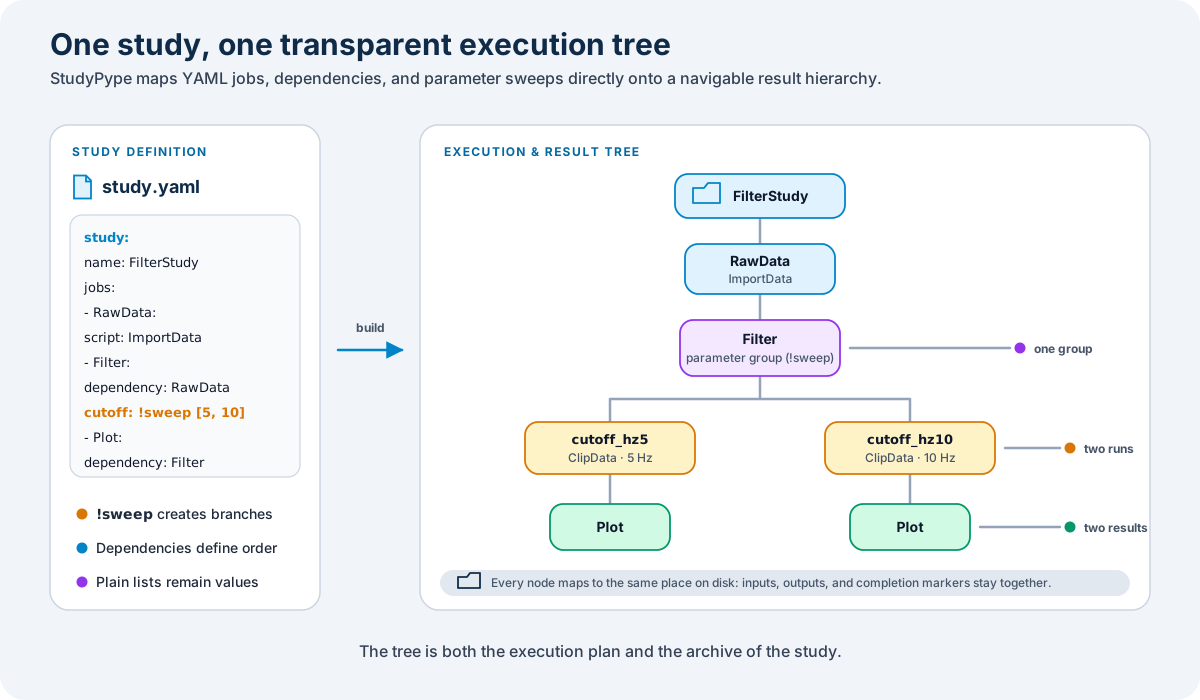
You describe a study in YAML. StudyPype builds a tree, creates the folder structure, and runs one Python job class per executable node. Intermediate results stay next to the step that produced them, so it is easy to inspect a run afterwards.
Installation
Install the released package from PyPI:
pip install studypype
For editable development from a repository checkout:
uv sync
StudyPype requires Python 3.13 or newer.
Working With LLMs
The repository includes a focused StudyPype skill at
.agents/skills/studypype/SKILL.md.
Codex discovers repository skills automatically when it works in the checkout;
you can also invoke this one explicitly as $studypype.
llms.txt provides a compact, tool-independent project map, and
CONTRIBUTING.md records the public development rules.
See the official Codex skill documentation for skill discovery and invocation details.
Parameter Sweeps
StudyPype uses the YAML tag !sweep for parameter sweeps. A value is swept only
when it carries this tag.
Plain YAML lists are regular values:
parameters:
  - point: [0.0, 1.0, 2.0]
Explicit scalar sweep:
parameters:
  - cutoff_hz: !sweep [5, 10, 20]
Explicit nested coordinate sweep:
parameters:
  - plane:
      origin: !sweep
        - [0.0, 0.0, 0.0]
        - [0.0, 0.02, 0.0]
      normal: [0.0, 1.0, 0.0]
Explicit paired-object sweep:
parameters:
  - plane: !sweep
      longitudinal:
        origin: [0.0, 0.0, 0.0]
        normal: [0.0, 1.0, 0.0]
      transverse:
        origin: [0.0, 0.0, 0.0]
        normal: [1.0, 0.0, 0.0]
Use the paired-object form when values must stay coupled. Independent !sweep
tags are combined as a Cartesian product.
Mapping keys become the folder labels for mapped sweeps. Sequence values are formatted into stable folder labels automatically.
Loading YAML
Because !sweep is a StudyPype-specific YAML tag, load study files with
StudyPype:
import studypype as Pype

yaml_content = Pype.load_yaml_file("study.yaml")
Do not use yaml.safe_load(...) for StudyPype study files that may contain
!sweep; PyYAML does not know that tag by default.
Minimal Example
study:
  name: results/FilterStudy
  max_workers: 2
  jobs:
    - RawData:
        script: ImportData
        recalculate: true
        parameters:
          - source: Measurement1.csv

    - Filter:
        script: ClipData
        dependency: RawData
        recalculate: true
        parameters:
          - cutoff_hz: !sweep [5, 10]
          - window_s: 2

    - Plot:
        script: MultiPlot
        dependency: Filter
        parameters:
          - export: png
After expansion, the folder tree is:
results/FilterStudy/
  RawData/
    Filter/
      cutoff_hz5/
        Plot/
      cutoff_hz10/
        Plot/
Filter is the implicit group folder. The executable jobs are cutoff_hz5 and
cutoff_hz10. Plot is copied below each parameter combination.
Running A Study
import studypype as Pype

yaml_content = Pype.load_yaml_file("study.yaml")
study_name = yaml_content["study"]["name"]
study = Pype.Tree(study_name)
study.createfromYAML(yaml_content)
study.expand_sweeps()

Pype.job_runner.run(study, job_folder="tasks")
With max_workers > 1, the runner uses Python processes. On Windows, keep the
runner call inside an if __name__ == "__main__": block.
Writing Jobs
Job classes live in Python files named Job__Something.py. The class name is
used in the YAML script field.
from studypype import Job, register_job


@register_job
class ClipData(Job):
    def func(self, path, parset, **kwargs):
        print(path)
        print(parset)
        print(kwargs.get("datalist"))
        return True
path is the output folder for the current job. parset is a flat dictionary
made from the YAML parameters. datalist contains output folders from tree
ancestors and declared dependencies.
Dependencies And Folders
A single dependency places the job below its predecessor:
- Compute:
    script: ComputeResult
    parameters:
      - alpha: !sweep [10, 20]

- MakeVideo:
    script: MakeVideo
    dependency: Compute
If Compute has an explicit !sweep, MakeVideo is copied under every
expanded combination:
ReadInput/
  Compute/
    alpha10/
      MakeVideo/
    alpha20/
      MakeVideo/
When a job depends on multiple previous jobs, StudyPype keeps the result tree simple: the job is placed under the nearest common folder of those dependencies.
- CompareMethods:
    script: CompareMethods
    dependency: [Linear, Riesz]
For a tree with Linear and Riesz below ReadInputFrames, the comparison
folder becomes:
ReadInputFrames/
  Linear/
  Riesz/
  CompareMethods/
This keeps fan-out easy to navigate and gives fan-in jobs a predictable place without turning the visible results into a full graph.
When a dependency ends with *, the job is placed once at the parameter sweep
group and receives every expanded result with that job name in datalist.
- Filter:
    script: BandpassFilter
    parameters:
      - in_h5_path: !sweep [patient_a.h5, patient_b.h5]

- Align:
    script: AlignBeats
    dependency: Filter

- PlotAll:
    script: PlotAlignedBeats
    dependency: Align*
The folder tree becomes:
Filter/
  in_h5_pathpatient_a.h5/
    Align/
  in_h5_pathpatient_b.h5/
    Align/
  PlotAll/
Use the * form for aggregate plots, summary tables, and reports that combine
all parameter or patient runs from the predecessor.
Parallel Runs
StudyPype reads study.max_workers from the YAML:
study:
  name: results/MyStudy
  max_workers: 3
With max_workers > 1, the runner uses Python processes. A job starts when all
of its executable ancestors and declared dependencies have finished. This means
parameter combinations can run at the same time after their shared input step is
done, while follow-up jobs still wait for their own parent result.
Choose max_workers conservatively for large image or video studies. Running
more jobs in parallel also multiplies memory use.
Development
Run the test suite from the repository root:
uv run python -m unittest discover -s tests -v
Packaging and PyPI release instructions are documented in
docs/PUBLISHING.md. Pushing a stable semantic-version tag
such as v3.0.0 builds, validates, and uploads the matching package to PyPI
through Trusted Publishing; no long-lived PyPI API token is stored in GitHub.
Citation
If StudyPype supports your research, please cite the software using the
metadata in CITATION.cff. GitHub can export this metadata in
common citation formats.
License
StudyPype is authored by Johannes Maierhofer and released under the MIT License.
1 maintainer

Download files
Download the file for your platform. If you're not sure which to choose, learn more about installing packages.
Source Distribution
Built Distribution
Filter files by name, interpreter, ABI, and platform.
If you're not sure about the file name format, learn more about wheel file names.
Copy a direct link to the current filters
File details
Details for the file studypype-3.0.0.tar.gz.
File metadata
- Download URL: studypype-3.0.0.tar.gz
- Upload date:
- Size: 150.9 kB
- Tags: Source
- Uploaded using Trusted Publishing? Yes
- Uploaded via:
twine/7.0.0 CPython/3.13.14
File hashes
| Algorithm | Hash digest | |
|---|---|---|
| SHA256 |
7cc8c2efd288612817a6c432cadecb7c83c8ffd5afe49c7f425f291198326a36
|
|
| MD5 |
6e8bb1b7033cbc129c3563c9d77269cb
|
|
| BLAKE2b-256 |
08416e5659801870f10e348c3c5749fc70e9e4ec782ce378c8723e4063eed3ff
|
Provenance
The following attestation bundles were made for studypype-3.0.0.tar.gz:
Publisher:
publish-to-pypi.yml on Maierhofer-Technology/studypype
-
Statement:
-
Statement type:
https://in-toto.io/Statement/v1 -
Predicate type:
https://docs.pypi.org/attestations/publish/v1 -
Subject name:
studypype-3.0.0.tar.gz -
Subject digest:
7cc8c2efd288612817a6c432cadecb7c83c8ffd5afe49c7f425f291198326a36 - Sigstore transparency entry: 2618875988
- Sigstore integration time:
-
Permalink:
Maierhofer-Technology/studypype@241982118e77d1427aecc5f21e3eb9e6770ae111 -
Branch / Tag:
refs/tags/v3.0.0 - Owner: https://github.com/Maierhofer-Technology
-
Access:
public
-
Token Issuer:
https://token.actions.githubusercontent.com -
Runner Environment:
github-hosted -
Publication workflow:
publish-to-pypi.yml@241982118e77d1427aecc5f21e3eb9e6770ae111 -
Trigger Event:
push
-
Statement type:
File details
Details for the file studypype-3.0.0-py3-none-any.whl.
File metadata
- Download URL: studypype-3.0.0-py3-none-any.whl
- Upload date:
- Size: 13.1 kB
- Tags: Python 3
- Uploaded using Trusted Publishing? Yes
- Uploaded via:
twine/7.0.0 CPython/3.13.14
File hashes
| Algorithm | Hash digest | |
|---|---|---|
| SHA256 |
b1e380294bd4c7567d07d30e8f2a38c409cb2c64fd350e50234505119562d44a
|
|
| MD5 |
e9ab539f324514ae32fd19e1f995c432
|
|
| BLAKE2b-256 |
332597624d3833211d47ade420b9028b690beecdda716dbfadd1c7c02edf102b
|
Provenance
The following attestation bundles were made for studypype-3.0.0-py3-none-any.whl:
Publisher:
publish-to-pypi.yml on Maierhofer-Technology/studypype
-
Statement:
-
Statement type:
https://in-toto.io/Statement/v1 -
Predicate type:
https://docs.pypi.org/attestations/publish/v1 -
Subject name:
studypype-3.0.0-py3-none-any.whl -
Subject digest:
b1e380294bd4c7567d07d30e8f2a38c409cb2c64fd350e50234505119562d44a - Sigstore transparency entry: 2618875992
- Sigstore integration time:
-
Permalink:
Maierhofer-Technology/studypype@241982118e77d1427aecc5f21e3eb9e6770ae111 -
Branch / Tag:
refs/tags/v3.0.0 - Owner: https://github.com/Maierhofer-Technology
-
Access:
public
-
Token Issuer:
https://token.actions.githubusercontent.com -
Runner Environment:
github-hosted -
Publication workflow:
publish-to-pypi.yml@241982118e77d1427aecc5f21e3eb9e6770ae111 -
Trigger Event:
push
-
Statement type:













