
🌳 py-tree - 目录树生成工具

一个Python实现的类 Linux tree命令工具,支持彩色输出、路径过滤、深度控制等功能,适配中英文环境。
✨ 功能特性
- 彩色高亮
区分目录、可执行文件、符号链接等类型 - 智能过滤
- 支持
-P通配符匹配包含文件 - 支持
-I多模式排除文件/目录 - 支持隐藏文件显示(
-a)和仅目录模式(-d)
- 支持
- 路径显示
可选完整路径模式(-f)或相对路径 - 多语言适配
自动根据系统语言显示中/英文帮助信息 - 深度控制
通过-L参数限制遍历层级
📦 安装
pip install stv_pytree
通过入口点命令 pytree 直接调用
🚀 使用示例
基础用法
pytree [目录]
显示隐藏文件(包括.开头文件)
pytree -a ~/projects
限制遍历深度为2
pytree -L 2 /usr
仅显示目录 & 完整路径
pytree -d -f /var/log
组合过滤
# 显示所有test开头的Python文件(排除.log结尾文件)
pytree -P "*.py" -I "*.log" -a src/
📌 命令行选项
usage: pytree [-h] [-a] [-d] [-L LEVEL] [-f] [-I EXCLUDE] [-P PATTERN] [--color {always,auto,never}] [-ns] [-fs] [-v] [-lic] [-sc] [-cl] [directory]

选项说明:
  -a, --all                     显示隐藏文件
  -d, --dir-only                仅显示目录
  -L LEVEL                      最大遍历深度
  -f, --full-path               显示完整路径
  -I EXCLUDE                    排除模式(可多次使用)
  -P PATTERN                    文件名匹配模式
  --color                       颜色模式:always/auto/never(默认auto)
  -ns, --no-stream              是否禁用流式输出
  -fs, --follow-symlinks        是否深入符号链接
  -sc, --set_Chinese            强制设置显示语言为中文
  -cl, --clear_language_setting 清除强制语言设置
🖼️ 效果演示
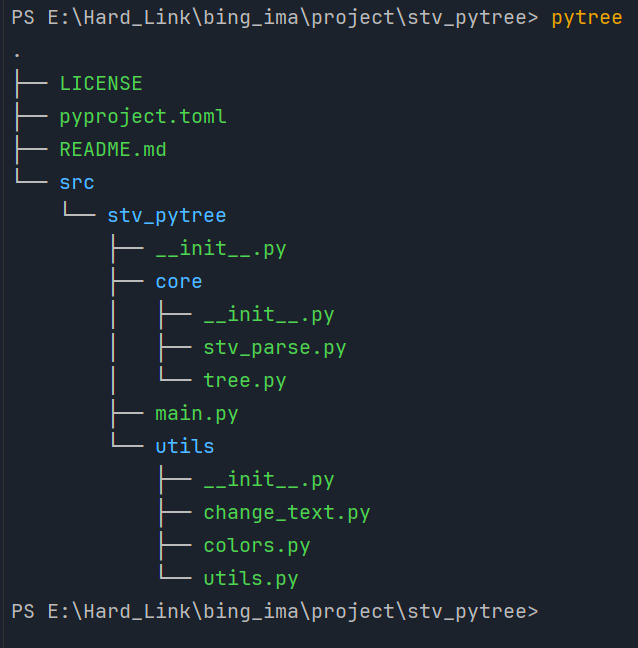
🤝 贡献指南
欢迎通过Issue报告问题或提交Pull Request!
📄 许可证
1 maintainer

Metadata
1 maintainer
Release files for stv-pytree 0.0.6
For a detailed explanation of source distributions (sdists) and built distributions (wheels), please see the package formats documentation.
Source distribution (sdist)
| File | Size | Uploaded | |
|---|---|---|---|
| stv_pytree-0.0.6.tar.gz | 9.5 kB | Details |
Built distribution (wheel)
| File | Interpreter | ABI | Platform | Reset |
|---|---|---|---|---|
| stv_pytree-0.0.6-py3-none-any.whl | Python 3 | none | any | Details |
Total release size: 19.6 kB
Release files / stv_pytree-0.0.6.tar.gz
| Download URL | stv_pytree-0.0.6.tar.gz |
|---|---|
| Size | 9.5 kB |
| Tags | Source |
|
SHA-256 checksum How to use checksums |
3b878e19fe3466e3becb1bd0d7b3bd39c8ad2719756d4b9191f932bc55ab6366
|
|
BLAKE2b-256 checksum How to use checksums |
57b3a0de621ca8ffc1751e7a7b9dac09ad3d8408f94169b8b1dfb7163904be8f
|
| Upload date | |
|
Uploaded using Trusted Publishing? What is trusted publishing? |
No |
| Uploaded via |
twine/6.1.0 CPython/3.12.3
|
Release files / stv_pytree-0.0.6-py3-none-any.whl
| Download URL | stv_pytree-0.0.6-py3-none-any.whl |
|---|---|
| Size | 10.1 kB |
| Tags | Python 3 |
|
SHA-256 checksum How to use checksums |
5b2ca18c8a74d96866f235203b7f3d4ca55b3be320bc65ea14d4c5df84fc0089
|
|
BLAKE2b-256 checksum How to use checksums |
2af2b0b76105c9cbc33530bda6798a74b9d04d18adddcdcb8f2e7eef3025a95d
|
| Upload date | |
|
Uploaded using Trusted Publishing? What is trusted publishing? |
No |
| Uploaded via |
twine/6.1.0 CPython/3.12.3
|














