
stv-watch
A SourceTV relay viewer for Half-Life 2: Deathmatch and Team Fortress 2, in the
terminal. It joins a relay as a spectator, as the game client would, and shows
what the relay sends:
who talks on voice chat and, with --asr parakeet, what they say; chat, console
messages, connects, joins, leaves, kills, team and nick changes, server and
SourceMod notices, the connection's state and its traffic. It can also replay a
recording at any speed. For scripts and agents, the same events come out as one
JSON object per line.
Every live session is recorded byte for byte (capture.tvd), and a replay of
that recording gives the same lines the live run printed.
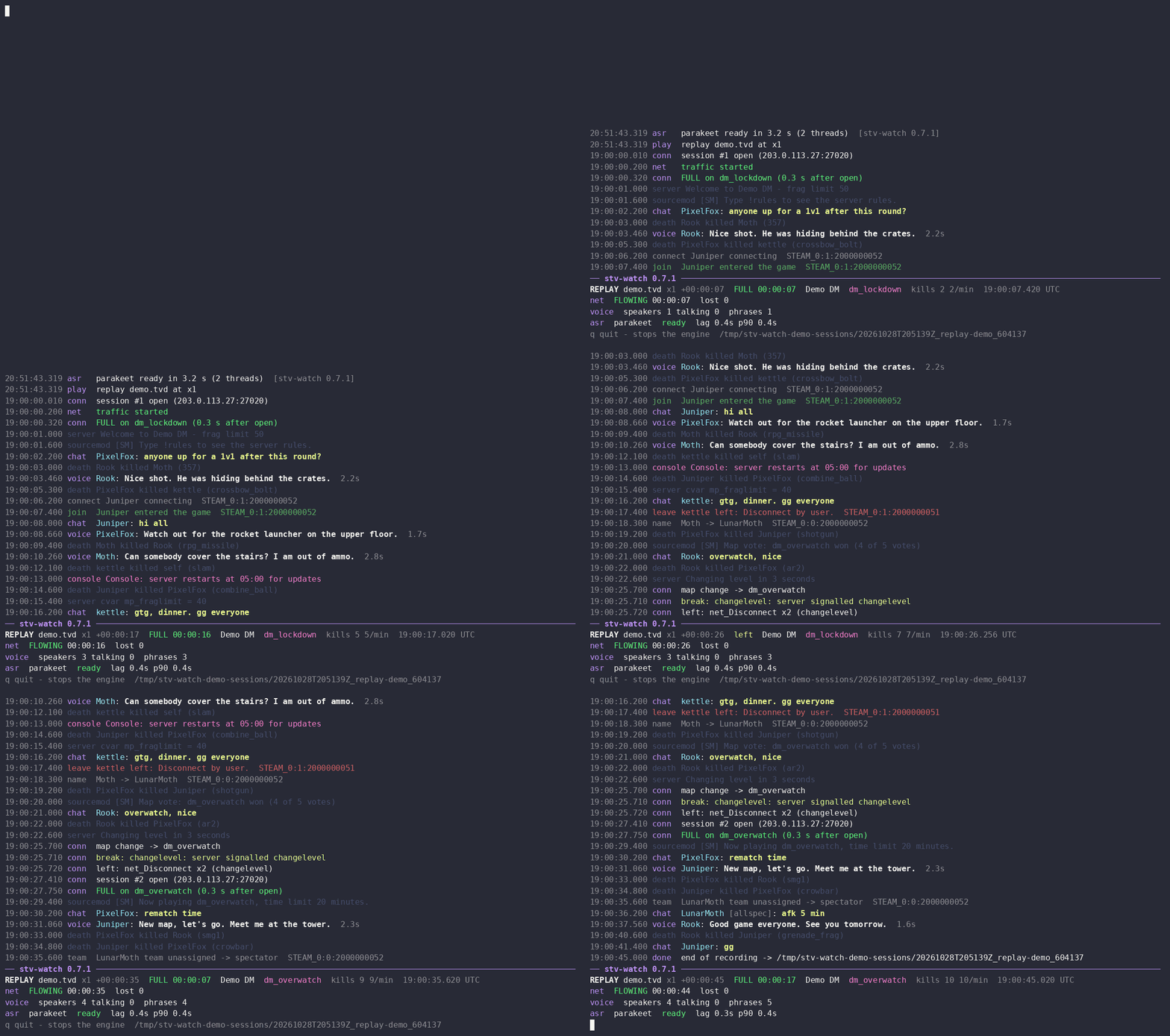
stv-watch 0.7.1 replaying a synthetic recording: invented players, English TTS voices, real Parakeet recognition.
Requirements
- Linux. The network client is a child process that the kernel stops when the
viewer dies (
PR_SET_PDEATHSIG), and the screen usestermios. - Python 3.12 to 3.14 (CI tests each), x86-64. onnxruntime publishes wheels up to CPython 3.14; on a newer Python the install stops at it with no matching wheel.
- uv (or pipx). uv provides the interpreter (a
Python 3.12 or newer it finds on the system, else one it downloads) and the
environment with the dependencies, all wheels from PyPI: numpy,
opuslib-next-bundled (the Opus decoder, libopus inside), onnxruntime, onnx-asr
and sherpa-onnx (speech recognition), cronsim (the
--rotateschedule): about 175 MB on disk afteruv tool install. A clone run withuv runalso gets the development tools of the project (black, ruff, pytest): about 70 MB of downloads in all, 210 MB in.venv. onnxruntime 1.29 and later on Linux sends usage events to Microsoft by default; stv-watch setsORT_DISABLE_TELEMETRY=1before loading it, unless you set that variable yourself. - For
--asr parakeet: 2.55 GB of disk for the model weights (Parakeet and Silero VAD) and about 2.9 GB of memory while it runs.--live-asr nemotronadds 0.68 GB of disk and about 1 GB of memory. - For
--tz: the system time zone database (packagetzdata).
A fresh Ubuntu 24.04 server has all of this but uv.
Install and run
Install uv if you do not have it (its standalone installer puts it into
~/.local/bin; other ways are in the uv docs):
curl -LsSf https://astral.sh/uv/install.sh | sh
source ~/.local/bin/env    # or open a new shell
Then install stv-watch from PyPI:
uv tool install stv-watch    # or: pipx install stv-watch
stv-watch --version
stv-watch --help
uv tool install puts the stv-watch command into ~/.local/bin, in an
environment of its own; uv tool upgrade stv-watch moves it to the latest
release, uv tool uninstall stv-watch removes it. The examples below run this
command.
To run from the source instead (the tests, the tools and the sample recording are only there):
git clone https://github.com/dmitry-ra/stv-watch.git
cd stv-watch
uv run stv-watch --help
uv run stv-watch --replay tests/data/sample.tvd --speed 0
The first uv run creates .venv in the clone and installs the dependencies
into it. Run later commands from the same directory, or pass
--project PATH_TO_CLONE to uv run, and put uv run before stv-watch in
the examples below. The replay of the bundled sample prints a dozen lines (chat,
a connect, a map change) and ends at once: it checks the install without a
network or a game server.
Examples
Watch a relay live (the relay's address is its SourceTV port, often 27020):
stv-watch --relay RELAY_IP:27020
The feed scrolls above a status block pinned to the bottom of the terminal; q
quits, which stops receiving and recording (it is the only key). Before
connecting, stv-watch asks the relay (A2S_INFO) whether it can take a spectator
and refuses when it should not (see Responsible use). The last line names the
session directory with the recording and the other files (see Session files).
Replay a recording, as fast as possible or at its own pace, from the start or from a point in it, all of it or a part:
stv-watch --replay capture.tvd --speed 0
stv-watch --replay ~/.local/share/stv-watch/sessions/SESSION/capture.tvd --speed 4
stv-watch --replay capture.tvd --skip-ms 600000 --duration-ms 60000
--duration-ms also bounds a live run: the viewer leaves the relay after that
much wall time (quit in meta.json says client left: time limit).
--follow watches the capture.tvd of a live run while it is being written,
with no connection of its own, so more people can watch one connection; what
the file held before only sets the state, and the feed starts with what comes
next. It waits for more until q or a signal, also once the writer has
stopped; a finished recording is for --replay:
stv-watch --follow ~/.local/share/stv-watch/sessions/SESSION/capture.tvd
Choose the events (--events, default chat,console,connect,join,leave,name;
the types are chat, console, connect, join, leave, death, team,
name, server, sourcemod):
stv-watch --relay RELAY_IP:27020 --events all
stv-watch --relay RELAY_IP:27020 --events all,-server   # everything but server notices
stv-watch --relay RELAY_IP:27020 --events chat,death
Voice and the viewer's own lines (connection, traffic, recognizer) are always
shown. Without a terminal (a pipe, a file) or with --plain the feed is
printed as lines with a status summary every --status-every-ms (default
10000) instead of the pinned block.
Finding the relay of a server
SourceTV listens on a port of its own (tv_port, 27020 by default), not on
the game port players join (often 27015), and not every server runs it. A
server with SourceTV names its relay port in its A2S_INFO reply; this prints
the reply as JSON, and tv_port is the port to give --relay (no tv_port:
the server has no SourceTV; from a clone):
uv run python -m stvwatch.net.a2s SERVER_IP:27015
Given a game port, stv-watch refuses before connecting with
refused: relay does not take anonymous login, auth protocol 3: the game
server wants a Steam login, which a SourceTV relay does not.
Team Fortress 2
--game tf2 watches a relay of Team Fortress 2 (the default is hl2dm):
stv-watch --relay RELAY_IP:27020 --game tf2 --events all --asr parakeet
The game must match the relay's: A2S_INFO names the game's folder (hl2mp,
tf), and stv-watch refuses a relay of another game before connecting, with
exit code 2 and the option to use (refused: relay serves tf2, not hl2dm (A2S folder tf): use --game tf2); --keep-trying does not wait that out. A relay
of a game stv-watch does not know is refused like any other relay that does not
take us (exit code 3). The game is written into capture.tvd and
meta.json, so --replay and --follow take it from the recording; a
recording made before 0.7.0 has none and is read as hl2dm (or as --game).
What differs from HL2DM is the game's own part of the stream, and stv-watch
decodes it for the same lines: chat (channel all, team, alldead,
team_dead, allspec, spec, coach; team chat on maps that name their
places also has location), the kill feed with the assister (killed bob (scattergun, assist carol)), headshots and backstabs, a faked death of a
Dead Ringer spy marked feigned (the spy lives), and teams RED and BLU. Bots
(MvM robots too) take part like players but get no connect or join lines.
Voice is the same steam codec as on HL2DM relays. Events of TF2 alone
(capture points, flags, uber charges, classes) are not shown yet.
Fewer TF2 servers can be watched than announce SourceTV: a third of them are
on Steam Datagram Relay addresses (169.254.x.x), which plain UDP cannot
reach, and of the rest many keep the relay port closed, set tv_password
or want a Steam login (auth protocol 3). TF2 is patched often; after a
patch its relays are refused as an unknown build until the CRC of the new
build is added (see A server on an unknown build). Some servers announce a
joining spectator in chat by its name (--name, default stvwatch).
A relay with a password
A server that sets tv_password closes its relay to spectators without it, and
its A2S_INFO reply on the relay port says so (visibility 1). stv-watch refuses
such a relay before connecting unless you give it the password: in a file
(its first line), in the environment, or in the password store:
stv-watch --relay RELAY_IP:27020 --password-file ~/.config/stv-watch/relay.pw
STV_WATCH_PASSWORD=... stv-watch --relay RELAY_IP:27020
stv-watch --relay RELAY_IP:27020        # the line of RELAY_IP:27020 in the store
The store is $XDG_CONFIG_HOME/stv-watch/passwords
(~/.config/stv-watch/passwords when XDG_CONFIG_HOME is unset), one relay
per line, # starts a comment:
# HOST:PORT     PASSWORD (the rest of the line, without leading and trailing spaces)
RELAY_IP:27020  the password
Like ssh with a key, stv-watch refuses to read it (exit code 2) when its mode
lets anyone but its owner read or change it: chmod 600 it. Its password is
sent only to a relay that announces one. The first source given wins:
--password-file, then STV_WATCH_PASSWORD, then the store; a broken file or
store is an error at the start. The file and the store are read again before
every connection attempt, so a long run picks up a new password without a
restart (see --keep-trying below).
There is no option that takes the password itself: a command line is visible to
every user of the machine (ps) and is copied into meta.json. The password
goes to the network client through its environment and to the relay in the
connect request; it is not written to any session file (capture.tvd keeps the
connect request with the password field empty), the screen or a log. A wrong
password is a refusal retrying will not change: the relay accepts the connect
and drops us at once with Bad spectator password, and stv-watch ends with exit
code 3 (tvd line [alarm] permanent failure: Bad spectator password).
A password set while we are connected does not drop us, but the next map change does: stv-watch reconnects after every map change, and that connect is checked.
A window that stays up
A run meant to stay up for days (a window in tmux, a service) should not end
because the relay turned it away for a while. With --keep-trying the refusals
that may pass without a change to stv-watch are waited out inside the run:
stv-watch --relay RELAY_IP:27020 --asr parakeet --keep-trying
- the relay refused us before connecting (silent, no free slot, a password
announced and none given, an unknown build) or with a standing refusal (
Bad spectator password, a ban, a build or class table mismatch): the next attempt is 300 s later, doubled while the same refusal repeats, at most 30 minutes (12 connects an hour is all a relay that keeps saying no gets from us; it is someone else's server); - the network client died (killed, crashed): 10 s, doubled up to 300 s.
The waits start over after a connection that reached FULL. When the password
file or the store changes during a wait, the next attempt comes at once (a
second after the last write), so fixing the password brings the window back
within seconds. The status line shows refused: Bad spectator password, next try in 4:12 or client died (rc -9): killed by SIGKILL, next try in 0:08,
and events.jsonl gets a wait line per failed attempt, with the cause, its
class and next_try_utc (see docs/session-files.md).
A new network client after a wait writes a new session directory, linked to
the old one by rotate lines with reason restart, as --rotate does: the
stream is cut where the new client starts, so the old session ends with the
failed attempt, its wait line and the rotate line. q, signals and
--duration-ms end the run as always, waiting or not. Usage errors (a bad
option, a password file that cannot be read, a store others may read, a relay
of another game than --game) and
errors in stv-watch itself still end it: waiting would not fix them.
Without --keep-trying a run ends at the first refusal or client death, with
the exit code of its class (below).
Voice
Every utterance is a line: who talks, talking N s while the key is held, then
the final line when the speaker has been silent for a second. A monologue is cut
into pieces of at most two minutes (--max-utt-ms, default 120000, at most
400000: Parakeet takes at most 400 s in one call); later pieces are marked
(cont). A piece ends in the middle of the longest pause in its last 40 %, the
pauses found by Silero VAD (with --asr); with no pause there, or without
--asr, the cut is hard at the limit. Each utterance is also saved as a WAV
file and a row of transcript.tsv (--no-audio turns the WAV files off).
To see what is said, add a recognizer:
stv-watch --relay RELAY_IP:27020 --asr parakeet
The first run downloads the weights of Parakeet TDT 0.6B v3 (2.55 GB, about 25
European languages, Russian and English among them) and of Silero VAD (0.64 MB)
into $XDG_CACHE_HOME/stv-watch/models (~/.cache/stv-watch/models when it is
unset; --models-dir chooses another place). For each it prints one line with
the size and the revision first, fetches every file from its source at a pinned
revision (Hugging Face, GitHub) and checks its size and SHA-256 before using it;
a file that fails the check is deleted and the run stops. Later runs start from
the files on disk.
Recognition runs on the CPU (--threads, default 2) after an utterance ends,
so its text follows the speech by about a second. A replay that reaches its
end waits until every queued utterance is recognized; live, or stopped by a
signal or q, the exit waits at most --drain-ms (default 20000), and the
rest are marked not recognized before exit. --drain-ms bounds a replay's
wait too, and a signal or q during the wait ends it. The queue holds at most
600 s of audio: a replay waits for room, while live an utterance that does not
fit is marked not recognized, queue full.
Silero VAD stands in front of the model as a gate: an utterance with less
speech in it than --min-speech-ms (default 250) gets no text (no speech)
and is not recognized, because on noise Parakeet tends to make up an
interjection; --min-speech-ms 0 turns the gate off. Each voice line carries
the speech the VAD found, speech_ms.
Live text while a player talks
--live-asr nemotron adds a second, streaming recognizer, Nemotron 3.5 ASR
Streaming 0.6B, next to the one of --asr: the talking line shows what it
hears while the player is still speaking, and the end of the text stays in
view when the line is wider than the terminal. When the utterance ends, the
--asr text replaces it. Only the screen shows that text (a terminal, or
--serve and its --attach screens) and no file keeps it: the voice lines,
transcript.tsv and the WAV files are the same with it or without it. The
session records only the live recognizer's own state: its asr lines (loaded,
failed, an error) in events.jsonl and feed.log, and live_asr in
meta.json. With --plain, --monitor or --json it is not loaded at all.
stv-watch --relay RELAY_IP:27020 --asr parakeet --live-asr nemotron
Its weights (0.68 GB, a 0.48 GB archive to download) are fetched and checked
like the others. It decodes 560 ms of audio at a time on one CPU thread
(--live-asr-threads), about half a core per player talking; its threads run at
a lower priority (nice + 10) than the --asr recognizer, and when it falls more
than 1.5 s behind, it drops what is queued: the utterances open at that moment
get no more live text, their final text comes as always. The model needs some
speech before it says anything: under 1.5 s most utterances get no live text,
from 3 s on it usually shows up in the first half. It runs on any x86-64; on a
CPU without AVX2 it is slower (not measured). A model that fails to load is
named in a red asr line and the run goes on without it.
The SteamID a voice line names comes from the voice data, which the speaker's
own game writes; the slot the data came from is the server's, and the server's
userinfo table says who is in that slot. Each voice line checks one against
the other (verified): a mismatch, a client claiming someone else's SteamID,
is marked in red on screen with the slot and the nick of its real owner.
A bot's slot (SourceTV talking, as a server plugin can make it) has no
account to check: its lines carry bot and the slot's name instead, marked
[bot] on screen.
Durations in options and in the files are whole milliseconds, their names end
in _ms / -ms; moments are ISO times. The screen speaks seconds.
Without a recording at hand, tests/voicegen.py writes a synthetic one with
voice made of tones and noise (no speech; from a clone):
uv run python tests/voicegen.py /tmp/voice.tvd
uv run stv-watch --replay /tmp/voice.tvd --speed 0 --asr parakeet
Time zones
Times are in UTC. --tz takes an IANA zone name for the screen and the files
(the system time zone database, package tzdata, must be installed):
stv-watch --relay RELAY_IP:27020 --tz Europe/Berlin
An --attach screen takes its own --tz, for that screen only (the engine's
files keep the engine's zone); without it, it shows the engine's zone.
Session rotation
A run that lasts for weeks can start a new session directory on a schedule,
so old sessions can be removed whole. --rotate takes a standard 5-field cron
schedule (minute, hour, day of month, month, day of week), read in the --tz
zone (UTC without it) and in the recording's time: a replay of a recording
rotates where the live run would have. Off by default.
stv-watch --relay RELAY_IP:27020 --tz Europe/Berlin --rotate "0 6 * * *" # 06:00 daily
Every file of the session goes on in the new directory, capture.tvd too; the
connection to the relay stays. The new directory is made and its files opened
first; then the old events.jsonl gets its last line, of type rotate, with
the absolute paths of the new directory and its events.jsonl:
{"t_utc": "2026-10-11T03:00:00.012Z", "t_local": "2026-10-11 06:00:00", "type": "rotate", "steamid64": 0, "nick": "", "text": "session goes on in /data/s/20261011T030000Z_RELAY_IP_27020_4242", "next_dir": "/data/s/20261011T030000Z_RELAY_IP_27020_4242", "next_events": "/data/s/20261011T030000Z_RELAY_IP_27020_4242/events.jsonl"}
A reader of events.jsonl that meets it opens next_events and reads on from
its first line, a rotate line with prev_dir, prev_events and version
that only marks the continuation: skip it. Follow next_events from file to
file and never order sessions by their directory names: in a replay the
sessions after a rotation are named by the recording's time, the first one by
the time the replay started, so the names do not sort in the order of the
run. --json prints both rotate lines, so its output is the sessions'
events.jsonl one after the other; the screen shows only the first.
A rotation cuts the stream of events (see For scripts and agents) at its
moment: every line before it is in the old session, every line from it on in
the new one, the same live and in a replay at any speed, with --asr or
without. An utterance that starts before the cut and closes after it has its
talk line in the old session and its voice line, transcript.tsv row and
WAV in the session where it closes (the next one, or a later one if it stays
open across several cuts); utt pairs them. capture.tvd is cut by the
receive time of the packets at the same moment, so the last voice data of such
an utterance is in the next file.
Each session has its own meta.json, written when it starts and when it ends
(quit is rotated for all but the last); its counters are totals since the
run started. A rotated capture.tvd starts in the middle of the connection:
--replay of it alone shows voice but not who is who until the next map
change, while --follow goes on from one file into the next by itself. A
schedule cron would misread (not 5 fields) or that never fires is refused at
the start (exit code 2), and --attach takes no --rotate: the engine
rotates. A period with no record in it gets no directory.
A headless engine and its screens
--serve SOCKET runs the viewer without a terminal UI: it connects, records,
recognizes and writes its session files as always, and serves its screen on a
Unix socket (mode 0600) to any number of clients. --attach SOCKET is such a
client: the same screen, drawn from what the engine sends, with no connection to
the relay, no parsing and no model of its own. A name without / is a socket in
$XDG_RUNTIME_DIR/stv-watch/; where that variable is unset (a system service,
sudo), give a path:
stv-watch --relay RELAY_IP:27020 --asr parakeet --serve watch   # in tmux, a service, ...
stv-watch --attach watch                                         # in any terminal, as often as you like
stv-watch --attach watch --plain                                 # finished lines only
The attached screen is the engine's screen, marked so that it is not taken for
the engine itself, since q does different things there:
| local run | --attach screen |
|
|---|---|---|
| label of the rule over the block | stv-watch VERSION, blue |
stv-watch VERSION, a middle dot, attached; magenta |
| hint line | q quit - stops the engine |
q close screen - engine keeps running |
| one more block line | attach SOCKET engine pid N |
The source word of the status line (LIVE, REPLAY, FOLLOW) is the engine's
and stays as it is. In a local run q stops receiving and recording; on an
attached screen it closes only that screen. On connect the screen gets the last
200 feed lines, the voice lines still open and the block, then follows the
engine. When the engine goes away the screen waits for it, and when an
engine serves the socket again it reconnects by itself and says so in one feed
line. A client that does not keep up is dropped and reconnects; the engine never
waits for a screen. The engine's stdout gets a first line
serving SOCKET (pid N): stv-watch --attach SOCKET, then its finished feed lines (as
--plain without status lines); its session directory ends in _N, the same
pid. A socket file left by an engine that died is
taken over, one that a live engine serves is refused. A screen and an engine of
different socket protocol versions (0.4.0 brought protocol 2, 0.5.0 protocol 3,
which every release since keeps) do not work together: the screen names both versions and
exits.
For scripts and agents
--json prints one JSON object per line, flushed as it is written; no
escape sequences, no status lines:
stv-watch --relay RELAY_IP:27020 --json --events all
{"t_utc": "2025-10-07T09:40:00.200Z", "type": "chat", "steamid64": 76561201960265729, "nick": "alice", "text": "hello", "channel": "all", "ent": 1}
{"t_utc": "2025-10-07T09:40:09.060Z", "type": "talk", "steamid64": 76561201960265729, "nick": "alice", "text": "", "utt": 3, "start_utc": "2025-10-07T09:40:09.060Z", "continued": false, "slot": 1}
{"t_utc": "2025-10-07T09:40:11.050Z", "type": "voice", "steamid64": 76561201960265729, "nick": "alice", "text": "see you", "utt": 3, "start_utc": "2025-10-07T09:40:09.060Z", "end_utc": "2025-10-07T09:40:11.050Z", "result": "text", "continued": false, "spectator": false, "details": "1.0s/0.9s fr 50 plc 0 gap 0 33kb/s press 1 msg 17 -2 0% arr 17 p50 60 max 60ms +1.1s asr 0.24s +0.9s", "speech_ms": 820, "slot": 1, "verified": true}
Lines come in the order of t_utc, the moment of the event on the recording's
clock (live, when its packet arrived), and a replay writes the same lines at
any speed. An utterance is two lines with the same utt: talk when the
player starts, voice when it closes (a second after his last voice data), with
start_utc, end_utc and the text. With --asr the stream waits for that
text: from the close of an utterance until it is recognized (live, usually
under a second) the lines after it are held back. The screen shows no talk
lines: there the player's voice line says talking until the text replaces it.
The fields are t_utc, t_local (only with --tz), type, steamid64, nick,
text and the extra fields of the type; the format is
docs/events.schema.json, described in
docs/session-files.md. --monitor gives the same events
as plain text lines. AGENTS.md is a guide for agents that run it.
For AI coding agents there is a skill, skills/stv-watch, in the format that Claude Code, Codex and Pi load. Link it into the agent's skill directory, from the clone:
mkdir -p ~/.claude/skills && ln -s "$PWD/skills/stv-watch" ~/.claude/skills/stv-watch       # Claude Code
mkdir -p ~/.codex/skills && ln -s "$PWD/skills/stv-watch" ~/.codex/skills/stv-watch         # Codex
mkdir -p ~/.pi/agent/skills && ln -s "$PWD/skills/stv-watch" ~/.pi/agent/skills/stv-watch   # Pi
The skill finds the clone through the link, so it stays current with
git pull.
Exit codes
One code per class of ending; the last line of events.jsonl (done) says
the same in fields: quit (what ended it), class, cause, rc.
| Code | Class | When |
|---|---|---|
| 0 | ok |
done as asked: q, a signal, --duration-ms (quit client left: time limit live, time limit in a replay), the end of a recording |
| 1 | bug |
an error in stv-watch itself (quit crash): the traceback is on the terminal and in the session's stderr.log, cause names the exception |
| 2 | usage |
a usage or configuration error: the command line, a relay of another game than --game (relay serves tf2, not hl2dm), a recording that cannot be read, a password file or store that cannot be read or that others may read, the socket of --serve or --attach, recognition weights that could not be fetched or checked, a model that failed to load (asr failed) |
| 3 | refused |
the relay does not take us: refused before connecting (precheck; also a relay of a game stv-watch does not know) or with a standing refusal (alarm) |
| 4 | client |
the network client died: killed or stopped from outside (also a SIGTERM to it alone), or crashed (quit client died (rc N)) |
| 5 | io |
the session cannot be written: the directory cannot be made, a full disk (write error, or client died (rc 5) when the network client could not write capture.tvd) |
Codes 3 and 4 end a run only without --keep-trying.
Other options
stv-watch --help lists every option. Those not shown above:
| Option | What it does |
|---|---|
--name NAME |
the client name the relay shows for us (default stvwatch) |
--game GAME |
the relay's game, hl2dm (default) or tf2; see Team Fortress 2 |
--threads N |
CPU threads of the --asr recognizer (default 2) |
--debug |
on screen also the transport and recognizer numbers (per utterance and in the block), both SteamIDs of a kill and a line per sequence gap counted as lost; feed.log and --json always hold the numbers |
--quiet-ms MS |
traffic counts as stopped after this long without datagrams (default 3000) |
--no-color |
no colours on the screen |
Version
stv-watch --version prints the version: the release from
pyproject.toml, and when run from a git checkout also the commit, as a PEP 440
local label: 0.1.0+g976b9ae, or 0.1.0+g976b9ae.dirty when tracked files
differ from that commit. Without git, outside a checkout, or at the release's
own tag (v0.1.0) with no changes, it is the release alone (0.1.0). Every run
names the same string in the status block, at the end of its first feed line
(screen, --plain, --monitor and feed.log), as the version field of its
first JSON line, in meta.json and in each session start record of
capture.tvd.
Session files
Each run writes a directory <UTC start>_<IP_PORT, replay-NAME or follow-NAME>_<pid> under $XDG_DATA_HOME/stv-watch/sessions
(~/.local/share/stv-watch/sessions when XDG_DATA_HOME is unset; --out
chooses another parent), and its last feed line (done) names it:
capture.tvd (live only), events.jsonl, feed.log,
transcript.tsv, audio/ (a WAV per utterance), meta.json, tvdump.log
(live only), stderr.log; with --rotate a directory per period, with
--keep-trying a new one for each new network client. See
docs/session-files.md.
A server on an unknown build
To join, a client must send the SendTable CRC of the server's build. stv-watch
knows the CRCs of the builds of each game in its profile
(stvwatch/games/hl2dm.py, stvwatch/games/tf2.py) and refuses a relay on
any other build, naming the game and the build number, instead of guessing
(each wrong guess would be a connection on someone else's server). After a game
update, extract the new CRC with tools/read_crc.py from a local dedicated
server of that build and add it to the table; tools/read_usermessages.py
checks that the update did not move the game's user message ids:
docs/protocol.md.
Responsible use
- stv-watch takes a spectator slot on someone else's server. Before connecting it
checks that at least one slot stays free for others after it joins
(
--allow-last-slotoverrides that), it joins a password-protected relay only with the password you give it, never one with a Steam-only login, and on every way out, including a crash of the viewer, it tells the relay it left, so the slot is freed at once rather than after the relay's 300 s timeout. - It does not hammer a relay: a refused or dropped connection is retried with a growing delay, and a refusal that retrying will not change (wrong build, password, ban) is retried only every few minutes and ends the viewer.
- Do not stay connected to a server whose owners asked you not to.
- Recordings, WAV files, transcripts and logs contain other people's voices, nicks, SteamIDs and chat. Treat them as personal data: keep them to yourself and delete what you do not need. Recording or transcribing voice chat may need the consent of those who speak where you or they live.
Development
uv run pytest -q
uv run black --check .
uv run ruff check .
The tests need no network beyond loopback, no game server and no model weights;
they use synthetic tones and noise, never speech. The tests with the real models
run on their own: uv run pytest -m model (they use the weights in the default
place, or the directory in STV_WATCH_MODELS; the Nemotron test also fetches the
English sample of its export from Hugging Face, 229 KB, as the k2-fsa archive
has none).
tools/local_srcds.py starts a loopback dedicated server with SourceTV for
manual checks (--game tf2 for Team Fortress 2, with bots from tf_bot_add), tools/tmux_check.sh checks the screen in a real terminal.
How the protocol works: docs/protocol.md.
Every pull request that changes stvwatch/ raises version in pyproject.toml
(the patch number for a fix, the minor one for a feature) and refreshes uv.lock;
CI fails a pull request that does not.
License
MIT, see LICENSE.
The recognition model is not part of this repository: stv-watch downloads it
from its source. Parakeet TDT 0.6B v3 is by NVIDIA
(nvidia/parakeet-tdt-0.6b-v3),
the ONNX export it uses is
istupakov/parakeet-tdt-0.6b-v3-onnx;
both are under CC-BY-4.0. Silero VAD is by the Silero team
(snakers4/silero-vad, MIT); the file
it uses, silero_vad.onnx (v4), is the ONNX export published by k2-fsa in the
asr-models release of k2-fsa/sherpa-onnx.
Nemotron 3.5 ASR Streaming 0.6B is by NVIDIA
(nvidia/nemotron-3.5-asr-streaming-0.6b,
OpenMDW-1.1); the ONNX int8 export it uses,
sherpa-onnx-nemotron-3.5-asr-streaming-0.6b-560ms-int8-2026-06-11.tar.bz2, is
published by k2-fsa in the same asr-models release of
k2-fsa/sherpa-onnx.
1 maintainer

Metadata
1 maintainer
Release files for stv-watch 0.7.1
For a detailed explanation of source distributions (sdists) and built distributions (wheels), please see the package formats documentation.
Source distribution (sdist)
| File | Size | Uploaded | Provenance | |
|---|---|---|---|---|
| stv_watch-0.7.1.tar.gz | 2.2 MB | With provenance | Details |
Built distribution (wheel)
| File | Interpreter | ABI | Platform | Reset |
|---|---|---|---|---|
| stv_watch-0.7.1-py3-none-any.whl | Python 3 | none | any | Details |
Total release size: 2.3 MB
Release files / stv_watch-0.7.1.tar.gz
| Download URL | stv_watch-0.7.1.tar.gz |
|---|---|
| Size | 2.2 MB |
| Tags | Source |
|
SHA-256 checksum How to use checksums |
c1c72ba41261ab61ce298a80aa664ec7c9c32935c7429d76a81a5458f0f6e7b7
|
|
BLAKE2b-256 checksum How to use checksums |
0fe427e6a557cd4cd779b1deb22334db9293b7fc250186f1a3c8916af2f494ea
|
| Upload date | |
|
Uploaded using Trusted Publishing? What is trusted publishing? |
Yes |
| Uploaded via |
twine/7.0.0 CPython/3.13.14
|
Provenance
Provenance describes where a file came from. On PyPI, provenance is shared via attestations, which provide a verifiable record of the build or publishing details. View details, limitations and caveats.


PyPI Publish Attestation
PyPI verified that this artifact, at this checksum, originated from the publisher listed below.
Signed by GitHub Actions, verified by PyPI on Oct 28, 2026.
Transparency logRelease files / stv_watch-0.7.1-py3-none-any.whl
| Download URL | stv_watch-0.7.1-py3-none-any.whl |
|---|---|
| Size | 161.1 kB |
| Tags | Python 3 |
|
SHA-256 checksum How to use checksums |
34d4abca8bf396e079f1517f363824bd837d8b2810f8263c6f75f7685e537a77
|
|
BLAKE2b-256 checksum How to use checksums |
da48855fe38339bf99f14c680568d0a460ce2218b3db3d1ae0c8241c3d1b6f69
|
| Upload date | |
|
Uploaded using Trusted Publishing? What is trusted publishing? |
Yes |
| Uploaded via |
twine/7.0.0 CPython/3.13.14
|
Provenance
Provenance describes where a file came from. On PyPI, provenance is shared via attestations, which provide a verifiable record of the build or publishing details. View details, limitations and caveats.
PyPI Publish Attestation
PyPI verified that this artifact, at this checksum, originated from the publisher listed below.
Signed by GitHub Actions, verified by PyPI on Oct 28, 2026.
Transparency logSecurity for stv-watch 0.7.1
Provenance
Provenance describes where a file came from. On PyPI, provenance is shared via attestations, which provide a verifiable record of the build or publishing details. View details, limitations and caveats.
Full provenance
All 2 files in this release have been uploaded with provenance metadata.
Attestation for stv_watch-0.7.1.tar.gz
PyPI Publish Attestation
PyPI verified that this artifact, at this checksum, originated from the publisher listed below.
Signed by GitHub Actions, verified by PyPI on Oct 28, 2026.
Transparency logA note on package security
PyPI is a repository for distributing packages, not a service for auditing them. While third-party security researchers and our staff do their best to detect and remove malicious packages, PyPI cannot guarantee the quality, security or suitability of any given package.
To learn more about protecting yourself from malicious actors, visit our package security documentation.













