
Stylecolor - 1.0.0
Stylecolor
stylecolor is the simplest package for coloring and/or styling text in the terminal.
stylecolor requires no other modules and is very lightweight and efficient.
Installation
No prerequisites are needed, only stylecolor.
pip install stylecolor
Description
stylecolor uses ANSI escape codes to work. It is therefore compatible with all other libraries that use ANSI codes.
Some terminals do not support ANSI escape codes, so you can disable styling with deactivate(). In this case, you will still be able to use the functions, but the various styles will no longer be applied.
Use reactivate() to reactivate the styling.
I recommend importing stylecolor as sc or st.
Additionally, if you are debugging, I suggest importing the rprint() function like this: from stylecolor import rprint()
More, source code is available on Stylecolor's GitHub page
Coloring
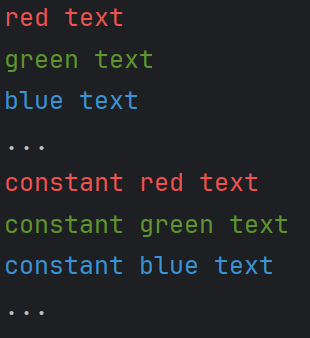
8 colors are available natively: black, red, green, yellow, blue, magenta, cyan, and white.
For each color, there are functions (e.g. stylecolor.red()), as well as constants (e.g. stylecolor.RED).
For other colors, use stylecolor.rgb() or stylecolor.hexa().
Simple Colors
import stylecolor as sc

print(sc.red('red text'))
print(sc.green_text('green text'))
print(sc.blue('blue text'))
# ...
# AND/OR
print(sc.RED + 'constant red text' + sc.RESET)
print(sc.GREEN + 'constant green text' + sc.RESET)
print(sc.BLUE + 'constant blue text' + sc.RESET)
# ...
output
Light Colors
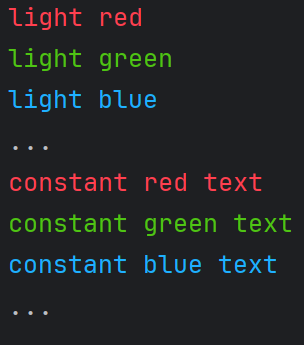
You can add the prefix l in front of the color to make it a light version.
import stylecolor as sc
print(sc.lred('light red'))
print(sc.lgreen('light green'))
print(sc.lblue('light blue'))
# ...
# AND/OR
print(sc.LRED + 'constant red text' + sc.RESET)
print(sc.LGREEN + 'constant green text' + sc.RESET)
print(sc.LBLUE + 'constant blue text' + sc.RESET)
# ...
output
Background Colors
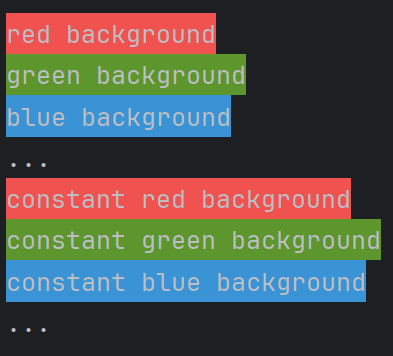
You can add the prefix b in front of each color to set it as a background color.
import stylecolor as sc
print(sc.bred('red background'))
print(sc.bgreen('green background'))
print(sc.bblue('blue background'))
# ...
# AND/OR
print(sc.BRED + 'constant red background' + sc.RESET)
print(sc.BGREEN + 'constant green background' + sc.RESET)
print(sc.BBLUE + 'constant blue background' + sc.RESET)
# ...
output
NOTE
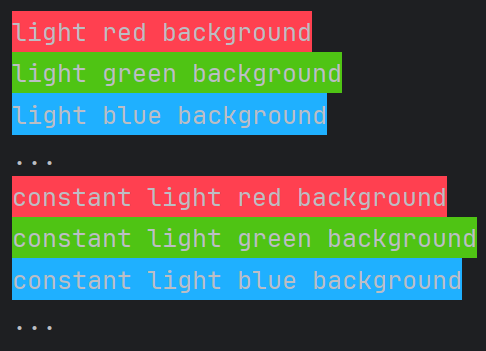
You can also addbin front of thelightcolors.import stylecolor as sc print(sc.blred('light red background')) print(sc.blgreen('light green background')) print(sc.blblue('light blue background')) # ... #AND/OR" print(sc.BLRED + 'constant light red background' + sc.RESET) print(sc.BLGREEN + 'constant light green background' + sc.RESET) print(sc.BLBLUE + 'constant light blue background' + sc.RESET) # ...output
Custom Colors
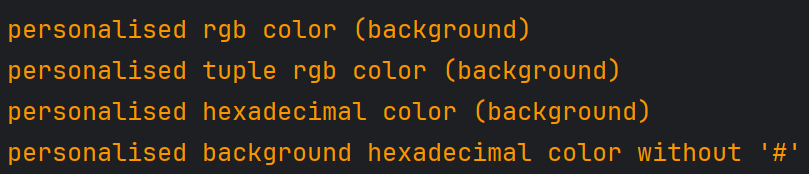
The rgb() and hexa() functions allow you to apply custom colors.
import stylecolor as sc
print(sc.rgb('personalised rgb color', '(background)', r=250, g=150, b=0))
print(sc.rgb('personalised tuple rgb color', '(background)', rgb=(250, 150, 0)))
print(sc.hexa('personalised hexadecimal color', '(background)', hexa='#fA9600'))
print(sc.hexa('personalised background hexadecimal color', "without '#'", hexa='Fa9600'))
output
Custom Background Colors
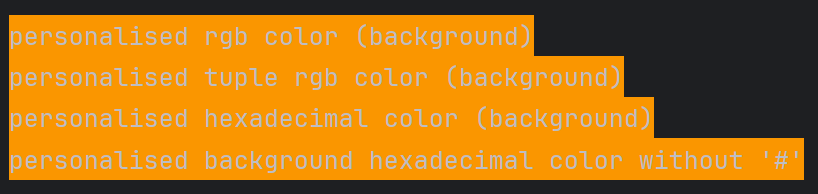
The brgb() and bhexa() functions allow you to apply custom background colors.
import stylecolor as sc
print(sc.brgb('personalised rgb color', '(background)', r=250, g=150, b=0))
print(sc.brgb('personalised tuple rgb color', '(background)', rgb=(250, 150, 0)))
print(sc.bhexa('personalised hexadecimal color', '(background)', hexa='#fA9600'))
print(sc.bhexa('personalised background hexadecimal color', "without '#'", hexa='Fa9600'))
output
Reset Colors
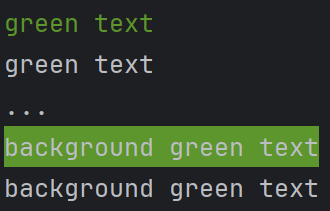
The functions stylecolor.rcolor() or stylecolor.RCOLOR and stylecolor.rbackground() or stylecolor.RBACKGROUND respectively remove the text color and the background color.
import stylecolor as sc
# color
green_text = sc.green('green text')
print(green_text)
print(sc.rcolor(green_text))
# background color
bgreen_text = sc.bgreen('background green text')
print(bgreen_text)
print(sc.rbackground(bgreen_text))
output
Built-in Styles
Apply Styles
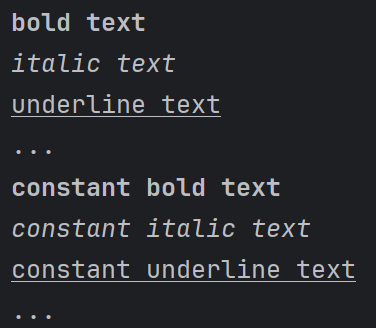
In addition to colors, many styles are available: bold, dim, italic, underline, blinking, reverse, hidden, and strikethrough.
Just like with colors, styles are accessible via functions (e.g. stylecolor.bold()) or constants (e.g. stylecolor.BOLD).
import stylecolor as sc
print(sc.bold('bold text'))
print(sc.italic('italic text'))
print(sc.underline('underline text'))
# ...
# AND/OR
print(sc.BOLD, 'constant bold text', sc.RESET, sep='')
print(sc.ITALIC, 'constant italic text', sc.RESET, sep='')
print(sc.UNDERLINE, 'constant underline text', sc.RESET, sep='')
# ...
output
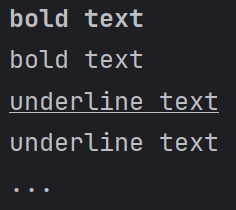
Reset Styles
You can add the prefix r in front of each style to cancel it (including with constants).
import stylecolor as sc
bold = sc.bold('bold text')
print(bold)
print(sc.rbold(bold))

underline = sc.underline('underline text')
print(underline)
print(sc.runderline(underline))
# ...
output
Other Styles
It is possible, using the functions stylecolor.style() and stylecolor.styles(), to apply one or more styles to text.
You can use textual styles like red, bred, underline, or directly use ANSI codes like 31, 41, 4, for example.
import stylecolor as sc
def func():
    pass
print(sc.style('text1', func, 'other text', style='blue'))
print(sc.styles('unique object', 'white', 'bblack', 'underline'))
output

Composability
Most functions and constants are composable with each other.
import stylecolor as sc
print(sc.blue(sc.underline('blue underline text'), 'blue text only'), 'normal text')
print(sc.styles('blue underline text', 'blue', 'underline', 'italic'))
# fonctions with constants
print(sc.green(sc.UNDERLINE, 'combined green underline text', sc.RUNDERLINE, ' green text only', sep=''),
      'normal text')
output

NOTE
Foreground colors are not composable with each other, same for background.import stylecolor as sc print(sc.blue(sc.green('colored text in blue and green which appears blue'))) print(sc.bblue(sc.bgreen('background colored text in blue and green which appears blue')))output

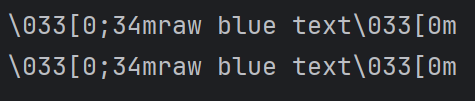
Debug Functions
The functions raw() and rprint() allow you to get the raw version of a styled text.
import stylecolor as sc
colored = sc.blue("raw blue text")
raw = sc.raw(colored) # return raw string
print(raw)
sc.rprint(colored)  # directly print raw result
output
1 maintainer

Metadata
1 maintainer
Release files for stylecolor 1.0.4
For a detailed explanation of source distributions (sdists) and built distributions (wheels), please see the package formats documentation.
Source distribution (sdist)
| File | Size | Uploaded | Provenance | Actions |
|---|---|---|---|---|
| stylecolor-1.0.4.tar.gz | 10.9 kB | Without provenance | Details for stylecolor-1.0.4.tar.gz |
Built distribution (wheel)
| File | Interpreter | ABI | Platform | Actions Reset |
|---|---|---|---|---|
| stylecolor-1.0.4-py3-none-any.whl | Python 3 | none | any | Details for stylecolor-1.0.4-py3-none-any.whl |
Total release size: 20.6 kB
Release files / stylecolor-1.0.4.tar.gz
| Download URL | stylecolor-1.0.4.tar.gz |
|---|---|
| Size | 10.9 kB |
| Tags | Source |
|
SHA-256 checksum How to use checksums |
3e57d19032c7b3e189911266b6e636a518a49cfad1ead5e056ce461b2747aee4
|
|
BLAKE2b-256 checksum How to use checksums |
b1b839335d93890efd2dc0cdbfbfbd023a9f2dad7abde382559811b28fddbff5
|
| Upload date | |
|
Uploaded using Trusted Publishing? What is trusted publishing? |
No |
| Uploaded via |
twine/5.1.1 CPython/3.12.7
|
Release files / stylecolor-1.0.4-py3-none-any.whl
| Download URL | stylecolor-1.0.4-py3-none-any.whl |
|---|---|
| Size | 9.7 kB |
| Tags | Python 3 |
|
SHA-256 checksum How to use checksums |
96b733415cbf61458d86bbf5e3512ee939d4d2cd054a35d53c4d4de29d88ee55
|
|
BLAKE2b-256 checksum How to use checksums |
9cb8b832852cfba0aa3cc2e1ba36b857f2555853371973491ba8ab969d31dc15
|
| Upload date | |
|
Uploaded using Trusted Publishing? What is trusted publishing? |
No |
| Uploaded via |
twine/5.1.1 CPython/3.12.7
|
Security for stylecolor 1.0.4
Provenance
Provenance describes where a file came from. On PyPI, provenance is shared via attestations, which provide a verifiable record of the build or publishing details. View details, limitations and caveats.
No provenance found
None of the files in this release were uploaded with provenance metadata.
A note on package security
PyPI is a repository for distributing packages, not a service for auditing them. While third-party security researchers and our staff do their best to detect and remove malicious packages, PyPI cannot guarantee the quality, security or suitability of any given package.
To learn more about protecting yourself from malicious actors, visit our package security documentation.














