
A simple output styler in Python
Verified details
These details have been verified by PyPIProject links
GitHub Statistics
Maintainers

Project description
How to use
Requirements
- Python 3.6 or more
- Windows*
How to use
First install with pip
pip install styleio
Now import
import styleio
Now style that IO!
First, you need to think about how your IO will look like. You can have text styled. Just simply enter one of bold, dim, italic, underline, blink, inverse, hidden, or strikethrough
Now, color your text. Color is optional, but you have four color mode choices: rgb**, 256 colors**, 16 colors, and bright colors***
*I have not tested on an operating system without windows, feel free to open an issue with the readme saying otherwise on github **RGB and 256 color modes do NOT support styled text ***Only terminals that support the aixterm specification (mine did) support brightcolors
If you have rgb colors, the mode will be 'rgb' and the color will be a tuple of (r, g, b), where 0 <= r, g, b, <= 255, and the mode will be 'rgb'
If you have 256 colors, the mode will be 'colors256' and the color will be an id 0 <= id <= 255, where each id means these colors:
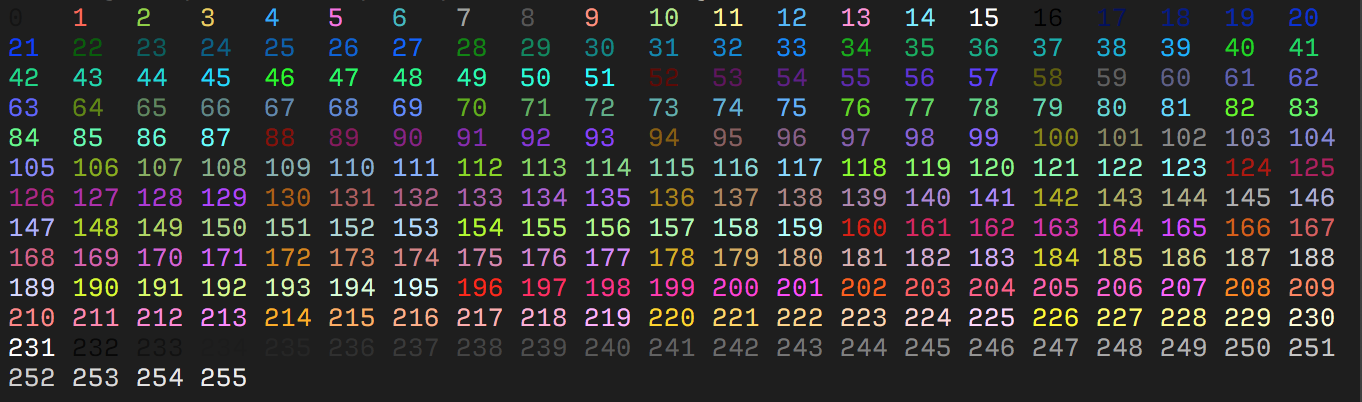
With 16 colors (normal, recommended), the mode will be 'colors16', and color will be one of 'black', 'red', 'green', 'yellow', 'blue', 'magenta', 'cyan', 'white', 'default' Bright colors are just like 16 colors, its just that they will look brighter on the terminal and the mode is 'brightcolors'
Styling the IO
First, specify the list of styles
graphics = ['bold', 'italic']
Next, specify the color. Say I want bright red
color = 'red'
mode = 'brightcolors'
Now, finally style the output
string = style(
    graphics=graphics,
    color=color,
    mode=mode
)
print(string)
Project details
Verified details
These details have been verified by PyPIProject links
GitHub Statistics
Maintainers
Release history Release notifications | RSS feed


Download files
Download the file for your platform. If you're not sure which to choose, learn more about installing packages.
Source Distribution
Built Distribution
Filter files by name, interpreter, ABI, and platform.
If you're not sure about the file name format, learn more about wheel file names.
Copy a direct link to the current filters
File details
Details for the file styleio-0.0.2.tar.gz.
File metadata
- Download URL: styleio-0.0.2.tar.gz
- Upload date:
- Size: 4.1 kB
- Tags: Source
- Uploaded using Trusted Publishing? Yes
- Uploaded via: twine/6.1.0 CPython/3.12.9
File hashes
| Algorithm | Hash digest | |
|---|---|---|
| SHA256 |
1b5a4ed1030f06d85efbb2c58411486ebaf3f69e00dc49e8f95f36377099eda0
|
|
| MD5 |
4a4dccf78e4d1e0dde3a620b59e678d0
|
|
| BLAKE2b-256 |
48864c479d7be50c4a06fc514dc4768016868b6cb673f2831adadcb23c2df6da
|
Provenance
The following attestation bundles were made for styleio-0.0.2.tar.gz:
Publisher:
python-publish.yml on anaphan1/styleio
-
Statement:
-
Statement type:
https://in-toto.io/Statement/v1 -
Predicate type:
https://docs.pypi.org/attestations/publish/v1 -
Subject name:
styleio-0.0.2.tar.gz -
Subject digest:
1b5a4ed1030f06d85efbb2c58411486ebaf3f69e00dc49e8f95f36377099eda0 - Sigstore transparency entry: 213233858
- Sigstore integration time:
-
Permalink:
anaphan1/styleio@4112e579aff7fa9a24a797ee4fbe940925a12745 -
Branch / Tag:
refs/heads/master - Owner: https://github.com/anaphan1
-
Access:
public
-
Token Issuer:
https://token.actions.githubusercontent.com -
Runner Environment:
github-hosted -
Publication workflow:
python-publish.yml@4112e579aff7fa9a24a797ee4fbe940925a12745 -
Trigger Event:
workflow_dispatch
-
Statement type:
File details
Details for the file styleio-0.0.2-py3-none-any.whl.
File metadata
- Download URL: styleio-0.0.2-py3-none-any.whl
- Upload date:
- Size: 4.2 kB
- Tags: Python 3
- Uploaded using Trusted Publishing? Yes
- Uploaded via: twine/6.1.0 CPython/3.12.9
File hashes
| Algorithm | Hash digest | |
|---|---|---|
| SHA256 |
83744831e64da57ed6c5677758884c10cb72126942f76968bf1aa31a4523a28d
|
|
| MD5 |
17a5c796e8f1f1d31a7bea2ed08f46c9
|
|
| BLAKE2b-256 |
76f2a3d1a5a1d1757742b3daefeaf9bf597ec6367a8a758d905bc442d4028a9d
|
Provenance
The following attestation bundles were made for styleio-0.0.2-py3-none-any.whl:
Publisher:
python-publish.yml on anaphan1/styleio
-
Statement:
-
Statement type:
https://in-toto.io/Statement/v1 -
Predicate type:
https://docs.pypi.org/attestations/publish/v1 -
Subject name:
styleio-0.0.2-py3-none-any.whl -
Subject digest:
83744831e64da57ed6c5677758884c10cb72126942f76968bf1aa31a4523a28d - Sigstore transparency entry: 213233859
- Sigstore integration time:
-
Permalink:
anaphan1/styleio@4112e579aff7fa9a24a797ee4fbe940925a12745 -
Branch / Tag:
refs/heads/master - Owner: https://github.com/anaphan1
-
Access:
public
-
Token Issuer:
https://token.actions.githubusercontent.com -
Runner Environment:
github-hosted -
Publication workflow:
python-publish.yml@4112e579aff7fa9a24a797ee4fbe940925a12745 -
Trigger Event:
workflow_dispatch
-
Statement type:






