
styletransfer-lite




Fast neural style transfer for Python. Pick one of 26 built-in painting styles, blend a few of them, or hand it any picture and it will use that as the style. It runs on onnxruntime, so the install is a few megabytes instead of a full TensorFlow or PyTorch, and a 1024 pixel photo takes about half a second on a laptop CPU.
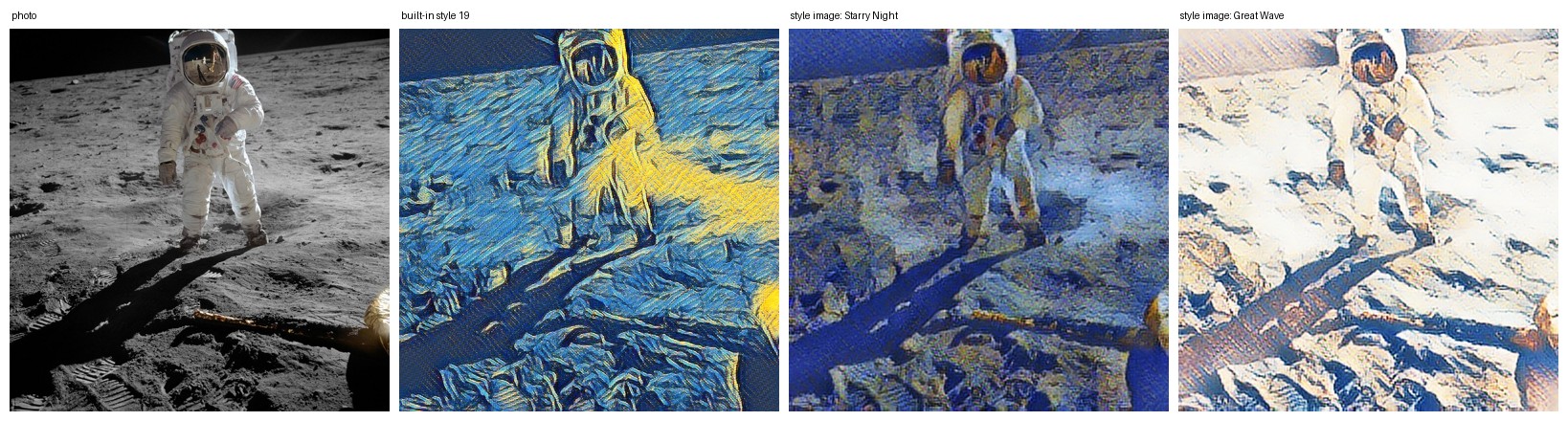
Left to right: the original photo, built-in style 19, Van Gogh's Starry Night used as a style image, and Hokusai's Great Wave used as a style image. Sources for the images are in examples/SOURCES.txt.
Quick start
pip install styletransfer-lite
styletransfer-lite photo.jpg --style 19
Real output from my machine (AMD laptop CPU, no GPU):
$ styletransfer-lite examples/astronaut.jpg --style 19
astronaut.jpg -> examples\astronaut_style19.png  (795x800, 0.337s on cpu)

$ styletransfer-lite examples/astronaut.jpg --style-image examples/starry_night.jpg
astronaut.jpg -> examples\astronaut_stylecustom.png  (795x800, 0.187s on cpu)

$ styletransfer-lite examples/astronaut.jpg --style 40
error: style index must be 0 to 25, got 40
Not sure which of the 26 styles you want? Render all of them on your photo at once:
styletransfer-lite sheet photo.jpg -o sheet.png
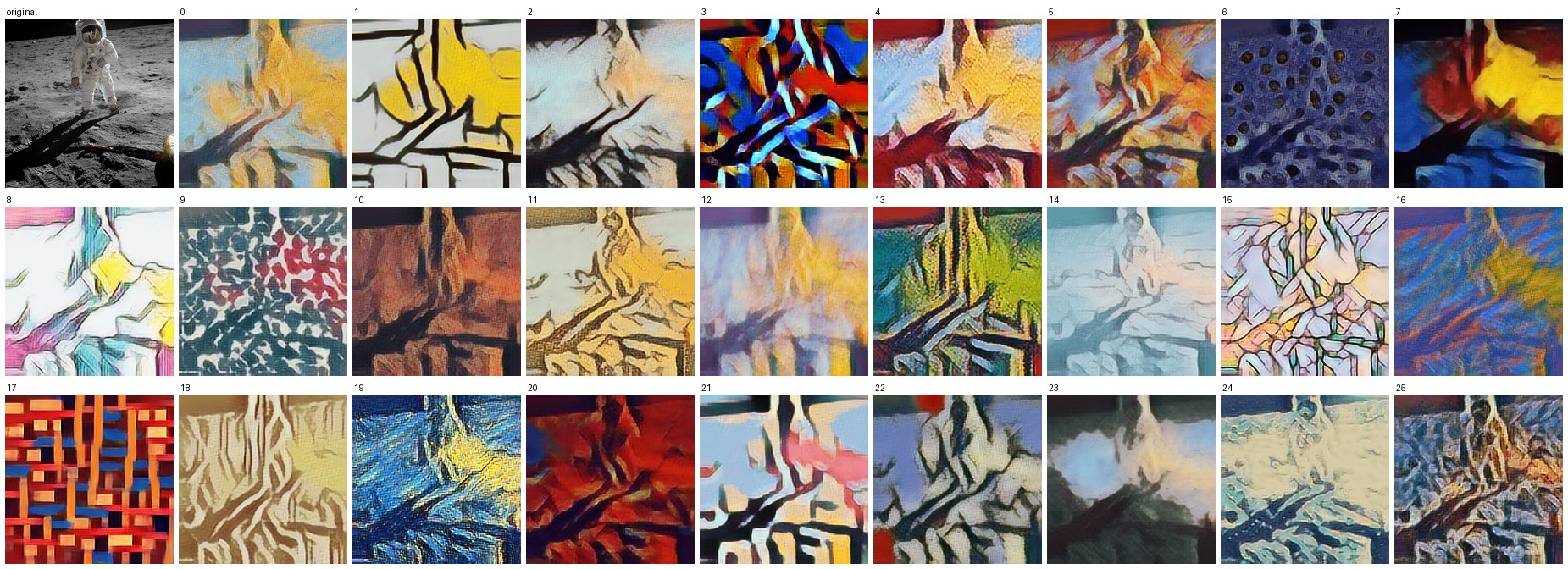
The numbers under each tile are the style indices you pass to --style. I did not invent names for them, because the model I started from never came with any.
Read this first
- The 26 built-in styles are fixed. This package runs pretrained networks, it does not train new ones.
- "Style image" mode works on a 384 pixel version of your photo and scales the result back up, so on large photos it looks softer than the built-in styles.
- Video is stylized frame by frame. Fine texture can shimmer between frames.
--smoothreduces it but does not remove it. - The networks are small and quantized in their original form. See Where the models come from for what I checked.
Install
Python 3.8 or newer.
pip install styletransfer-lite             # CLI, Python API, GUI (needs tkinter)
pip install "styletransfer-lite[video]"    # adds OpenCV for video and webcam
The base install pulls in numpy, Pillow and onnxruntime. That is all.
GPU. The default onnxruntime is CPU only. For CUDA, swap it for the GPU build and use --device cuda:
pip uninstall onnxruntime
pip install onnxruntime-gpu
This needs CUDA 12 and cuDNN 9 on your PATH. If onnxruntime cannot load them it quietly falls back to CPU, so the CLI checks and gives you an error with --device cuda instead of pretending. On Windows with DirectML, install onnxruntime-directml and use --device dml (I have not tested this one). --device auto, the default, uses whatever is available.
On Debian or Ubuntu the GUI needs sudo apt install python3-tk.
Usage
Command line
styletransfer-lite photo.jpg --style 7                       # one built-in style
styletransfer-lite photo.jpg --style 3:0.5,12:0.5            # blend two styles
styletransfer-lite photo.jpg --style 7 --strength 0.6        # mix 60% style with the original
styletransfer-lite photo.jpg --style 7 --preserve-color      # stylized brightness, original colours
styletransfer-lite photo.jpg --style-image painting.jpg      # any picture as the style
styletransfer-lite photos/ -o out/ --style 4                 # whole folder
cat photo.jpg | styletransfer-lite - -s 4 -o - > out.png     # stdin to stdout
styletransfer-lite video clip.mp4 -o out.mp4 -s 19 --smooth 0.3
styletransfer-lite webcam -s 19                              # n / p change style, q quits
styletransfer-lite gui
styletransfer-lite info                                      # versions, devices, model files
Add --json to stylize, sheet, video and info for output you can parse:
$ styletransfer-lite examples/astronaut.jpg --style 3:0.5,12:0.5 --strength 0.8 --json
{
  "input": "astronaut.jpg",
  "output": "examples\\astronaut_style3-0.5_12-0.5.png",
  "size": [795, 800],
  "style": "3:0.5,12:0.5",
  "mode": "builtin",
  "strength": 0.8,
  "device": "cpu",
  "seconds": 0.306
}
(I collapsed the size list to one line here. The tool prints it across several.)
Errors go to stderr with exit code 2. A missing OpenCV gives you the exact pip install line.
What --strength means depends on the mode. With a built-in style it blends the result with your photo. With --style-image it moves between the photo's own style and the one you gave, which tends to look better than a plain fade.
Python
from styletransfer_lite import StyleTransfer

st = StyleTransfer()                                  # device="auto", max_size=1024
st.stylize("photo.jpg", style=7).save("out.png")
st.stylize("photo.jpg", style={3: 0.5, 12: 0.5}, strength=0.8)
st.stylize("photo.jpg", style=7, preserve_color=True)
st.stylize_with("photo.jpg", "painting.jpg")          # any picture as the style
st.contact_sheet("photo.jpg").save("sheet.png")
Everything returns a PIL.Image. Inputs can be paths, PIL images or HxWx3 uint8 arrays. Bad input raises StyleTransferError. Importing the package loads no models and opens no windows; models load on first use.
Desktop window
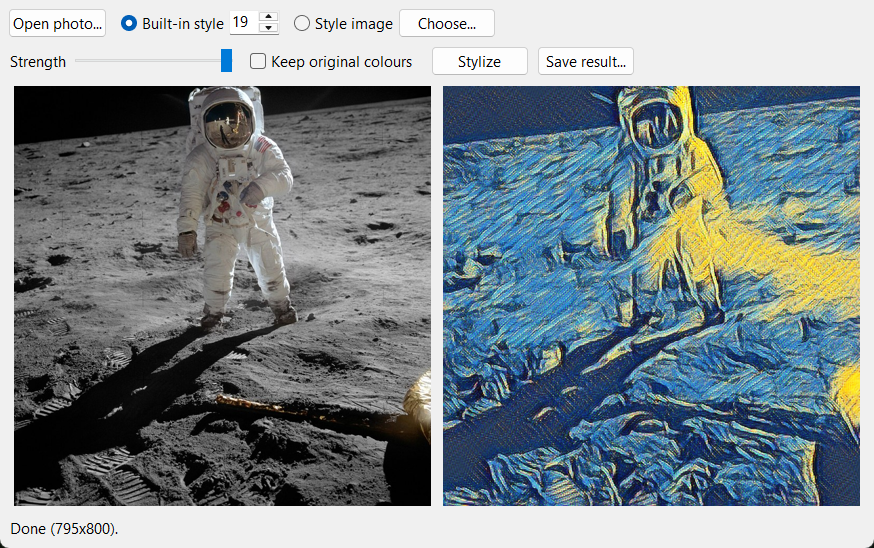
styletransfer-lite gui opens a small tkinter window: open a photo, choose a style index or a style image, move the strength slider, press Stylize.
Speed
Measured with benchmarks/latency.py, median of 10 warm runs, on a Windows 11 laptop with an AMD CPU and an RTX 4060 Laptop GPU (8 GB). The "first call" column includes loading the model.
| built-in style | CPU | CUDA |
|---|---|---|
| 256 x 256 | 18 ms | 7 ms |
| 512 x 512 | 106 ms | 20 ms |
| 800 x 800 | 251 ms | 53 ms |
| 1024 x 1024 | 584 ms | 84 ms |
Style image mode (384 pixel network) is about 100 ms on either, and rendering the full 26 style contact sheet takes 0.76 s on CPU and 0.54 s on CUDA. The first CUDA call in a process took 2.2 s to start up. Full tables are in benchmarks/. A 320 x 320 test video ran at about 25 frames per second on CPU with the 26-style network.
The GPU gap is small below 512 pixels, so for single photos CPU is fine.
Where the models come from
I did not train anything. Three pretrained networks ship inside the wheel (about 3.8 MB in total):
multistyle26.onnx: the 26 style network (conditional instance normalization, Dumoulin et al.). I started from a quantizedstylize_quantized.pbthat, as far as I can tell, comes from the TensorFlow Android stylize demo. That file needs TensorFlow to run, sotools/convert_pb_to_onnx.pydequantizes its 8-bit weights, rebuilds the network in PyTorch and exports it to ONNX.arbitrary_predict.onnxandarbitrary_transform.onnx: Magenta's arbitrary image stylization models (Ghiasi et al., 2017), the int8 TFLite versions from TF Hub, converted to ONNX withtf2onnx.
What I checked after converting, and what I did not:
- 26 style network vs the original quantized TensorFlow graph, same input image: mean absolute pixel difference 0.008, 0.011 and 0.020 (on a 0 to 1 scale) for styles 0, 7 and 19. That is on one synthetic test image and three styles, not a full evaluation. The differences come from the original being 8-bit quantized and mine being float.
- Style image network vs the TFLite originals: mean absolute difference 0.013 on one photo and one style.
- There is no accuracy benchmark, because "good style transfer" has no ground truth. If you need a number, the speed table is the only one I can stand behind.
If you find a style that looks wrong compared with the original TensorFlow model, please open an issue with the input image.
Limitations
- Style transfer changes a lot of an image. Faces and text can warp, especially at high strength.
- Built-in styles are tuned to look right at roughly 500 to 1000 pixels. At 256 pixels the strokes look huge, as in the contact sheet above.
- Images smaller than 32 pixels on a side are rejected.
- Video output has no audio, and I only tested it on a short synthetic clip. The webcam command is implemented but I have not run it against a camera.
- The
dmldevice and macOS are untested. CI covers Linux, Windows and macOS on the CPU path.
Development
git clone https://github.com/Ekaghni/styletransfer-lite
cd styletransfer-lite
pip install -e ".[dev]"
pytest
The original scripts this project grew out of are kept in legacy/ for reference. One of them, pytorch_model.py, exported an untrained random network to style_transfer.pt, so do not use that file for anything.
Credits and licenses
Code: MIT, see LICENSE. Model weights are Apache-2.0 from the TensorFlow and Magenta projects. Example images: see examples/SOURCES.txt.
- Dumoulin, Shlens, Kudlur. A Learned Representation for Artistic Style. 2017.
- Ghiasi, Lee, Kudlur, Dumoulin, Shlens. Exploring the Structure of a Real-time, Arbitrary Neural Artistic Stylization Network. 2017.
1 maintainer

Metadata
1 maintainer
Release files for styletransfer-lite 0.1.0
For a detailed explanation of source distributions (sdists) and built distributions (wheels), please see the package formats documentation.
Source distribution (sdist)
| File | Size | Uploaded | |
|---|---|---|---|
| styletransfer_lite-0.1.0.tar.gz | 2.9 MB | Details |
Built distribution (wheel)
| File | Interpreter | ABI | Platform | Reset |
|---|---|---|---|---|
| styletransfer_lite-0.1.0-py3-none-any.whl | Python 3 | none | any | Details |
Total release size: 5.8 MB
Release files / styletransfer_lite-0.1.0.tar.gz
| Download URL | styletransfer_lite-0.1.0.tar.gz |
|---|---|
| Size | 2.9 MB |
| Tags | Source |
|
SHA-256 checksum How to use checksums |
db5dd09955aace7eff5af937cb4e22697d55154c0b6103d72834e85bafdd10c2
|
|
BLAKE2b-256 checksum How to use checksums |
a4d8571c0681095d32224f376967a24aaeb2e3162566b6f2fd80704e544642ba
|
| Upload date | |
|
Uploaded using Trusted Publishing? What is trusted publishing? |
No |
| Uploaded via |
twine/7.0.0 CPython/3.10.6
|
Release files / styletransfer_lite-0.1.0-py3-none-any.whl
| Download URL | styletransfer_lite-0.1.0-py3-none-any.whl |
|---|---|
| Size | 2.9 MB |
| Tags | Python 3 |
|
SHA-256 checksum How to use checksums |
f4ddd424e6a637097155bd47293c1423b13345b9b84d983079009b93f2f0775b
|
|
BLAKE2b-256 checksum How to use checksums |
8d1a3afe3b83e4607f0e5b5452021ffa1a9cf980849bd7a7b331cb3fe5e4751a
|
| Upload date | |
|
Uploaded using Trusted Publishing? What is trusted publishing? |
No |
| Uploaded via |
twine/7.0.0 CPython/3.10.6
|













