
Lightning-fast subdomain discovery tool for security professionals and bug bounty hunters.

Project description
SubCat v1.6.0



Fast subdomain enumeration tool.
Features • Modes • Install • Post Installation • Usage • Running SubCat • Screenshots & Reports • Available Modules
SubCat is a powerful subdomain discovery tool that combines passive aggregation from a variety of online sources with active DNS brute forcing, continuous monitoring, screenshots, and a built-in web report to identify and triage valid subdomains for websites. Designed with a modular and efficient architecture, SubCat is ideal for penetration testers, bug bounty hunters, and security researchers.
From quick passive recon to deep, browser-rendered detection and visual reporting, SubCat delivers in-depth subdomain intelligence while keeping its passive sources compliant with their licensing and usage restrictions.
Features
- Multiple Modes:
passive(API/passive sources),brute(DNS brute force),monitor(continuous monitoring), andreport(serve the screenshot web UI). - Fast Enumeration: Leverages a high-performance resolution and wildcard elimination module.
- Curated Passive Sources: Gathers subdomains from trusted online sources to maximize coverage.
- DNS Brute Force: Resolve subdomains from a built-in or custom wordlist.
- Continuous Monitoring: Re-scan on an interval and log newly discovered subdomains over time.
- Screenshots: Capture screenshots of discovered subdomains with Playwright (Chromium).
- Web Report UI: Browse screenshots, titles, status codes, and detected technologies in a built-in web report.
- Deep Detection: Optional browser-mode detection that renders JS, cookies, and the DOM for more accurate tech/title/status results.
- Lightweight & Efficient: Optimized for speed with minimal resource consumption.
- STDIN/STDOUT Integration: Seamlessly integrate with other tools and workflows.
- IP Scope Filtering: Filter results by IP addresses using a provided scope (CIDR or file-based).
- Detailed Output: Options to display HTTP status codes, page titles, IP addresses, and technology detection.
- Multiple Output Formats: Export results in TXT, JSON, CSV, and XML formats for easy integration with other tools.
- Intelligent Caching: Cache API responses to improve performance and reduce external API calls.
- Advanced Rate Limiting: Domain-specific rate limiting to prevent API throttling and ensure reliable results.
- Reverse Lookup Mode: Supports reverse lookup to load only modules that handle reverse enumeration (requires a valid IP scope).
- Custom Module Selection: Include or exclude specific modules via command-line flags.
- Enhanced Multi-threading: Uses 50 concurrent threads by default for rapid processing.
Modes
SubCat is organized into subcommands. Running subcat without a subcommand defaults to passive mode, so the classic subcat -d example.com still works.
| Mode | Description |
|---|---|
passive (default) |
Passive enumeration using APIs and passive sources. |
brute |
DNS brute force enumeration from a wordlist. |
monitor |
Continuously re-scan on an interval and log changes. |
report |
List or serve a saved screenshot scan in the web report UI. |
subcat -h            # top-level help (lists all modes)
subcat passive -h    # help for a specific mode
subcat brute -h
subcat monitor -h
subcat report -h
Install
# Linux, Windows, MacOS
pip install subcat
Screenshots and deep-detection (browser mode) require the Playwright Chromium browser. Install it once after installing SubCat:
playwright install chromium
Post Installation
Before querying third-party services, configure your API keys in the config.yaml file.
By default, SubCat looks for the configuration file in your user's home directory under ~/.subcat/config.yaml. You can also specify a custom config path using the -c or --config option.
Not all modules require an API key, but the following sources do:
- BinaryEdge
- Virustotal
- SecurityTrails
- Shodan
- Bevigil
- Chaos
- DNSDumpster
- Netlas
- DigitalYama
- Censys
- AlienVault
- CertSpotter
- URLScan (for advanced usage)
An example provider config file
binaryedge:
  - e3a2f1c4-9d2b-47f3-a1e2-4b8d7f0a1c2e
virustotal:
  - b1e2d3c4f5a6978877665544332211ffeeddccbbaa99887766554433221100ff
securitytrails:
  - X7a9B2c4D6e8F0g1H3i5J7k9L1m3N5o7
  - P8q6R4s2T0u8V6w4X2y0Z8a6B4c2D0e2
shodan:
  - M3n4O5p6Q7r8S9t0U1v2W3x4Y5z6A7b8
bevigil:
  - F1g2H3i4J5k6L7m8
chaos:
  - d2c4b6a8-90ef-12ab-34cd-56ef78ab90cd
dnsdumpster:
  - c3d4e5f6a7b8c9d0e1f2a3b4c5d6e7f8a9b0c1d2e3f4a5b6c7d8e9f0a1b2c3d4
  - e4f5a6b7c8d9e0f1a2b3c4d5e6f7a8b9c0d1e2f3a4b5c6d7e8f9a0b1c2d3e4f5
netlas:
  - Z1x2C3v4B5n6M7a8S9d0F1g2H3j4K5l6
digitalyama:
  - Q1w2E3r4T5y6U7i8O9p0
Usage
subcat passive -h
This will display help for passive mode. Here are all the switches it supports.
INPUT:
  -d DOMAIN, --domain DOMAIN
                        Target domain to scan (required if -l not provided)
  -l LIST, --list LIST  File containing list of domains (required if -d not provided)
  --scope SCOPE         IP scope filter (IP or CIDR)

OUTPUT:
  -o OUTPUT, --output OUTPUT
                        Output file
  -of {txt,json,csv,xml}, --output-format {txt,json,csv,xml}
                        Output format (default: txt)
  -title, --title       Show page titles
  -ip, --ip             Resolve IP addresses
  -sc, --status-code    Show HTTP status codes
  --up                  Show only alive domains
  -td, --tech           Show detected technologies
  -sm, --show-modules   Show module names

SCREENSHOTS:
  -ss, --screenshot     Capture screenshots of discovered subdomains (Playwright)
  -dd, --deep-detect    Run detection in browser mode (renders JS, cookies, DOM) — pair
                        with --tech/--title/--status-code. No screenshots
  --screenshot-dir SCREENSHOT_DIR
                        Directory for screenshots (default: ~/.subcat/screenshots)
  --screenshot-full     Capture full-page screenshots
  --screenshot-timeout SCREENSHOT_TIMEOUT
                        Per-page screenshot timeout in seconds (default: 15)
  --serve               Capture screenshots then open the report in a browser
  --serve-host SERVE_HOST
                        Report server host (default: 127.0.0.1)
  --serve-port SERVE_PORT
                        Report server port (default: 7171)

FILTERS:
  -mc MATCH_CODES, --match-codes MATCH_CODES
                        Comma separated list of HTTP status codes to filter (e.g., 200,404)

SOURCES:
  -s SOURCES, --sources SOURCES
                        Specific sources to use (comma-separated, e.g., crtsh,wayback)
  -es EXCLUDE_SOURCES, --exclude-sources EXCLUDE_SOURCES
                        Sources to exclude (comma-separated, e.g., alienvault,crtsh)
  -r, --reverse         Enable reverse lookup mode (loads only modules supporting reverse
                        lookup). Requires --scope to be provided.

CONFIGURATION:
  -t THREADS, --threads THREADS
                        Number of threads (default: 50)
  -c CONFIG, --config CONFIG
                        Path to YAML config file (default: config.yaml)
  --no-cache            Disable caching of results
  --cache-ttl CACHE_TTL
                        Cache TTL in seconds (default: 86400 = 24 hours)
  --clear-cache         Clear all cached data before running
  -ls                   List available modules and exit

DEBUG:
  -v, --verbose         Increase verbosity level (-v, -vv, -vvv)
  -silent, --silent     Suppress all output except results
  -nc, --no-colors      Disable colored output
Brute force mode adds a wordlist option (-w/--wordlist, defaults to a built-in list of 100 common subdomains) and a --timeout flag. Monitor mode adds --interval (seconds between scans, default 3600) and --iterations (max scans, default infinite). Run subcat brute -h / subcat monitor -h / subcat report -h for the full per-mode switches.
Running SubCat
Here are several examples to help you get started:
Scan a Single Domain:
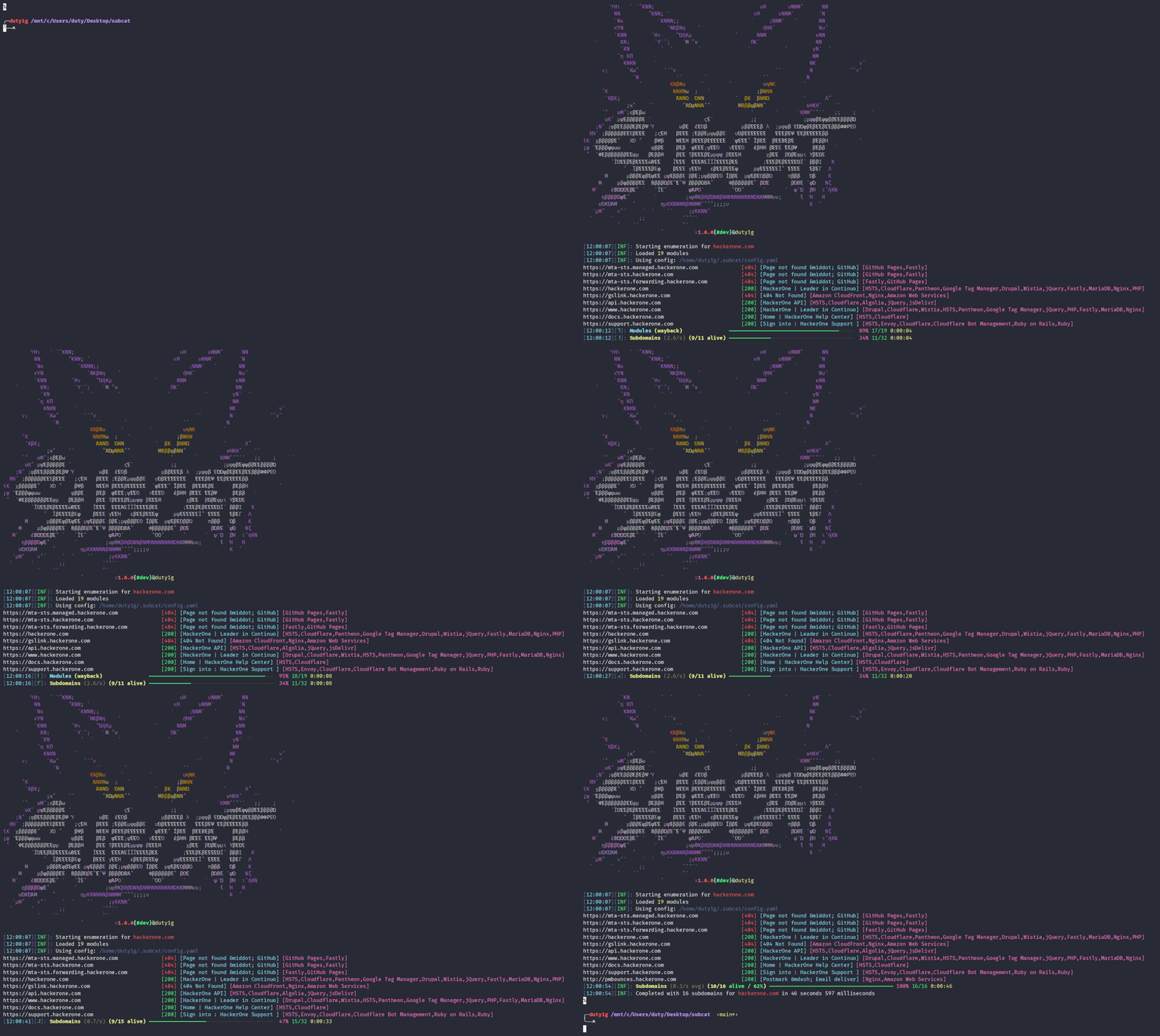
subcat passive -d hackerone.com -sc --title --tech --up

    ΄Υκκ;                                                                νΗΗ;
     ΎΗκ΅ΚΝΚ;                                             Μ          ;ΚΝΜγΎΚ΅
     ΄ΗΉ   ΄ΎΝΝη                                        ύ΅        υΝΝΜ΄   ήΗ
      ΎΗι   ΄ ΄΅ΚΝΝ;                                  υΜ       υΝΝΜ΅      ΝΝ
       ΝΝ         ΅ΚΝΝ; ΄                           κΜ      υΝΝΜ΄        ΄Ν
       ΄Νκ           ΄ΚΝΝΝ;;                       ΄     ;ΝΝΜ΄   ΄       ΝΝ
       κΎΝ              ΄ΝΚβΝη    ΅                    ήΉΚ΅              Νυ΅
       ΄ΚΝΝ        ΅Ην     ΅ΏήΚμ              ΄      ΝΝΜ                κΝΝ
 ΄       ΚΝ;        ΄Υ΄΅;    ΄Μ ΅ν                 ΠΚ΄                  ΝΝ
         ΄ΚΝ          ΄  ΄        ΄               ΄           ΄        γΝ΄  ΄
        ΅η ΚΠ                                                          ΝΜ
          ΚΝΚΝ      ΄                                                 ΝΚ              ν΅
   ν;      ΄Κω΅        ΄΄΅ν                                ΄΄         Ν            ΅΅ν΅
             ΄Ν            ΄΄       ΄                  ΄΄            Ν
               ΄         ΚΝβΝυ     ΄        ΄          υηΝΚ         ΄
   ΅Κ                     ΝΝΚΉω  ;   ΄               ;βΝΝΝ
    ΄ΚβΚ;                  ΆΝΝΏ  ΏΝΝ          ΄  βΚ  βΝΝΏ           ΄      Λ΅
           ;κ΅    ΄΄         ΅ΆΏφΝΝΆ΅΅         ΜΒββψβΝΝ΅             νΗΚΗ΅    ΄΄
   ΄΅   υΜ΅;εβΈβω                                  ΄       ΄      ΄ΚΜΜ΅΅΅΄΄   ;;    ;     ΄
    υΚ΅ μφΈβββββΈ ΄                 ςΈ΄            ;;               ;μφφβΈφφββΈΈββββΏ
 ;Ν΅ ;φβΈΈβββΈβΈβΨ Ύ        ωβΈ  έΈΌβ           μββΈΈΈβ λ  ;μφφβ ΈΏΏφβΈβΈΈβΈΈβββΦΦΡΈΌ
ΚΉ΄ ;ββββββΈΈΈβΈΈΈ   ;ςΈΜ   βΈΈΈ ;ΈββΈμφφββΈ   υΏβΈΈΈΈΈΈΈ   ΈΈΈβΈΨ ΈΈβΈΈΈΈΈββ
ίΚ  χβββββΈ΅   ΧΌ ΅    βΨβ    ΝΈΈΜ βΈΈΈβΈΈΈΈΈΈ  ΄φΈΈΈ΅ ΪβΈΈ  βΈΈΒΈβΈ      βΈββΉ          ΄
;ψ ΄Έβββφφωω          φββΈ    βΈβ  φΈΈΈ;φΈΈΌ   νΈΈΈΌ   έβΜΜ βΈΈΈ ΈΈβΨ     βΈββ   ΄
΅  ΄ΦΈβββββββΈΈφμ   βΈββΜ    βΈΈ ΤβΈΈΈβΈμμφφ βΈΈΈΜ        χβΈΈ  βΏβΈψμι ΥβΈΏΈ
      ΄ΪΏΈΈβΈβΈΈΈΈώΒΈΈ    ΪΈΈΈ  ΈΈΈΆΈΪΪΪΈΈΈΈβΈΈ        ;ΈΈΈβΈβΈΈΈΈΏΪ΄ βββΊ   Κ
          ΅  ΪβΈΈΈΈβΈφ    βΈΈΈ γΈΈΉ   εβΈΈβΈΈΈφ     μφΈΈΈΈΈΈΪ΅ ΈΈΈΈ   ΈβΈΓ  Λ
    Μ      μβββΈφβΈφΈΈ μφΈβββΈ ββΈ;μφβββΈΌ ΪββΈ  μφΈβΈΏββΏ     πβββ   Ώβ    Κ
  Μ     μβφββββΈΈ  ΒβββΏβΈ΅Έ΅Ψ ββββΏΒΆ΅     ΦββββββΈ΅ βΏΈ       βΏΒΈ ΄φΏ   Νζ
Μ΄    έΒΏΏΏΈβΈ΅ ΄   ΄ΪΈ΅       φΆΡΌ΄         ΅ΌΌ΅      ΄      ΄  ψ΄Ώ  βΉ  ι΅ήΚΝ
   ηββββΏφΈ΅        ΄         ;υρθΚβΘβΏΝΝβΝΝΉΝΝΝΝΝΝΝΏΝΚΜΜΜυυ;      ΐ  Ή   Μ
  υΏΚΏΆΜ     ΅        ημΚΚΝΝΝΝβΝΝΜΜ΅΅΅΅;;;;υ                          Κ  ΅
΄μΜ΅    ν΅΄     ΄  ΄    ΄΄     ;γΚΚΝΝ΅
΄      ΄        ;;            ΄΅΅΄΄
        ΄    ΄΄              ΅΄
                      ΅          v1.6.0{#dev}@duty1g

[11:51:23][INF]: Starting enumeration for hackerone.com
[11:51:23][INF]: Loaded 19 modules
[11:51:23][INF]: Using config: /home/duty1g/.subcat/config.yaml
https://mta-sts.managed.hackerone.com              [404] [Page not found · GitHub] [Fastly,GitHub Pages]
https://mta-sts.hackerone.com                      [404] [Page not found · GitHub] [GitHub Pages,Fastly]
https://hackerone.com                              [200] [HackerOne | Leader in Continuo] [HSTS,Cloudflare,Pantheon,Google Tag Manager,Drupal,Wistia,jQuery,Fastly,MariaDB,Nginx,PHP]
https://mta-sts.forwarding.hackerone.com           [404] [Page not found · GitHub] [Fastly,GitHub Pages]
https://gslink.hackerone.com                       [404] [404 Not Found] [Amazon CloudFront,Nginx,Amazon Web Services]
https://api.hackerone.com                          [200] [HackerOne API] [HSTS,Algolia,Cloudflare,jQuery,jsDelivr]
https://www.hackerone.com                          [200] [HackerOne | Leader in Continuo] [Drupal,Cloudflare,HSTS,Google Tag Manager,Wistia,Pantheon,jQuery,PHP,Fastly,MariaDB,Nginx]
https://docs.hackerone.com                         [200] [Home | HackerOne Help Center] [Cloudflare,HSTS]
https://support.hackerone.com                      [200] [Sign into : HackerOne Support ] [Ruby on Rails,Cloudflare,Cloudflare Bot Management,Envoy,HSTS,Ruby]
http://pmbounces.hackerone.com                     [200] [Postmark — Email deliver] [Nginx,Amazon Web Services]
[11:52:09][INF]: Subdomains (0.3/s avg) (10/12 alive / 83%) ━━━━━━━━━━━━━━━━━━━━━━━━━━━━━━━━━━━━━━━━ 100% 12/12 0:00:46
[11:52:09][INF]: Completed with 12 subdomains for hackerone.com in 46 seconds 489 milliseconds
Pipe Domains from a File with IP Resolution and HTTP Status Codes:
cat domains.txt | subcat -ip -sc
Run with Reverse Lookup Mode (Requires IP Scope):
subcat -d example.com --scope 8.8.8.0/24 -r
Scan a Domain and Save the Output to a File (Verbose Mode):
subcat -d hackerone.com -o output.txt -v
Integrate with HTTPx for Further Processing or any other tool:
echo hackerone.com | subcat -silent -td -title | httpx -silent
Scan Multiple Domains from a List:
subcat -l domains.txt
Custom Module Selection:
subcat -d example.com -s dnsdumpster,virustotal,urlscan -es digitalyama,anubis
Export Results in JSON Format:
subcat -d example.com -o results.json -of json
Export Results in CSV Format with Status Codes and IP Addresses:
subcat -d example.com -o results.csv -of csv -sc -ip
Save Results Using Specific Modules:
subcat -d example.com -s ctrsh,wayback,hackertarget -o example_results.txt
This command will:
- Scan only the example.com domain
- Use only the crt.sh, Wayback, and HackerTarget modules
- Save all discovered subdomains to example_results.txt
Save Results in Different Formats Using Specific Modules:
# Save as JSON
subcat -d example.com -s ctrsh,wayback,hackertarget -o example_results.json -of json

# Save as CSV
subcat -d example.com -s ctrsh,wayback,hackertarget -o example_results.csv -of csv

# Save as XML
subcat -d example.com -s ctrsh,wayback,hackertarget -o example_results.xml -of xml
Use Caching with Custom TTL:
subcat -d example.com --cache-ttl 3600
Clear Cache Before Running:
subcat -d example.com --clear-cache
DNS Brute Force (built-in wordlist):
subcat brute -d example.com --sc --title
DNS Brute Force with a Custom Wordlist:
subcat brute -d example.com -w wordlist.txt -t 150
Continuous Monitoring (every hour, log new subdomains):
subcat monitor -d example.com --interval 3600 -o changes.log
Deep Detection in Browser Mode (renders JS/cookies/DOM):
subcat -d example.com -dd -td -title -sc
Capture Screenshots and Open the Web Report:
subcat -d example.com -ss --serve
Screenshots & Reports
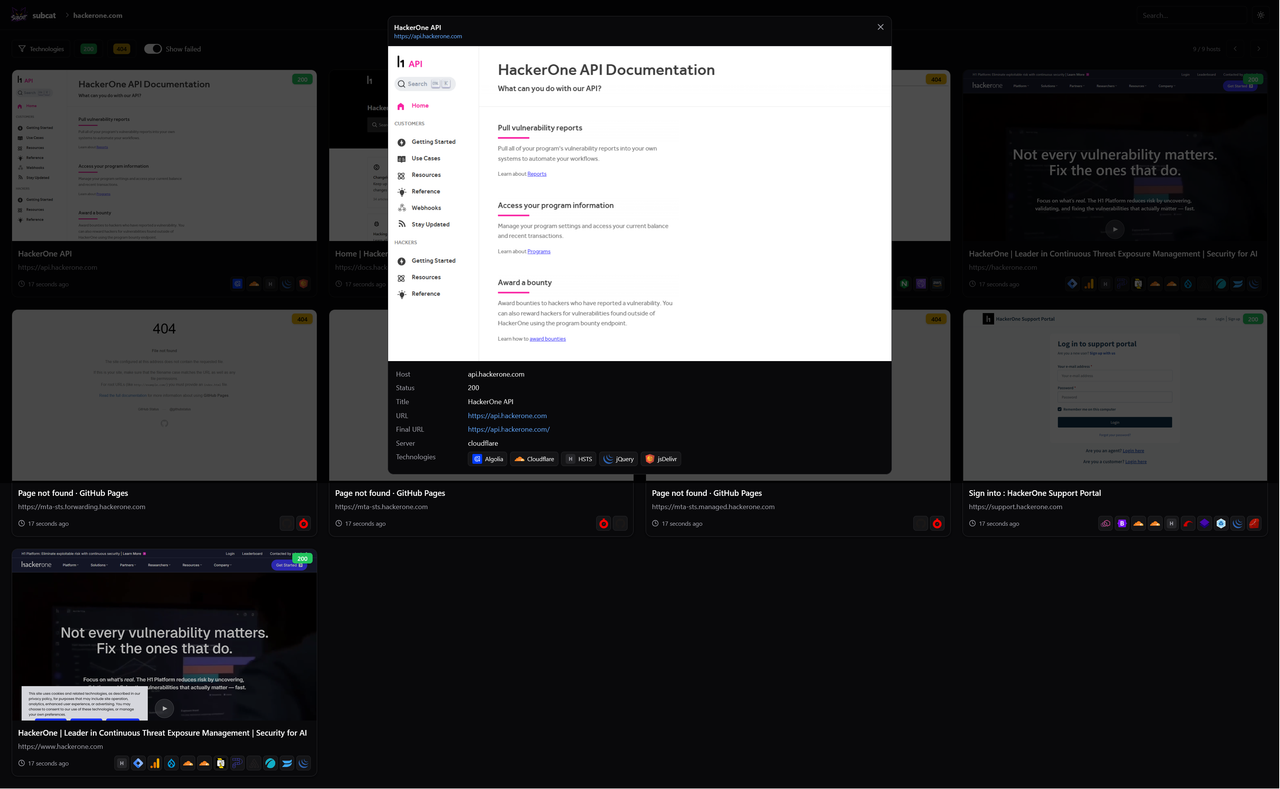
With -ss/--screenshot, SubCat captures a screenshot of every discovered subdomain using Playwright (Chromium) and fingerprints technologies during the browser render. Each run is saved as a scan under ~/.subcat/screenshots/<scan-id>/. The built-in web report shows a gallery of screenshots and a detail view with the host's status code, title, final URL, server, and detected technologies.
Use the report mode to browse saved scans in a built-in web UI:
# List all saved scans and their ids
subcat report --list

# Serve a specific scan in the browser
subcat report serve <scan-id>

# Bind to a custom host/port
subcat report serve <scan-id> --host 0.0.0.0 -p 8080
Or capture and open the report in one step with --serve:
subcat -d example.com -ss --serve
Screenshots and deep-detect require the Chromium browser — run
playwright install chromiumonce after installing SubCat.
Available Modules
SubCat currently supports the following modules for passive subdomain discovery:
- dnsdumpster
- digitalyama
- virustotal
- binaryedge
- chaos
- bevigil
- dnsarchive
- netlas
- wayback
- shodan
- securitytrails
- urlscan
- ctrsh
- threatcrowd
- anubis
- censys
- alienvault
- hackertarget
- certspotter
SubCat's modular architecture is designed for flexibility and ease of extension.
If you have an idea for a new module or want to contribute improvements, feel free to submit a pull request. Your contributions help make SubCat even better!
What's New in v1.6.0
Subcommand Modes
SubCat is now organized into modes — passive (default), brute, monitor, and report. The legacy subcat -d example.com syntax still works and maps to passive mode.
DNS Brute Force
A new brute mode resolves subdomains from a wordlist (built-in list of common subdomains, or your own via -w/--wordlist):
subcat brute -d example.com -w wordlist.txt -t 150
Continuous Monitoring
The monitor mode re-scans a target on an interval and logs newly discovered subdomains, ideal for ongoing attack-surface tracking:
subcat monitor -d example.com --interval 3600 -o changes.log
Screenshots & Web Report
Capture screenshots of discovered subdomains with Playwright and browse them — alongside titles, status codes, and detected technologies — in a built-in web report:
subcat -d example.com -ss --serve
subcat report --list
subcat report serve <scan-id>
Deep Detection (Browser Mode)
The -dd/--deep-detect flag runs detection inside a real browser, rendering JavaScript, cookies, and the DOM for more accurate technology, title, and status-code results:
subcat -d example.com -dd -td -title -sc
Contributors
Special thanks to all the contributors who help make SubCat better! Want to contribute? Pull requests are welcome. 🙌
License
SubCat is licensed under the MIT License. Made with 🖤 by @duty1g
Release history Release notifications | RSS feed


Download files
Download the file for your platform. If you're not sure which to choose, learn more about installing packages.
Source Distribution
Built Distribution
Filter files by name, interpreter, ABI, and platform.
If you're not sure about the file name format, learn more about wheel file names.
Copy a direct link to the current filters
File details
Details for the file subcat-1.6.0.tar.gz.
File metadata
- Download URL: subcat-1.6.0.tar.gz
- Upload date:
- Size: 19.0 MB
- Tags: Source
- Uploaded using Trusted Publishing? No
- Uploaded via: twine/6.2.0 CPython/3.14.2
File hashes
| Algorithm | Hash digest | |
|---|---|---|
| SHA256 |
bc9cebd716e64e146f91d6d1a34e0402620f9bdfa1cf28d99672a887ee88698f
|
|
| MD5 |
d59199c406b675ff2caff00657b8ea9e
|
|
| BLAKE2b-256 |
cf07a3f600ac158b79e56e9a53fbc54fcd3d1440d5faafe2162fc76b729debc4
|
File details
Details for the file subcat-1.6.0-py3-none-any.whl.
File metadata
- Download URL: subcat-1.6.0-py3-none-any.whl
- Upload date:
- Size: 19.7 MB
- Tags: Python 3
- Uploaded using Trusted Publishing? No
- Uploaded via: twine/6.2.0 CPython/3.14.2
File hashes
| Algorithm | Hash digest | |
|---|---|---|
| SHA256 |
155570618fb9c4d77fe82ee8501051d5cf9e62ad90e3b0ff65307311776cc9e2
|
|
| MD5 |
0eb605f4da6b94475efc8faa80b6d0a7
|
|
| BLAKE2b-256 |
fcb9cd90d49a2a18972b7da9054c8188a56451b2dfa44af6f364bc27b8868104
|






