
Subdx-dl


A cli tool for download subtitle from www.subdivx.com with the better possible matching results.
Install
pip install -U subdx-dl
Or using pipx
pipx install subdx-dl
Portable Version
You can download the portable version for Windows x64 (subdx-dl.exe) and x86 (subdx-dl_x86.exe), as well as the binary for Linux (subdx-dl) from: release
Tips for portable usage
Try to put the executable version in the environment variables PATH , here some examples:
In Linux:
mkdir -p ~/.local/bin && \
curl --progress-bar -L "https://github.com/Spheres-cu/subdx-dl/releases/latest/download/subdx-dl" -o ~/.local/bin/subdx-dl && \
chmod +x ~/.local/bin/subdx-dl && \
echo 'export PATH="$HOME/.local/bin:$PATH"' >> ~/.bashrc && source ~/.bashrc
or
mkdir -p ~/.local/bin && \
wget --show-progress --progress=bar:force -qO ~/.local/bin/subdx-dl "https://github.com/Spheres-cu/subdx-dl/releases/latest/download/subdx-dl" && \
chmod +x ~/.local/bin/subdx-dl && \
echo 'export PATH="$HOME/.local/bin:$PATH"' >> ~/.bashrc && source ~/.bashrc
In Windows:
$dir = "$env:APPDATA\subdx-dl"; mkdir -Force $dir; `
Invoke-WebRequest -Uri "https://github.com/Spheres-cu/subdx-dl/releases/latest/download/subdx-dl.exe" -OutFile "$dir\subdx-dl.exe"; `
$path = [Environment]::GetEnvironmentVariable("PATH", "User"); `
if ($path -notlike "*$dir*") { [Environment]::SetEnvironmentVariable("PATH", "$path;$dir", "User") }; `
Write-Host "Added to PATH. Restart terminal for changes to take effect."
Special case installing on Termux (Android) for first time
pkg upgrade
pkg install python-lxml
pkg install python-psutil
pip install -U subdx-dl
For testing use a virtual env and install it there
For linux:
mkdir subdx
python3 -m venv subdx
source subdx/bin/activate
git clone https://github.com/Spheres-cu/subdx-dl.git
cd subdx-dl
pip install -e .
For Windows:
mkdir subdx
python -m venv subdx
.\subdx\Scripts\activate
git clone https://github.com/Spheres-cu/subdx-dl.git
cd subdx-dl
pip install -e .
Usage
usage: sdx-dl [-h or --help] [optional arguments] search
positional arguments:
search file, directory or movie/series title or IMDB Id to retrieve subtitles
optional arguments:
  -h, --help            show this help message and exit
  --quiet, -q           No verbose mode
  --verbose, -v         Be in verbose mode
  --force, -f           override existing file
  --no-choose, -nc      No Choose sub manually
  --no-filter, -nf      Do not filter search results
  --nlines [], -nl []   Show nl(5,10,15,20) availables records per screen. Default 10 records
  --lang [], -l []      Show messages in language es or en
  --version, -V         Show program version
  --check-version, -cv  Check for new version

Download:
  --path PATH, -p PATH  Path to download subtitles
  --proxy x, -x x       Set a http(s) proxy(x) connection

Search by:
  --Season, -S          Search by Season
  --kword kw, -k kw     Add keywords to search among subtitles descriptions
  --title t, -t t       Set the title to search
  --imdb, -i            Search first for the IMDB id or title
  --SubX, -sx           Search using SubX API

Config:
  --view-config, -vc    View config file
  --save-config, -sc    Save options to config file
  --load-config, -lc    Load config file options
  --config [o], -c [o]  Save an option[o] to config file
  --reset [o], -r [o]   Reset an option[o] in the config file

Bypasser:
  --bypass [o], -b [o]  Run bypass with options [force, manual]
  --conf-bypass, -cb    Config bypass options
Examples
Search a single TV-Show by: Title, Season number or simple show name:
sdx-dl "Abbott Elementary S04E01"

sdx-dl "Abbott Elementary 04x01"

sdx-dl "Abbott Elementary"
or search for complete Season:
sdx-dl -S "Abbott Elementary S04E01"
Search for a Movie by Title, Year or simple title, even by IMDB ID:
sdx-dl "Deadpool and Wolverine 2024"

sdx-dl "Deadpool 3"

sdx-dl tt6263850
Search by a file reference:
sdx-dl Harold.and.the.Purple.Crayon.2024.720p.AMZN.WEBRip.800MB.x264-GalaxyRG.mkv
_Search first for the IMDB ID or correct tv show Title if don't know they name or it's in another language:
sdx-dl --imdb "Los Caza fantasmas"

sdx-dl -i "Duna S1E3"
- IMDB search:


You need a TMDB API key for IMDb searches
See in the wiki page: TMDB API key
Config options
With config file arguments you can save some options for use any time, thats options are: quiet, verbose, force, no_choose, no_filter, nlines, path, proxy, Season, imdb, lang, SubX.
The arguments for settings this options are:
--view-config, -vc to view what config you have saved.
--save-config, -sc this argument can save all allowed options you pass in search session, keeping the options already saved, merging, with preferer the new passed options.
--config, -c with this argument you can save an option to the config file. The options to save always be the allowed one.
--reset, -r opposite to --config, -c this argument simply reset an option.
--load-config, -lc this is for load all saved options and run the search with they. If you pass some others options those will merged, maintaining preference over the loaded options.
Configure bypass
- For the bypass methods see wiki: Configure the bypass
Tips
-
Always try to search with Title, Year or season number for better results.
-
Search by filename reference.
Search in this way have advantage because the results are filtered and ordered by the metadata of the filename (e.g.: 1080p, Web, Blu-ray, DDP5.1., Atmos, PSA, etc.).
-
Try to pass the IMDB ID of the movie or TV Show.
-
Pass keywords (
--kword, -k "<str1 str2 str3 ...>") of the subtitle you are searching for better ordered results. -
If the search not found any records by a single chapter number (exe. S01E02) try search by the complete Seasson with
--Seasson, -Sparameter. -
If you don't wanna filter the search results for a better match and, instead, improved response time use
--no-filter, -nfargument. -
Sometimes our display is a little tiny and the amount of results don't fix well, a way to fix that is using the --nlines, -nl argument with an amount of records who fix in the screen size.
-
Very important!: You need to be installed some rar decompression tool for example: unrar (preferred), unar, 7zip or bsdtar. Otherwise, subtitle file will do not decompress.
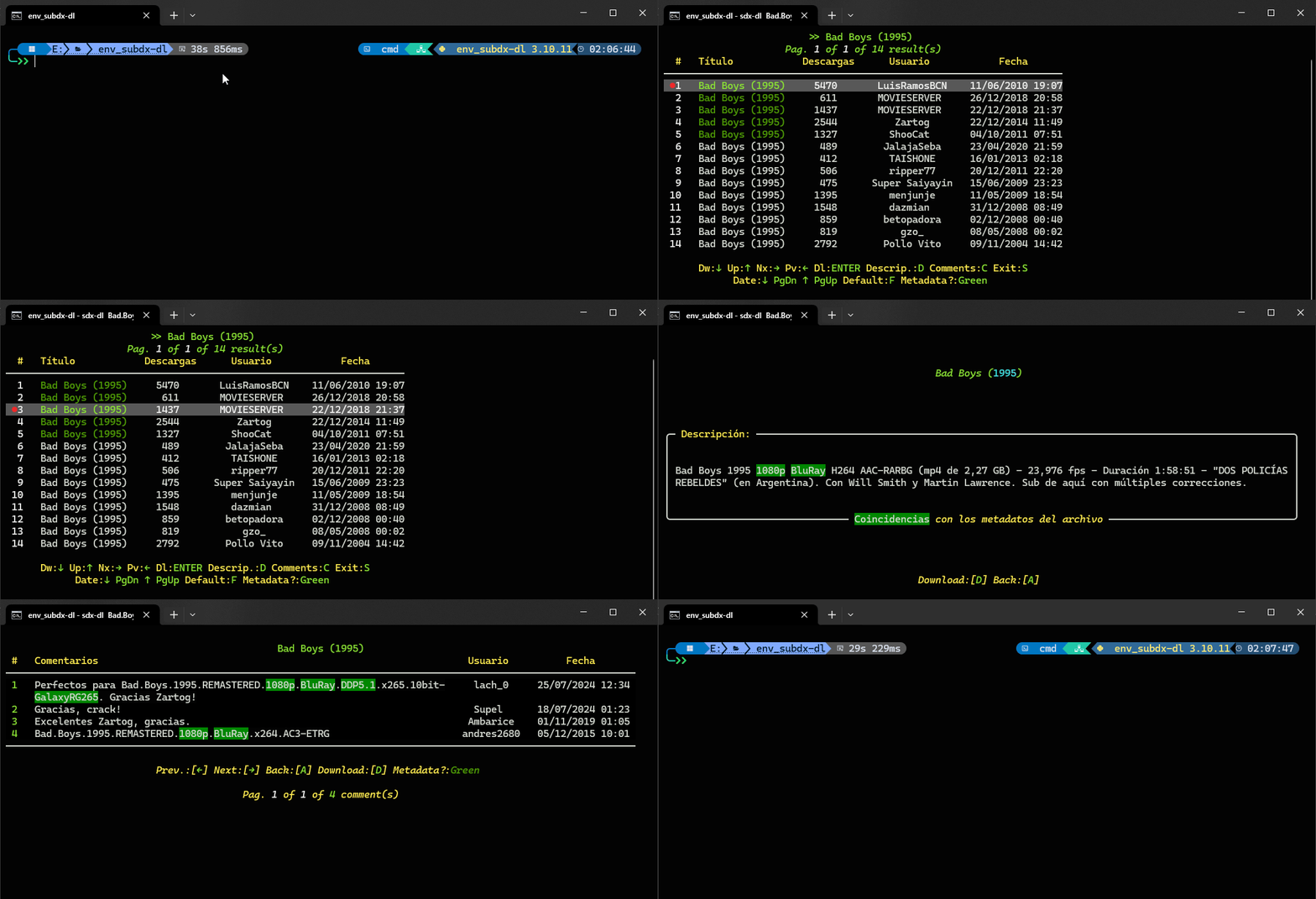
Some Captures
Performing search:
- Navigable searches results:
- Subtitle description:
- User comments:
1 maintainer

Metadata
1 maintainer
Release files for subdx-dl 2.2.0
For a detailed explanation of source distributions (sdists) and built distributions (wheels), please see the package formats documentation.
Source distribution (sdist)
| File | Size | Uploaded | Provenance | Actions |
|---|---|---|---|---|
| subdx_dl-2.2.0.tar.gz | 65.8 kB | With provenance | Details for subdx_dl-2.2.0.tar.gz |
Built distribution (wheel)
| File | Interpreter | ABI | Platform | Actions Reset |
|---|---|---|---|---|
| subdx_dl-2.2.0-py3-none-any.whl | Python 3 | none | any | Details for subdx_dl-2.2.0-py3-none-any.whl |
Total release size: 134.6 kB
Release files / subdx_dl-2.2.0.tar.gz
| Download URL | subdx_dl-2.2.0.tar.gz |
|---|---|
| Size | 65.8 kB |
| Tags | Source |
|
SHA-256 checksum How to use checksums |
50de1004d045ed63aee98c3205badcf61a30852eaa2b4019d9948b5d003ca5e1
|
|
BLAKE2b-256 checksum How to use checksums |
a18be1e4230e4b5cb3756151e1aa976e746cfc51b389060e0e926c8b93ae45bf
|
| Upload date | |
|
Uploaded using Trusted Publishing? What is trusted publishing? |
Yes |
| Uploaded via |
twine/7.0.0 CPython/3.13.16
|
Provenance
Provenance describes where a file came from. On PyPI, provenance is shared via attestations, which provide a verifiable record of the build or publishing details. View details, limitations and caveats.


PyPI Publish Attestation
PyPI verified that this artifact, at this checksum, originated from the publisher listed below.
Signed by GitHub Actions, verified by PyPI on Nov 3, 2026.
Transparency logRelease files / subdx_dl-2.2.0-py3-none-any.whl
| Download URL | subdx_dl-2.2.0-py3-none-any.whl |
|---|---|
| Size | 68.8 kB |
| Tags | Python 3 |
|
SHA-256 checksum How to use checksums |
3018c42e2106b8109b9e5f2658c81aee37349f789aa26d3b0a4c8ff1c0ea7f0b
|
|
BLAKE2b-256 checksum How to use checksums |
577ab3ea6099125007229480f04e88d136f9c7cae3479c4f684dfb533c0b17a6
|
| Upload date | |
|
Uploaded using Trusted Publishing? What is trusted publishing? |
Yes |
| Uploaded via |
twine/7.0.0 CPython/3.13.16
|
Provenance
Provenance describes where a file came from. On PyPI, provenance is shared via attestations, which provide a verifiable record of the build or publishing details. View details, limitations and caveats.
PyPI Publish Attestation
PyPI verified that this artifact, at this checksum, originated from the publisher listed below.
Signed by GitHub Actions, verified by PyPI on Nov 3, 2026.
Transparency logSecurity for subdx-dl 2.2.0
Provenance
Provenance describes where a file came from. On PyPI, provenance is shared via attestations, which provide a verifiable record of the build or publishing details. View details, limitations and caveats.
Full provenance
All 2 files in this release have been uploaded with provenance metadata.
Attestation for subdx_dl-2.2.0.tar.gz
PyPI Publish Attestation
PyPI verified that this artifact, at this checksum, originated from the publisher listed below.
Signed by GitHub Actions, verified by PyPI on Nov 3, 2026.
Transparency logA note on package security
PyPI is a repository for distributing packages, not a service for auditing them. While third-party security researchers and our staff do their best to detect and remove malicious packages, PyPI cannot guarantee the quality, security or suitability of any given package.
To learn more about protecting yourself from malicious actors, visit our package security documentation.














