

Sublime Music is a native, GTK3 Subsonic/Airsonic/Revel/Gonic/Navidrome/Ampache/*sonic client for the Linux Desktop.
- CI
-
- Community
-
- Code
-
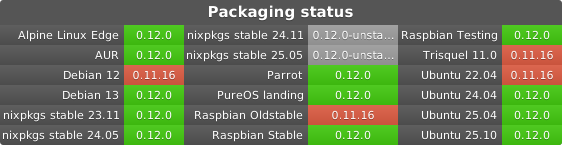
- Packages
-








The Albums tab of Sublime Music with the Play Queue opened. More Screenshots
Features
Switch between multiple Subsonic-API-compliant [1] servers.
Play music through Chromecast devices on the same LAN.
Offline Mode where Sublime Music will not make any network requests.
DBus MPRIS interface integration for controlling Sublime Music via clients such as playerctl, i3status-rust, KDE Connect, and many commonly used desktop environments.
Browse songs by the sever-reported filesystem structure, or view them organized by ID3 tags in the Albums, Artists, and Playlists views.
Intuitive play queue.
Create/delete/edit playlists.
Download songs for offline listening.
Installation
Via the AUR:
Install the sublime-music package. Example using yay:
yay -S sublime-music
If you want support for storing passwords in the system keychain, also install python-keyring.
If you want support for playing on Chromecast devices, install python-pychromecast. If you want to serve cached files from your computer over the LAN to Chromecast devices also install python-bottle.
Via NixOS:
Sublime Music is part of the nixos-20.09 channel and newer (including nixos-unstable).
To install Sublime Music on NixOS, either use the declarative or the imperative way:
In configuration.nix (declarative):
environment.systemPackages = [ pkgs.sublime-music ];
In command line (imperative):
nix-env -iA sublime-music
To customize the extra components installed, you need to use the override function provided by Nix:
(sublime-music.override {
  serverSupport = true;
  chromecastSupport = true;
})
The following components are supported:
chromecastSupport: if you want support for playing on Chromecast devices on the LAN. Defaults to false.
serverSupport: if you want to be able to serve cached files from your computer over the LAN to Chromecast devices. Defaults to false.
keyringSupport: if you want to store your passwords in the system keyring instead of in plain-text. Defaults to true.
notifySupport: if you want to enable notifications when a new song begins to play. Defaults to true.
networkSupport: if you want to change the address used to access the server depending on what network you are connected to. Defaults to true.
See Nix package management for more information.
Via the Debian package
Sublime Music is not currently in the Debian ‘Stable’ distribution, but has been packaged for Debian ‘Unstable’ and ‘Testing’.
If you have these sources in your /etc/apt/sources.list, you can install the package with:
sudo apt install sublime-music
Via PyPi:
pip install sublime-music
There are a few optional dependencies that you can install. Here’s an example of how to do that:
pip install sublime-music[keyring,chromecast,server]
keyring: if you want to store your passwords in the system keyring instead of in plain-text
chromecast: if you want support for playing on Chromecast devices on the LAN.
server: if you want to be able to serve cached files from your computer over the LAN to Chromecast devices
Click HERE for the Sublime Music website.
Click HERE for extended user documentation.
See the CONTRIBUTING.md document for how to contribute to this project.
You can also join the conversation in our Matrix room: #sublime-music:matrix.org.
1 maintainer

Metadata
1 maintainer
Release files for sublime_music 0.12.0
For a detailed explanation of source distributions (sdists) and built distributions (wheels), please see the package formats documentation.
Source distribution (sdist)
| File | Size | Uploaded | Provenance | |
|---|---|---|---|---|
| sublime_music-0.12.0.tar.gz | 21.0 MB | Without provenance | Details |
Built distribution (wheel)
| File | Interpreter | ABI | Platform | Reset |
|---|---|---|---|---|
| sublime_music-0.12.0-py3-none-any.whl | Python 3 | none | any | Details |
Total release size: 21.3 MB
Release files / sublime_music-0.12.0.tar.gz
| Download URL | sublime_music-0.12.0.tar.gz |
|---|---|
| Size | 21.0 MB |
| Tags | Source |
|
SHA-256 checksum How to use checksums |
458bacab6be5c926852d4a43ce675b5e767210287844c6fce921832e263db3c0
|
|
BLAKE2b-256 checksum How to use checksums |
cc01ff2974ec1c475970180c10b33501a7b485bb23ee55db908d63f20ba34478
|
| Upload date | |
|
Uploaded using Trusted Publishing? What is trusted publishing? |
No |
| Uploaded via |
python-requests/2.28.2
|
Release files / sublime_music-0.12.0-py3-none-any.whl
| Download URL | sublime_music-0.12.0-py3-none-any.whl |
|---|---|
| Size | 235.3 kB |
| Tags | Python 3 |
|
SHA-256 checksum How to use checksums |
008ea7241f79acabf85902615a32b31a68b950d7693c07f513438c55ab897b72
|
|
BLAKE2b-256 checksum How to use checksums |
3bfe5be97c525ee6add3023ac61f7ce637faf352515a103480cbf7495a4b9bbe
|
| Upload date | |
|
Uploaded using Trusted Publishing? What is trusted publishing? |
No |
| Uploaded via |
python-requests/2.28.2
|
Security for sublime_music 0.12.0
Provenance
Provenance describes where a file came from. On PyPI, provenance is shared via attestations, which provide a verifiable record of the build or publishing details. View details, limitations and caveats.
No provenance found
None of the files in this release were uploaded with provenance metadata.
A note on package security
PyPI is a repository for distributing packages, not a service for auditing them. While third-party security researchers and our staff do their best to detect and remove malicious packages, PyPI cannot guarantee the quality, security or suitability of any given package.
To learn more about protecting yourself from malicious actors, visit our package security documentation.














