
SUBRAKE
A Subdomain Enumeration and Validation tool for Bug Bounty and Pentesters.





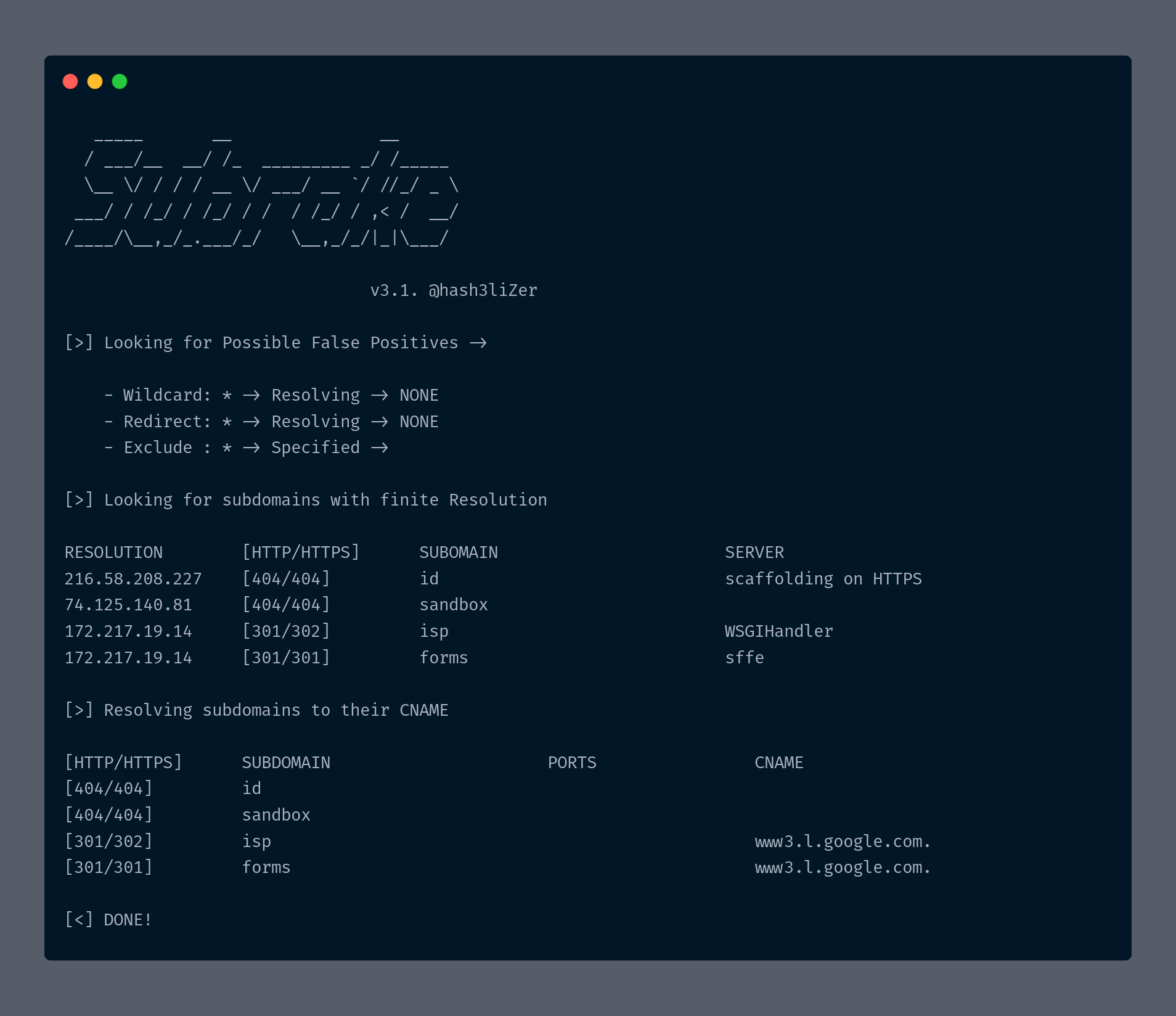
Key Features
- OSINT + Subdomain Bruteforcing
- Capable of handling outputs from multiple tools
- Handling False Positives and Filters subdomains with same resolutions.
- Checking for Server Banners and Ports
- Incredibly Fast
- Handling domains with larger scopes
- Port Scanning
Documentation
Installation
Installing stable version directly from PYPI:
$ pip3 install subrake
Installing latest build:
$ git clone https://github.com/hash3liZer/Subrake.git
$ cd Subrake/
$ python3 setup.py install
Run after installation:
$ subrake --help
Usage
Subrake is highly flexible and is made to work under different situations. It can parse output files from multiple tools collectively. It does OSINT search alongside wordlist bruteforcing and before actual bruteforcing, it removes similar subdomains and false positives. It does also support a filter which when supplied allows you to seperate subdomains with same IP addresses in the final CSV result. Let's see some of the Subrake uses:
A simple run with OSINT results from search engines:
$ subrake -d google.com
Subrake with Multiple Threads:
$ subtake -d google.com -t 50
Subrake with OSINT results + SecLists subdomains list:
$ subrake -d google.com --wordlists SecLists/Discovery/DNS/namelist.txt
Subrake with OSINT results + Multiple SecLists subdomains list:
Note: Subdomains with similar names will automatically be filtered and counted as 1
$ subrake -d google.com --wordlists SecLists/Discovery/DNS/namelist.txt,SecLists/Discovery/DNS/dns-Jhaddix.txt
Subrake without OSINT + Output from multiple tools combined + IP Filtering:
$ domain="google.com"
$ subfinder -d $domain -nW -o $domain/1.txt && sublist3r -d $domain -o $domain/2.txt && cat $domain/* >> /tmp/output.txt
$ subrake -d $domain -w tmp/output.txt --filter --skip-search
Subrake without DNS + OSINT:
$ subrake -d google.com --skip-dns
Subrake with Port Scanning:
NOTE: The port 80,443 will be scanned by default for every host under HTTP/HTTPS banner. So, there's no need to specify them here
$ subrake -d google.com --ports 8080,8443,8000,23,445
Manual
   Args               Description                                    Default
   -h, --help           Show this manual                             NONE
   -d, --domain         Target domain. Possible
                        example: [example.com]                       NONE
   -w, --wordlists      Wordlists containing subdomains
                        to test. Multiple wordlists can
                        be specified.                                NONE
   -t, --threads        Number of threads to spawn                    25
   -o, --output         Store final subdomains in a specified file   NONE
   -c, --csv            Store output results in CSV format           NONE
   -p, --ports          Comma-seperated list of ports to scan.       NONE
   -s, --skip-search    Search for subdomains Online from various
                        sites.                                       FALSE
       --filter         Filter subdomains with same IP in CSV output FALSE
                        Helpful with larger scopes.
       --skip-dns       Skip initial DNS enumeration phase           FALSE
       --exclude-ips    Exclude specified IPs from the final results
                        Helpful in removing False Positives          NONE
Contribution
You can contribute to the project in many ways:
- Report Bugs
- Suggestions for making it better
Have any further Question? You can hit me up on Twitter and Email:
Twitter: @hash3liZer
1 maintainer

Metadata
1 maintainer
Release files for subrake 3.3
For a detailed explanation of source distributions (sdists) and built distributions (wheels), please see the package formats documentation.
Source distribution (sdist)
| File | Size | Uploaded | |
|---|---|---|---|
| subrake-3.3.tar.gz | 16.7 kB | Details |
Release files / subrake-3.3.tar.gz
| Download URL | subrake-3.3.tar.gz |
|---|---|
| Size | 16.7 kB |
| Tags | Source |
|
SHA-256 checksum How to use checksums |
42359afab1534a3fdb0dca78819e774cd92f8a424a7b7d1ad7f6a9e1e0f38c50
|
|
BLAKE2b-256 checksum How to use checksums |
fb22683ef295defa4b1b3b84369e9d02b62ec7b06ee0a27ad112c20d4d0ff877
|
| Upload date | |
|
Uploaded using Trusted Publishing? What is trusted publishing? |
No |
| Uploaded via |
twine/3.2.0 pkginfo/1.5.0.1 requests/2.24.0 setuptools/41.1.0 requests-toolbelt/0.9.1 tqdm/4.48.2 CPython/3.8.3
|













