
Find informative examples to efficiently (human-)evaluate NLG models.

Project description
 subset2evaluate

Package to select informative samples to human-evaluate for NLG tasks such as machine translation or summarization. It is based on a paper by Vilém Zouhar, Peng Cui, and Mrinmaya Sachan from ETH Zürich.
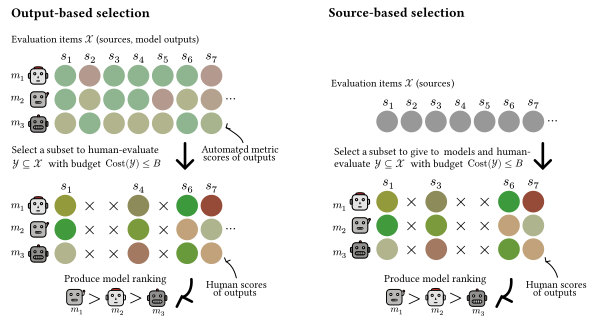
Selecting Examples to Efficiently Human-Evaluate Models: Human evaluation for language generation is the gold-standard but expensive. To fit the budgetary constraints, often only a random subset of the test set is chosen for evaluation. The random selection is grossly inefficient and in this work we formalize the task of selecting most informative items for evaluation. We show that methods based on variance in automated metric scores or diversity in modeloutputs, outperform the commonly used, yet inefficient, random selection. However, these methods are not applicable for test set creation where the modeloutputs are not yet available. This is applicable to blind test set creation or for selecting from a very large set of items. To this end, we introduce PreCOMET which predicts item usefulness for human evaluation just based on the input alone. We demonstrate the efficacy of our methods on two common language generations tasks, machine translation and summarization. We show that only 30%-60% of human annotations are needed to produce the same evaluation result.
Usage
In short, you put list of items in the package and the package sorts the list in descending order (first is better) based on how suitable each item is for evaluation, such as with human annotations.
In addition to the sorting, the package also returns the item utility stored in the subset2evalute_utility field of each item.
General recommendations based on MT evaluation:
| When to use? | What is it? | How to use? |
|---|---|---|
Good automated metric available, such as MetricX-23. |
Variance in metric scores. | method="metric_var", metric="MetricX-23" |
| Metric not available but modeloutputs available. | Diversity of mmodelutputs. | method="diversity_bleu" |
| Model outputs not available, only sources. | Estimated diversity in modeloutputs. | method="precomet_diversity" |
The package supports multiple methods. We show benchmark of the methods on machine translation evaluation:
| Method | Requirements | Accuracy | Cluster count |
|---|---|---|---|
| Random | 91.0% | 2.25 | |
| Output-based selection | |||
| MetricX-23 var | MetricX-23 scores | 92.0% | 3.22 |
| MetricX-23 avg | MetricX-23 scores | 91.8% | 3.16 |
| Diversity BLEU | Outputs | 92.1% | 2.99 |
| Diversity unigram | Outputs | 91.1% | 2.62 |
| IRT diff.×disc. | MetricX-23 scores | 91.2% | 3.14 |
| Source-based selection | |||
| PreCOMET var model | Sources | 91.2% | 2.58 |
| PreCOMET avg model | Sources | 91.1% | 2.68 |
| PreCOMET diversity [model] | Sources | 92.1% | 2.86 |
| PreCOMET diff.×disc. [model1, model2] | Sources | 93.1% | 3.22 |
And benchmark of the methods for summarization:
| Method | Requirements | Accuracy | Cluster count |
|---|---|---|---|
| Random | 90.5% | 2.00 | |
| Output-based selection | |||
| Coverage var | Coverage scores | 92.2% | 2.30 |
| Coverage avg | Coverage scores | 91.8% | 2.20 |
| IRT diff.×disc. | Coverage scores | 92.6% | 2.44 |
| Diversity BLEU | Outputs | 89.3% | 2.90 |
| Diversity unigram | Outputs | 87.2% | 2.80 |
Example for Machine Translation
Install the package and download WMT data:
pip3 install subset2evaluate
# optionally these two packages for IRT and PreCOMET based selections
pip3 install git+https://github.com/zouharvi/PreCOMET.git git+https://github.com/zouharvi/py-irt.git
Then in Python we compute the baseline:
import subset2evaluate

data_full = subset2evaluate.utils.load_data("wmt23/en-cs")
len(data_full)
> 1098

# take only top 100 items to "human-evaluate"
data_new = subset2evaluate.select_subset.basic(data_full, method="random")
subset2evaluate.evalute.eval_subset_clusters(data_new[:100])
> 1

# compare it to something better:
data_new = subset2evaluate.select_subset.basic(data_full, method="metric_var" metric="MetricX-23")
subset2evaluate.evaluate.eval_subset_clusters(data_new[:100])
> 3
Example for Summarization
import subset2evaluate

data_full = subset2evaluate.utils.load_data("summeval")
len(data_full)
> 100

# take only top 25 items to "human-evaluate"
data_new = subset2evaluate.select_subset.basic(data_full, method="random")
subset2evaluate.evaluate.eval_subset_clusters(data_new[:25], metric="human_relevance")
> 2

data_new = subset2evaluate.select_subset.basic(data_full, method="diversity_bleu")
subset2evaluate.evaluate.eval_subset_clusters(data_new[:25], metric="human_relevance")
> 3
Example for Custom Dataset
The intended usage is for your own custom datasets where you wish to choose which to evaluate.
The input to subset2evaluate needs to be a list of items.
What each item needs to contain depends on the method.
For example, diversity requires tgt on each item such that the output diversity can be computed.
As another texample var requires scores/metric on each item such that the metric variance can be computed.
The item can contain any additional extra fields even if they're not explicitly used.
As an example, look at the existing loaders:
import subset2evaluate
import json
data = subset2evaluate.utils.load_data("wmt23/en-de")

len(data)
> 549

json.dumps(data[0], indent=2)
> {
>   "i": 0,
>   "src": "Police arrest 15 after violent protest outside UK refugee hotel",
>   "ref": "Polizei verhaftet 15 Menschen nach gewalttätigen Protesten vor einer Flüchtlingsunterkunft in Großbritannien",
>   "tgt": {
>     "Lan-BridgeMT": "Polizei verhaftet 15 nach gewalttätigem Protest vor britischem Flüchtlingshotel",
>     "NLLB_MBR_BLEU": "Polizei verhaftet 15 nach gewaltsamen Protesten vor einem britischen Flüchtlingshotel",
>     "ZengHuiMT": "Die Polizei verhaftet 15 Personen nach gewalttätigem Protest vor britischem Flüchtlingshotel.",
>     "ONLINE-A": "Polizei nimmt 15 nach gewalttätigen Protesten vor britischem Flüchtlingshotel fest",
>     "ONLINE-W": "Polizei nimmt 15 Personen nach gewaltsamen Protesten vor einem britischen Flüchtlingshotel fest",
>     "ONLINE-B": "Polizei verhaftet 15 Personen nach gewalttätigem Protest vor britischem Flüchtlingshotel",
>     "NLLB_Greedy": "Polizei verhaftet 15 nach gewalttätigen Protesten vor einem Flüchtlingshotel in Großbritannien",
>     "ONLINE-M": "Polizei verhaftet 15 nach gewalttätigem Protest vor britischem Flüchtlingshotel",
>     "AIRC": "Polizeiverhaftung 15 nach gewaltsamen Protesten außerhalb des britischen Flüchtlingshotels",
>     "ONLINE-Y": "Die Polizei verhaftet 15 Personen nach gewaltsamen Protesten vor einem britischen Flüchtlingshotel",
>     "GPT4-5shot": "Die Polizei nimmt 15 Personen nach gewalttätigen Protesten vor einem britischen Flüchtlingshotel fest.",
>     "ONLINE-G": "Polizei verhaftet 15 nach gewalttätigem Protest vor britischem Flüchtlingshotel"
>   },
>   "time": 0.2119810263850096,
>   "domain": "news",
>   "doc": "aj-english.33941",
>   "scores": {
>     "Lan-BridgeMT": {
>       "human": 0.9175257731958762,
>       "XCOMET-XL": 0.9867596612701105,
>       "f200spBLEU": 0.2759278681802151,
>       ...
>     },
>     "GPT4-5shot": {
>       "human": 0.9948453608247423,
>       "XCOMET-XL": 0.988012809964431,
>       "f200spBLEU": 0.3275118410766353,
>       ...
>     },
>     "ONLINE-G": {
>       "human": 0.8762886597938144,
>       "XCOMET-XL": 0.9867596612701105,
>       "f200spBLEU": 0.2759278681802151,
>       ...
>     }
>   }
> }
Command-line Interface
We recommend using the Python interface but the package can also be used from the command line:
subset2evaluate wmt23/en-cs --method metric_var --args "{'metric': 'MetricX-23'}" > wmt23_encs_sorted.jsonl
subset2evaluate-eval wmt23/en-cs wmt23_encs_sorted.jsonl
> Clusters: 2.30
> Accuracy: 86.7%
Advanced Usage
The package also supports cost-aware subset selection, which is useful for the cases where we know the estimated annotation costs of items. For example, annotating a five paragraph-long summarization output likely takes 3-6 times more than a single paragraph output. For cost-aware selection, the package requires two things:
- the data has already been ran through
select_subset.basicmethod (such that each item now hassubset2evaluate_utilityproperty), ans - each item has a
costvalue The WMT data already have the cost values for each item (estimated annotation time):
import subset2evaluate
data_full = subset2evaluate.utils.load_data("wmt23/en-zh")
data_full[0]["cost"]
> 0.2973610038416405

# run basic selection
data_new = subset2evaluate.select_subset.basic(data_full, method="metric_var", metric="MetricX-23")

# only the first 23 items fit our budget of 50
sum([line["cost"] for line in data_new[:23]])
> 49.18571270950981

subset2evaluate.evaluate.eval_subset_correlation(data_new[:23], data_full)
> 0.8714285714285712

# let's run cost-aware selection
data_costaware = subset2evaluate.select_subset.costaware(data_new, budget=50)

# indeed the whole output fits our budget
sum([line["cost"] for line in data_costaware])
> 49.98968875693353

subset2evaluate.evaluate.eval_subset_correlation(data_costaware, data_full)
> 0.9107142857142855
Contact & Contributions
We are look forward to contributions, especially (1) using subset2evaluate for other tasks, (2) adding new methods, (3) finding bugs and increasing package usability. Please file a GitHub issue or send us an email.
The repository is structured as follows:
subset2evaluate/contains the primary package and all methodsexperiments/contains scripts to run experiments in the paper
Release history Release notifications | RSS feed


Download files
Download the file for your platform. If you're not sure which to choose, learn more about installing packages.
Source Distribution
Built Distribution
Filter files by name, interpreter, ABI, and platform.
If you're not sure about the file name format, learn more about wheel file names.
Copy a direct link to the current filters
File details
Details for the file subset2evaluate-0.0.1a10.tar.gz.
File metadata
- Download URL: subset2evaluate-0.0.1a10.tar.gz
- Upload date:
- Size: 25.2 kB
- Tags: Source
- Uploaded using Trusted Publishing? No
- Uploaded via: twine/6.0.1 CPython/3.11.5
File hashes
| Algorithm | Hash digest | |
|---|---|---|
| SHA256 |
467b3800b871510d34a3cb6071155972ed6217e2ff0b5368dd1b0c50d125be82
|
|
| MD5 |
5aca99741fae2096d97b7bb4b65b636d
|
|
| BLAKE2b-256 |
fc1cc585370618f403f270075a0eea80e5f35c05f97bfe260bda75b1a5a2f9ba
|
File details
Details for the file subset2evaluate-0.0.1a10-py3-none-any.whl.
File metadata
- Download URL: subset2evaluate-0.0.1a10-py3-none-any.whl
- Upload date:
- Size: 24.0 kB
- Tags: Python 3
- Uploaded using Trusted Publishing? No
- Uploaded via: twine/6.0.1 CPython/3.11.5
File hashes
| Algorithm | Hash digest | |
|---|---|---|
| SHA256 |
50b5fff1ecb437aff73a633e0e817cc1915d9bd0aa900346c3a3ab2b5a47638c
|
|
| MD5 |
b47c14e883f920e1274c747f3dbb64c9
|
|
| BLAKE2b-256 |
d257e0bd4792b31b197427e091c4ff5980593d98eb309311d6c7cf2d08fead4d
|






