
Sufficient visibility into cloud infrastructure failures — live AWS topology + Terraform drift in one CLI.

Project description
🔬 sudiviz
X-ray vision for your cloud infrastructure
sudiviz visualizes your live cloud infrastructure as an interactive graph — terminal, web, or PNG. It auto-detects misconfigurations, unhealthy targets, and orphan resources, then generates one-click fixes. 🚀 Zero AI tokens. 💸 Zero operational cost. 🐍 Pure Python.
                _ _       _
   ___ _   _  __| (_)_   _(_)____
  / __| | | |/ _` | \ \ / / |_  /
  \__ \ |_| | (_| | |\ V /| |/ /
  |___/\__,_|\__,_|_| \_/ |_/___|

  X-ray vision for your cloud infrastructure
📸 Screenshots
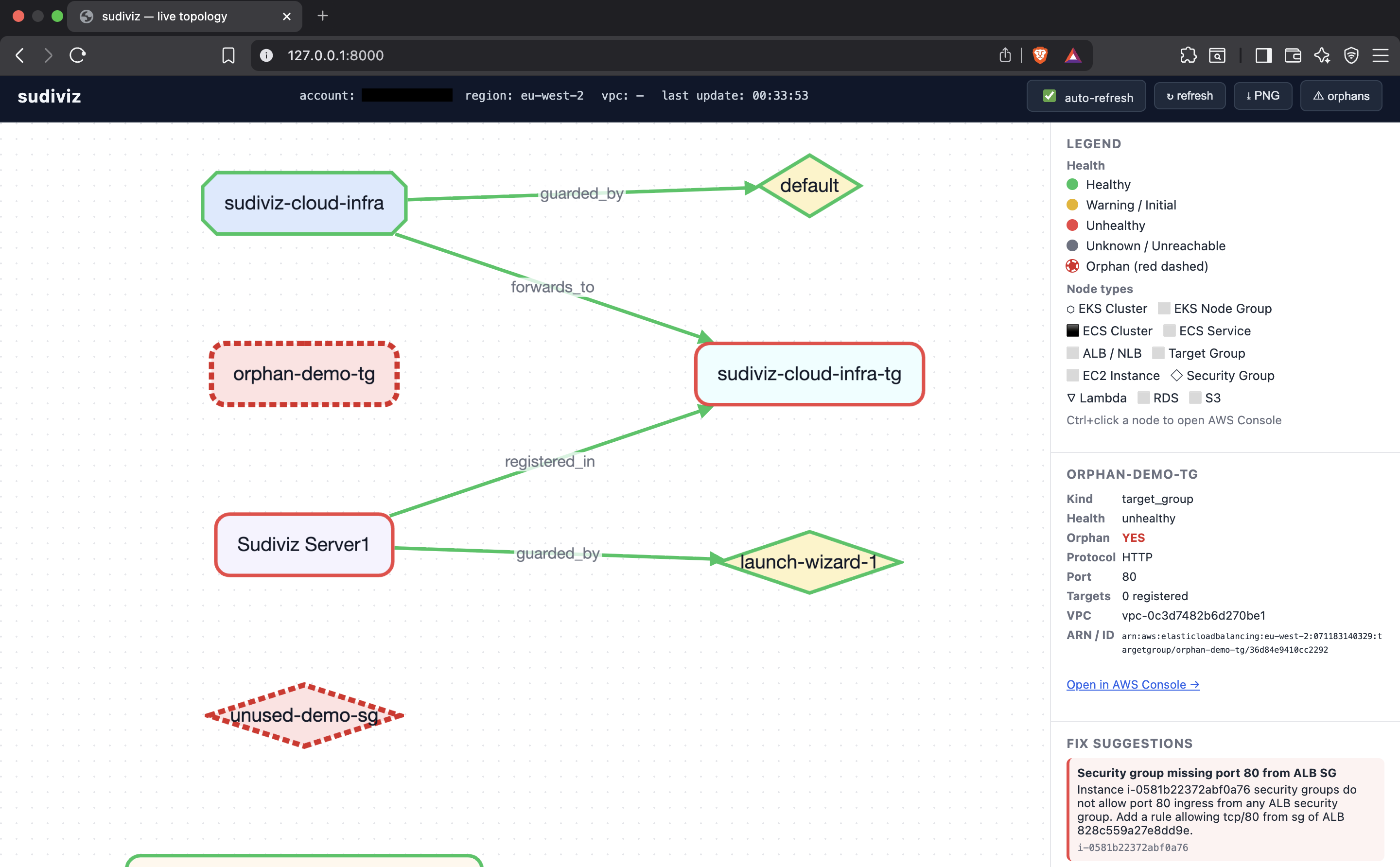
🌐 Web Visualization
Interactive graph with live updates, node inspection, orphan detection (red dashed), and one-click AWS Console access.
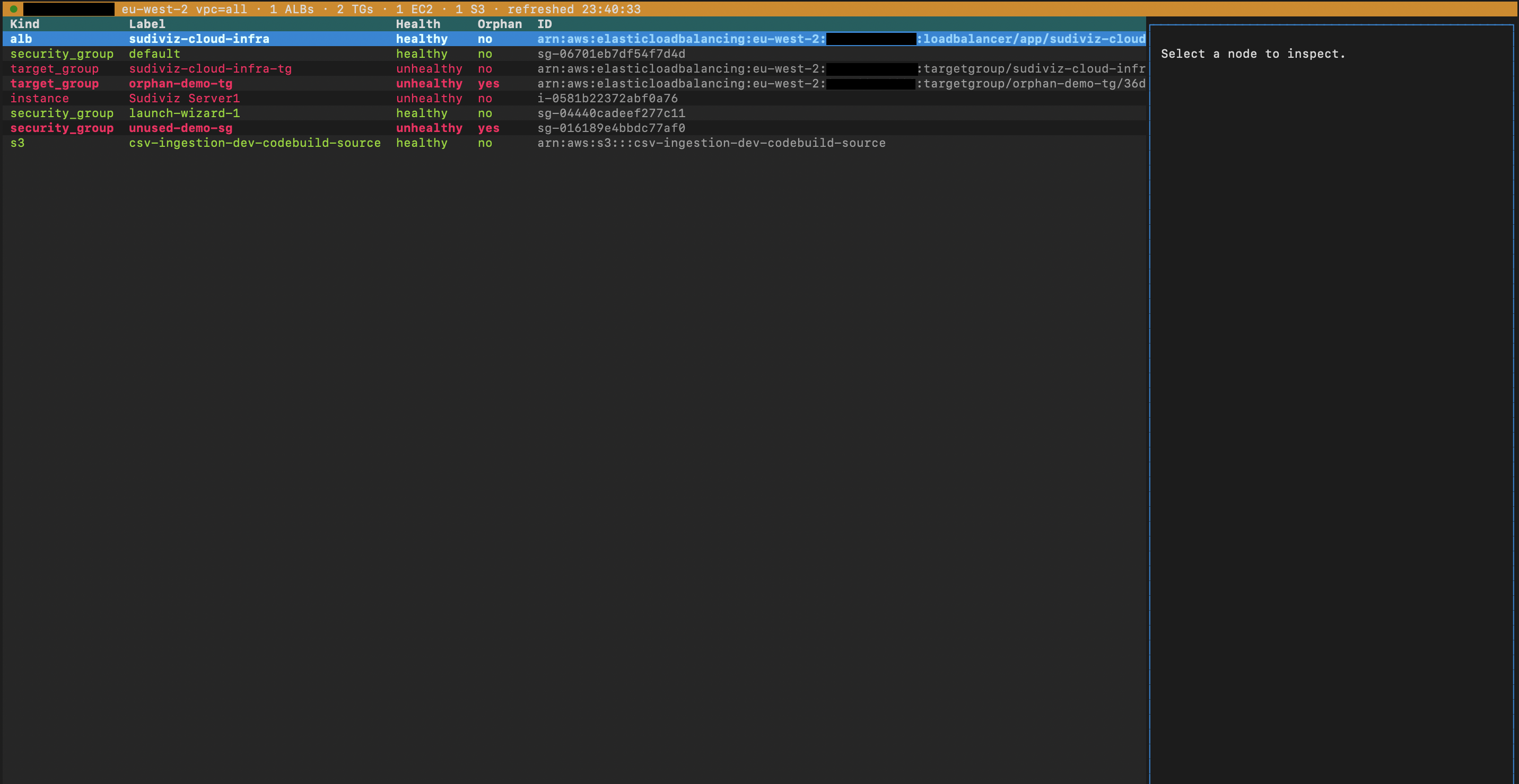
🖥️ Terminal TUI
Full-featured terminal UI with keyboard navigation, health status, and orphan highlighting.
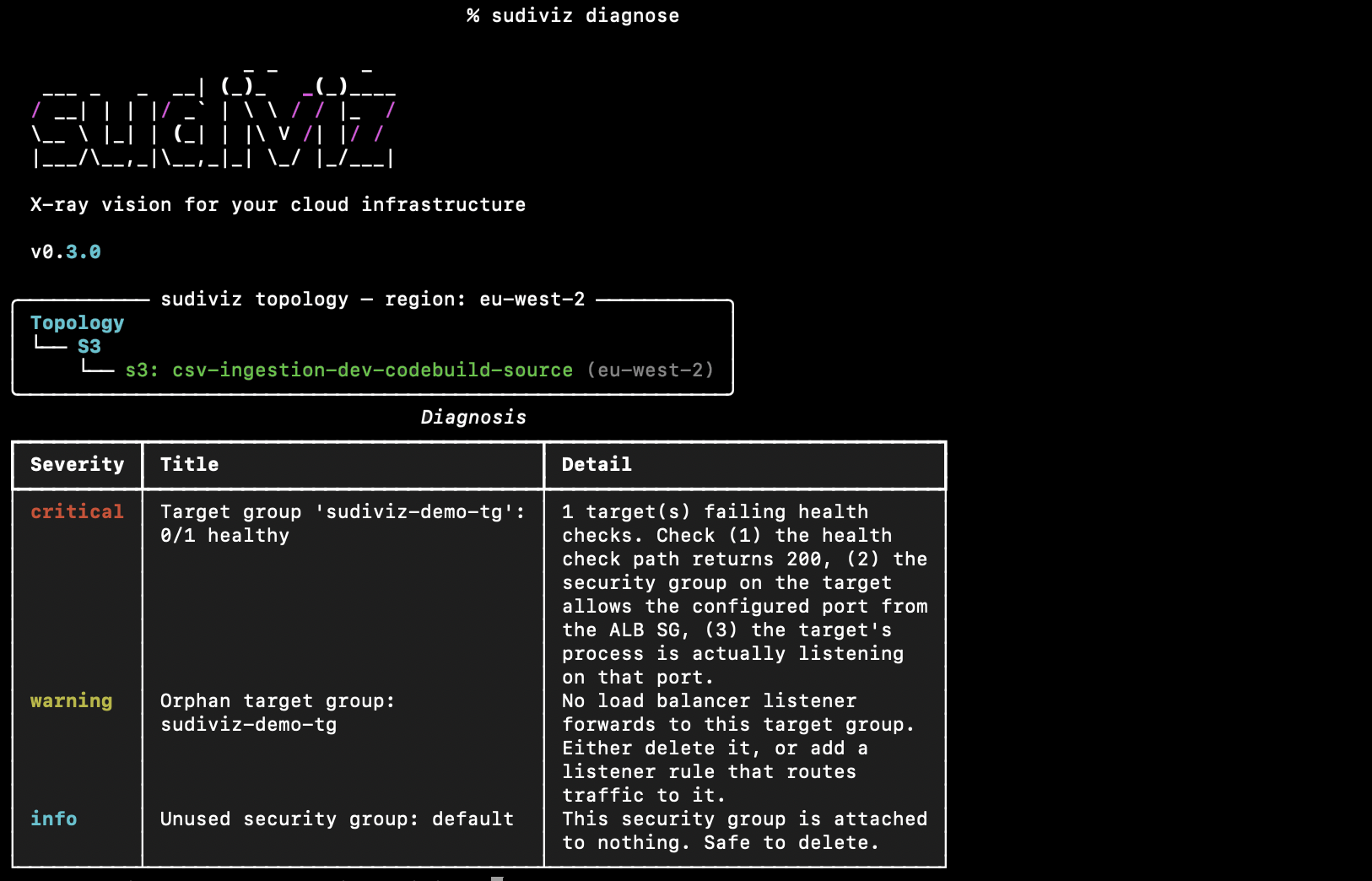
💻 Diagnose
Instant topology view + diagnosis table showing issues by severity.
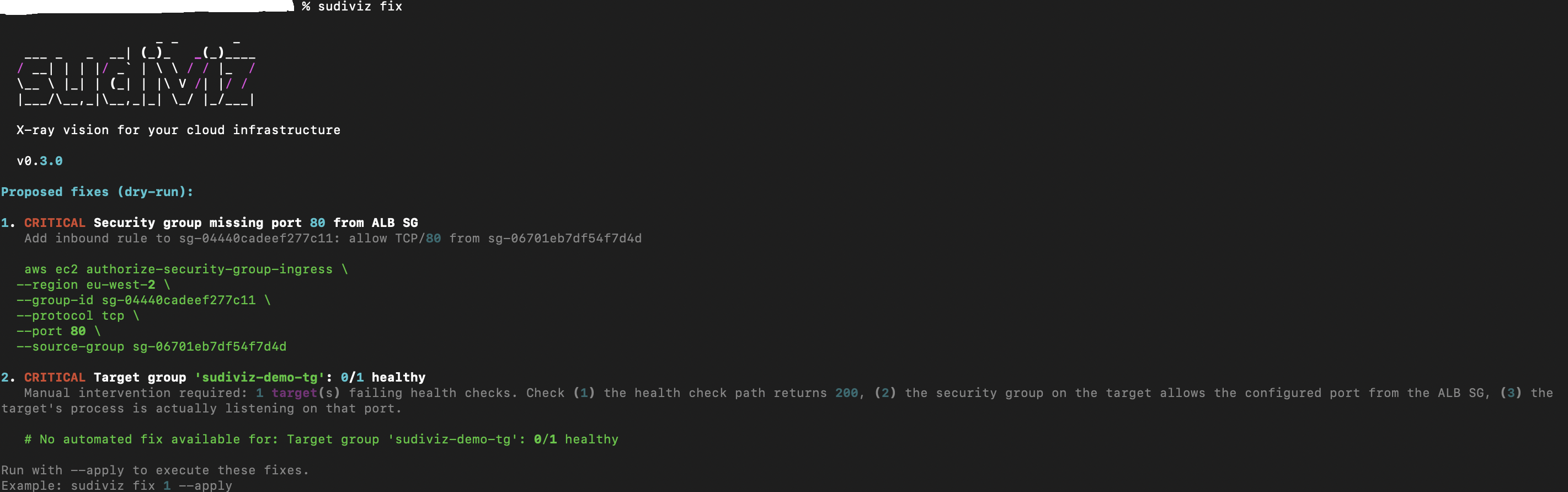
🔧 Auto-Fix (Preview)
See exactly what will be fixed before applying — with AWS CLI commands included.
⚡ Auto-Fix (Apply)
One command to fix issues. Destructive operations require --force.

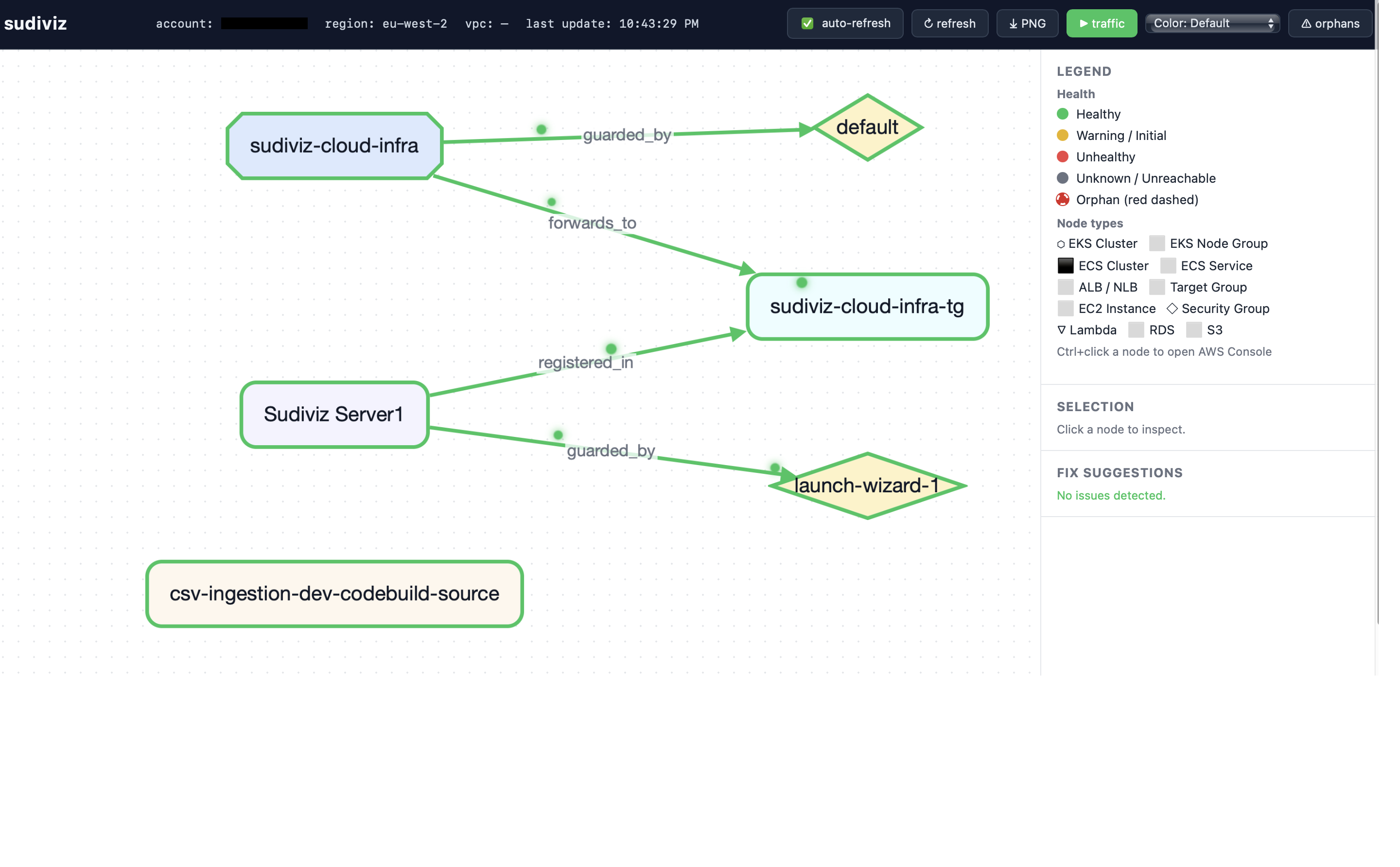
🚦 Traffic Flow Animation
Watch data flow through your infrastructure in real-time. Green pulses show healthy traffic paths, red pulses highlight broken connections — instantly spot where requests are failing.
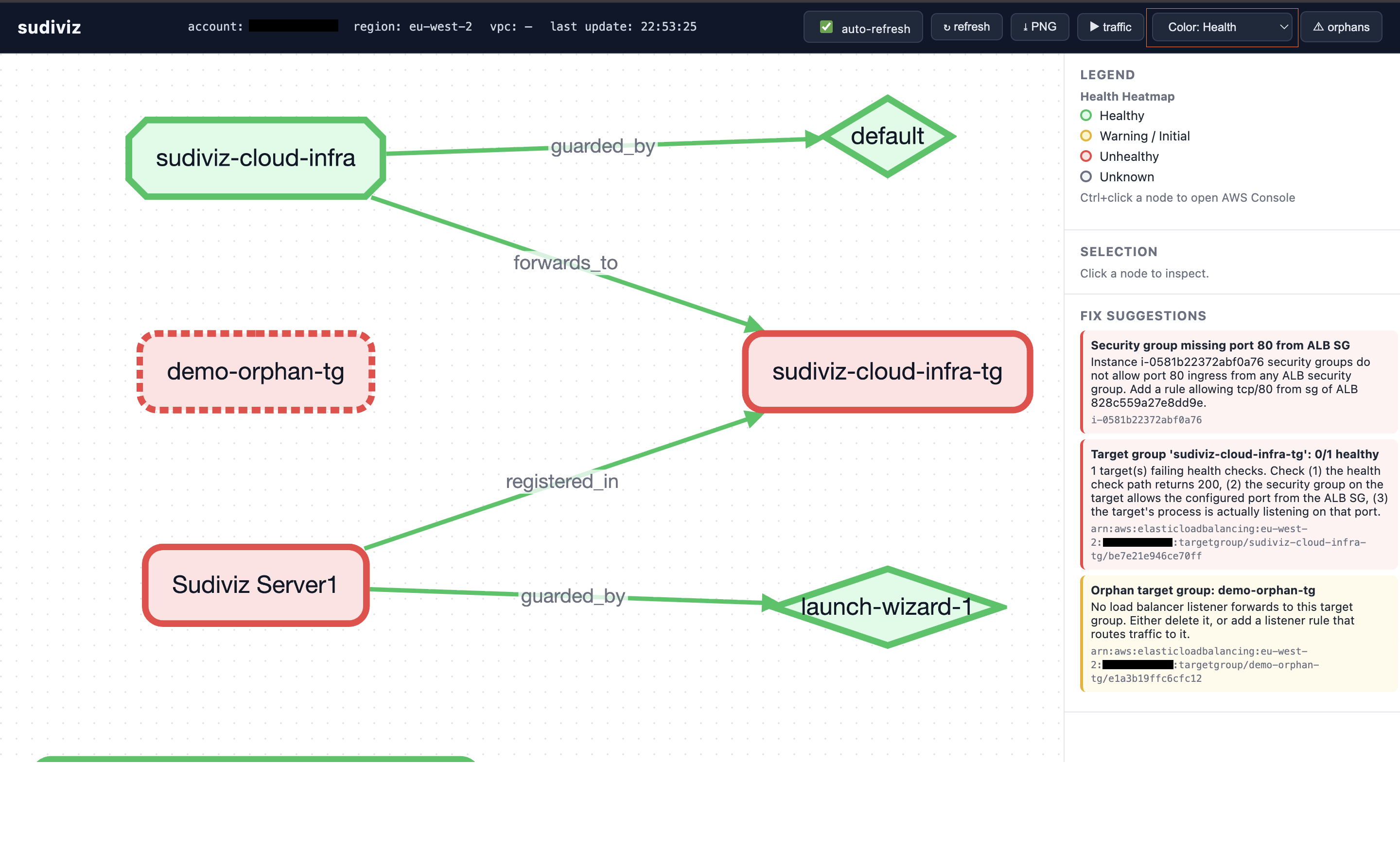
🌡️ Health Heatmap
Switch to heatmap mode to color-code your entire infrastructure by health status. Green = healthy, yellow = warning, red = unhealthy. Instantly identify problem areas at a glance.
🤔 Why sudiviz?
Hava.io and Cloudcraft.co generate gorgeous diagrams — but they're snapshots. By the time you reload, your problem has moved. sudiviz is built around live data: every render is a fresh API call, every node is clickable, every orphan is highlighted in red dashed lines.
| Feature | sudiviz | Hava.io | Cloudcraft |
|---|---|---|---|
| Live data (no manual refresh) | ✅ | ❌ (static) | ❌ (static) |
| Terminal UI (Textual) | ✅ | ❌ | ❌ |
| Interactive web (Cytoscape.js) | ✅ | ✅ | ✅ |
| WebSocket real-time updates | ✅ | ❌ | ❌ |
| Animated traffic flow | ✅ | ❌ | ❌ |
| Health heatmaps | ✅ | ❌ | ❌ |
| PNG export | ✅ | ✅ | ✅ |
| Plain-English fix suggestions | ✅ | ❌ | ❌ |
| Auto-fix with one command | ✅ | ❌ | ❌ |
| Terraform drift detection | ✅ | ❌ | ❌ |
| Orphan detection (red dashed) | ✅ | ❌ | ❌ |
| ECS / EKS / RDS / Lambda / S3 | ✅ | ✅ | ✅ |
| Security & encryption checks | ✅ | ❌ | ❌ |
| Free / open source | ✅ MIT | ❌ ($29/mo) | ❌ ($49/mo) |
CI-friendly --json flag |
✅ | ❌ | ❌ |
📦 Install
pip install sudiviz                 # core CLI (EC2, ALB, SGs, basic discovery)
pip install 'sudiviz[all]'          # + TUI, web server, PNG diagrams
Auth: sudiviz uses the standard boto3 credential chain — env vars,
~/.aws/credentials, SSO, instance profile. Credentials are never accepted as CLI flags. Runaws configureor setAWS_ACCESS_KEY_ID/AWS_SECRET_ACCESS_KEY/AWS_DEFAULT_REGIONbefore running.
☁️ AWS services discovered
sudiviz discovers these services in parallel from your live AWS account:
| Service | What's collected |
|---|---|
| ALB / NLB | Load balancers, listeners, listener rules, scheme, state |
| Target Groups | Protocol, port, per-target health (healthy / unhealthy / draining) |
| EC2 Instances | State, IPs, subnet, security group memberships |
| Security Groups | Ingress/egress rules, ENI attachments |
| ECS | Clusters → Services (desired vs running tasks, launch type, TG links) |
| EKS | Clusters → Node Groups (status, capacity type, scaling config) |
| RDS | DB instances (engine, status, endpoint, encryption, public access) |
| Lambda | Functions (runtime, state, VPC config, event source mappings) |
| S3 | Buckets (versioning, public access block, server-side encryption) |
| VPC | Used as the graph root when --vpc-id is supplied |
All discovery calls run via asyncio.to_thread — a typical account with
~50 resources finishes in under 5 seconds.
🎨 Three visualization modes
1. 💻 Terminal (default)
sudiviz diagnose --region us-east-1
sudiviz diagnose --vpc-id vpc-abc --service-tag Service=checkout
╭─ sudiviz topology ──────────────────────────────────────╮
│ Topology                                                │
│ ├── alb: web-prod                                       │
│ │   └── ──▶ target_group: web-prod-tg [2/3]             │
│ │       ├── ──▶ instance: i-0a1b2c (healthy)            │
│ │       └── ──▶ instance: i-0a1b2d (unhealthy)          │
│ ├── ECS                                                 │
│ │   └── ecs_cluster: prod-cluster                       │
│ │       └── ──▶ ecs_service: api [3/3 running]          │
│ ├── EKS                                                 │
│ │   └── eks_cluster: prod  ──▶ eks_nodegroup: workers   │
│ ├── RDS                                                 │
│ │   └── rds: mydb (postgres / available)                │
│ ├── Lambda                                              │
│ │   └── lambda: worker (python3.12 / Active)            │
│ ├── S3                                                  │
│ │   └── s3: my-bucket                                   │
│ └── ORPHANS                                             │
│     ╌╌ target_group: legacy-tg                          │
│     ╌╌ security_group: unused-sg                        │
╰─────────────────────────────────────────────────────────╯

┌──────────┬─────────────────────────────────────┬──────────────────────────────────────┐
│ Severity │ Title                               │ Detail                               │
├──────────┼─────────────────────────────────────┼──────────────────────────────────────┤
│ critical │ S3 'my-bucket': public access open  │ Enable S3 Block Public Access…       │
│ critical │ TG 'web-prod-tg': 2/3 healthy       │ 1 target failing health checks…      │
│ warning  │ RDS 'mydb': storage not encrypted   │ Enable SSE-S3 or SSE-KMS…            │
│ warning  │ Orphan target group: legacy-tg      │ No listener forwards here…           │
│ info     │ Unused security group: unused-sg    │ Safe to delete.                      │
└──────────┴─────────────────────────────────────┴──────────────────────────────────────┘
2. 🖥️ Textual TUI (mouse + keyboard)
sudiviz tui --vpc-id vpc-abc
pip install 'sudiviz[tui]'   # if not already installed
| Key | Action |
|---|---|
r |
Refresh discovery |
o |
Toggle orphan-only filter |
d |
Drift overlay hint |
q |
Quit |
Click any row to populate the details pane — shows ARN, health, engine, task counts, encryption status, and more depending on node type.
Status bar shows live counts for all services:
● 123456789 us-east-1 vpc=all · 3 ALBs · 5 TGs · 8 EC2 · 2 ECS clusters (6 svcs) · 1 EKS clusters · 3 RDS · 4 Lambda · 12 S3 · refreshed 14:23:01
3. 🌐 Interactive web (Cytoscape.js)
pip install 'sudiviz[web]'   # if not already installed
sudiviz graph --output web --port 8000 --open
Opens a browser with a live topology graph that:
- Pans, zooms, and drags nodes freely
- Click any node → sidebar shows full metadata (ARN, health, engine, task counts, encryption)
- Cmd/Ctrl-click opens the AWS Console directly for that resource
- Auto-refreshes every 30 s via WebSocket (toggleable)
- Orphan edges pulse red dashed — impossible to miss
- ⚠ Orphans button filters the graph to only show problem nodes
- ⤓ PNG button exports the current view as a PNG
Node colours by kind:
| Node type | Shape | Colour |
|---|---|---|
| ALB / NLB | Cut rectangle | Blue |
| Target Group | Rounded rect | Cyan |
| EC2 Instance | Rounded rect | Purple |
| Security Group | Diamond | Amber |
| ECS Cluster | Barrel | Pink |
| ECS Service | Rounded rect | Fuchsia |
| EKS Cluster | Hexagon | Blue |
| EKS Node Group | Rounded rect | Sky |
| RDS | Barrel | Yellow |
| Lambda | Triangle | Green |
| S3 | Rounded rect | Orange |
| VPC | Rectangle | Gray |
Or export a static PNG:
sudiviz graph --output png --file topology.png --open
🚦 Connectivity indicators — green / red / dashed
sudiviz uses a consistent visual language across all three output modes:
| State | Terminal | Web (Cytoscape) | PNG (Graphviz) |
|---|---|---|---|
| Healthy edge | ──▶ (dim) |
Solid green line (#22c55e) |
style=solid color=#374151 |
| Orphan edge | ╌╌▶ (bold red) |
Dashed red line (#dc2626) + pulse |
style=dashed color=#dc2626 penwidth=2 |
| Healthy node border | — | Green border | Green fill #dcfce7 |
| Unhealthy node border | — | Red border | Red fill #fecaca |
| Orphan node | Red dashed section | Red dashed border + red fill #fee2e2 |
Red fill #fee2e2 |
What triggers a red dashed line?
An edge turns red and dashed whenever either endpoint is an orphan:
- Orphan target group — no ALB listener has a
forwards_toedge pointing at it. - Orphan instance — not registered in any target group.
- Orphan security group — no ENI or resource has a
guarded_byedge to it.
sudiviz diagnose --show-unattached --highlight-orphans
Algorithm lives in sudiviz/graph/analyzer.py →
mark_orphaned_edges(). It annotates node['orphan']=True and
edge['style']='dashed' so all visualizers stay output-agnostic.
🩺 Diagnostic rules — what sudiviz checks
Load balancer + networking
| Check | Severity |
|---|---|
| Target group has unhealthy targets | critical / warning |
| Instance SG missing required port from ALB SG | critical |
| Orphan target group (no listener routes to it) | warning |
| Instance not in any target group | info |
| Security group attached to nothing | info |
ECS
| Check | Severity |
|---|---|
Service running < desired tasks |
critical (0 running) / warning |
| Service has 0 desired tasks | — (skipped, intentional scale-down) |
EKS
| Check | Severity |
|---|---|
| Cluster not in ACTIVE state | critical |
| Node group not in ACTIVE state | warning |
RDS
| Check | Severity |
|---|---|
Instance not available |
critical (failed) / warning |
| Storage encryption disabled | warning |
| Publicly accessible | warning |
Lambda
| Check | Severity |
|---|---|
Function state not Active |
warning |
S3
| Check | Severity |
|---|---|
| Public access not fully blocked | critical |
| Server-side encryption not enabled | warning |
🔄 Terraform drift detection
terraform show -json > tfstate.json
sudiviz drift --tfstate tfstate.json --region us-east-1
Compares your Terraform state against live AWS. Covers:
| Terraform resource type | Live check |
|---|---|
aws_lb / aws_alb |
Load balancers |
aws_lb_target_group |
Target groups |
aws_security_group |
Security groups |
aws_instance |
EC2 instances |
aws_ecs_cluster |
ECS clusters |
aws_ecs_service |
ECS services |
aws_eks_cluster |
EKS clusters |
aws_db_instance |
RDS instances |
aws_lambda_function |
Lambda functions |
Drift kinds reported:
| Kind | Meaning |
|---|---|
missing |
Terraform expects this, AWS doesn't have it |
orphan_in_aws |
AWS has it, Terraform doesn't (manual change) |
orphan_listener |
TF expected a listener TG, but no live listener routes there |
Exits non-zero on drift — use as a CI gate:
- run: sudiviz drift --tfstate plan.json --json > drift.json
🤖 CI / scripting (--json)
Every command emits machine-readable JSON with --json:
# Fail CI if any critical issue exists
sudiviz diagnose --region us-east-1 --json | jq '.diagnosis.fixes[] | select(.severity=="critical")'

# Drift as a CI gate
sudiviz drift --tfstate tfstate.json --json
Exit codes:
| Code | Meaning |
|---|---|
0 |
No critical findings / no drift |
1 |
Drift detected (drift command) |
2 |
At least one critical fix (diagnose command) |
🔧 Automated remediation (sudiviz fix)
sudiviz can automatically fix diagnosed issues — not just report them.
Usage
sudiviz fix                    # List all fixes (dry-run)
sudiviz fix 1                  # Show fix #1 only
sudiviz fix 1 --apply          # Apply fix #1
sudiviz fix 1,3 --apply        # Apply fixes #1 and #3
sudiviz fix 1-3 --apply        # Apply fixes #1, #2, and #3
sudiviz fix --apply            # Apply all fixes
sudiviz fix --apply --force    # Apply all fixes including destructive ones
Example output
$ sudiviz fix

Proposed fixes (dry-run):

1. CRITICAL Security group missing port 80 from ALB SG
   Add inbound rule to sg-instance: allow TCP/80 from sg-alb

   aws ec2 authorize-security-group-ingress \
     --region us-east-1 \
     --group-id sg-instance \
     --protocol tcp \
     --port 80 \
     --source-group sg-alb

2. WARNING S3 bucket 'my-bucket': server-side encryption not enabled
   Enable SSE-S3 encryption on bucket: my-bucket

   aws s3api put-bucket-encryption \
     --bucket my-bucket \
     --server-side-encryption-configuration ...

Run with --apply to execute these fixes.
Supported auto-fixes
| Issue | Fix applied |
|---|---|
| Security group missing port from ALB SG | ec2:AuthorizeSecurityGroupIngress |
| S3 public access not blocked | s3:PutPublicAccessBlock |
| S3 encryption not enabled | s3:PutBucketEncryption |
| RDS publicly accessible | rds:ModifyDBInstance |
| Orphan target group | elbv2:DeleteTargetGroup (requires --force) |
| Unused security group | ec2:DeleteSecurityGroup (requires --force) |
IAM permissions required
For sudiviz diagnose (read-only):
ReadOnlyAccess(AWS managed policy)
For sudiviz fix --apply (write operations):
AmazonEC2FullAccess— security group fixesElasticLoadBalancingFullAccess— delete orphan target groupsAmazonS3FullAccess— S3 encryption and public access fixesAmazonRDSFullAccess— RDS public accessibility fixes
Safety
- Dry-run by default — always shows what would change before applying
- Destructive operations require
--force— delete operations won't run without explicit flag - Selective application — apply specific fixes by number instead of all at once
👁️ Continuous monitoring
sudiviz watch --interval 30 --region us-east-1
Re-runs full discovery + analysis every --interval seconds. Pair with
tmux for an always-on dashboard. The web mode (sudiviz graph --output web)
is more ergonomic for long-running monitoring — it auto-refreshes via
WebSocket and lets you inspect nodes interactively.
🛠️ Additional commands
sudiviz compare --baseline graph.json— diff a saved snapshot vs live topology (shows added/removed nodes).sudiviz share --upload— push graph JSON to transfer.sh for an ephemeral public link.sudiviz diagnose --speak— macOSsayreads the top fixes aloud.
🏗️ Architecture
sudiviz/
├── cli.py                # Typer commands: diagnose, drift, graph, tui, watch, compare, share
├── tui.py                # Textual TUI — live table + details pane
├── web.py                # FastAPI + WebSocket broadcast loop
├── discovery/
│   ├── aws.py            # boto3 + asyncio.to_thread — ECS/EKS/RDS/Lambda/S3/ALB/EC2/SG
│   ├── terraform.py      # `terraform show -json` parser + drift detection
│   └── models.py         # Pydantic v2 — provider-agnostic data models
├── graph/
│   ├── builder.py        # NetworkX DiGraph construction
│   ├── analyzer.py       # Orphan detection + diagnostic rules + fix suggestions
│   └── visualizer.py     # Terminal (Rich) / Cytoscape JSON / PNG (Graphviz)
├── web_templates/
│   ├── index.html        # Cytoscape.js app + WebSocket client
│   ├── style.css         # Dark topbar, health-state colours, orphan pulse animation
│   └── cytoscape.js      # Bundled Cytoscape (offline fallback)
└── utils/
    ├── auth.py           # boto3 session + STS identity + AWS Console URL builder
    ├── reachability.py   # VPC Reachability Analyzer integration (opt-in, paid)
    └── branding.py       # Logo, version, shared colour palette
Multi-cloud ready. All discovery returns Pydantic types defined in
discovery/models.py. AWS-specific code is isolated to discovery/aws.py.
Add discovery/azure.py or discovery/gcp.py to extend without touching
the graph or visualization layer.
⚡ Performance
- All boto3 calls run via
asyncio.to_thread— parallel discovery with no extra dependencies. - New service discovery (ECS, EKS, RDS, Lambda, S3) runs in the same parallel gather as ALB/EC2 — no extra latency.
- If any individual service fails (e.g. no EKS in the account), it logs a warning and returns an empty list — the rest of discovery continues.
- botocore retries are configured
mode="adaptive"(exponential backoff + jitter). - Pagination is fully drained for every API.
- The web server caches the latest discovery — multiple browser tabs don't trigger multiple sweeps.
📤 Publishing to PyPI
pip install build twine
python -m build
python -m twine upload dist/*
After upload, anyone can install with:
pip install sudiviz
pip install 'sudiviz[all]'


Download files
Download the file for your platform. If you're not sure which to choose, learn more about installing packages.
Source Distribution
Built Distribution
Filter files by name, interpreter, ABI, and platform.
If you're not sure about the file name format, learn more about wheel file names.
Copy a direct link to the current filters
File details
Details for the file sudiviz-0.3.2.tar.gz.
File metadata
- Download URL: sudiviz-0.3.2.tar.gz
- Upload date:
- Size: 71.6 kB
- Tags: Source
- Uploaded using Trusted Publishing? No
- Uploaded via: twine/6.2.0 CPython/3.11.5
File hashes
| Algorithm | Hash digest | |
|---|---|---|
| SHA256 |
5ef4d8ade4c15dba8e254dcdd0cd549f557cfa9cd114d62d4fa4972e245be66d
|
|
| MD5 |
1c95f7a4c11ec4ae37382707e0a4802c
|
|
| BLAKE2b-256 |
95dbb10572eb795e14150887d5f648969e1afa1a2586386f63130b69d88306f9
|
File details
Details for the file sudiviz-0.3.2-py3-none-any.whl.
File metadata
- Download URL: sudiviz-0.3.2-py3-none-any.whl
- Upload date:
- Size: 68.5 kB
- Tags: Python 3
- Uploaded using Trusted Publishing? No
- Uploaded via: twine/6.2.0 CPython/3.11.5
File hashes
| Algorithm | Hash digest | |
|---|---|---|
| SHA256 |
5132170517ff0e6e74d7dd0356125a7da1ba3cb24a4dad3306e698d758f65cca
|
|
| MD5 |
b69a79a625757f2caf6ba4ec53c81d71
|
|
| BLAKE2b-256 |
eb2fe7feb28f53690961b1cfca3f6f3aedbf0137f4c3e0c484a41dd6ab0b6f3c
|






