
sudoagent



A Python library that guards function calls at runtime with policy evaluation, optional human approval, and a verifiable ledger.
Version: 0.2.0 (v2 ledger/verification)
What it does
SudoAgent wraps a function call and enforces one of three outcomes:
- allow: execute immediately
- deny: block the call, raise
ApprovalDenied - require_approval: request approval; executes only if approved
By default, SudoAgent writes two local files:
- Audit log:
sudo_audit.jsonl(operational record; not tamper-evident) - Ledger:
sudo_ledger.jsonl(tamper-evident evidence; verifiable withsudoagent verify)
How it works
- You create a
SudoEnginewith a required policy. - You decorate functions with
@sudo.guard()or callsudo.execute(func, ...). - The engine evaluates the policy, optionally invokes the approver, writes the decision to the ledger + audit log, and then executes (or denies).
Key behavior:
- Decision logging happens before execution and is fail-closed. If logging fails, execution is blocked and
AuditLogErroris raised. - Outcome logging happens after execution and is best-effort. Logging failures do not affect the return value.
- Approved actions produce two audit entries (decision + outcome). Denied actions produce one (decision only).
- Entries for the same call are linked by
request_id(UUID4). - Audit entries include timestamp, action, decision, reason, and safe representations of args/kwargs.
See docs/architecture.md for the full execution flow and audit semantics.
Install
pip install sudoagent
Optional extras:
- Signing / receipts:
pip install "sudoagent[crypto]" - Adapters:
pip install "sudoagent[langchain]",pip install "sudoagent[crewai]",pip install "sudoagent[autogen]"
Dev install:
python -m venv .venv
source .venv/bin/activate  # Linux/macOS
# PowerShell: .\.venv\Scripts\Activate.ps1
pip install -e ".[dev]"
Quickstart
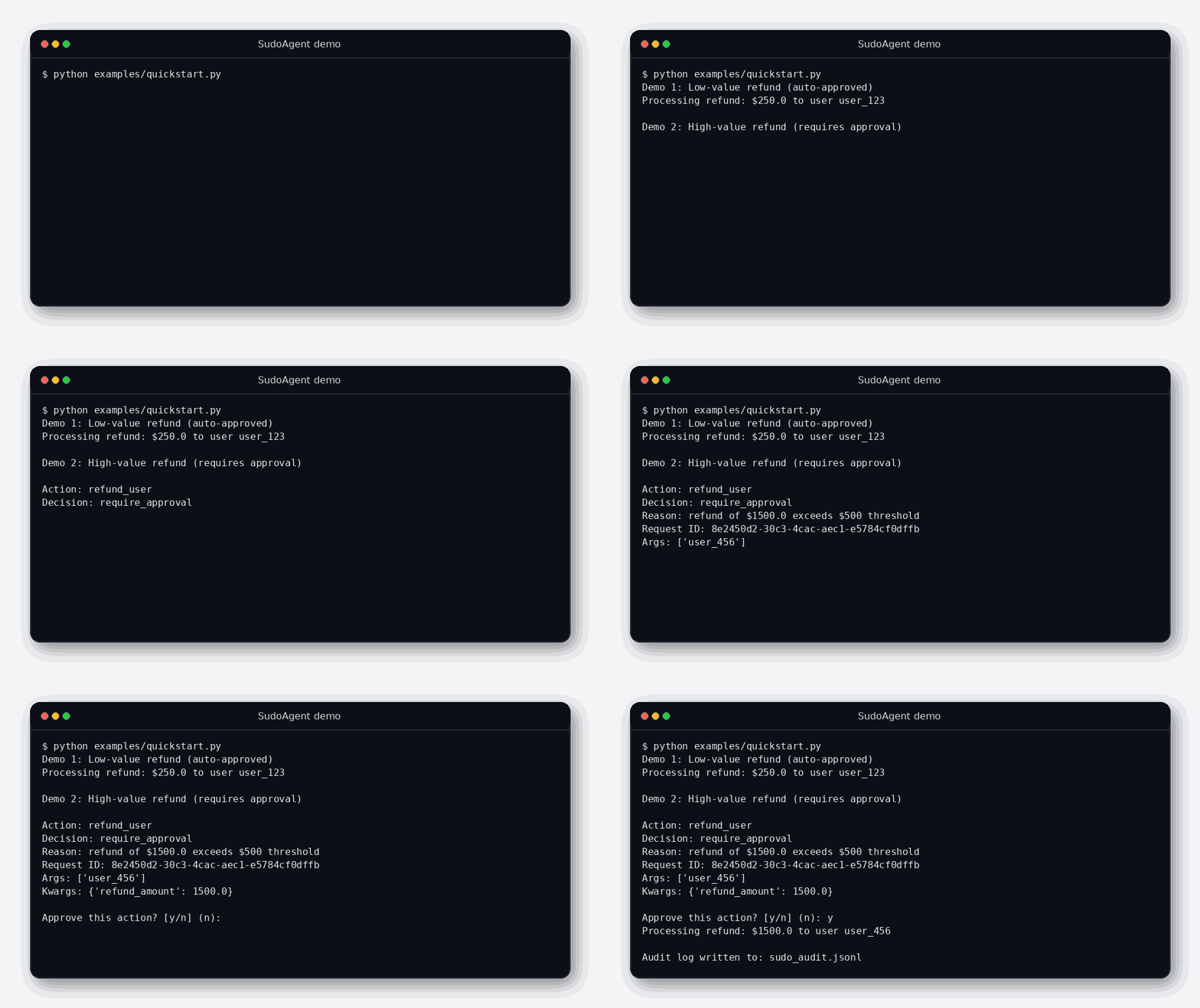
Run the demo:
python examples/quickstart.py
What happens:
- A low-value refund is allowed automatically.
- A high-value refund triggers an interactive approval prompt.
- Decisions/outcomes are written to
sudo_audit.jsonlandsudo_ledger.jsonl.
For a 5-minute walkthrough and production checklist, see docs/quickstart.md. OSS guide: docs/oss_guide.md. FAQ / gotchas: docs/faq.md.
Full workflow demo (approval + budgets + verify):
SUDOAGENT_AUTO_APPROVE=1 python examples/workflow_demo.py
sudoagent verify sudo_ledger.jsonl
v2 ledger demo (decision_hash + verification):
python examples/v2_demo.py
sudoagent verify sudo_ledger.jsonl
# Or JSON output
sudoagent verify sudo_ledger.jsonl --json
(The demo writes sudo_ledger.jsonl in the current directory; delete it between runs if you want a fresh ledger.)
CLI export/filter/search:
sudoagent export sudo_ledger.jsonl --format json
sudoagent filter sudo_ledger.jsonl --request-id <id>
sudoagent search sudo_ledger.jsonl --query refund_user
Signing and receipts:
pip install "sudoagent[crypto]"
sudoagent keygen --private-key keys/private.pem --public-key keys/public.pem
sudoagent verify sudo_ledger.jsonl --public-key keys/public.pem
sudoagent receipt sudo_ledger.jsonl --request-id <id>
To run non-interactively (CI/demo):
SUDOAGENT_AUTO_APPROVE=1 python examples/quickstart.py
On Windows PowerShell:
$env:SUDOAGENT_AUTO_APPROVE="1"; python examples/quickstart.py
Basic usage
from sudoagent import ApprovalDenied, Context, Decision, PolicyResult, SudoEngine

class HighValueRefundPolicy:
    def evaluate(self, ctx: Context) -> PolicyResult:
        refund_amount = ctx.kwargs.get("refund_amount", 0)
        if refund_amount <= 500:
            return PolicyResult(decision=Decision.ALLOW, reason="within limit")
        return PolicyResult(decision=Decision.REQUIRE_APPROVAL, reason="over limit")

policy = HighValueRefundPolicy()
sudo = SudoEngine(policy=policy)

@sudo.guard()
def refund_user(user_id: str, refund_amount: float) -> None:
    print(f"Refunding {refund_amount} to {user_id}")

refund_user("user_1", refund_amount=10.0)

try:
    refund_user("user_2", refund_amount=1500.0)
except ApprovalDenied as e:
    print(f"Denied: {e}")
Core concepts
- Context: captures the function call (action name, redacted args/kwargs, metadata).
- Policy: returns
ALLOW,DENY, orREQUIRE_APPROVALwith a reason. - Approver: handles the approval step. Default is
InteractiveApprover(terminal y/n). - AuditLogger: writes audit entries. Default is
JsonlAuditLogger. - Budgets: optional rate limits via
BudgetManager(passbudget_costtoexecute/guardfor spend accounting). - Fail-closed: if policy, approval, or decision logging fails, execution is blocked.
- decision_hash: SHA-256 over canonical decision payload (request_id, intent, parameters, actor, policy_hash).
- policy_id: stable policy identifier (class name by default).
- policy_hash: SHA-256 over canonicalized policy identifier (class name by default).
- Ledger schema: entries include
schema_version,ledger_version,agent_id,policy_id,policy_hash, and redacted args/kwargs metadata. - Ledger verification:
sudoagent verify <ledger_path>checks schema/ledger versions, hash chain, and decision_hash references.
Reason codes
Stable, searchable reason codes are emitted in decision metadata and ledger entries:
POLICY_ALLOW_LOW_RISKPOLICY_DENY_HIGH_RISKPOLICY_REQUIRE_APPROVAL_HIGH_VALUEPOLICY_EVALUATION_FAILEDBUDGET_EXCEEDED_AGENT_RATEBUDGET_EXCEEDED_TOOL_RATEBUDGET_EVALUATION_FAILEDAPPROVAL_DENIEDAPPROVAL_PROCESS_FAILEDLEDGER_WRITE_FAILED_DECISION
Security
- Threat model: see THREAT_MODEL.md.
- Security policy: see SECURITY.md.
- Rich markup in approval prompts is escaped to prevent terminal injection.
- Redaction is centralized and applied before policy evaluation, approval prompts, and ledger hashing.
- Audit logging redacts sensitive key names (
api_key,token,password, etc.) and values (JWT-like strings,sk-prefixes, PEM blocks). - Decision logging failures raise
AuditLogErrorand block execution. Outcome logging failures do not block. - Denied actions log the decision only. Approved actions log decision and outcome, linked by
request_id. - SudoAgent is not a sandbox; protect the host and secrets separately.
Example audit entries:
{"event":"decision","request_id":"...","action":"...","decision":"allow","reason":"within limit",...}
{"event":"outcome","request_id":"...","outcome":"success",...}
Limitations:
- This is not a sandbox. Side effects inside the guarded function are not prevented.
- The default audit log (
sudo_audit.jsonl) is not tamper-evident and is intended for single-process use. - The default JSONL ledger (
sudo_ledger.jsonl) is single-writer; for multi-process on one host, useSQLiteLedger.
Extending
SudoAgent is designed for dependency injection:
- Implement
Policy.evaluate(ctx) -> PolicyResult. - Implement
Approver.approve(ctx, result, request_id) -> bool(Slack/UI/etc.). - Implement
Ledgerfor custom evidence stores. - Implement
AuditLoggerfor operational logging sinks.
Notes:
- Policy is required at construction. Pass
AllowAllPolicy()explicitly for permissive mode. InteractiveApproveris intended for local development. For production, implement a custom approver.
Adapters:
- LangChain:
pip install "sudoagent[langchain]"+ docs/adapters.md - CrewAI:
pip install "sudoagent[crewai]" - AutoGen:
pip install "sudoagent[autogen]"
Roadmap
See ROADMAP.md for a short, best-effort plan.
Support policy
We support the latest minor release line. See SUPPORT.md for details.
Contributing
Small PRs are welcome. See CONTRIBUTING.md and CODE_OF_CONDUCT.md.
pytest -q
ruff check .
mypy src
License
MIT License. See LICENSE.
1 maintainer

Metadata
1 maintainer
Release files for sudoagent 2.0.0
For a detailed explanation of source distributions (sdists) and built distributions (wheels), please see the package formats documentation.
Source distribution (sdist)
| File | Size | Uploaded | Provenance | Actions |
|---|---|---|---|---|
| sudoagent-2.0.0.tar.gz | 272.9 kB | Without provenance | Details for sudoagent-2.0.0.tar.gz |
Built distribution (wheel)
| File | Interpreter | ABI | Platform | Actions Reset |
|---|---|---|---|---|
| sudoagent-2.0.0-py3-none-any.whl | Python 3 | none | any | Details for sudoagent-2.0.0-py3-none-any.whl |
Total release size: 306.7 kB
Release files / sudoagent-2.0.0.tar.gz
| Download URL | sudoagent-2.0.0.tar.gz |
|---|---|
| Size | 272.9 kB |
| Tags | Source |
|
SHA-256 checksum How to use checksums |
27fefc16f1a286b27dff8ad45ab4aa0b2adc2fe6ff4f8991ed437645dde967b2
|
|
BLAKE2b-256 checksum How to use checksums |
0553ecdcaf1b015781b4c6c4c005f32624b41c8d731c5e313966fdb28cd320f0
|
| Upload date | |
|
Uploaded using Trusted Publishing? What is trusted publishing? |
No |
| Uploaded via |
twine/6.2.0 CPython/3.12.8
|
Release files / sudoagent-2.0.0-py3-none-any.whl
| Download URL | sudoagent-2.0.0-py3-none-any.whl |
|---|---|
| Size | 33.8 kB |
| Tags | Python 3 |
|
SHA-256 checksum How to use checksums |
6346e6f488c7a994a55ce3a5fb9a0f25a058fe2c3839955a4bf42ec4f09743d0
|
|
BLAKE2b-256 checksum How to use checksums |
82ed276048fb2b197cbfeab8d8e488787760a78706627e47addd02026312835f
|
| Upload date | |
|
Uploaded using Trusted Publishing? What is trusted publishing? |
No |
| Uploaded via |
twine/6.2.0 CPython/3.12.8
|
Security for sudoagent 2.0.0
Provenance
Provenance describes where a file came from. On PyPI, provenance is shared via attestations, which provide a verifiable record of the build or publishing details. View details, limitations and caveats.
No provenance found
None of the files in this release were uploaded with provenance metadata.
A note on package security
PyPI is a repository for distributing packages, not a service for auditing them. While third-party security researchers and our staff do their best to detect and remove malicious packages, PyPI cannot guarantee the quality, security or suitability of any given package.
To learn more about protecting yourself from malicious actors, visit our package security documentation.














