
This program first converts a screenshot of a sudoku grid into plain text. Afterwards, it will solve the sudoku puzzle, display the result and save the solution as a .csv file.

Project description
sudoku-solver
A python program that takes in an image of a sudoku puzzle and outputs its answer.
Installation
This library uses tesseract-ocr for OCR.
Installation of python library and tesseract
Note: this installation mainly focuses on UNIX based systems. I have absolutely no idea how this setup would go on Windows machines.
First download the package.
pip install sudoku-solver-ocr
On UNIX systems, we need to install tesseract through the package manager on your system.
On debian based systems:
sudo apt-get install tesseract-ocr
On Arch based systems:
sudo pacman -Sy tesseract
Verify that it's installed:
tesseract --version
Configuring tessdata
Find tessdata directory using fzf (can be installed using apt install fzf etc...)
find / -name tessdata |fzf
You may get a result like this:
/usr/share/tessdata
or generally:
/path/to/tessdata
Setup the environmental variable called TESSDATA_PREFIX in ~/.bashrc
echo "export TESSDATA_PREFIX=/path/to/tessdata" >> ~/.bashrc
Source the ~/.bashrc file
source ~/.bashrc
Verify by recalling the environmental variable.
echo $TESSDATA_PREFIX
Should result in something like this:
/path/to/tessdata
in my case:
/usr/share/tessdata
Change directory to $TESSDATA_PREFIX
cd $TESSDATA_PREFIX
Check that eng.traineddata is in the directory using the ls command.
If it isn't in the directory, download the file from here and move it to the $TESSDATA_PREFIX directory.
Using it as a CLI program
Note: The computer vision algorithm used to detect and process the sudoku grid isn't very sophisticated. In short, this is the algorithm:
- load the image
- crop the image by detecting external borders (no perspective transform)
- split the cells by detecting contours of the cell in the grid (very error prone)
- feed the cells one by one into an
tesseract-ocr(very slow)
As such, it's best not to use it on sudoku puzzles images taken through a camera. From testing, these sudoku sites work best with the program (from best to worst):
And from testing, it seems like it's best if the image's resolution is not too high while not being too low either.
First take a screenshot of a sudoku board from an online website as such:
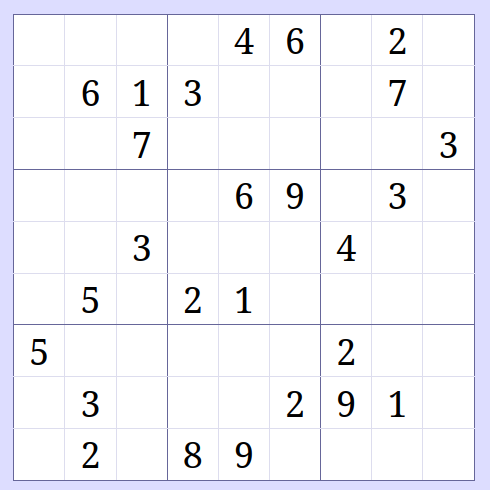
Now run the following command:
python3 -m sudoku_solver_ocr ./path/to/image /path/to/tesseract
./path/to/imageis path to the image from your current working directory./path/to/tesseractis the path to the tesseract program itself. It can be checked by runningwhich tesseract
I've stored it in web_sudoku.png in my current working directory and my path to tesseract is at /sbin/tesseract.
Therefore, I'll run:
python3 -m sudoku_solver_ocr ./web_sudoku.png /sbin/tesseract
If no error arises, a sudoku board should appear in your screen.
Loading image...
Cropping image...
Splitting image...
Using OCR...
  0   1   2   3   4   5   6   7   8
╔═══╤═══╤═══╦═══╤═══╤═══╦═══╤═══╤═══╗
║   ┃   ┃   ║   ┃ 4 ┃ 6 ║   ┃ 2 ┃   ║0
╟━━━┿━━━┿━━━╫━━━┿━━━┿━━━╫━━━┿━━━┿━━━╢
║   ┃ 6 ┃ 1 ║ 3 ┃   ┃   ║   ┃ 7 ┃   ║1
╟━━━┿━━━┿━━━╫━━━┿━━━┿━━━╫━━━┿━━━┿━━━╢
║   ┃   ┃ 7 ║   ┃   ┃   ║   ┃   ┃ 3 ║2
╠═══╪═══╪═══╫═══╪═══╪═══╫═══╪═══╪═══╣
║   ┃   ┃   ║   ┃ 6 ┃ 9 ║   ┃ 3 ┃   ║3
╟━━━┿━━━┿━━━╫━━━┿━━━┿━━━╫━━━┿━━━┿━━━╢
║   ┃   ┃ 3 ║   ┃   ┃   ║ 4 ┃   ┃   ║4
╟━━━┿━━━┿━━━╫━━━┿━━━┿━━━╫━━━┿━━━┿━━━╢
║   ┃ 5 ┃   ║ 2 ┃ 1 ┃   ║   ┃   ┃   ║5
╠═══╪═══╪═══╫═══╪═══╪═══╫═══╪═══╪═══╣
║ 5 ┃   ┃   ║   ┃   ┃   ║ 2 ┃   ┃   ║6
╟━━━┿━━━┿━━━╫━━━┿━━━┿━━━╫━━━┿━━━┿━━━╢
║   ┃ 3 ┃   ║   ┃   ┃ 2 ║ 9 ┃ 1 ┃   ║7
╟━━━┿━━━┿━━━╫━━━┿━━━┿━━━╫━━━┿━━━┿━━━╢
║   ┃ 2 ┃   ║ 8 ┃ 9 ┃   ║   ┃   ┃   ║8
╚═══╧═══╧═══╩═══╧═══╧═══╩═══╧═══╧═══╝

Please recheck your sudoku board:
- help
- ok
- replace <x> <y> <n>
input a command:
As suggested, if the board is incorrect, this interface allows us to replace a particular cell given an x, a y and a number to insert n.
The command list is of follows:
helpsimply prints some information about sudokureplace <x> <y> <n>places a numbernwhich can be from0to9(0to place an empty cell) at coordinates (x,y).okcommand breaks out of the loop and feeds the following board into a sudoku solver.
Once ok is entered, we can either solve it while visualizing it or simply solve it and print the solution (animating it intentionally slows the algorithm down).
✅ Final board accepted.
Animate?(y/n)
I'll simply type n.
If all goes well, we should be greeted with a solved sudoku board.
  0   1   2   3   4   5   6   7   8
╔═══╤═══╤═══╦═══╤═══╤═══╦═══╤═══╤═══╗
║ 3 ┃ 8 ┃ 5 ║ 7 ┃ 4 ┃ 6 ║ 1 ┃ 2 ┃ 9 ║0
╟━━━┿━━━┿━━━╫━━━┿━━━┿━━━╫━━━┿━━━┿━━━╢
║ 9 ┃ 6 ┃ 1 ║ 3 ┃ 2 ┃ 5 ║ 8 ┃ 7 ┃ 4 ║1
╟━━━┿━━━┿━━━╫━━━┿━━━┿━━━╫━━━┿━━━┿━━━╢
║ 2 ┃ 4 ┃ 7 ║ 9 ┃ 8 ┃ 1 ║ 6 ┃ 5 ┃ 3 ║2
╠═══╪═══╪═══╫═══╪═══╪═══╫═══╪═══╪═══╣
║ 8 ┃ 7 ┃ 2 ║ 4 ┃ 6 ┃ 9 ║ 5 ┃ 3 ┃ 1 ║3
╟━━━┿━━━┿━━━╫━━━┿━━━┿━━━╫━━━┿━━━┿━━━╢
║ 6 ┃ 1 ┃ 3 ║ 5 ┃ 7 ┃ 8 ║ 4 ┃ 9 ┃ 2 ║4
╟━━━┿━━━┿━━━╫━━━┿━━━┿━━━╫━━━┿━━━┿━━━╢
║ 4 ┃ 5 ┃ 9 ║ 2 ┃ 1 ┃ 3 ║ 7 ┃ 8 ┃ 6 ║5
╠═══╪═══╪═══╫═══╪═══╪═══╫═══╪═══╪═══╣
║ 5 ┃ 9 ┃ 8 ║ 1 ┃ 3 ┃ 4 ║ 2 ┃ 6 ┃ 7 ║6
╟━━━┿━━━┿━━━╫━━━┿━━━┿━━━╫━━━┿━━━┿━━━╢
║ 7 ┃ 3 ┃ 4 ║ 6 ┃ 5 ┃ 2 ║ 9 ┃ 1 ┃ 8 ║7
╟━━━┿━━━┿━━━╫━━━┿━━━┿━━━╫━━━┿━━━┿━━━╢
║ 1 ┃ 2 ┃ 6 ║ 8 ┃ 9 ┃ 7 ║ 3 ┃ 4 ┃ 5 ║8
╚═══╧═══╧═══╩═══╧═══╧═══╩═══╧═══╧═══╝

Save solution as CSV file?(y/n)
We can save the solution as a .csv file. For instance, if I want to save it in sudoku_solution.csv:
Save solution as CSV file?(y/n) y
Specify path (solution 1/1): sudoku_solution.csv
Now we can check that the solution is saved in sudoku_solution.csv.
CSV data as plain text:
3,8,5,7,4,6,1,2,9
9,6,1,3,2,5,8,7,4
2,4,7,9,8,1,6,5,3
8,7,2,4,6,9,5,3,1
6,1,3,5,7,8,4,9,2
4,5,9,2,1,3,7,8,6
5,9,8,1,3,4,2,6,7
7,3,4,6,5,2,9,1,8
1,2,6,8,9,7,3,4,5
Using it as a library
Once it's installed, simply import the library:
import sudoku_solver_ocr as sso
This is an overview of all the functions, more details can be extracted by reading the source code (as it's not very long).
A sudoku grid is represented a 2d list of integers which has dimensions 9x9.
Note: these functions all lie under sudoku_solver_ocr when importing. I've divded it only because the functions lie in 3 different files.
sudoku_utils.py
This file provides useful utility functions used throughout the program.
| function | details |
|---|---|
read_sudoku_csv |
opens a sudoku grid in a .csv file and outputs 2d list representation of the grid |
write_sudoku_csv |
writes a 2d list representation of a sudoku puzzle to .csv file |
print_board |
prints the 2d list representation of the sudoku puzzle to stdout in a nice sudoku board format |
show_help |
simply prints basic info about sudoku to stdout |
color_text |
wraps a string with ANSI code to make that string a certain color |
double_check |
runs a interactive user interface to edit the given sudoku board |
format_grid |
prepares the 2d list of int to a 2d list of str to print it nicely to stdout (replacing all 0 with ' ', apply coloring, etc) |
get_non_empty_coord |
returns a set of the non empty (non 0) coordinates as a tuple representing coordinates (y, x) |
This file also contains a dictionary called ANSI_CODE which maps a color to an ANSI code. This is useful for coloring strings.
sudoku_ocr.py
This file provides tools used to convert sudoku images to plain text.
| function | details |
|---|---|
load_and_prepare_image |
loads the sudoku image, grayscale the image and also binarize it |
crop_image |
simply detects an external border of the sudoku grid and crops it. Splits out the cropped image |
split_grid |
splits the sudoku grid image to 81 images representing cells that either contain a number or nothing. This is all then stored in a 2d list. |
image_to_num_grid |
does OCR on the output of split_grid which is a 2d list of images. The path to the tesseract is also an argument here |
sudoku_solver.py
This file provides all the functions used to solve a sudoku puzzle.
| function | details |
|---|---|
is_possible |
checks whether a number n can be placed at a particular cell of coordinates (x, y) |
solve_sudoku |
collects the solution of a sudoku puzzle in a list (in case the sudoku puzzle isn't well designed or you've messed up with editting the cells) |
solve_sudoku_single_solution |
is faster than solve_sudoku but assume that there's only one solution |
solve_sudoku_animated |
solve the sudoku puzzle while also printing the state of the sudoku board to stdout while solving |
Release history Release notifications | RSS feed


Download files
Download the file for your platform. If you're not sure which to choose, learn more about installing packages.
Source Distribution
Built Distribution
Filter files by name, interpreter, ABI, and platform.
If you're not sure about the file name format, learn more about wheel file names.
Copy a direct link to the current filters
File details
Details for the file sudoku_solver_ocr-0.4.tar.gz.
File metadata
- Download URL: sudoku_solver_ocr-0.4.tar.gz
- Upload date:
- Size: 15.4 kB
- Tags: Source
- Uploaded using Trusted Publishing? No
- Uploaded via: twine/6.1.0 CPython/3.13.5
File hashes
| Algorithm | Hash digest | |
|---|---|---|
| SHA256 |
d4db56192581e67fe90c225dead4f6eddcf7ed99aa38da5069924fc36a5258be
|
|
| MD5 |
9e70eb8e1fae472e7dedeedf77c42f5d
|
|
| BLAKE2b-256 |
3972fabc78b087a9db5e03bd22211d936a5b279cac146665da1353fe9cc8b2af
|
File details
Details for the file sudoku_solver_ocr-0.4-py3-none-any.whl.
File metadata
- Download URL: sudoku_solver_ocr-0.4-py3-none-any.whl
- Upload date:
- Size: 13.8 kB
- Tags: Python 3
- Uploaded using Trusted Publishing? No
- Uploaded via: twine/6.1.0 CPython/3.13.5
File hashes
| Algorithm | Hash digest | |
|---|---|---|
| SHA256 |
ca1582853dbfb49c7a22b4a79e57ccec08a1d52e68037780076e5ef027c42a51
|
|
| MD5 |
05439a0731dbb5c3425ac1062f27899d
|
|
| BLAKE2b-256 |
a8a2d0aa4468113fb23a0daa316946e9e8ab68a902326dd0a8a3eef1c121cae1
|






