
Sudoku Wizard 💻🪄
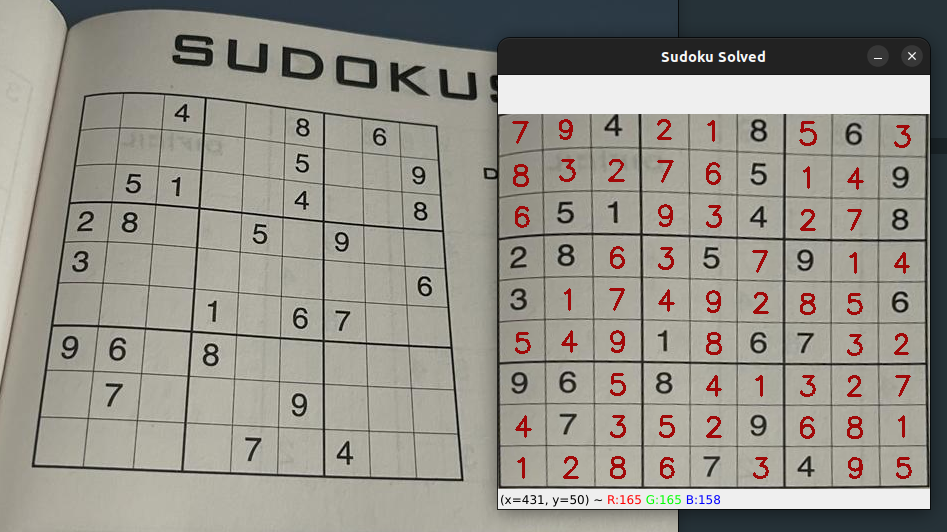
Sudoku Wizard is a Python project that digitizes and solves Sudoku puzzles from images using advanced image processing techniques and OCR (Optical Character Recognition).
Features
- Image Processing: Detects and extracts Sudoku grids from images.
- OCR and Template Matching: Recognizes digits within the Sudoku grid using either OCR or template matching.
- Sudoku Solving: Solves the extracted Sudoku puzzle using a DFS algorithm.
- Visualization: Overlays the solution onto the original image.
Installation
To install Sudoku Wizard, follow these steps:
Prerequisites
- Python 3.8 or later
- Git
Clone the Repository
git clone https://github.com/yourusername/SudokuWizard.git
cd SudokuWizard
Using requirements.txt
To install the dependencies using pip, run:
pip install -r requirements.txt
Using environment.yml
To create a conda environment and install the dependencies, run:
conda env create -f environment.yml
conda activate sudoku-wizard
Usage
Here's a quick example of how to use Sudoku Wizard:
import cv2 as cv
from sudoku_wizard import SudokuWizard

# Create a SudokuWizard instance
sw = SudokuWizard()

# Load your sudoku image (works with .jpg, .jpeg, .png and .webp; support for other extensions is unknown)
sw.load_image('image.jpg')

# Run the Sudoku digitalization and resolution process
sw.run()
Project Structure
sudoku_wizard.py: Main implementation of the Sudoku Wizard class.sudoku_algorithms.py: Contains various algorithms for solving Sudoku puzzles.exceptions.py: Custom exceptions for error handling.res/photos/: Contains template images for number recognition.requirements.txt: Python dependencies.environment.yml: Conda environment configuration.
Contributing
Contributions are welcome! Please open an issue or submit a pull request on GitHub.
License
This project is licensed under the MIT License.
Feel free to reach out if you have any questions or need further assistance!
Enjoy solving Sudoku puzzles with Sudoku Wizard! 🧩✨
1 maintainer

Release files for sudokuwizard 0.0.1
For a detailed explanation of source distributions (sdists) and built distributions (wheels), please see the package formats documentation.
Source distribution (sdist)
| File | Size | Uploaded | |
|---|---|---|---|
| sudokuwizard-0.0.1.tar.gz | 67.7 kB | Details |
Built distribution (wheel)
| File | Interpreter | ABI | Platform | Reset |
|---|---|---|---|---|
| sudokuwizard-0.0.1-py3-none-any.whl | Python 3 | none | any | Details |
Total release size: 149.9 kB
Release files / sudokuwizard-0.0.1.tar.gz
| Download URL | sudokuwizard-0.0.1.tar.gz |
|---|---|
| Size | 67.7 kB |
| Tags | Source |
|
SHA-256 checksum How to use checksums |
e3552193125d236834065539bdfe99b9d93fce643ddf1f427afa247c1426e27e
|
|
BLAKE2b-256 checksum How to use checksums |
7edaf41c2d36252387bca7bbc168ecafe4bdff099c29bb2836e881da2ff3ee83
|
| Upload date | |
|
Uploaded using Trusted Publishing? What is trusted publishing? |
No |
| Uploaded via |
twine/5.1.0 CPython/3.11.5
|
Release files / sudokuwizard-0.0.1-py3-none-any.whl
| Download URL | sudokuwizard-0.0.1-py3-none-any.whl |
|---|---|
| Size | 82.2 kB |
| Tags | Python 3 |
|
SHA-256 checksum How to use checksums |
75c9d2541937db7ae757b7570143d26c9fb7dc78542971d830c39a0426d81197
|
|
BLAKE2b-256 checksum How to use checksums |
efe155deff13a8d9228bc1f39b61c30a65b877df51f845f555464e37bdfc298e
|
| Upload date | |
|
Uploaded using Trusted Publishing? What is trusted publishing? |
No |
| Uploaded via |
twine/5.1.0 CPython/3.11.5
|













