
suite-gate



suite-gate connects six command-line audit tools: git-surface, trust-path, release-drift, git-overlap, pr-merge-audit and glassbox. It has three parts:
- One result format. Each tool, run with
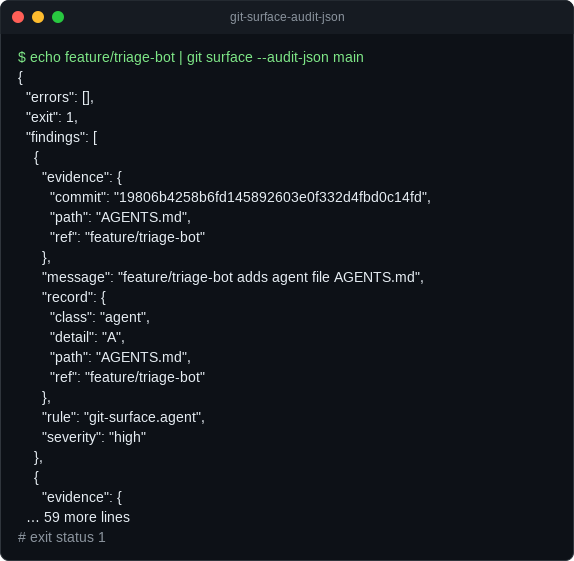
--audit-json, prints the same JSON object: every finding with a rule id, a severity, one sentence and the evidence to check it (file, line, ref, commit). - A gate.
suite-gate gate BASE REFruns the tools that apply to what a branch changes and gives one verdict,pass,warn,failorerror, from a versioned rules file. - An MCP server.
suite-gate mcplets a coding agent run the installed tools and read their results, so it can check its own branch before asking for review.
Branches written by coding agents arrive faster than a person can read them. The checks that matter (does it change CI, an install script, a dependency, a workflow's trust boundary, another branch's files?) are spread over six tools with six output formats. suite-gate makes them one check with one answer, and keeps every finding that led to it.
It decides nothing on its own. The verdict follows fixed rules in a file you can read and version, no model takes part, and each finding is the tool's own, unchanged.
Example output
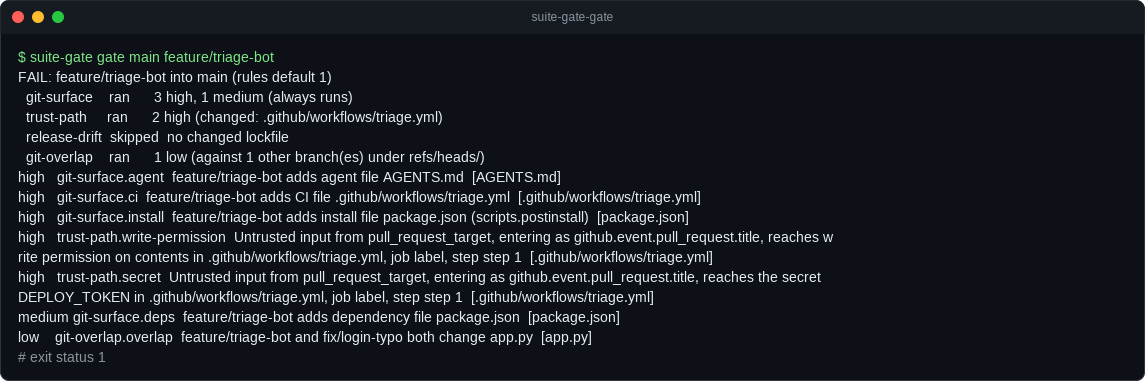
The gate on a demo branch that adds a pull-request workflow, an agent instruction file and an npm install script, and edits a file another branch also edits:
One tool's result in the shared format (git surface --audit-json, first lines):
Requirements
-
Python 3.9 or later, standard library only.
-
git 2.38 or later, as an executable named
gitonPATH, for the gate. -
The audit tools to run, at a version that has
--audit-json:Tool Minimum Install git-surface 0.4.0 pip install git-surfacetrust-path 0.8.1 pip install trust-pathrelease-drift 0.7.0 pip install release-driftgit-overlap 0.7.0 pip install git-overlappr-merge-audit 2.3.0 pip install pr-merge-auditglassbox 0.6.0 brew install jacob-adm/tap/glassbox, or a releaseThe gate uses the first four. The MCP server offers each tool that is installed.
Install
From PyPI:
pip install suite-gate
From a clone:
git clone https://github.com/jacob-adm/suite-gate
cd suite-gate
pip install .
Either way pip installs suite-gate as a console script. Check the install:
suite-gate --version
suite-gate 0.2.0
Without installing, it also runs from a clone as python3 -m suite_gate.
How it works
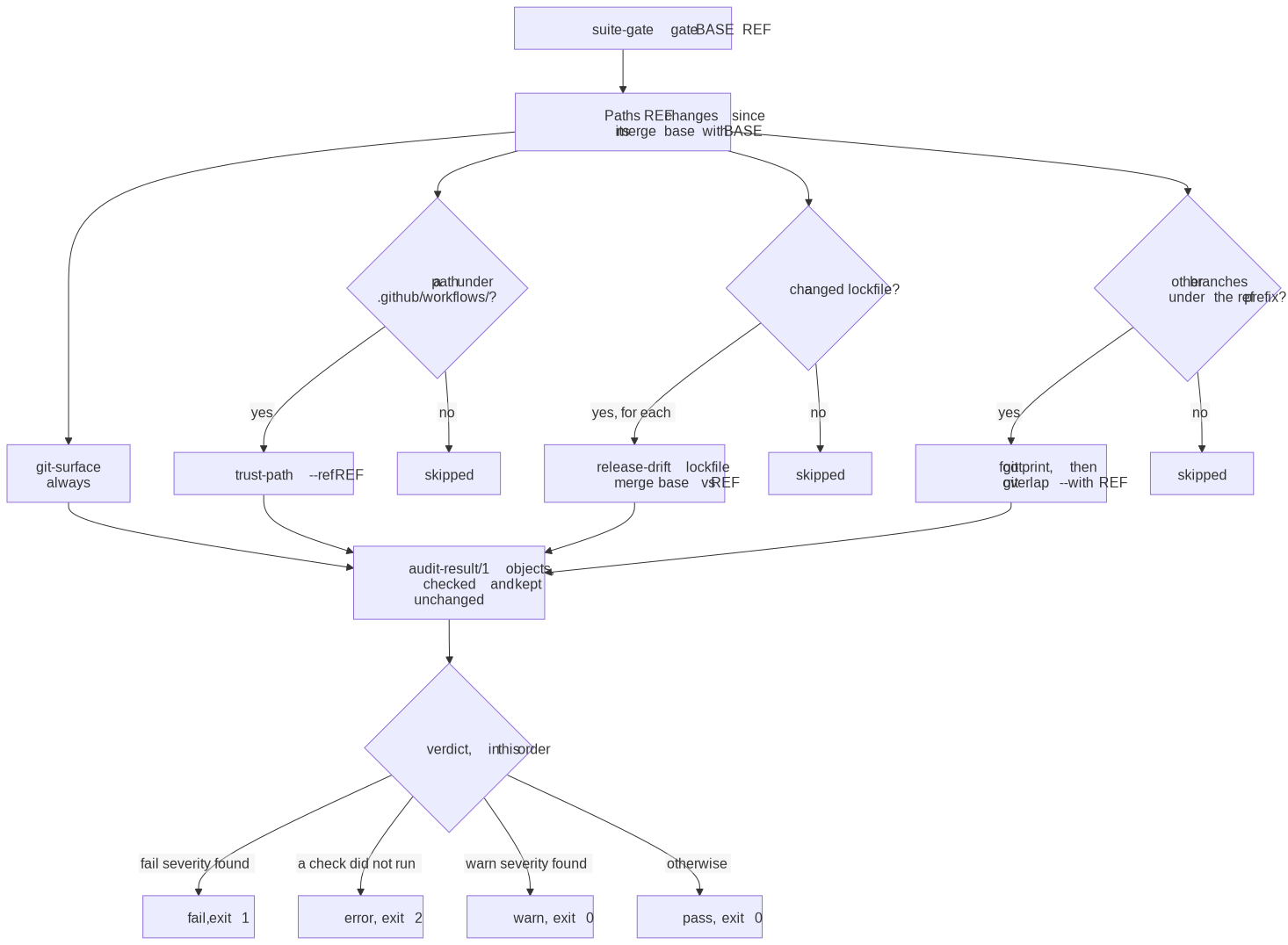
- Find what the branch changes. The gate takes the merge base of BASE and REF and lists the paths REF changes since then, as a pull request's "files changed" does.
- Pick the checks. The rules file names each check and when it runs: git-surface always, trust-path when a workflow changed, release-drift for each changed lockfile, git-overlap against the other branches. A check that does not apply is listed as skipped, with the reason.
- Run each tool with
--audit-json. Every result is checked against the format before it is used: a tool that is missing, too old, or prints an invalid object is an error, never a pass. - Decide.
failif a finding has a severity the rules fail on (highby default); elseerrorif a check could not run; elsewarnif a finding has a warn severity (medium,low); elsepass. The exit status is 1 forfail, 2 forerrorand 0 otherwise. - Report. One line per check, then each finding with its path and line. With
--json, one object with the rules' name, version and SHA-256, the commits, and every tool's result, unchanged.
Commands
suite-gate gate [--repo DIR] [--rules FILE] [--json] BASE REF   one verdict for REF against BASE
suite-gate mcp [--timeout SECONDS]                              serve the audit tools to an MCP client
suite-gate session save|check|run [--repo DIR]... [-- COMMAND]  what an agent session left that runs later
suite-gate validate [FILE]                                      check an audit result object
See Gate for every option, the rules file and the JSON result, and MCP server for the tools an agent gets.
Quick start
Install the tools the gate runs, then run it inside the repository on the branch to check.
Replace main with the base branch:
pip install git-surface trust-path release-drift git-overlap
suite-gate gate main ci
For a branch named ci whose only change is to a CI workflow:
FAIL: ci into main (rules default 1)
  git-surface    ran      1 high (always runs)
  trust-path     ran      nothing found (changed: .github/workflows/ci.yml)
  release-drift  skipped  no changed lockfile
  git-overlap    ran      nothing found (against 5 other branch(es) under refs/heads/)
high   git-surface.ci  ci modifies CI file .github/workflows/ci.yml  [.github/workflows/ci.yml]
git-surface reports the workflow change as high, so the verdict is fail and the exit status
is 1. trust-path ran because a workflow changed and found no path from untrusted input. No
lockfile changed, so release-drift was skipped.
To run the gate on every pull request, use the GitHub Action. To give a coding agent the tools, register the MCP server. For Claude Code:
claude mcp add suite-gate -- suite-gate mcp
Documentation
- For coding agents: how an agent runs suite-gate, reads
--audit-jsonand cites the evidence. - Gate: the command, the rules file, the verdict and the JSON result.
- MCP server: setting it up, the tools, and how results and errors are returned.
- GitHub Action: the gate on every pull request, with findings annotated on their lines.
- Session check: a glassbox snapshot before an agent session and a report after it, by hand, around one command, or as Claude Code hooks.
- Result format: the object each tool prints with
--audit-json, its exit status rules, and the JSON Schema with examples that pass and fail. - Screenshots: each tool's real output on a demo repository, with and without
--audit-json. - Contributing: running the tests and contributing a change.
- Reporting a vulnerability
License
Apache License 2.0; see LICENSE.
1 maintainer

Metadata
1 maintainer
Release files for suite-gate 0.2.0
For a detailed explanation of source distributions (sdists) and built distributions (wheels), please see the package formats documentation.
Source distribution (sdist)
| File | Size | Uploaded | Provenance | Actions |
|---|---|---|---|---|
| suite_gate-0.2.0.tar.gz | 247.8 kB | With provenance | Details for suite_gate-0.2.0.tar.gz |
Built distribution (wheel)
| File | Interpreter | ABI | Platform | Actions Reset |
|---|---|---|---|---|
| suite_gate-0.2.0-py3-none-any.whl | Python 3 | none | any | Details for suite_gate-0.2.0-py3-none-any.whl |
Total release size: 277.8 kB
Release files / suite_gate-0.2.0.tar.gz
| Download URL | suite_gate-0.2.0.tar.gz |
|---|---|
| Size | 247.8 kB |
| Tags | Source |
|
SHA-256 checksum How to use checksums |
c234bfa489c06ed2232413ac7b655ba18f5848e52a145007eaed7a4664be65b8
|
|
BLAKE2b-256 checksum How to use checksums |
34fe075a8b42e039c7bed33451ea230150355175ac2d47691526f66f5d0f4e6d
|
| Upload date | |
|
Uploaded using Trusted Publishing? What is trusted publishing? |
Yes |
| Uploaded via |
twine/7.0.0 CPython/3.13.16
|
Provenance
Provenance describes where a file came from. On PyPI, provenance is shared via attestations, which provide a verifiable record of the build or publishing details. View details, limitations and caveats.


PyPI Publish Attestation
PyPI verified that this artifact, at this checksum, originated from the publisher listed below.
Signed by GitHub Actions, verified by PyPI on Nov 28, 2026.
Transparency logRelease files / suite_gate-0.2.0-py3-none-any.whl
| Download URL | suite_gate-0.2.0-py3-none-any.whl |
|---|---|
| Size | 30.0 kB |
| Tags | Python 3 |
|
SHA-256 checksum How to use checksums |
f6e8a77cda714e5bf97cd99be3f3025057e43d07162e9b57ca4de23ff1c6d186
|
|
BLAKE2b-256 checksum How to use checksums |
52d7e23fd1268b1dd67ec5bbf614a47a118152ceff87741a83632345b050ee62
|
| Upload date | |
|
Uploaded using Trusted Publishing? What is trusted publishing? |
Yes |
| Uploaded via |
twine/7.0.0 CPython/3.13.16
|
Provenance
Provenance describes where a file came from. On PyPI, provenance is shared via attestations, which provide a verifiable record of the build or publishing details. View details, limitations and caveats.
PyPI Publish Attestation
PyPI verified that this artifact, at this checksum, originated from the publisher listed below.
Signed by GitHub Actions, verified by PyPI on Nov 28, 2026.
Transparency logSecurity for suite-gate 0.2.0
Provenance
Provenance describes where a file came from. On PyPI, provenance is shared via attestations, which provide a verifiable record of the build or publishing details. View details, limitations and caveats.
Full provenance
Both files in this release have been uploaded with provenance metadata.
Attestation for suite_gate-0.2.0.tar.gz
PyPI Publish Attestation
PyPI verified that this artifact, at this checksum, originated from the publisher listed below.
Signed by GitHub Actions, verified by PyPI on Nov 28, 2026.
Transparency logA note on package security
PyPI is a repository for distributing packages, not a service for auditing them. While third-party security researchers and our staff do their best to detect and remove malicious packages, PyPI cannot guarantee the quality, security or suitability of any given package.
To learn more about protecting yourself from malicious actors, visit our package security documentation.














