
suk
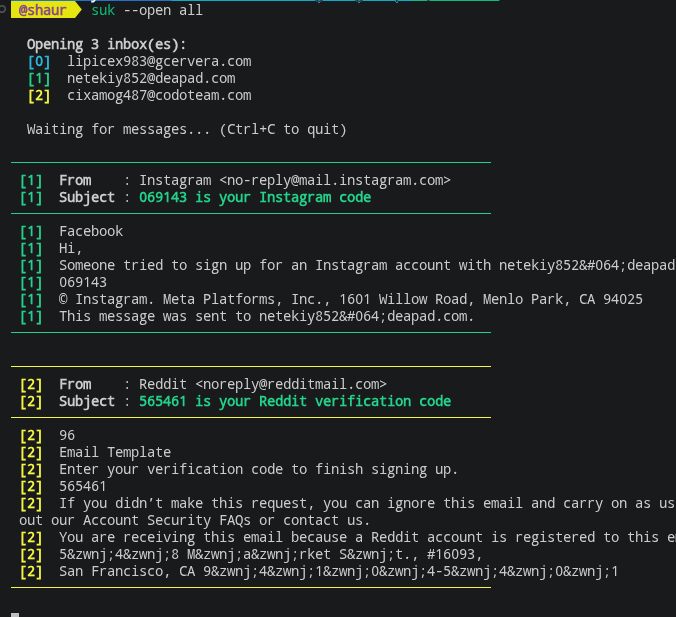
Upto 4 live disposable inboxes in your terminal, persistent across sessions — zero browser, zero clicks.
Use multiple sessions for account take over chains, invite abuse, OTP rate limiting and anything that needs multiple live identities at once
Install
pip install suk
Usage
suk                      # open saved inbox (creates one on first run)
suk --new                # burn current address, get a fresh one
suk --sessions <n>       # spin up n inboxes (1–4) and listen on all simultaneously
suk --list               # list all saved sessions
suk --open <n>           # reopen saved session by slot number
suk --open <a> <b> ...   # open multiple slots simultaneously
suk --open all           # reopen every saved session at once
Emails print to terminal in real time. Sessions persist in ~/.suk_sessions.json — close and reopen any inbox anytime with --open.
License
MIT
1 maintainer

Metadata
1 maintainer
Release files for suk 3.0.0
For a detailed explanation of source distributions (sdists) and built distributions (wheels), please see the package formats documentation.
Source distribution (sdist)
| File | Size | Uploaded | |
|---|---|---|---|
| suk-3.0.0.tar.gz | 11.7 kB | Details |
Built distribution (wheel)
| File | Interpreter | ABI | Platform | Reset |
|---|---|---|---|---|
| suk-3.0.0-py3-none-any.whl | Python 3 | none | any | Details |
Total release size: 24.1 kB
Release files / suk-3.0.0.tar.gz
| Download URL | suk-3.0.0.tar.gz |
|---|---|
| Size | 11.7 kB |
| Tags | Source |
|
SHA-256 checksum How to use checksums |
a242a1e7a10442231cc1e6f332ff24972c67f31d1785ceff7f21976b58665a5d
|
|
BLAKE2b-256 checksum How to use checksums |
c41fae4b7299242a1554f0949228c0c7941045fd94d7c3bfdda1937c017c7ae9
|
| Upload date | |
|
Uploaded using Trusted Publishing? What is trusted publishing? |
No |
| Uploaded via |
twine/6.2.0 CPython/3.14.5
|
Release files / suk-3.0.0-py3-none-any.whl
| Download URL | suk-3.0.0-py3-none-any.whl |
|---|---|
| Size | 12.4 kB |
| Tags | Python 3 |
|
SHA-256 checksum How to use checksums |
16f31ffb0833ebd117099160611dffc49dcf56b95a976e3152d123cbfc35f17a
|
|
BLAKE2b-256 checksum How to use checksums |
ebc32a51ab4ba5e00a90df00228c4723ff2fdddd757b3a0b098c0c200130ac2d
|
| Upload date | |
|
Uploaded using Trusted Publishing? What is trusted publishing? |
No |
| Uploaded via |
twine/6.2.0 CPython/3.14.5
|














