
Sulguk - HTML to telegram entities converter



Need to deliver formatted content to your bot clients? Having a hangover after trying to fit HTML into telegram? Beautifulsoup is too complicated and not helping with messages?
Try sulguk (술국, a hangover
soup) - delivered since 1800s.
Problem
Telegram supports parse_mode="html", but:
- Telegram processes spaces and new lines incorrectly. So we cannot format HTML source for more readability.
- Amount of supported tags is very low
- It does not ignore additional attributes in supported tags.
Let's imagine we have HTML like this:
<b>This is a demo of <a href="https://github.com/tishka17/sulguk">Sulguk</a></b>

  <u>Underlined</u>
  <i>Italic</i>
  <b>Bold</b>
This is how it is rendered in browser (expected behavior):

But this is how it is rendered in Telegram with parse_mode="html":
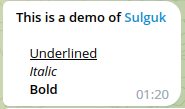
To solve this we can convert HTML to telegram entities with sulguk. So that's how it looks now:

Example
- Create your nice HTML:
<ol start="10">
    <li>some item</li>
    <li>other item</li>
</ol>
<p>Some <b>text</b> in a paragraph</p>
- Convert it into text and entities
result = transform_html(raw_html)
- Send it to telegram.
Depending on your library you may need to convert entities from dict into proper type
await bot.send_message(
    chat_id=CHAT_ID,
    text=result.text,
    entities=result.entities,
)
Example for aiogram users
- Add
SulgukMiddlewareto your bot
from sulguk import AiogramSulgukMiddleware

bot.session.middleware(AiogramSulgukMiddleware())
- Create your nice HTML:
<ol start="10">
    <li>some item</li>
    <li>other item</li>
</ol>
<p>Some <b>text</b> in a paragraph</p>
- Send it using
sulgukas aparse_mode:
from sulguk import SULGUK_PARSE_MODE

await bot.send_message(
    chat_id=CHAT_ID,
    text=raw_html,
    parse_mode=SULGUK_PARSE_MODE,
)
Supported tags:
For all supported tags unknown attributes are ignored as well as unknown classes. Unsupported tags are raising an error.
Standard telegram tags (with some changes):
<a>- a hyperlink withhrefattribute<b>,<strong>- a bold text<i>,<em>- an italic text<s>,<strike>,<del>- a strikethrough text<u>,<ins>- an underlined text<span>- an inline element with optional attributeclass="tg-spoiler"to make a spoiler<tg-spoiler>- a telegram spoiler<pre>with optionalclass="language-<name>"- a preformatted block with code.<name>will be sent as a language attribute in telegram.<code>- an inline preformatted element.<details>- rendered as an expandable blockquote<summary>- treated as a paragraph, typically used as first child of<details>for the heading
Note: In standard Telegram HTML you can set a preformatted text language nesting <code class="language-<name>"> in <pre> tag. This works when it is an only child. But any additional symbol outside of <code> breaks it.
The same behavior is supported in sulguk. Otherwise, you can set the language on <pre> tag itself.
Additional tags:
<br/>- new line<hr/>- horizontal line<wbr/>- word break opportunity<ul>- unordered list<ol>- ordered list with optional attributesreversed- to reverse numbers ordertype(1/a/A/i/I) - to set numbering stylestart- to set starting number
<li>- list item, with optionalvalueattribute to change number. Nested lists have indentation<div>- a block (not inline) element<p>- a paragraph, emphasized with empty lines<q>- a quoted text<blockquote>- a block quote. Like a paragraph with indentation<blockquote expandable>- a block quote with expandable<h1>-<h6>- text headers, styled using available telegram options<noscirpt>- contents is shown as not scripting is supported<cite>,<var>- italic<progress>,<meter>are rendered using emoji (🟩🟩🟩🟨⬜️⬜️)<kbd>,<samp>- preformatted text<img>- as a link with picture emoji before.alttext is used if provided.<tt>- as italic text<input>- as symbols ✅⬜️(checkbox), 🔘⚪️(radio) or_______/value in other cases
Tags which are treated as block elements (like <div>):
<footer>, <header>, <main>, <nav>, <section>
Tags which are treated as inline elements (like <span>):
<html>, <body>, <output>, <data>, <time>
Tags which contents is ignored:
<head>, <link>, <meta>, <script>, <style>, <template>, <title>
Command line utility for channel management
- Install with addons
pip install 'sulguk[cli]'
- Set environment variable
BOT_TOKEN
export BOT_TOKEN="your telegram token"
- Send HTML file as a message to your channel. Additional files will be sent as comments to the first one. You can provide a channel name or a public link
sulguk send @chat_id file.html
- If you want to, edit using the link from shell or from your tg client. Edition of comments is supported as well.
sulguk edit 'https://t.me/channel/1?comment=42' file.html
1 maintainer

Metadata
1 maintainer
Release files for sulguk 0.12.0
For a detailed explanation of source distributions (sdists) and built distributions (wheels), please see the package formats documentation.
Source distribution (sdist)
| File | Size | Uploaded | |
|---|---|---|---|
| sulguk-0.12.0.tar.gz | 31.0 kB | Details |
Built distribution (wheel)
| File | Interpreter | ABI | Platform | Reset |
|---|---|---|---|---|
| sulguk-0.12.0-py3-none-any.whl | Python 3 | none | any | Details |
Total release size: 62.8 kB
Release files / sulguk-0.12.0.tar.gz
| Download URL | sulguk-0.12.0.tar.gz |
|---|---|
| Size | 31.0 kB |
| Tags | Source |
|
SHA-256 checksum How to use checksums |
826b3cbc1ac3e9df215dc4d8a4c564569e0c1777e4f1f459e6829798dad4a93c
|
|
BLAKE2b-256 checksum How to use checksums |
7a3477fbb1fde50a5af4a51189d29567acfd90391333b676eb95d77a156a6ae5
|
| Upload date | |
|
Uploaded using Trusted Publishing? What is trusted publishing? |
No |
| Uploaded via |
twine/6.1.0 CPython/3.12.3
|
Release files / sulguk-0.12.0-py3-none-any.whl
| Download URL | sulguk-0.12.0-py3-none-any.whl |
|---|---|
| Size | 31.9 kB |
| Tags | Python 3 |
|
SHA-256 checksum How to use checksums |
22981ac9a9083d498882e200efcf9527c3c6def24f6b8677b7b0ed7a7cfbbd68
|
|
BLAKE2b-256 checksum How to use checksums |
ca654ee61d3d4856230d2abda454e7511e0675a01024dc19101bb90d397ebd59
|
| Upload date | |
|
Uploaded using Trusted Publishing? What is trusted publishing? |
No |
| Uploaded via |
twine/6.1.0 CPython/3.12.3
|














