




Sulie - Foundation Models for Time-Series Forecasting
Sulie offers cutting-edge foundation models for time series forecasting, enabling accurate, zero-shot predictions with minimal setup. Our transformer-based models automate the process, eliminating the need for manual training and complex configurations.
Documentation · Report Bug · Join Our Slack · Twitter
🔥 Features
- Zero-Shot Forecasting: Obtain precise forecasts instantly with our foundation model, without requiring training or preprocessing of historical data.
- Auto Fine-Tuning: Enhance model performance with a single API call. We manage the entire training pipeline, providing transparency into model selection and metrics.
- Covariates Support (Enterprise): Conduct multivariate forecasting by incorporating dynamic and static covariates with no feature engineering needed.
- Managed Infrastructure: Focus on forecasting as we manage all aspects of deployment, scaling, and maintenance seamlessly.
- Centralized Datasets: Push time series data continuously through our Python SDK, creating a centralized, versioned repository accessible across your organization.
🚀 Getting Started
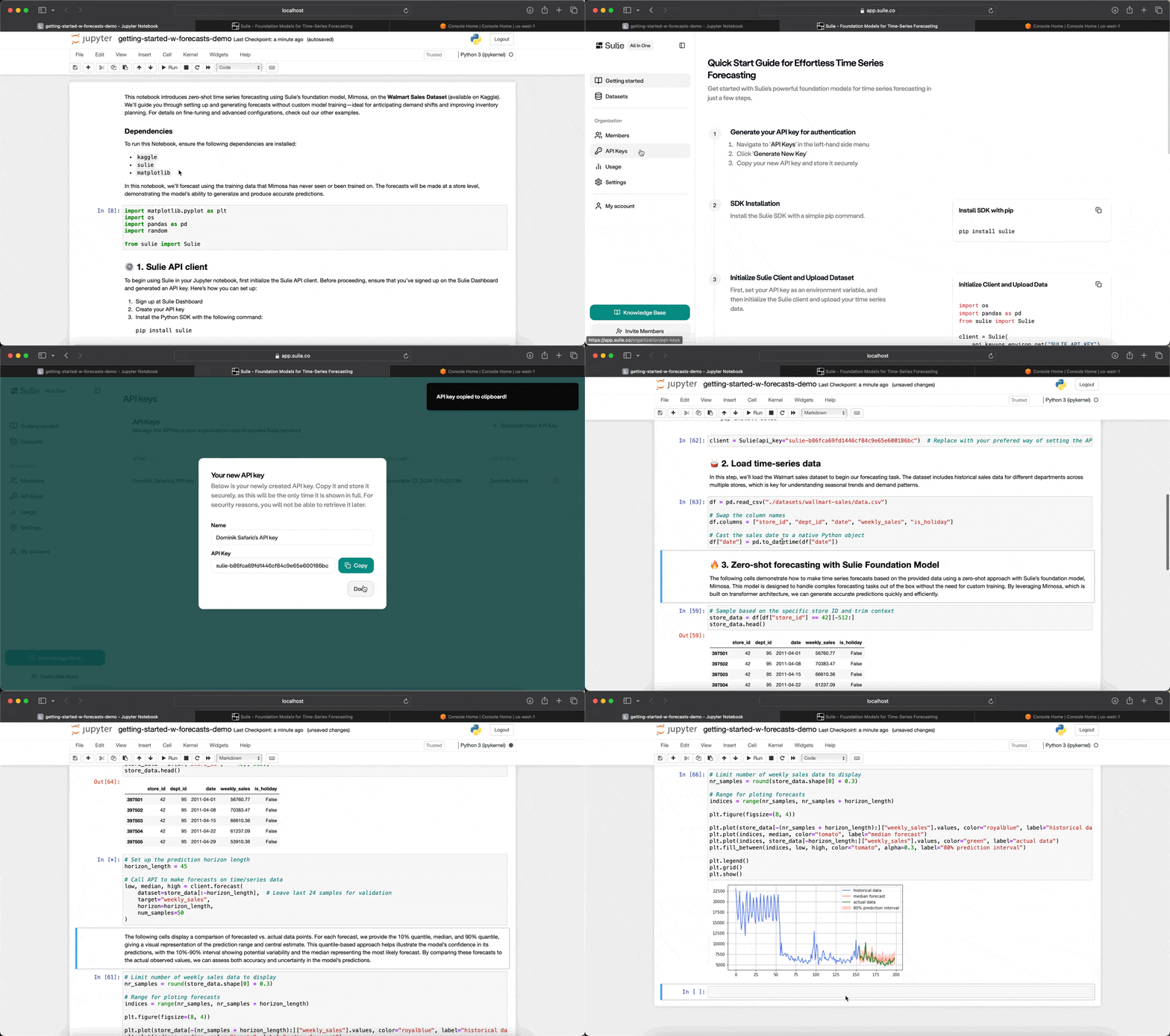
To begin using the Sulie SDK, you’ll need an API key, which can be generated from the Sulie Dashboard:
- Visit the Sulie Dashboard.
- Sign in to your Sulie account.
- Navigate to the API Keys section.
- Generate a new API key and copy it to use within the SDK.
With your API key ready, you’re set to start forecasting.
⚙️ Installation
To install the Sulie SDK, simply run:
pip install sulie==1.0.8
Quick Start Example
After installation, initialize the SDK using your API key to start forecasting with Mimosa:
from sulie import Sulie

# Initialize the Sulie client
client = Sulie(api_key="YOUR_API_KEY")
⚡️ Features
1. Forecasting with Mimosa
Generate accurate time series forecasts using Mimosa’s zero-shot inference capabilities. This approach is ideal when you need fast, reliable predictions without training the model.
import pandas as pd

# Example time series data
df = pd.DataFrame({
    'timestamp': pd.date_range(start='2023-01-01', periods=1000, freq='H'),
    'demand': [ ... ],           # Demand data
    'location': ['Plant A', ...] # Data for different locations
})

# Forecast demand for each location over the next 24 hours
forecast = client.forecast(
    dataset=df,
    target_col='demand',
    id_col='location',
    timestamp_col='timestamp',
    frequency='H',
    quantiles=[0.2, 0.8],
    horizon=24            # Predict 24 hours ahead
)
print(forecast)
The Forecast object includes two properties: median and quantiles, corresponding to different certainty levels in the predictions. These help you understand the range of possible outcomes, from conservative to optimistic.
If the id_col was set, forecast returns a list of Forecast objects.
You can also visualize the forecasts directly by calling the plot function:
forecast.plot()
This quickly generates a chart showing the forecast ranges, making it easy to spot trends and variability in the results. Perfect for a fast, clear analysis.
Forecasting Parameters
| Name | Description | Default |
|---|---|---|
dataset |
A Dataset or pd.DataFrame containing time series data. |
Required |
target_col |
Column name for the forecast variable. | Required |
id_col |
Column name for multiple time series IDs (e.g. locations). | None |
timestamp_col |
Timestamp column name. | None |
frequency |
Frequency of the time series (e.g., H for hourly). |
None |
horizon |
Time steps to forecast ahead. | 24 |
2. Fine-Tuning for Customized Forecasting
With automatic fine-tuning, you can optimize Mimosa for unique datasets and business cases. The fine-tuning process uses Weighted Quantile Loss (WQL) for evaluation, ensuring high accuracy.
# Fine-tune Mimosa on custom dataset
fine_tune_job = client.fine_tune(
    dataset=df,
    target_col="demand",
    description="Fine-tune for Plant A demand prediction"
)

# Check the fine-tuning job status
print(f"Job status: {fine_tune_job.status}")
Fine-Tuning Parameters
| Name | Description | Default |
|---|---|---|
dataset |
A Dataset or pd.DataFrame with time series data. |
Required |
target_col |
Target variable for optimization. | Required |
id_col |
Name of the column to group the DataFrame series by. | None |
description |
Description of the fine-tuning job. | None |
Once fine-tuning completes, the model is automatically deployed and available for forecasting.
3. Managing Datasets
Sulie’s Dataset API lets you manage and version your datasets, making them accessible for forecasting and fine-tuning across teams.
# Upload a dataset to Sulie
dataset = client.upload_dataset(
    name="product-sales-data-v1",
    df=df,
    mode="append"  # Choose 'append' or 'overwrite'
)

# List available datasets
datasets = client.list_datasets()
print(f"Available datasets: {datasets}")
Dataset Management Functions
- Upload: Store and version your data for easy access and updates.
- List: Retrieve a list of uploaded datasets.
- Update: Append or overwrite data for an existing dataset.
4. Forecasting with Custom Models
Fine-tuned models can be selected for new forecasts using list_custom_models or get_model.
# List custom and fine-tuned models
custom_models = client.list_custom_models()

# Select and forecast with a fine-tuned model
model_name = custom_models[0].name
custom_model = client.get_model(model_name)

# Forecast using the selected model
forecast_custom = custom_model.forecast(
    dataset=df,
    target_col='demand',
    id_col='location',
    timestamp_col='timestamp',
    frequency='H',
    horizon=24
)
print(forecast_custom)
📚 Additional Resources
- API Documentation: Full documentation with detailed usage.
- Forecasting Guide: Detailed parameters for Mimosa forecasting.
- Fine-Tuning Guide: Options and tuning customization.
- Support: Assistance and feedback on the SDK.
1 maintainer

Metadata
1 maintainer
Release files for sulie 1.0.8
For a detailed explanation of source distributions (sdists) and built distributions (wheels), please see the package formats documentation.
Source distribution (sdist)
| File | Size | Uploaded | |
|---|---|---|---|
| sulie-1.0.8.tar.gz | 17.8 kB | Details |
Built distribution (wheel)
| File | Interpreter | ABI | Platform | Reset |
|---|---|---|---|---|
| sulie-1.0.8-py3-none-any.whl | Python 3 | none | any | Details |
Total release size: 35.3 kB
Release files / sulie-1.0.8.tar.gz
| Download URL | sulie-1.0.8.tar.gz |
|---|---|
| Size | 17.8 kB |
| Tags | Source |
|
SHA-256 checksum How to use checksums |
14687ebb110f99e37cf90af66a76b744cad40c94f73ad64bbe27871b9fa98299
|
|
BLAKE2b-256 checksum How to use checksums |
2a53aab2afa94c1c22a3deddd9be789f6c156e5510147324bf218e21cb0847c1
|
| Upload date | |
|
Uploaded using Trusted Publishing? What is trusted publishing? |
No |
| Uploaded via |
twine/5.1.1 CPython/3.10.14
|
Release files / sulie-1.0.8-py3-none-any.whl
| Download URL | sulie-1.0.8-py3-none-any.whl |
|---|---|
| Size | 17.5 kB |
| Tags | Python 3 |
|
SHA-256 checksum How to use checksums |
4aa3ddcc1eb34dea210496cd1995ac1912e94993eee6234abb6fbbfd1e2d7843
|
|
BLAKE2b-256 checksum How to use checksums |
bb3819fec416720dba243eb7b13f415f9b9ca16bffe0361f1d92543e6acff9ea
|
| Upload date | |
|
Uploaded using Trusted Publishing? What is trusted publishing? |
No |
| Uploaded via |
twine/5.1.1 CPython/3.10.14
|














